
PHP Variables
Easy PHP Variables Guide: Complete Types & Scope Tutorial
Master backend memory management with this complete PHP variables guide. Learn variable declaration rules, naming conventions, dynamic typing, and variable scopes.
Overview: Understanding PHP Variables & Memory Allocation
Quick PHP Variables Summary:
- Dollar Sign Prefix ($): In PHP, every variable name must strictly begin with a dollar sign symbol (
$). - Loosely Typed Language: You do not need to explicitly declare variable data types; PHP automatically assigns and converts data types based on assigned values.
- Strict Naming Conventions: Variable names must start with a letter or an underscore (
_), and can never begin with a number. - Case Sensitivity: Variable identifiers are strictly case-sensitive (
$userAgeand$userageare stored in separate memory locations). - Variable Scope Boundaries: Scope dictates where a variable can be accessed, categorized into Local, Global, and Static scopes.
Welcome to Lesson 5 of our structured web development course. Following our previous lesson on Easy PHP Echo Print Guide: Complete Beginner Tutorial & Differences, you now know how to output dynamic text and HTML elements to the browser window. The next essential step in backend programming is learning how to store, track, and manipulate dynamic data in server memory using PHP variables.
In software development, a variable acts as a named memory container that holds temporary values—such as user account names, form submission inputs, shopping cart balances, or database results—while a server script executes.
In this comprehensive PHP variables tutorial, we will explore variable declaration rules, dynamic type casting, variable assignment operators, variable scopes (local, global, static), and best coding practices for writing clean backend applications.
Prerequisites Before Creating Variables
To follow along with the hands-on code examples in this PHP variables guide, ensure your environment meets these basic development requirements:
- Active Web Server: Running installation of Apache or Nginx with PHP 8.x+ (configured via XAMPP, Homebrew, or Terminal).
- Code Editor: A modern IDE such as Visual Studio Code or PhpStorm.
- Output Basics: Knowledge of displaying variables to the browser screen using
echoorprint.
If you need a quick refresher on how to set up your local development server, visit our step-by-step Easy PHP Installation Guide: Complete Step-by-Step Setup.
1. Rules for Declaring PHP Variables
When creating PHP variables in your backend scripts, the execution engine enforces strict syntax rules regarding identifier formatting and memory assignment.
Basic Variable Syntax and Declaration
Unlike compiled languages like C++ or Java—where you must explicitly declare variable types like int, String, or boolean—PHP creates variables automatically the moment you assign a value using the assignment operator (=):
<?php
// Declaring string variables
$siteName = "PHPOnline";
$userName = "Alex Mercer";

// Declaring numeric variables (integer and float)
$userAge = 28;
$accountBalance = 1540.75;

// Declaring a boolean variable
$isPremiumMember = true;

// Displaying variable contents via echo
echo "User Name: " . $userName . "<br>";
echo "Account Balance: $" . $accountBalance;
?>
Mandatory Naming Rules for Identifiers
When naming PHP variables, your identifier names must follow these strict syntax rules:
- Dollar Sign Requirement: A variable identifier must always begin with the
$character. - Starting Characters: The character directly following the
$sign must be an uppercase letter (A-Z), a lowercase letter (a-z), or an underscore (_). - Forbidden Numbers at Start: A variable name can never start with a number (e.g.,
$10totalis invalid and causes a fatal parse error). - Allowed Characters: Variable names can only contain alphanumeric characters and underscores (
A-z,0-9, and_). Special symbols like-,@,%, or spaces are forbidden. - Case Sensitivity: Variable identifiers are strictly case-sensitive. For example,
$score,$Score, and$SCORErepresent three distinct variables in server memory.
2. Loose Typing & Dynamic Variable Assignment
PHP is a loosely typed (or dynamically typed) language. This means you do not have to tell PHP which data type a variable holds when you create it. The PHP interpreter automatically detects the data type based on the assigned value and can convert the type dynamically during runtime as needed.
Type Conversion Example
<?php
// Initially, $quantity holds an integer value
$quantity = 5;

// $itemPrice holds a floating-point number
$itemPrice = 12.50;

// PHP automatically converts $quantity to a float during mathematical evaluation
$totalCost = $quantity * $itemPrice;

// Reassigning $quantity to a string value dynamically
$quantity = "Five items ordered";

echo "Total Cost: $" . $totalCost . "<br>";
echo "Quantity Description: " . $quantity;
?>
While dynamic typing provides flexibility, it can lead to subtle bugs if you inadvertently perform arithmetic operations on string variables. In modern PHP (PHP 8.x+), developers often use strict typing declarations (declare(strict_types=1);) inside functions to prevent unwanted type conversions.
3. Comprehensive Breakdown of PHP Variable Scope
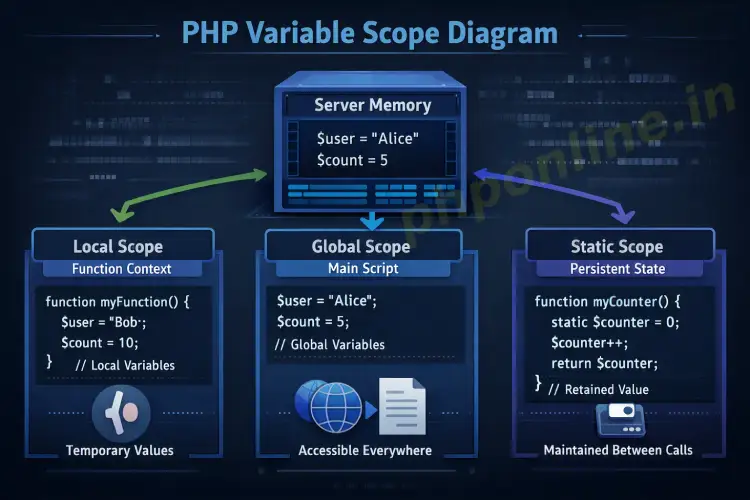
In PHP backend development, variable scope refers to the specific execution context where a declared variable can be accessed or modified. Understanding scope is vital to preventing variable collisions and ensuring memory security.
There are three primary variable scopes in PHP:
| Scope Type | Declaration Location | Access & Lifetime Boundaries |
|---|---|---|
| Global Scope | Declared outside all function blocks. | Accessible anywhere in the main script file, but not directly accessible inside functions unless explicitly imported. |
| Local Scope | Declared inside a function block. | Accessible strictly inside that specific function. Destroyed from server memory as soon as the function finishes executing. |
| Static Scope | Declared inside a function using the static keyword. | Accessible only within the function, but retains its value in server memory across multiple function calls. |
A. Local Scope in Functions
Variables created inside a function exist strictly within that function’s local execution block. They cannot be referenced or modified outside the function:
<?php
function calculateDiscount() {
    // $discountRate has local scope
    $discountRate = 0.15;
    echo "Inside Function Local Discount: " . $discountRate . "<br>";
}

calculateDiscount();

// Attempting to access $discountRate outside the function causes a warning
// echo $discountRate; // Triggers: Warning: Undefined variable $discountRate
?>
B. Global Scope and the ‘global’ Keyword
Variables declared in the main body of a script (outside any function) have global scope. However, by default, PHP prevents functions from reading global variables directly to avoid unintended state changes.
To access or modify a global variable from inside a local function, you must use the global keyword or reference the superglobal $GLOBALS array:
<?php
$taxPercentage = 0.08; // Global scope variable

function computeTax($subtotal) {
    // Importing global variable into local scope using 'global' keyword
    global $taxPercentage;

    return $subtotal * $taxPercentage;
}

echo "Tax Amount: $" . computeTax(100.00) . "<br>";

// Alternative approach using $GLOBALS superglobal array
function computeTaxAlternative($subtotal) {
    return $subtotal * $GLOBALS['taxPercentage'];
}

echo "Alternative Tax Amount: $" . computeTaxAlternative(100.00);
?>
C. Static Variables for State Retention
Normally, when a function completes execution, all of its local variables are deleted from memory. However, if you need a local variable to retain its previous value for subsequent function calls, prefix the variable declaration with the static keyword:
<?php
function trackPageViews() {
    // Static variable initialization (executes only once)
    static $viewCounter = 0;

    $viewCounter++;
    echo "Current Page Views: " . $viewCounter . "<br>";
}

// Calling the function multiple times
trackPageViews(); // Outputs: Current Page Views: 1
trackPageViews(); // Outputs: Current Page Views: 2
trackPageViews(); // Outputs: Current Page Views: 3
?>
Practical Example: Building a Secure Order Processing Script
Below is a complete, real-world example demonstrating how to combine PHP variables, dynamic typing, local function scopes, global parameters, and sanitized output formatting inside a production-level script:
<?php
declare(strict_types=1);

// Global store settings
$storeName = "PHPOnline Learning Hub";
$standardShippingFee = 5.99;

/**
 * Calculates order total including tax and shipping.
 */
function processCustomerOrder(float $itemPrice, int $itemQuantity): float {
    global $standardShippingFee;

    // Local scope variables
    $subtotal = $itemPrice * $itemQuantity;
    $taxRate = 0.07;
    $calculatedTax = $subtotal * $taxRate;

    // Computing final total
    $finalTotal = $subtotal + $calculatedTax + $standardShippingFee;

    return $finalTotal;
}

// Simulating order data
$customerName = "Rachel Green";
$pricePerItem = 24.99;
$quantityOrdered = 3;

$orderTotal = processCustomerOrder($pricePerItem, $quantityOrdered);
?>

<!-- Order Confirmation Output -->
<h2>Order Invoice Confirmation</h2>
<p>Store: <strong><?= $storeName ?></strong></p>
<p>Customer: <strong><?= htmlspecialchars($customerName, ENT_QUOTES, 'UTF-8') ?></strong></p>
<p>Items Purchased: <?= $quantityOrdered ?> x $<?= $pricePerItem ?></p>
<p>Flat Shipping Fee: $<?= $standardShippingFee ?></p>
<h3>Total Amount Charged: $<?= number_format($orderTotal, 2) ?></h3>
Troubleshooting Common Variable Errors
Refer to this troubleshooting guide to diagnose and resolve common errors encountered when working with variables in PHP:
| Observed Error | Probable Cause | Recommended Solution |
|---|---|---|
Warning: Undefined variable $... | Reading a variable before initializing it, or misspelling the variable name or letter casing. | Initialize variables before usage or verify exact identifier spelling and case sensitivity. |
Parse error: syntax error, unexpected '10'... | Starting a variable name with a number (e.g., $10cost). | Rename the variable so it begins with a letter or an underscore (e.g., $cost10). |
Variable value returns NULL inside a function | Attempting to use a global variable inside a function without declaring the global keyword. | Add global $variableName; inside the function or reference $GLOBALS['variableName']. |
Fatal error: Uncaught TypeError... | Passing incorrect variable types to functions in strict typing mode (e.g., passing string to float). | Ensure variable data types match function parameter type hints or cast types explicitly using (float) or (int). |
Frequently Asked Questions (FAQ)
Q1: What are PHP variables and why are they used?
PHP variables are named memory containers used to temporarily hold dynamic values—such as numbers, text strings, database results, or booleans—during script execution. They allow developers to store, manipulate, and pass data dynamically throughout web applications.
Q2: Do I need to explicitly define variable data types in PHP?
No. PHP is a loosely typed language that automatically detects and converts variable data types based on the assigned value. However, you can enforce type safety inside functions using strict type declarations.
Q3: What is the difference between local and global PHP variable scope?
Global variables are declared outside functions and exist throughout the main script file. Local variables are declared inside a function block and can only be accessed within that function. Global variables cannot be read inside functions unless imported using the global keyword.
Q4: Why should I use static variables inside a PHP function?
Static variables retain their assigned values in server memory across multiple function calls, whereas standard local variables are destroyed as soon as the function finishes executing. Static variables are ideal for tracking counters or caching function results locally.
Next Steps & Official References
Consult official specification standards on the PHP Official Variables Manual (php.net).
Ready for the next lesson in sequence? Proceed directly to the next lesson in Module 2: Next Lesson: PHP Data Types Explained →
# Summary
Here is what you've learned in this lesson:
- Easy PHP Variables Guide: Complete Types & Scope Tutorial
- Overview: Understanding PHP Variables & Memory Allocation
- Prerequisites Before Creating Variables
- 1. Rules for Declaring PHP Variables
- 2. Loose Typing & Dynamic Variable Assignment
- 3. Comprehensive Breakdown of PHP Variable Scope
- Practical Example: Building a Secure Order Processing Script
- Troubleshooting Common Variable Errors
- Frequently Asked Questions (FAQ)
- Next Steps & Official References
Continue to the next lesson and learn more about PHP Data Types.