
PHP Numbers
Easy PHP Numbers Guide: 8 Essential Math Functions & Rules
Master numerical operations with this complete PHP numbers guide. Learn integers, floats, numeric strings, type checking, and 8 core math functions.
Overview: Understanding PHP Numbers & Mathematical Operations
Quick PHP Numbers Summary:
- Numeric Classifications: PHP handles numeric data primarily as Integers (whole numbers) or Floats (floating-point numbers with decimals).
- Automatic Type Conversion: Operating on mixed numeric types (e.g., adding an integer to a float) causes PHP to cast the result to a float automatically.
- Numeric Strings: Strings containing numerical characters (e.g.,
"150") are automatically recognized and converted during mathematical evaluations. - Special Numeric Constants: PHP features built-in limits such as
PHP_INT_MAX,PHP_INT_MIN, and special float values likeNAN(Not a Number) andINF(Infinity). - Math Function Ecosystem: PHP provides native mathematical functions for rounding, square roots, absolute values, random number generation, and currency formatting.
Welcome to Lesson 8 of our structured web development course. Following our previous tutorial on Easy PHP Strings Guide: 7 Essential Functions & Examples[cite: 143], you now understand how to manipulate text sequences, concatenate variables, and format strings. The next essential step in backend web development is mastering numerical calculations using PHP numbers[cite: 151].
In web application engineering, numerical calculations are required for almost every business feature—including calculating shopping cart totals, estimating shipping costs, generating secure OTP verification codes, processing pagination counts, and handling financial transactions.
In this comprehensive PHP numbers tutorial, we will examine integer limits, floating-point precision rules, numeric string handling, type inspection functions, type casting, and 8 core mathematical functions used in production applications daily.
Prerequisites Before Working with Numbers
To follow along with the hands-on code examples in this PHP numbers guide, verify that your environment meets these basic requirements:
- Active Web Server: Running installation of Apache or Nginx with PHP 8.x+ (configured via XAMPP, Homebrew, or Terminal)[cite: 111].
- Code Editor: A modern IDE such as Visual Studio Code or PhpStorm.
- Data Type Basics: Understanding of variables, data types, and output statements[cite: 100, 139, 149].
If you need to review how scalar data types are classified in server memory, visit our previous guide on Easy PHP Data Types Guide: 4 Core Categories & Examples[cite: 133].
1. Integers vs. Floats in PHP Numbers
When working with PHP numbers, data is categorized primarily into two numeric types: Integers and Floats (also referred to as doubles or floating-point numbers)[cite: 139].
A. PHP Integers
An integer is a non-decimal whole number that can be positive, negative, or zero. Integers can be expressed in decimal (base 10), hexadecimal (base 16 with 0x prefix), octal (base 8 with 0 prefix), or binary (base 2 with 0b prefix) notation:
<?php
$decimalInt = 42;         // Standard decimal integer
$negativeInt = -150;      // Negative integer
$hexInt = 0x1A;          // Hexadecimal (26 in decimal)
$binaryInt = 0b11010;    // Binary (26 in decimal)

echo "Decimal Value: " . $decimalInt . "<br>";
echo "Hexadecimal Value: " . $hexInt;
?>
Want to test this code live? Try running it in our PHP Online Compiler.
Integer Size Limits and Constants
The maximum size of an integer depends on your system architecture (32-bit vs. 64-bit). PHP provides built-in predefined constants to inspect these memory boundaries:
PHP_INT_MAX: The maximum integer supported on the system (e.g.,9223372036854775807on 64-bit systems).PHP_INT_MIN: The minimum integer supported on the system.PHP_INT_SIZE: The size of an integer in bytes (e.g., 8 bytes on 64-bit systems).
If an arithmetic calculation exceeds integer limits, PHP automatically converts (overflows) the value into a float[cite: 139].
B. PHP Floats (Floating-Point Numbers)
A float is a number containing a decimal point or a number written in exponential notation:
<?php
$productPrice = 29.99;
$scientificNumber = 2.5e3; // Equivalent to 2500
$smallDecimal = 1.2e-3;   // Equivalent to 0.0012

echo "Product Price: $" . $productPrice;
?>
Want to test this code live? Try running it in our PHP Online Compiler.
Important Precision Warning: Floating-point numbers are represented internally using binary fractions, which means floating-point operations can occasionally suffer from minor rounding inaccuracies. Never compare floats directly for equality in financial logic without rounding them first.
2. Numeric Strings & Type Checking Functions
Web applications often receive numeric input as string data (for example, values submitted through HTML form fields or URL query strings). PHP handles numeric strings intelligently during mathematical calculations.
A. Automatic Numeric String Conversion
<?php
$itemQuantity = "5";        // String data type
$unitPrice = 12.50;         // Float data type

// PHP converts $itemQuantity to integer automatically during multiplication
$totalCost = $itemQuantity * $unitPrice;

echo "Total Cost: $" . $totalCost; // Outputs: Total Cost: $62.5
?>
Want to test this code live? Try running it in our PHP Online Compiler.
B. Built-in Type Inspection Functions for Numbers
To validate whether a variable holds a valid number before executing mathematical logic, PHP provides several specialized boolean inspection functions:
is_int()oris_integer(): Checks if a variable is an integer data type[cite: 139].is_float()oris_double(): Checks if a variable is a float data type[cite: 139].is_numeric(): Checks if a variable is a number OR a numeric string (ideal for validating form input).is_nan(): Checks if a value is “Not a Number” (e.g., the result of an invalid math operation likeacos(8)).is_infinite(): Checks if a value is infinitely large.
<?php
$userInput1 = "450";
$userInput2 = "450.75";
$userInput3 = "Hello World";

var_dump(is_numeric($userInput1)); // bool(true)
var_dump(is_numeric($userInput2)); // bool(true)
var_dump(is_numeric($userInput3)); // bool(false)
?>
Want to test this code live? Try running it in our PHP Online Compiler.
3. Casting Variables to Numeric Types
When you need to explicitly transform a variable data type to a numeric type, PHP provides explicit type casting keywords[cite: 139]:
<?php
$rawPrice = "199.99";

// Explicitly casting string to integer (truncates decimals without rounding)
$integerPrice = (int)$rawPrice; // Result: 199

// Explicitly casting string to float
$floatPrice = (float)$rawPrice; // Result: 199.99

echo "Integer Price: " . $integerPrice . "<br>";
echo "Float Price: " . $floatPrice;
?>
Want to test this code live? Try running it in our PHP Online Compiler.
4. Master the 8 Essential Built-in PHP Math Functions
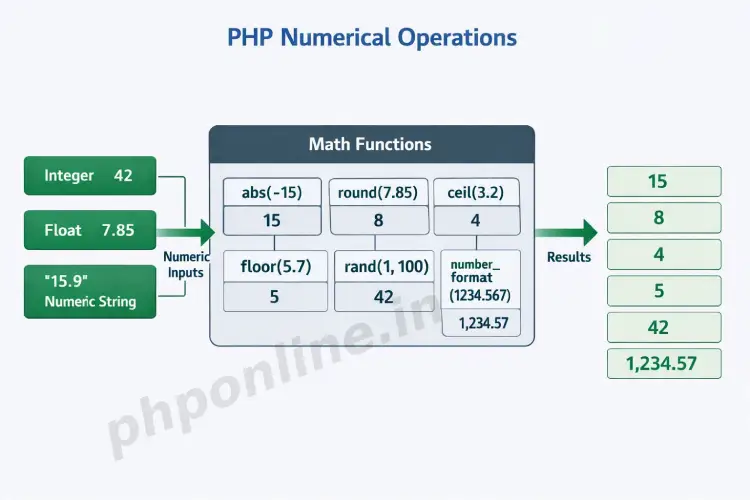
PHP provides a robust library of built-in mathematical functions to perform arithmetic, rounding, statistical calculations, and number formatting. Below are 8 of the most critical math functions used constantly in web applications:
1. abs() — Absolute Value
The abs() function returns the positive absolute value of a number, turning negative values positive:
<?php
echo abs(-15.5); // Outputs: 15.5
?>
2. round() — Rounding Numbers to Nearest Integer or Precision
The round() function rounds a float to the nearest whole integer or to a specified number of decimal places:
<?php
echo round(4.6) . "<br>";       // Outputs: 5
echo round(4.3) . "<br>";       // Outputs: 4
echo round(12.3456, 2);         // Outputs: 12.35
?>
3. ceil() — Rounding Up
The ceil() function always rounds a floating-point number UP to the next highest integer:
<?php
echo ceil(4.1); // Outputs: 5
echo ceil(-4.8); // Outputs: -4
?>
4. floor() — Rounding Down
The floor() function always rounds a floating-point number DOWN to the next lowest integer:
<?php
echo floor(4.9); // Outputs: 4
echo floor(-4.1); // Outputs: -5
?>
5. sqrt() — Square Root Calculation
The sqrt() function calculates the square root of a positive number:
<?php
echo sqrt(64); // Outputs: 8
?>
6. pow() — Exponential Power
The pow() function raises a base number to the power of an exponent (alternative to the ** operator):
<?php
echo pow(2, 3); // 2 raised to power 3. Outputs: 8
?>
7. rand() / random_int() — Generating Random Numbers
The rand() function generates a random integer within an optional minimum and maximum range. For cryptographic security (such as generating security tokens or OTPs), use random_int() instead:
<?php
// Standard pseudo-random number between 10 and 100
$randomNumber = rand(10, 100);

// Cryptographically secure random integer for security tokens
$secureOtp = random_int(100000, 999999);

echo "Generated OTP: " . $secureOtp;
?>
8. number_format() — Formatting Numbers for Currency & Display
The number_format() function formats a numeric float with grouped thousands (commas) and rounded decimal points, making it ideal for displaying financial prices:
<?php
$amount = 1254390.876;

// Format with 2 decimal places, decimal point '.', and thousands separator ','
$formattedCurrency = number_format($amount, 2, ".", ",");

echo "Formatted Total: $" . $formattedCurrency; // Outputs: Formatted Total: $1,254,390.88
?>
Want to test this code live? Try running it in our PHP Online Compiler.
Quick Reference Table: Core PHP Math Functions
| Function Name | Sample Syntax | Returned Result | Common Use Case |
|---|---|---|---|
abs() | abs(-25) | 25 | Ensuring positive values for distance or quantities. |
round() | round(3.567, 2) | 3.57 | Standard decimal rounding for metrics and averages. |
ceil() | ceil(3.1) | 4 | Calculating total pages required for pagination. |
floor() | floor(3.9) | 3 | Truncating completed years from user age calculations. |
max() / min() | max(1, 5, 9) | 9 | Finding highest or lowest values in a dataset. |
random_int() | random_int(1000, 9999) | e.g., 5821 | Generating cryptographically secure OTP security codes. |
number_format() | number_format(1500.5, 2) | "1,500.50" | Formatting prices and account balances for UI display. |
Troubleshooting Common PHP Number Errors
| Observed Error / Issue | Probable Cause | Recommended Solution |
|---|---|---|
Fatal error: Uncaught DivisionByZeroError | Attempting to divide a number by zero (e.g., 10 / 0). | Validate the denominator before division using if ($denominator !== 0). |
TypeError: Unsupported operand types | Performing arithmetic on incompatible non-numeric types (e.g., adding an array to a number)[cite: 139]. | Check variable data types using is_numeric() before executing math calculations. |
Float comparisons fail unexpectedly in if statements | Floating-point binary precision inaccuracies (e.g., (0.1 + 0.2) == 0.3 evaluates to false). | Use round() or compare floating-point differences with an epsilon threshold (e.g., abs($a - $b) < 0.00001). |
number_format() returns a string that causes math errors later | number_format() returns a formatted string containing commas, which cannot be used in arithmetic. | Only call number_format() at the final presentation step when echoing output to the user. |
Frequently Asked Questions (FAQ)
Q1: What is the difference between an integer and a float in PHP numbers?
An integer is a whole number without a decimal point (e.g., 25 or -100). A float (or floating-point number) is a number that includes a decimal point or exponential notation (e.g., 19.99 or 1.5e3).
Q2: How do you check if a form input is a valid number in PHP?
The best way to check if a variable contains a valid number or numeric string is using the is_numeric() function. It returns true for both integers, floats, and numeric string representations (like "150.75").
Q3: What is the difference between rand() and random_int()?
rand() generates standard pseudo-random numbers and is suitable for non-sensitive tasks like games or UI randomness. random_int() generates cryptographically secure pseudo-random numbers, making it necessary for passwords, security tokens, and OTP verification codes.
Q4: How do you format numbers as currency in PHP?
You format numbers as currency using the number_format() function. By supplying arguments for decimals, decimal separator, and thousands separator (e.g., number_format($price, 2, '.', ',')), you can format raw floats into clean financial strings (e.g., "1,250.50").
Next Steps & Official References
Consult official technical standards on the PHP Official Math Functions Manual (php.net).
Ready for the next lesson in sequence? Proceed directly to the final lesson in Module 2: Next Lesson: PHP Constants (define vs const) → [cite: 91]
# Summary
Here is what you've learned in this lesson:
- Easy PHP Numbers Guide: 8 Essential Math Functions & Rules
- Overview: Understanding PHP Numbers & Mathematical Operations
- Prerequisites Before Working with Numbers
- 1. Integers vs. Floats in PHP Numbers
- 2. Numeric Strings & Type Checking Functions
- 3. Casting Variables to Numeric Types
- 4. Master the 8 Essential Built-in PHP Math Functions
- Quick Reference Table: Core PHP Math Functions
- Troubleshooting Common PHP Number Errors
- Frequently Asked Questions (FAQ)
- Next Steps & Official References
Continue to the next lesson and learn more about PHP Constants.