
PHP Form Handling
Easy PHP Form Handling Guide: 2 Core Request Methods & Examples
Master dynamic web input processing with this complete PHP form handling guide. Learn GET vs POST requests, superglobals, sanitization, and real-world form examples.
Overview: Understanding PHP Form Handling & HTTP Requests
Quick PHP Form Handling Summary:
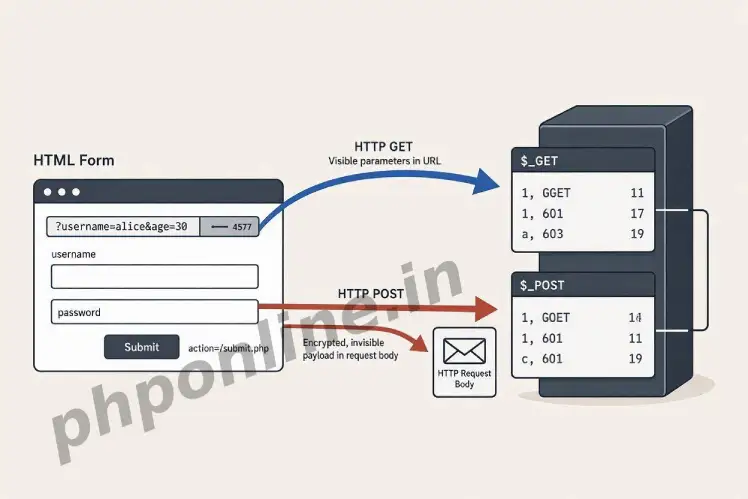
- Bridge to Interactive Web Apps: Form handling allows PHP scripts to collect, process, and respond to user inputs submitted through HTML form controls (text fields, checkboxes, dropdowns).
- Two Core HTTP Request Methods: HTML forms pass submitted data to the server using either the
GETmethod or thePOSTmethod. - PHP Superglobal Arrays: PHP automatically populates predefined associative superglobal arrays—
$_GET,$_POST, and$_REQUEST—with submitted user input. - GET Request Highway: Appends form parameters directly into the browser URL bar (ideal for search bars, filters, and bookmarkable pages).
- POST Request Highway: Sends input payload data invisibly inside the HTTP request body (mandatory for passwords, sensitive data, and file uploads).
Welcome to Lesson 16 of our structured web development course, marking the beginning of Module 5: Dynamic Web Forms & Security. Following our previous tutorial on Easy PHP Array Functions Guide: 10 Core Methods & Examples, you now understand how to filter, map, sort, and transform array datasets in memory. The next essential milestone in backend software engineering is processing real-world user interactions using PHP form handling.
Static websites only display information to visitors. True dynamic web applications—such as user login portals, contact forms, checkout gateways, search engines, and content management systems—rely on forms to accept user input. When a user submits an HTML form, the web browser packages the inputs and sends an HTTP request to a backend PHP script on the server.
In this comprehensive PHP form handling guide, we will explore HTML form attributes, HTTP GET vs. POST execution mechanics, PHP superglobals, form security fundamentals, multi-input element handling, and practical production form processing examples.
Prerequisites Before Processing Web Forms
To test the hands-on code examples in this PHP form handling tutorial, verify that your development environment meets these basic requirements:
- Active Web Server: Running installation of Apache or Nginx with PHP 8.x+ (configured via XAMPP, Homebrew, or Terminal).
- Code Editor: A modern IDE such as Visual Studio Code or PhpStorm.
- Foundational Knowledge: Basic understanding of HTML form tags (
<form>,<input>,<button>) and PHP associative arrays.
If you need to review how key-value pairs operate inside associative arrays, visit our previous guide on Easy PHP Arrays Guide: 3 Core Types & Examples.
1. The Anatomy of an HTML Form for PHP Processing
Before PHP can process form data, the client-side HTML form must be configured with two essential attributes inside the opening <form> tag:
action: Specifies the URL or path of the PHP script that will process the submitted form data (e.g.,action="process.php"). If left empty, the form submits to the current URL.method: Specifies the HTTP request method used to send data to the server (eitherGETorPOST).name(on input tags): Crucial requirement! PHP uses the HTML input’snameattribute as the array key inside superglobal arrays. Inputs without anameattribute are ignored by PHP completely.
Basic HTML Form Structure
<!-- Basic Contact Form Submitting via POST to process.php -->
<form action="process.php" method="POST">
    <label for="username">Username:</label>
    <input type="text" id="username" name="username" required><br><br>

    <label for="user_email">Email Address:</label>
    <input type="email" id="user_email" name="user_email" required><br><br>

    <button type="submit" name="submit_form">Submit Registration</button>
</form>
2. Processing GET Requests with $_GET
When a form uses method="GET", the browser appends all submitted form inputs to the end of the destination URL as key-value pairs (a query string starting with ? and separated by &).
For example, submitting a GET search form with the query "PHP Tutorials" produces a URL like:https://phponline.in/search.php?query=PHP+Tutorials&category=coding
Handling GET Data in PHP
PHP automatically captures query string parameters inside the $_GET associative superglobal array:
<?php
// HTML Search Form Definition
?>
<form action="" method="GET">
    <input type="text" name="search_term" placeholder="Search tutorials...">
    <button type="submit">Search</button>
</form>

<?php
// Checking if search_term was submitted in $_GET
if (isset($_GET['search_term']) && !empty($_GET['search_term'])) {
    $searchTerm = $_GET['search_term'];
    echo "<p>Displaying search results for: <strong>" . htmlspecialchars($searchTerm, ENT_QUOTES, 'UTF-8') . "</strong></p>";
}
?>
Want to test this code live? Try running it in our PHP Online Compiler.
When to Use GET:
- Search engines and site search bars.
- Filterable product listing pages.
- Pagination navigation links (e.g.,
?page=2). - Any non-sensitive data request that users should be able to bookmark or share via URL.
3. Processing POST Requests with $_POST
When a form uses method="POST", form input parameters are packed invisibly inside the HTTP request body. The submitted values are never shown in the browser URL bar.
Handling POST Data in PHP
PHP automatically captures request body payloads inside the $_POST associative superglobal array:
<?php
// HTML User Login Form Definition
?>
<form action="" method="POST">
    <label>Username:</label>
    <input type="text" name="login_user" required><br><br>

    <label>Password:</label>
    <input type="password" name="login_pass" required><br><br>

    <button type="submit" name="do_login">Log In</button>
</form>

<?php
// Verifying POST submission using server request method check
if ($_SERVER['REQUEST_METHOD'] === 'POST' && isset($_POST['do_login'])) {
    $username = $_POST['login_user'] ?? '';
    $password = $_POST['login_pass'] ?? '';

    echo "<p style='color: green;'>Form submitted securely via POST! Username: " . htmlspecialchars($username, ENT_QUOTES, 'UTF-8') . "</p>";
}
?>
Want to test this code live? Try running it in our PHP Online Compiler.
When to Use POST:
- User login and account registration forms.
- Credit card processing and checkout payment gateways.
- Submitting sensitive personal information (passwords, social security numbers).
- Uploading file attachments (e.g., profile pictures, PDF resumes).
- Database modification operations (inserting, updating, or deleting records).
Technical Comparison: GET vs. POST Request Methods
| Feature / Criteria | HTTP GET Method | HTTP POST Method |
|---|---|---|
| Data Visibility | Data is appended visibly into the browser URL bar. | Data is sent invisibly inside the HTTP request body. |
| Data Size Limit | Limited to ~2,000 characters (URL length restrictions). | No strict built-in limit (configured via post_max_size in php.ini). |
| Security Level | Insecure for sensitive data (passwords appear in browser history and server logs). | Secure for sensitive data (does not appear in URL bar or browser history). |
| Bookmarkability | Can be bookmarked and shared directly via URL link. | Cannot be bookmarked directly. Resubmission triggers browser warnings. |
| File Upload Support | Cannot be used to upload file attachments. | Mandatory for file uploads (paired with enctype="multipart/form-data"). |
| PHP Superglobal Array | Populates the $_GET superglobal array. | Populates the $_POST superglobal array. |
4. Handling Multi-Value Form Controls (Checkboxes & Select)
When dealing with multi-choice form controls—such as checkboxes where a user can select multiple options—append square brackets [] to the input’s name attribute in HTML. This tells PHP to treat submitted selections as a numeric array inside $_POST.
Multi-Checkbox Code Example
<?php
// HTML Form with Checkbox Array
?>
<form action="" method="POST">
    <p>Select your favorite programming topics:</p>
    <input type="checkbox" name="topics[]" value="PHP"> PHP <br>
    <input type="checkbox" name="topics[]" value="JavaScript"> JavaScript <br>
    <input type="checkbox" name="topics[]" value="SQL"> SQL <br>
    <input type="checkbox" name="topics[]" value="Docker"> Docker <br><br>

    <button type="submit" name="save_topics">Save Topics</button>
</form>

<?php
if ($_SERVER['REQUEST_METHOD'] === 'POST' && isset($_POST['save_topics'])) {
    // Checking if any checkboxes were selected
    if (!empty($_POST['topics']) && is_array($_POST['topics'])) {
        $selectedTopics = $_POST['topics'];

        echo "<h3>Selected Topics:</h3><ul>";
        foreach ($selectedTopics as $topic) {
            echo "<li>" . htmlspecialchars($topic, ENT_QUOTES, 'UTF-8') . "</li>";
        }
        echo "</ul>";
    } else {
        echo "<p style='color: red;'>No topics were selected!</p>";
    }
}
?>
Want to test this code live? Try running it in our PHP Online Compiler.
5. Complete Real-World Form Processing Script
Below is a production-level, single-file contact form script that checks the request method, validates inputs, sanitizes string data against XSS vulnerabilities, and displays user feedback:
<?php
declare(strict_types=1);

// Initialize feedback variables
$formSuccess = false;
$errorMessage = "";
$cleanName = "";
$cleanEmail = "";
$cleanMessage = "";

// Process form submission
if ($_SERVER['REQUEST_METHOD'] === 'POST') {
    // Read raw user inputs safely
    $rawName = $_POST['full_name'] ?? '';
    $rawEmail = $_POST['email_address'] ?? '';
    $rawMessage = $_POST['user_message'] ?? '';

    // Validate empty fields
    if (empty(trim($rawName)) || empty(trim($rawEmail)) || empty(trim($rawMessage))) {
        $errorMessage = "All form fields are mandatory. Please complete all fields.";
    } elseif (!filter_var($rawEmail, FILTER_VALIDATE_EMAIL)) {
        $errorMessage = "Invalid email address format provided.";
    } else {
        // Sanitize string data for display to prevent Cross-Site Scripting (XSS)
        $cleanName = htmlspecialchars(trim($rawName), ENT_QUOTES, 'UTF-8');
        $cleanEmail = htmlspecialchars(trim($rawEmail), ENT_QUOTES, 'UTF-8');
        $cleanMessage = htmlspecialchars(trim($rawMessage), ENT_QUOTES, 'UTF-8');

        $formSuccess = true;
    }
}
?>

<!-- Contact Form Interface -->
<h2>Send Us a Message</h2>

<?php if ($formSuccess): ?>
    <div style="background-color: #d4edda; color: #155724; padding: 15px; margin-bottom: 20px;">
        <h3>Thank You, <?= $cleanName ?>!</h3>
        <p>Your message has been received successfully. We will reply to <strong><?= $cleanEmail ?></strong> shortly.</p>
        <p><em>"<?= $cleanMessage ?>"</em></p>
    </div>
<?php else: ?>
    <?php if (!empty($errorMessage)): ?>
        <div style="background-color: #f8d7da; color: #721c24; padding: 15px; margin-bottom: 20px;">
            <strong>Error:</strong> <?= $errorMessage ?>
        </div>
    <?php endif; ?>

    <form action="" method="POST">
        <label for="full_name">Full Name:</label><br>
        <input type="text" id="full_name" name="full_name" value="<?= $cleanName ?>" required><br><br>

        <label for="email_address">Email Address:</label><br>
        <input type="email" id="email_address" name="email_address" value="<?= $cleanEmail ?>" required><br><br>

        <label for="user_message">Message:</label><br>
        <textarea id="user_message" name="user_message" rows="4" required><?= $cleanMessage ?></textarea><br><br>

        <button type="submit">Send Message</button>
    </form>
<?php endif; ?>
Want to test this code live? Try running it in our PHP Online Compiler.
Troubleshooting Common PHP Form Handling Errors
| Observed Error / Issue | Probable Cause | Recommended Solution |
|---|---|---|
Warning: Undefined array key "..." | Accessing $_POST['key'] or $_GET['key'] before the form is submitted. | Wrap key access inside isset($_POST['key']) checks or use the Null Coalescing operator ($_POST['key'] ?? ''). |
Form submits but $_POST array is completely empty | Forgetting the name attribute on HTML input tags (e.g., <input type="text"> without name="field"). | Ensure every input tag has a unique, descriptive name="..." attribute. |
| Checkbox form value returns only the last selected item | Forgetting square brackets on checkbox names (e.g., name="interests" instead of name="interests[]"). | Append [] to the input name attribute so PHP treats submitted selections as an array. |
File upload fails or $_FILES is empty | Omitting method="POST" or the enctype="multipart/form-data" attribute on the HTML <form> tag. | Add method="POST" and enctype="multipart/form-data" to your form tag when uploading files. |
Frequently Asked Questions (FAQ)
Q1: What is PHP form handling and why is it essential?
PHP form handling is the backend process of capturing, validating, sanitizing, and processing user input submitted through HTML web forms. It enables dynamic web application features such as user registration, login authentication, contact messaging, and e-commerce transactions.
Q2: What is the main difference between GET and POST in PHP form handling?
The GET method appends input data visibly to the browser URL bar, making it suitable for search bars and filter pages. The POST method sends data invisibly inside the HTTP request body, making it mandatory for sensitive data (passwords, credit cards) and database modifications.
Q3: What are PHP superglobals in form handling?
PHP superglobals are predefined associative arrays (such as $_GET, $_POST, $_REQUEST, and $_SERVER) that are automatically available across all script scopes. They automatically hold submitted form inputs and HTTP request header details.
Q4: How do you prevent Cross-Site Scripting (XSS) attacks in PHP forms?
You prevent XSS vulnerabilities by passing user-submitted text inputs through htmlspecialchars($input, ENT_QUOTES, 'UTF-8') before displaying the values on a web page. This converts dangerous HTML special characters (such as <script> tags) into safe, non-executable HTML entities.
Next Steps & Official References
Consult official technical standards on the PHP Official Form Handling Manual (php.net).
Ready for the next lesson in sequence? Proceed directly to the next lesson in Module 5: Next Lesson: Form Validation & Input Sanitization →
# Summary
Here is what you've learned in this lesson:
- Easy PHP Form Handling Guide: 2 Core Request Methods & Examples
- Overview: Understanding PHP Form Handling & HTTP Requests
- Prerequisites Before Processing Web Forms
- 1. The Anatomy of an HTML Form for PHP Processing
- 2. Processing GET Requests with $_GET
- 3. Processing POST Requests with $_POST
- Technical Comparison: GET vs. POST Request Methods
- 4. Handling Multi-Value Form Controls (Checkboxes & Select)
- 5. Complete Real-World Form Processing Script
- Troubleshooting Common PHP Form Handling Errors
- Frequently Asked Questions (FAQ)
- Next Steps & Official References
Continue to the next lesson and learn more about PHP Form Validation.