
MySQL Data Types
Easy MySQL Data Types Guide: 5 Core Storage Categories & Examples
Master database schema design with this complete MySQL data types guide. Learn INT, VARCHAR vs CHAR, DECIMAL, DATETIME vs TIMESTAMP, and JSON storage rules.
Overview: Understanding MySQL Data Types & Table Column Storage
Quick MySQL Data Types Summary:
- Schema Foundation: A MySQL data type defines the classification, byte storage size, valid value range, and operational constraints of data stored inside a table column.
- Numeric Types: Includes exact integers (
TINYINT,INT,BIGINT) and fixed-point exact decimals (DECIMAL) essential for financial and currency calculations. - String & Text Types: Includes fixed-length
CHAR, dynamic variable-lengthVARCHAR, large-documentTEXT, and constrainedENUMoptions. - Temporal Date & Time: Distinguishes between static calendar dates (
DATE,DATETIME) and timezone-aware automatic audit timestamps (TIMESTAMP). - Modern JSON Storage: The native
JSONdata type provides schema validation and high-speed binary lookup for semi-structured document payloads.
Welcome to Lesson 3 of our structured Database curriculum. Following our previous tutorial on Easy MySQL Installation Guide: 4 Step-by-Step Server Setup Methods, you now have a functioning MySQL server instance and phpMyAdmin environment running locally on port 3306. The next critical architectural milestone in database engineering is mastering MySQL data types.
Selecting the appropriate data type for each table column is one of the most important decisions in database design. Choosing an oversized data type (such as using BIGINT for a status flag that only holds values 0 to 5) wastes disk storage, slows down memory caching, and degrades SQL query execution speeds. Conversely, choosing an incorrect data type (such as using FLOAT instead of DECIMAL for e-commerce prices) introduces precision rounding errors that can corrupt financial accounting records.
In this comprehensive MySQL data types guide, we will explore numeric types, integer ranges, fixed-point decimals, character string allocations (`CHAR` vs. `VARCHAR`), date and time formats (`DATETIME` vs. `TIMESTAMP`), binary objects, JSON fields, memory optimization best practices, and hands-on code examples.
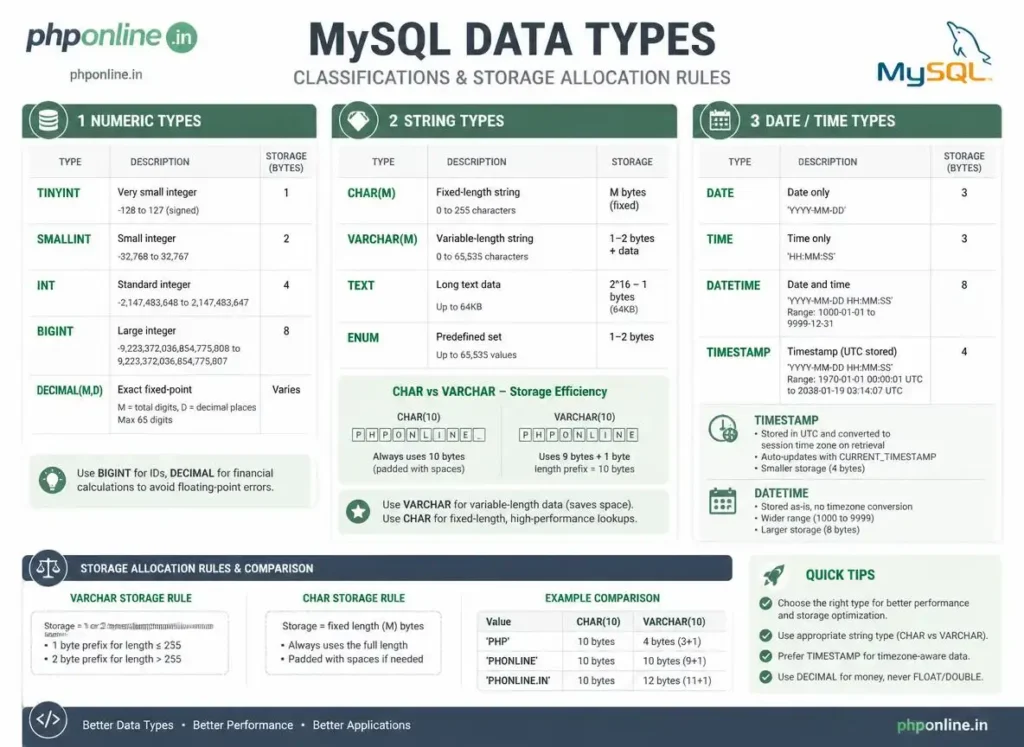
Prerequisites Before Defining Column Data Types
To test the hands-on code examples in this MySQL data types tutorial, verify that your development environment meets these basic requirements:
- MySQL Server: An active local MySQL 8.0+ server daemon or XAMPP MariaDB instance.
- Database Client: MySQL Command-Line Client (CLI), MySQL Workbench, or phpMyAdmin.
- Database Foundations: Understanding of relational tables, columns, rows, and primary keys.
If you need to review how tables structure columns inside relational schemas, visit our foundational guide on Easy MySQL Introduction Guide: 5 Core Relational Database Concepts & Examples.
1. Numeric Data Types (Integers, Decimals, Floats)
Numeric data types store numbers, calculations, quantities, and financial transactions. They are divided into **Exact Integers**, **Exact Decimals**, and **Approximate Floating-Point** numbers.
A. Integer Types (Whole Numbers)
Integers store whole numbers without fractional decimals. Choose the smallest integer type that comfortably accommodates your expected maximum data range to conserve memory:
| Data Type | Storage Size | Signed Value Range | Unsigned Range (0 to Max) | Best Application Scenario |
|---|---|---|---|---|
TINYINT | 1 Byte | -128 to 127 | 0 to 255 | Boolean flags (0/1), user age, order status IDs. |
SMALLINT | 2 Bytes | -32,768 to 32,767 | 0 to 65,535 | Year numbers, postal codes, small inventory counts. |
MEDIUMINT | 3 Bytes | -8,388,608 to 8,388,607 | 0 to 16,777,215 | Medium site catalog IDs, city populations. |
INT (INTEGER) | 4 Bytes | -2.14 Billion to 2.14 Billion | 0 to 4.29 Billion | Industry Standard: Primary Keys for users, posts, orders. |
BIGINT | 8 Bytes | -9.22 Quintillion to 9.22 Quintillion | 0 to 18.44 Quintillion | Global enterprise transactions, social media view counts. |
B. Exact Decimals: DECIMAL(M, D) — Mandatory for Money
The DECIMAL (or NUMERIC) type stores exact fixed-point numerical values where precision is critical. It accepts two parameters:
- M (Precision): Total number of significant digits (1 to 65).
- D (Scale): Number of digits after the decimal point (0 to 30).
-- Stores prices up to $999,999.99 with guaranteed arithmetic accuracy
product_price DECIMAL(8, 2) NOT NULL
Financial Best Practice: Never use FLOAT or DOUBLE to store monetary values! Floating-point types use approximate binary representations that produce inexact rounding discrepancies (e.g., 0.1 + 0.2 = 0.30000000000000004).
Want to test code syntax or review code snippets? Try running your markup in our Online Code Editor.
2. String & Text Data Types (VARCHAR vs. CHAR, TEXT, ENUM)
String types store textual characters, alphanumeric strings, and structured code blocks.
A. CHAR vs. VARCHAR: The Core Difference
| Feature / Property | CHAR(M) — Fixed Length | VARCHAR(M) — Variable Length |
|---|---|---|
| Storage Mechanism | Always allocates the full fixed length M bytes on disk, padding spaces if shorter. | Allocates only the exact length of characters used + 1 or 2 prefix length bytes. |
| Max Length | 0 to 255 characters | 0 to 65,535 characters (subject to row size) |
| Performance | Slightly faster for static, uniform-length data. | Far more disk-efficient for variable-length text. |
| Best Application Scenario | 2-letter country codes (US, IN), SHA-256 hashes (64 chars), UUIDs. | Usernames, email addresses, blog titles, passwords. |
B. Large Document Text Types (TEXT)
When text exceeds 255 characters or variable length exceeds typical row limits, use TEXT types (stored outside the main table row space):
TINYTEXT: Up to 255 bytes.TEXT: Up to 65,535 bytes (~64 KB) — Ideal for article paragraphs and product descriptions.MEDIUMTEXT: Up to 16.7 MB — Ideal for book chapters or raw HTML markup.LONGTEXT: Up to 4.29 GB — Ideal for large log files or data dumps.
C. ENUM and SET (Constrained Lists)
ENUM restricts a column to a single value chosen from an explicit predefined list of string literals. Internally, MySQL stores ENUM values as compact integers (1 byte for up to 255 choices):
-- Restricts account roles strictly to one of three valid choices
user_role ENUM('admin', 'editor', 'subscriber') DEFAULT 'subscriber'
3. Date and Time Data Types (DATETIME vs. TIMESTAMP)
Temporal data types store dates, calendar schedules, timestamps, and execution intervals.
| Data Type | Standard Format | Supported Range | Timezone Aware? | Primary Application Scenario |
|---|---|---|---|---|
DATE | YYYY-MM-DD | 1000-01-01 to 9999-12-31 | No | Birthdays, employee hire dates, national holidays. |
TIME | HH:MM:SS | -838:59:59 to 838:59:59 | No | Daily store opening hours, track race lap times. |
DATETIME | YYYY-MM-DD HH:MM:SS | 1000-01-01 00:00:00 to 9999-12-31 23:59:59 | No (Static storage) | Flight bookings, future appointment schedules, historical records. |
TIMESTAMP | YYYY-MM-DD HH:MM:SS | 1970-01-01 00:00:01 UTC to 2038-01-19 03:14:07 UTC | Yes (Converts to UTC) | Audit Logging: created_at and updated_at record timestamps. |
Automatic Timestamp Tracking Example:
-- Automatically sets creation timestamp and auto-updates on row modifications
created_at TIMESTAMP DEFAULT CURRENT_TIMESTAMP,
updated_at TIMESTAMP DEFAULT CURRENT_TIMESTAMP ON UPDATE CURRENT_TIMESTAMP
Want to test code snippets live? Try running them in our Online Code Editor.
4. Modern JSON & Binary Data Types
MySQL 8.0+ includes advanced data types for handling semi-structured data and binary payloads:
A. Native JSON Data Type
The JSON type provides automatic validation of JSON documents and optimized binary storage for fast key lookups without parsing raw text strings:
-- Creating a table with a native JSON configuration column
CREATE TABLE user_preferences (
    user_id INT PRIMARY KEY,
    settings JSON NOT NULL
);

-- Inserting structured JSON payload
INSERT INTO user_preferences (user_id, settings)
VALUES (101, '{"theme": "dark", "notifications": {"email": true, "sms": false}}');

-- Querying inside JSON columns using the column-path operator (->>)
SELECT user_id, settings->>'$.theme' AS active_theme
FROM user_preferences;
B. BLOB Data Types (Binary Large Objects)
Stores raw binary data such as images, PDF files, or encrypted encryption keys (TINYBLOB, BLOB, MEDIUMBLOB, LONGBLOB). However, storing media files directly on web server file systems and saving only the file path string (VARCHAR) in MySQL is the recommended web best practice.
5. Complete Hands-on Table Schema Example
Below is a complete SQL script demonstrating optimal data type selections for an enterprise e-commerce customer and order management schema:
-- 1. Create a well-optimized Customers table
CREATE TABLE customers (
    customer_id INT UNSIGNED AUTO_INCREMENT PRIMARY KEY,
    first_name VARCHAR(50) NOT NULL,
    last_name VARCHAR(50) NOT NULL,
    email_address VARCHAR(100) UNIQUE NOT NULL,
    country_code CHAR(2) NOT NULL DEFAULT 'US',
    account_balance DECIMAL(10, 2) NOT NULL DEFAULT 0.00,
    membership_status ENUM('bronze', 'silver', 'gold') NOT NULL DEFAULT 'bronze',
    is_active TINYINT(1) NOT NULL DEFAULT 1,
    profile_metadata JSON NULL,
    created_at TIMESTAMP DEFAULT CURRENT_TIMESTAMP,
    updated_at TIMESTAMP DEFAULT CURRENT_TIMESTAMP ON UPDATE CURRENT_TIMESTAMP
) ENGINE=InnoDB DEFAULT CHARSET=utf8mb4 COLLATE=utf8mb4_unicode_ci;

-- 2. Insert valid data adhering to column data types
INSERT INTO customers (
    first_name, last_name, email_address, country_code,
    account_balance, membership_status, profile_metadata
) VALUES (
    'Alex', 'Mercer', 'alex@phponline.in', 'IN',
    149.50, 'gold', '{"newsletter": true, "preferred_currency": "INR"}'
);

-- 3. Query records with accurate type evaluation
SELECT
    customer_id,
    CONCAT(first_name, ' ', last_name) AS full_name,
    email_address,
    account_balance,
    profile_metadata->>'$.preferred_currency' AS currency,
    created_at
FROM customers;
Want to test code snippets live? Try running them in our Online Code Editor.
6. Interactive Data Type Explorer Simulation
Below is a complete, working HTML and JavaScript interactive simulation demonstrating byte allocation, value boundaries, and column validation rules across MySQL data types:
<!DOCTYPE html>
<html lang="en">
<head>
    <meta charset="UTF-8">
    <meta name="viewport" content="width=device-width, initial-scale=1.0">
    <title>MySQL Data Type Storage Explorer</title>

    <style>
        body {
            font-family: Arial, sans-serif;
            background-color: #f4f6f9;
            color: #333;
            padding: 30px;
            max-width: 650px;
            margin: 0 auto;
        }

        .type-card {
            background-color: #ffffff;
            border: 1px solid #e0e0e0;
            border-radius: 8px;
            padding: 25px;
            box-shadow: 0 4px 12px rgba(0,0,0,0.05);
        }

        .form-group {
            margin-bottom: 15px;
        }

        .form-group label {
            display: block;
            margin-bottom: 6px;
            font-weight: bold;
        }

        .form-group select {
            width: 100%;
            padding: 10px;
            border: 1px solid #ccc;
            border-radius: 4px;
            font-size: 15px;
        }

        .info-panel {
            margin-top: 20px;
            padding: 15px;
            background-color: #e8f5e9;
            border: 1px solid #c8e6c9;
            border-radius: 4px;
            line-height: 1.8;
        }
    </style>
</head>
<body>

    <div class="type-card">
        <h2 style="color: #0073aa; margin-bottom: 10px;">MySQL Data Type Inspector</h2>
        <p>Select a data type to inspect its storage size, value range, and recommended use case:</p>

        <div class="form-group">
            <label for="datatype-select">Select Column Data Type:</label>
            <select id="datatype-select">
                <option value="tinyint">TINYINT (1 Byte)</option>
                <option value="int" selected>INT / INTEGER (4 Bytes)</option>
                <option value="decimal">DECIMAL(10, 2) (Exact Numeric)</option>
                <option value="varchar">VARCHAR(255) (Variable String)</option>
                <option value="timestamp">TIMESTAMP (UTC Time-Aware)</option>
                <option value="json">JSON (Native Binary Document)</option>
            </select>
        </div>

        <div id="type-details" class="info-panel">
            <!-- Dynamic Type Specifications Rendered Here -->
        </div>
    </div>

    <script>
        const typeSelect = document.getElementById("datatype-select");
        const typeDetails = document.getElementById("type-details");

        const typeSpecs = {
            tinyint: {
                category: "Numeric (Integer)",
                size: "1 Byte",
                range: "-128 to 127 (Signed) | 0 to 255 (Unsigned)",
                useCase: "Boolean flags (0/1), user age, status enumeration codes."
            },
            int: {
                category: "Numeric (Integer)",
                size: "4 Bytes",
                range: "-2.14 Billion to +2.14 Billion (Signed)",
                useCase: "Standard auto-incrementing Primary Keys for users and orders."
            },
            decimal: {
                category: "Exact Fixed-Point Numeric",
                size: "Variable (approx. 4 Bytes per 9 digits)",
                range: "Exact precision up to 65 significant digits",
                useCase: "Financial accounting, currency amounts, product sales prices."
            },
            varchar: {
                category: "Dynamic Variable String",
                size: "Length of string + 1 byte overhead",
                range: "0 to 65,535 characters",
                useCase: "Usernames, email addresses, blog post titles, URLs."
            },
            timestamp: {
                category: "Temporal (Date & Time)",
                size: "4 Bytes",
                range: "1970-01-01 UTC to 2038-01-19 UTC",
                useCase: "Automatic audit tracking (created_at and updated_at triggers)."
            },
            json: {
                category: "Structured Document",
                size: "Dynamic binary representation",
                range: "Up to maximum packet size (~1 GB)",
                useCase: "Dynamic user settings, API payload caches, key-value configurations."
            }
        };

        function updateTypeDisplay() {
            const selected = typeSelect.value;
            const data = typeSpecs[selected];

            typeDetails.innerHTML = `
                <strong>Category:</strong> ${data.category}<br>
                <strong>Disk Storage Footprint:</strong> ${data.size}<br>
                <strong>Value Range / Capacity:</strong> ${data.range}<br>
                <strong>Recommended Use Case:</strong> ${data.useCase}
            `;
        }

        typeSelect.addEventListener("change", updateTypeDisplay);
        updateTypeDisplay();
    </script>

</body>
</html>
Want to test this HTML layout code live? Try running it in our Online Code Editor.
Validating Code Standards & Testing
Inserting text values that exceed declared VARCHAR lengths or attempting to store out-of-range numbers will trigger strict SQL mode truncation errors.
Before publishing web application pages that interact with MySQL database scripts, test your frontend markup and inline scripts using our PHPOnline HTML Validator Tool.
Troubleshooting Common MySQL Data Type Errors
| Observed Database Error | Probable Cause | Recommended Solution |
|---|---|---|
| ERROR 1264 (22003): Out of range value for column ‘x’ | Attempting to insert a number that exceeds the maximum signed or unsigned integer range limit. | Upgrade the column data type (e.g., from TINYINT to SMALLINT or INT). |
| ERROR 1406 (22001): Data too long for column ‘x’ | Attempting to insert a text string whose character length exceeds the declared VARCHAR(M) or CHAR(M) length. | Increase the character boundary limit (e.g., VARCHAR(255)) or switch to TEXT. |
| Financial calculations show strange rounding discrepancies (e.g., 19.99 becoming 19.9899997) | Using approximate floating-point data types (FLOAT or DOUBLE) to store currency. | Convert currency columns to exact fixed-point DECIMAL(10, 2). |
| ERROR 3140 (22032): Invalid JSON text in argument to function | Attempting to insert malformed, non-standard JSON strings into a column with the JSON data type. | Ensure all JSON keys and string values are enclosed in double quotes ("...") before insertion. Validate code with our HTML Validator Tool. |
Frequently Asked Questions (FAQ)
Q1: What are MySQL data types and why are they fundamental?
MySQL data types are column specifications that define the nature, storage capacity, and operational rules of data stored in database tables. They are fundamental because proper data type selection optimizes disk storage, speeds up query execution indexes, and enforces database data integrity.
Q2: What is the main difference between CHAR and VARCHAR in MySQL?
CHAR(M) is a fixed-length string type that always allocates the full M bytes on disk regardless of input length. VARCHAR(M) is a variable-length string type that allocates only the actual number of characters stored plus 1–2 bytes of length overhead, conserving disk storage for variable text.
Q3: Why should currency and money always be stored as DECIMAL in MySQL?
Currency must always be stored as DECIMAL (e.g., DECIMAL(10, 2)) because it is an exact fixed-point type that preserves mathematical accuracy. Approximate types like FLOAT and DOUBLE cause floating-point rounding errors during financial arithmetic calculations.
Q4: What is the difference between DATETIME and TIMESTAMP in MySQL?
DATETIME stores a static calendar date and time (1000 to 9999) without timezone conversion. TIMESTAMP stores time converted to UTC from the current timezone (1970 to 2038), making it ideal for automatic record tracking (created_at / updated_at).
Next Steps & Official References
Consult official technical reference manuals on the MySQL Official Data Types Documentation (dev.mysql.com).
Before publishing your web page layouts, validate your code syntax using our PHPOnline HTML Validator Tool.
Ready for the final lesson in Module 1? Proceed directly to the final lesson in Module 1: Next Lesson: MySQL CREATE & DROP Database, Tables & Constraints →
# Summary
Here is what you've learned in this lesson:
- Easy MySQL Data Types Guide: 5 Core Storage Categories & Examples
- Overview: Understanding MySQL Data Types & Table Column Storage
- Prerequisites Before Defining Column Data Types
- 1. Numeric Data Types (Integers, Decimals, Floats)
- 2. String & Text Data Types (VARCHAR vs. CHAR, TEXT, ENUM)
- 3. Date and Time Data Types (DATETIME vs. TIMESTAMP)
- 4. Modern JSON & Binary Data Types
- 5. Complete Hands-on Table Schema Example
- 6. Interactive Data Type Explorer Simulation
- Validating Code Standards & Testing
- Troubleshooting Common MySQL Data Type Errors
- Frequently Asked Questions (FAQ)
- Next Steps & Official References
Continue to the next lesson and learn more about MySQL CREATE Table.