
MySQL INSERT
Easy MySQL INSERT Statement Guide: 5 Core Insertion Techniques & Examples
Master database record creation with this complete MySQL INSERT statement guide. Learn single and multi-row inserts, INSERT IGNORE, and ON DUPLICATE KEY UPDATE.
Overview: Understanding the MySQL INSERT Statement & Record Creation
Quick MySQL INSERT Statement Summary:
- Data Creation Foundation (CRUD): The
INSERT INTOstatement is the core Data Manipulation Language (DML) command used to add new data rows (records) into an existing MySQL table. - Column-to-Value Mapping: Values declared in the
VALUES (...)clause must match the exact sequence and data types of the specified column list. - Multi-Row Bulk Batching: A single
INSERTstatement can insert hundreds of records simultaneously by separating value sets with commas, dramatically reducing disk I/O network overhead. - Duplicate Key Handling (INSERT IGNORE): Prevents script crashes when duplicate primary or unique keys are encountered by silently skipping conflicting rows.
- Atomic Upserts (ON DUPLICATE KEY UPDATE): Combines insert and update logic into a single atomic statement, updating existing records if a unique key collision occurs.
Welcome to Lesson 5 of our structured Database curriculum, marking the beginning of Module 2: Data Manipulation (SQL CRUD). Following our previous tutorial on Easy MySQL CREATE Table Guide: 6 Essential Constraints & Examples, you now understand how to define databases, relational tables, primary keys, and foreign key constraints. The next vital hands-on milestone in backend database engineering is populating those tables with records using the MySQL INSERT statement.
Every dynamic web application relies on data insertion: user registration forms creating account credentials, e-commerce checkout funnels logging order invoices, content management systems publishing blog posts, and analytics trackers recording page views. Understanding how to structure single-row inserts, execute multi-row bulk batches, and handle duplicate key collisions gracefully is critical for writing robust, high-performance database applications.
In this comprehensive MySQL INSERT statement guide, we will explore standard insert syntax, inserting default values, multi-row bulk batching, `INSERT IGNORE`, `ON DUPLICATE KEY UPDATE` (upserts), `INSERT INTO … SELECT` copying, and hands-on code examples.
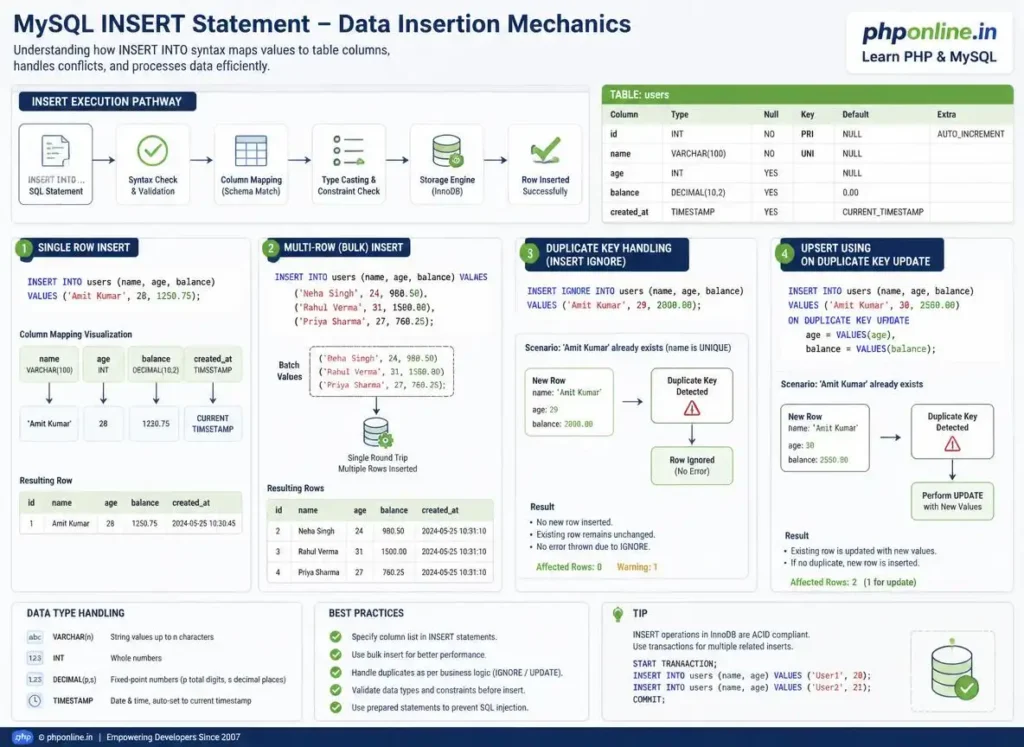
Prerequisites Before Inserting Records
To test the hands-on code examples in this MySQL INSERT statement tutorial, verify that your development environment meets these basic requirements:
- MySQL Server: An active local MySQL 8.0+ server daemon or XAMPP MariaDB service running on port 3306.
- Database Client: Access to MySQL CLI, MySQL Workbench, or the web-based phpMyAdmin console.
- Schema Foundations: An existing database with tables configured with primary keys and appropriate column data types.
If you need to review how table schemas and column constraints are defined before inserting data, visit our previous guide on Easy MySQL CREATE Table Guide: 6 Essential Constraints & Examples.
1. Standard Single-Row INSERT Syntax
The standard INSERT INTO statement requires specifying the target table name, the target column list in parentheses, and the corresponding values matching each column:
INSERT INTO table_name (column1, column2, column3)
VALUES (value1, value2, value3);
Core Rules of Value Mapping:
- Order Alignment: Values inside
VALUES (...)must align in the exact positional sequence as the columns declared in the column list. - String & Date Quoting: Textual strings (
VARCHAR,CHAR,TEXT) and temporal values (DATE,TIMESTAMP) must always be enclosed in single quotes (e.g.,'alex_mercer','2026-08-15'). - Numeric Literals: Integers and decimal numbers (
INT,DECIMAL) are written as raw numeric literals without quotes (e.g.,101,49.99). - Auto-Increment Omission: Columns defined with
AUTO_INCREMENTshould be omitted from the column list; MySQL will generate sequential IDs automatically.
Single-Row Insertion Example:
-- Insert a single customer record into the customers table
INSERT INTO customers (first_name, last_name, email_address, account_balance)
VALUES ('Alex', 'Mercer', 'alex@phponline.in', 250.00);
Want to test SQL syntax or review code snippets? Try running your markup in our Online Code Editor.
2. Inserting Default Values and Omitting Columns
If a column has a DEFAULT constraint defined or permits NULL values, you can omit it from the column list during insertion. MySQL will populate it with its defined fallback value automatically:
-- Omitting account_balance and status (MySQL applies defined DEFAULT values)
INSERT INTO customers (first_name, last_name, email_address)
VALUES ('Sarah', 'Connor', 'sarah@phponline.in');

-- Explicitly requesting default values using the DEFAULT keyword
INSERT INTO customers (first_name, last_name, email_address, account_balance, membership_status)
VALUES ('John', 'Doe', 'john@phponline.in', DEFAULT, DEFAULT);
3. Multi-Row Bulk Batch Insertion (High Performance)
When importing datasets or logging multiple items (such as line items in an order), executing individual INSERT statements in a loop creates massive network and disk transaction overhead.
MySQL allows you to insert multiple rows in a **single atomic statement** by separating sets of values with commas:
-- High-Performance Multi-Row Bulk INSERT Statement
INSERT INTO products (product_sku, product_name, unit_price, stock_quantity)
VALUES
    ('SKU-LAPTOP-01', 'Developer Workstation 16-inch', 1299.99, 15),
    ('SKU-MOUSE-02', 'Wireless Ergonomic Mouse', 49.99, 120),
    ('SKU-KEYBOARD-03', 'Mechanical Gaming Keyboard', 89.99, 75),
    ('SKU-MONITOR-04', '4K Ultra-HD Monitor 27-inch', 349.99, 30);
Performance Benefit:
A single bulk insert containing 1,000 rows executes up to **20 to 50 times faster** than executing 1,000 individual INSERT statements because it opens only one connection transaction, writes to the redo log once, and updates indexes in a single batch.
4. Handling Duplicate Key Conflicts: INSERT IGNORE
When inserting rows into tables with PRIMARY KEY or UNIQUE constraints, attempting to insert a duplicate value causes MySQL to halt execution with an ERROR 1062 (23000): Duplicate entry exception.
Adding the IGNORE keyword instructs MySQL to downgrade duplicate key errors to warnings, silently skipping the conflicting rows while successfully inserting all valid non-conflicting rows:
-- If 'alex@phponline.in' already exists, MySQL skips this row without crashing the script
INSERT IGNORE INTO customers (first_name, last_name, email_address)
VALUES ('Alex', 'Mercer', 'alex@phponline.in');
Want to test code snippets live? Try running them in our Online Code Editor.
5. Atomic Upserts: ON DUPLICATE KEY UPDATE
An **Upsert** (Update or Insert) is an essential database operation where MySQL attempts to insert a new row, but if a unique or primary key collision occurs, it updates the existing row instead.
The ON DUPLICATE KEY UPDATE clause provides an atomic mechanism to update specific columns upon duplicate detection:
-- Page View Counter Upsert Example
INSERT INTO page_analytics (page_url, view_count, last_visited)
VALUES ('/tutorials/mysql/mysql-insert/', 1, NOW())
ON DUPLICATE KEY UPDATE
    view_count = view_count + 1,
    last_visited = NOW();
How it Works: If page_url does not exist, a new row is created with view_count = 1. If page_url already exists (unique key collision), MySQL increments the existing row’s view_count by 1 and updates the timestamp without creating a duplicate row!
6. Copying Data with INSERT INTO … SELECT
You can copy records from one table directly into another table by combining INSERT INTO with a SELECT subquery:
-- Copying all inactive customers into an archival table
INSERT INTO archived_customers (customer_id, full_name, email_address, archived_date)
SELECT customer_id, CONCAT(first_name, ' ', last_name), email_address, NOW()
FROM customers
WHERE account_status = 'suspended';
Summary Comparison of MySQL INSERT Techniques
| Insertion Technique | Sample Syntax Structure | Duplicate Key Behavior | Primary Application Scenario |
|---|---|---|---|
| Standard Single INSERT | INSERT INTO t (c1) VALUES (v1); | Throws ERROR 1062 on duplicate. | Individual user form registrations, single transaction logs. |
| Multi-Row Bulk INSERT | INSERT INTO t (c1) VALUES (v1), (v2); | Aborts entire batch if any row conflicts. | CSV dataset imports, batch order line items, bulk logs. |
| INSERT IGNORE | INSERT IGNORE INTO t (c1) VALUES (v1); | Skips conflicting row silently without error. | Data scraping imports, bulk mailing list syncing. |
| ON DUPLICATE KEY UPDATE | INSERT INTO t ... ON DUPLICATE KEY UPDATE c1=v1; | Updates specified columns on existing row. | Upserts: Analytics counters, shopping cart quantity updates, inventory sync. |
| INSERT INTO … SELECT | INSERT INTO t1 SELECT * FROM t2; | Follows standard table key rules. | Table backups, archival migration, data warehousing pipelines. |
7. Complete Hands-on Demonstration Script
Below is a complete SQL script demonstrating table setup, single insertions, multi-row bulk batching, duplicate handling, and verification queries:
-- 1. Create a clean working schema
CREATE DATABASE IF NOT EXISTS phponline_inventory
CHARACTER SET utf8mb4 COLLATE utf8mb4_unicode_ci;

USE phponline_inventory;

-- 2. Create products table with constraints
DROP TABLE IF EXISTS inventory_items;
CREATE TABLE inventory_items (
    item_id INT UNSIGNED AUTO_INCREMENT PRIMARY KEY,
    item_sku VARCHAR(30) NOT NULL UNIQUE,
    item_name VARCHAR(100) NOT NULL,
    unit_price DECIMAL(10, 2) NOT NULL DEFAULT 0.00,
    quantity_on_hand INT UNSIGNED NOT NULL DEFAULT 0,
    last_updated TIMESTAMP DEFAULT CURRENT_TIMESTAMP ON UPDATE CURRENT_TIMESTAMP
) ENGINE=InnoDB;

-- 3. Standard Single-Row Insert
INSERT INTO inventory_items (item_sku, item_name, unit_price, quantity_on_hand)
VALUES ('SKU-SSD-500', 'NVMe M.2 SSD 500GB', 59.99, 45);

-- 4. High-Performance Multi-Row Bulk Insert
INSERT INTO inventory_items (item_sku, item_name, unit_price, quantity_on_hand)
VALUES
    ('SKU-RAM-16', 'DDR5 RAM 16GB Module', 74.50, 60),
    ('SKU-CPU-I7', 'Core i7 Desktop Processor', 329.00, 20),
    ('SKU-GPU-4070', 'GeForce RTX 4070 12GB', 599.99, 12);

-- 5. Upsert Demonstration using ON DUPLICATE KEY UPDATE
-- Attempts to insert SKU-RAM-16 again; increments stock quantity instead of failing
INSERT INTO inventory_items (item_sku, item_name, unit_price, quantity_on_hand)
VALUES ('SKU-RAM-16', 'DDR5 RAM 16GB Module', 74.50, 40)
ON DUPLICATE KEY UPDATE
    quantity_on_hand = quantity_on_hand + VALUES(quantity_on_hand);

-- 6. Verify Table Data
SELECT item_id, item_sku, item_name, unit_price, quantity_on_hand, last_updated
FROM inventory_items;
Want to test code snippets live? Try running them in our Online Code Editor.
8. Interactive SQL INSERT Query Builder Simulation
Below is a complete, working HTML and JavaScript interactive simulation demonstrating SQL `INSERT INTO` statement compilation and payload formatting:
<!DOCTYPE html>
<html lang="en">
<head>
    <meta charset="UTF-8">
    <meta name="viewport" content="width=device-width, initial-scale=1.0">
    <title>MySQL INSERT Statement Builder Simulation</title>

    <style>
        body {
            font-family: Arial, sans-serif;
            background-color: #f4f6f9;
            color: #333;
            padding: 30px;
            max-width: 650px;
            margin: 0 auto;
        }

        .insert-card {
            background-color: #ffffff;
            border: 1px solid #e0e0e0;
            border-radius: 8px;
            padding: 25px;
            box-shadow: 0 4px 12px rgba(0,0,0,0.05);
        }

        .form-group {
            margin-bottom: 15px;
        }

        .form-group label {
            display: block;
            margin-bottom: 6px;
            font-weight: bold;
        }

        .form-group input, .form-group select {
            width: 100%;
            padding: 10px;
            border: 1px solid #ccc;
            border-radius: 4px;
            font-size: 15px;
        }

        .btn-compile {
            background-color: #0073aa;
            color: #ffffff;
            border: none;
            padding: 12px 20px;
            font-size: 14px;
            border-radius: 4px;
            cursor: pointer;
            width: 100%;
            font-weight: bold;
        }

        .sql-preview {
            margin-top: 20px;
            padding: 15px;
            background-color: #1e1e1e;
            color: #81d4fa;
            font-family: monospace;
            border-radius: 4px;
            white-space: pre-wrap;
        }
    </style>
</head>
<body>

    <div class="insert-card">
        <h2 style="color: #0073aa; margin-bottom: 10px;">SQL INSERT Statement Generator</h2>
        <p>Input customer details to generate valid MySQL INSERT syntax with automatic data type quoting:</p>

        <div class="form-group">
            <label for="cust-name">Customer Full Name (VARCHAR):</label>
            <input type="text" id="cust-name" value="Alex Mercer">
        </div>

        <div class="form-group">
            <label for="cust-email">Email Address (VARCHAR):</label>
            <input type="email" id="cust-email" value="alex@phponline.in">
        </div>

        <div class="form-group">
            <label for="cust-balance">Account Balance (DECIMAL):</label>
            <input type="number" id="cust-balance" step="0.01" value="150.00">
        </div>

        <div class="form-group">
            <label for="insert-mode">Insertion Strategy:</label>
            <select id="insert-mode">
                <option value="standard">Standard INSERT INTO</option>
                <option value="ignore">INSERT IGNORE (Skip Duplicates)</option>
                <option value="upsert">ON DUPLICATE KEY UPDATE (Upsert Balance)</option>
            </select>
        </div>

        <button id="compile-btn" class="btn-compile">Compile SQL INSERT Statement</button>

        <div id="sql-display" class="sql-preview">
Click button above to compile SQL statement...
        </div>
    </div>

    <script>
        const nameInput = document.getElementById("cust-name");
        const emailInput = document.getElementById("cust-email");
        const balanceInput = document.getElementById("cust-balance");
        const modeSelect = document.getElementById("insert-mode");
        const compileBtn = document.getElementById("compile-btn");
        const sqlDisplay = document.getElementById("sql-display");

        compileBtn.addEventListener("click", () => {
            const name = nameInput.value.trim() || "John Doe";
            const email = emailInput.value.trim() || "john@phponline.in";
            const balance = parseFloat(balanceInput.value) || 0.00;
            const mode = modeSelect.value;

            let sql = "";
            if (mode === "ignore") {
                sql = `INSERT IGNORE INTO customers (full_name, email_address, account_balance)\n` +
                      `VALUES ('${name}', '${email}', ${balance.toFixed(2)});`;
            } else if (mode === "upsert") {
                sql = `INSERT INTO customers (full_name, email_address, account_balance)\n` +
                      `VALUES ('${name}', '${email}', ${balance.toFixed(2)})\n` +
                      `ON DUPLICATE KEY UPDATE account_balance = account_balance + ${balance.toFixed(2)};`;
            } else {
                sql = `INSERT INTO customers (full_name, email_address, account_balance)\n` +
                      `VALUES ('${name}', '${email}', ${balance.toFixed(2)});`;
            }

            sqlDisplay.textContent = sql;
            console.log("Compiled SQL Statement:\n" + sql);
        });
    </script>

</body>
</html>
Want to test this HTML layout code live? Try running it in our Online Code Editor.
Validating Code Standards & Testing
Column count mismatches between the declared column list and the VALUES (...) clause or unquoted string literals will trigger SQL syntax exceptions.
Before publishing web application pages that interact with MySQL database scripts, test your frontend markup and inline scripts using our PHPOnline HTML Validator Tool.
Troubleshooting Common MySQL INSERT Errors
| Observed Database Error | Probable Cause | Recommended Solution |
|---|---|---|
| ERROR 1136 (21S01): Column count doesn’t match value count at row 1 | The number of columns listed in (col1, col2) does not equal the number of items in VALUES (val1, val2, val3). | Ensure the count of declared columns matches the exact count of supplied values in every row tuple. |
| ERROR 1062 (23000): Duplicate entry ‘x’ for key ’email_address’ | Attempting to insert a row with a value that already exists in a column with a UNIQUE or PRIMARY KEY constraint. | Use INSERT IGNORE to skip duplicate rows or ON DUPLICATE KEY UPDATE to update existing records. |
| ERROR 1364 (HY000): Field ‘x’ doesn’t have a default value | Omitting a column defined as NOT NULL that lacks a DEFAULT fallback value constraint. | Provide a value for the mandatory column or add a DEFAULT value constraint to the table definition. |
| ERROR 1452 (23000): Cannot add or update a child row: a foreign key constraint fails | Attempting to insert a foreign key integer that does not exist in the referenced parent table’s primary key. | Ensure the parent record exists prior to inserting child records. Validate code with our HTML Validator Tool. |
Frequently Asked Questions (FAQ)
Q1: What is the MySQL INSERT statement and why is it fundamental?
The MySQL INSERT statement is a Data Manipulation Language (DML) SQL command used to add new records into an existing database table. It is fundamental because it handles the “Create” operation in CRUD (Create, Read, Update, Delete) application development.
Q2: How do you insert multiple rows in a single MySQL query?
You can insert multiple rows in a single query by separating value tuples with commas inside the VALUES clause (e.g., INSERT INTO users (name) VALUES ('Alex'), ('Sarah'), ('John');). This bulk batching technique reduces network latency and disk I/O.
Q3: What is the difference between INSERT IGNORE and standard INSERT?
A standard INSERT halts query execution with a fatal error if a duplicate primary or unique key collision occurs. INSERT IGNORE downgrades duplicate key errors to warnings, silently skipping conflicting rows while inserting all valid rows.
Q4: What is an upsert in MySQL?
An upsert is a database operation that inserts a new row if it does not exist, or updates the existing row if a duplicate unique/primary key is detected. In MySQL, this is achieved using the ON DUPLICATE KEY UPDATE clause.
Next Steps & Official References
Consult official technical reference manuals on the MySQL Official INSERT Documentation (dev.mysql.com).
Before publishing your web page layouts, validate your code syntax using our PHPOnline HTML Validator Tool.
Ready for the next lesson in sequence? Proceed directly to the next lesson in Module 2: Next Lesson: MySQL SELECT & WHERE Clause (Filtering, Comparison & Logical Operators) →
# Summary
Here is what you've learned in this lesson:
- Easy MySQL INSERT Statement Guide: 5 Core Insertion Techniques & Examples
- Overview: Understanding the MySQL INSERT Statement & Record Creation
- Prerequisites Before Inserting Records
- 1. Standard Single-Row INSERT Syntax
- 2. Inserting Default Values and Omitting Columns
- 3. Multi-Row Bulk Batch Insertion (High Performance)
- 4. Handling Duplicate Key Conflicts: INSERT IGNORE
- 5. Atomic Upserts: ON DUPLICATE KEY UPDATE
- 6. Copying Data with INSERT INTO ... SELECT
- Summary Comparison of MySQL INSERT Techniques
- 7. Complete Hands-on Demonstration Script
- 8. Interactive SQL INSERT Query Builder Simulation
- Validating Code Standards & Testing
- Troubleshooting Common MySQL INSERT Errors
- Frequently Asked Questions (FAQ)
- Next Steps & Official References