
MySQL CREATE Table
Easy MySQL CREATE Table Guide: 6 Essential Constraints & Examples
Master schema construction with this complete MySQL CREATE table guide. Learn CREATE DATABASE, DROP TABLE, PRIMARY KEY, FOREIGN KEY, and AUTO_INCREMENT rules.
Overview: Understanding MySQL CREATE Table & Schema Construction
Quick MySQL CREATE Table Summary:
- Data Definition Foundation (DDL): The
CREATE DATABASEandCREATE TABLEstatements are foundational SQL commands used to instantiate database containers and define structured relational schemas. - Column Constraints: Constraints enforce data integrity rules at the column level, preventing invalid, missing, or duplicate data from entering the database.
- The 6 Core Constraints: Includes
NOT NULL(mandatory data),UNIQUE(no duplicates),PRIMARY KEY(unique row identifier),FOREIGN KEY(relational link),AUTO_INCREMENT(automatic sequential IDs), andDEFAULT(fallback values). - Safe Schema Deletion: The
DROP DATABASEandDROP TABLE IF EXISTScommands permanently delete schemas and data records from disk storage. - Referential Integrity: Foreign key constraints (
ON DELETE CASCADE/ON DELETE RESTRICT) ensure that child table records stay synchronized when parent rows are updated or deleted.
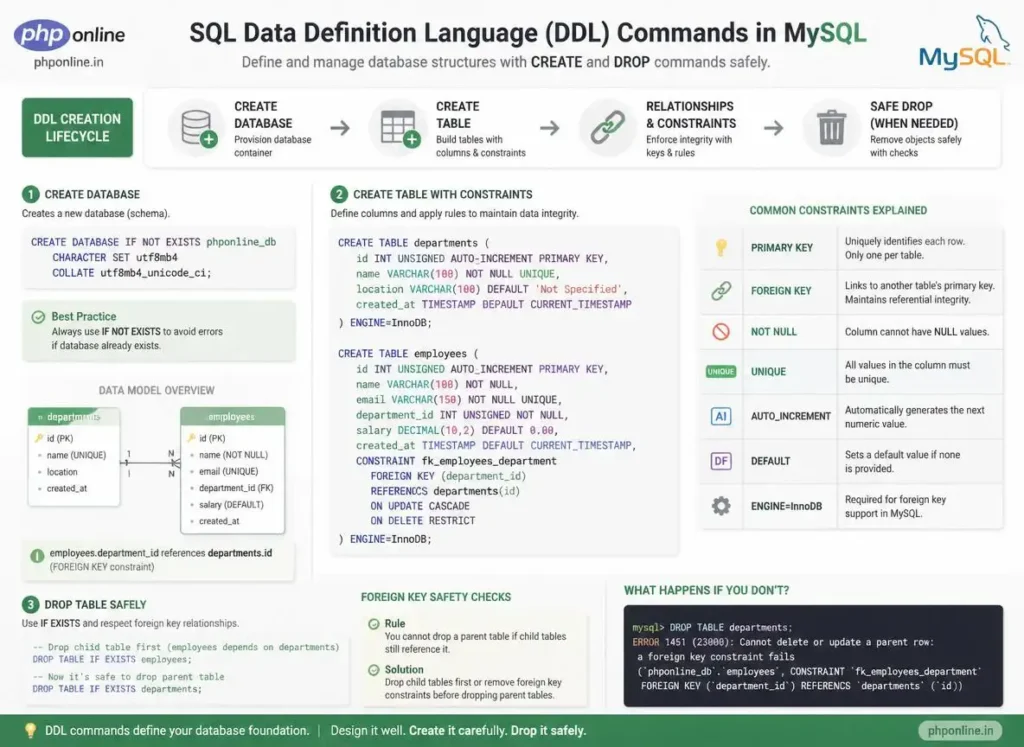
Welcome to Lesson 4 of our structured Database curriculum, marking the final lesson in Module 1: MySQL Basics & Relational Architecture. Following our previous tutorial on Easy MySQL Data Types Guide: 5 Core Storage Categories & Examples, you now understand numeric precision, character allocations (`CHAR` vs. `VARCHAR`), and date/time temporal formats. The next critical operational milestone is building database schemas using a comprehensive MySQL CREATE table architecture.
Before an application can insert user records, manage shopping carts, or query blog articles, the underlying database container and relational tables must be built with strict structural constraints. Defining accurate primary keys, auto-incrementing ID sequences, unique email constraints, and foreign key relationships directly inside your table definitions prevents database corruption and eliminates application-level data bugs.
In this comprehensive MySQL CREATE table guide, we will explore database provisioning, table creation syntax, the 6 essential column constraints, foreign key referential integrity (`CASCADE` vs. `RESTRICT`), dropping tables safely, table alteration (`ALTER TABLE`), and hands-on code examples.
Prerequisites Before Creating Tables
To test the hands-on code examples in this MySQL CREATE table tutorial, verify that your development environment meets these basic requirements:
- MySQL Server: An active local MySQL 8.0+ server daemon or XAMPP MariaDB service running on port 3306.
- Database Client: Access to MySQL CLI, MySQL Workbench, or the web-based phpMyAdmin console.
- Data Type Foundations: Understanding of `INT`, `VARCHAR`, `DECIMAL`, and `TIMESTAMP` data types.
If you need to review how data types allocate memory storage before defining column fields, visit our previous guide on Easy MySQL Data Types Guide: 5 Core Storage Categories & Examples.
1. Creating and Dropping Databases (CREATE & DROP DATABASE)
A **Database** is a root storage namespace that encapsulates related tables, views, stored procedures, and access privileges.
A. Creating a Database (CREATE DATABASE)
Always use the IF NOT EXISTS clause to prevent runtime errors if a database with the same name already exists. Specify utf8mb4 character encoding to support international multilingual text and modern emojis:
-- 1. Create a new database with modern UTF-8 encoding
CREATE DATABASE IF NOT EXISTS phponline_ecommerce
CHARACTER SET utf8mb4
COLLATE utf8mb4_unicode_ci;

-- 2. Select the database to make it the active working schema
USE phponline_ecommerce;
B. Dropping a Database (DROP DATABASE)
The DROP DATABASE command **permanently deletes** the database and all its enclosed tables, indexes, and records from disk:
-- Permanently deletes the database container and all data
DROP DATABASE IF EXISTS old_test_db;
Want to test code syntax or review code snippets? Try running your markup in our Online Code Editor.
2. The Core Anatomy of the CREATE TABLE Statement
The CREATE TABLE statement defines the name of the table, lists every column alongside its data type, and attaches structural validation constraints:
CREATE TABLE IF NOT EXISTS table_name (
    column1_name DATA_TYPE CONSTRAINTS,
    column2_name DATA_TYPE CONSTRAINTS,
    PRIMARY KEY (column1_name)
) ENGINE=InnoDB DEFAULT CHARSET=utf8mb4;
3. The 6 Essential MySQL Column Constraints
Constraints are rules enforced by the MySQL engine to maintain the accuracy, reliability, and integrity of table data:
| Constraint Name | Rule Definition | Primary Application Scenario |
|---|---|---|
PRIMARY KEY | Uniquely identifies each row in a table. Automatically enforces UNIQUE and NOT NULL. | Unique record identifiers (e.g., user_id, order_id). |
AUTO_INCREMENT | Automatically generates an incremental integer (1, 2, 3…) when a new row is inserted without a manual ID. | Primary key counter sequences for continuous record logging. |
NOT NULL | Guarantees that a column cannot accept a NULL (empty/missing) value. | Mandatory fields (e.g., customer names, login passwords, transaction prices). |
UNIQUE | Ensures that all values stored inside a column are distinct with zero duplicates. | Usernames, email addresses, phone numbers, passport codes. |
DEFAULT | Supplies an automatic fallback value if no value is provided during record insertion. | Account statuses (DEFAULT 'active'), currency defaults, timestamps. |
FOREIGN KEY | Links a column in a child table to the PRIMARY KEY of a parent table, enforcing referential integrity. | Connecting orders to customers, comments to blog posts, line items to invoices. |
4. Establishing Relationships with FOREIGN KEY Constraints
A **Foreign Key** ensures that a child table cannot reference a non-existent parent record, preventing “orphan” data in your database.
Referential Action Triggers:
ON DELETE CASCADE: If a parent row is deleted, MySQL automatically deletes all associated child records.ON DELETE RESTRICT/NO ACTION(Default): Prevents the parent row from being deleted if child records still point to it.ON DELETE SET NULL: Sets the child foreign key column toNULLif the parent row is deleted.
-- 1. Create Parent Table: Users
CREATE TABLE users (
    user_id INT UNSIGNED AUTO_INCREMENT PRIMARY KEY,
    username VARCHAR(50) NOT NULL UNIQUE,
    email VARCHAR(100) NOT NULL UNIQUE,
    created_at TIMESTAMP DEFAULT CURRENT_TIMESTAMP
) ENGINE=InnoDB;

-- 2. Create Child Table: Orders (with Foreign Key linked to Users)
CREATE TABLE orders (
    order_id INT UNSIGNED AUTO_INCREMENT PRIMARY KEY,
    user_id INT UNSIGNED NOT NULL,
    order_total DECIMAL(10, 2) NOT NULL,
    order_status ENUM('pending', 'completed', 'cancelled') DEFAULT 'pending',
    order_date TIMESTAMP DEFAULT CURRENT_TIMESTAMP,

    -- Defining Foreign Key Constraint
    CONSTRAINT fk_orders_user_id
        FOREIGN KEY (user_id)
        REFERENCES users(user_id)
        ON DELETE CASCADE
        ON UPDATE CASCADE
) ENGINE=InnoDB;
Want to test code snippets live? Try running them in our Online Code Editor.
5. Dropping and Truncating Tables Safely
When removing table schemas or resetting test data, choose the command that matches your operational requirements:
| SQL Command | Operation Scope | Resets AUTO_INCREMENT? | Preserves Table Structure? |
|---|---|---|---|
DROP TABLE IF EXISTS table_name; | Permanently deletes table structure, indexes, and all stored rows from disk. | N/A (Table is destroyed) | No (Structure is wiped out) |
TRUNCATE TABLE table_name; | Deletes all rows inside the table instantly by de-allocating data pages. | Yes (Resets counter back to 1) | Yes (Structure remains intact) |
DELETE FROM table_name; | Deletes rows one by one (supports WHERE clauses for selective removal). | No (Preserves highest counter ID) | Yes (Structure remains intact) |
6. Modifying Tables with ALTER TABLE
If you need to change a table after it has been created, use the ALTER TABLE command without dropping or losing existing data:
-- 1. Add a new column to an existing table
ALTER TABLE users ADD phone_number VARCHAR(20) NULL AFTER email;

-- 2. Modify an existing column's data type
ALTER TABLE users MODIFY username VARCHAR(80) NOT NULL;

-- 3. Drop a column from an existing table
ALTER TABLE users DROP COLUMN phone_number;
7. Complete Hands-on E-Commerce Schema Demonstration
Below is a complete SQL script demonstrating database provisioning, table creation with all 6 constraints, foreign key linkage, and index configuration:
-- 1. Database Provisioning
CREATE DATABASE IF NOT EXISTS phponline_store
CHARACTER SET utf8mb4 COLLATE utf8mb4_unicode_ci;

USE phponline_store;

-- 2. Drop existing tables safely in reverse dependency order
DROP TABLE IF EXISTS order_items;
DROP TABLE IF EXISTS products;
DROP TABLE IF EXISTS customers;

-- 3. Create Customers Table (Parent 1)
CREATE TABLE customers (
    customer_id INT UNSIGNED AUTO_INCREMENT PRIMARY KEY,
    full_name VARCHAR(100) NOT NULL,
    email_address VARCHAR(120) NOT NULL UNIQUE,
    account_status ENUM('active', 'suspended') NOT NULL DEFAULT 'active',
    registered_at TIMESTAMP DEFAULT CURRENT_TIMESTAMP
) ENGINE=InnoDB;

-- 4. Create Products Table (Parent 2)
CREATE TABLE products (
    product_id INT UNSIGNED AUTO_INCREMENT PRIMARY KEY,
    product_sku VARCHAR(30) NOT NULL UNIQUE,
    product_name VARCHAR(150) NOT NULL,
    unit_price DECIMAL(10, 2) NOT NULL,
    stock_quantity INT UNSIGNED NOT NULL DEFAULT 0,
    created_at TIMESTAMP DEFAULT CURRENT_TIMESTAMP
) ENGINE=InnoDB;

-- 5. Create Order Items Table (Child Table with Multiple Foreign Keys)
CREATE TABLE order_items (
    item_id INT UNSIGNED AUTO_INCREMENT PRIMARY KEY,
    customer_id INT UNSIGNED NOT NULL,
    product_id INT UNSIGNED NOT NULL,
    quantity_purchased INT UNSIGNED NOT NULL DEFAULT 1,
    subtotal_price DECIMAL(10, 2) NOT NULL,
    order_timestamp TIMESTAMP DEFAULT CURRENT_TIMESTAMP,

    -- Foreign Key to Customers
    CONSTRAINT fk_order_customer
        FOREIGN KEY (customer_id)
        REFERENCES customers(customer_id)
        ON DELETE CASCADE,

    -- Foreign Key to Products
    CONSTRAINT fk_order_product
        FOREIGN KEY (product_id)
        REFERENCES products(product_id)
        ON DELETE RESTRICT
) ENGINE=InnoDB;
Want to test code snippets live? Try running them in our Online Code Editor.
8. Interactive Schema Builder Simulation
Below is a complete, working HTML and JavaScript interactive simulation demonstrating table constraint definitions and SQL query generation in a visual web interface:
<!DOCTYPE html>
<html lang="en">
<head>
    <meta charset="UTF-8">
    <meta name="viewport" content="width=device-width, initial-scale=1.0">
    <title>MySQL CREATE Table Query Builder</title>

    <style>
        body {
            font-family: Arial, sans-serif;
            background-color: #f4f6f9;
            color: #333;
            padding: 30px;
            max-width: 650px;
            margin: 0 auto;
        }

        .builder-card {
            background-color: #ffffff;
            border: 1px solid #e0e0e0;
            border-radius: 8px;
            padding: 25px;
            box-shadow: 0 4px 12px rgba(0,0,0,0.05);
        }

        .form-group {
            margin-bottom: 15px;
        }

        .form-group label {
            display: block;
            margin-bottom: 6px;
            font-weight: bold;
        }

        .form-group input, .form-group select {
            width: 100%;
            padding: 10px;
            border: 1px solid #ccc;
            border-radius: 4px;
            font-size: 15px;
        }

        .checkbox-group {
            display: flex;
            gap: 15px;
            margin: 15px 0;
        }

        .btn-generate {
            background-color: #0073aa;
            color: #ffffff;
            border: none;
            padding: 12px 20px;
            font-size: 14px;
            border-radius: 4px;
            cursor: pointer;
            width: 100%;
            font-weight: bold;
        }

        .sql-output {
            margin-top: 20px;
            padding: 15px;
            background-color: #1e1e1e;
            color: #81d4fa;
            font-family: monospace;
            border-radius: 4px;
            white-space: pre-wrap;
        }
    </style>
</head>
<body>

    <div class="builder-card">
        <h2 style="color: #0073aa; margin-bottom: 10px;">SQL CREATE TABLE Generator</h2>
        <p>Configure table properties to generate valid DDL SQL syntax in real time:</p>

        <div class="form-group">
            <label for="tbl-name">Table Name:</label>
            <input type="text" id="tbl-name" value="members">
        </div>

        <div class="form-group">
            <label for="primary-col">Primary Key Column Name:</label>
            <input type="text" id="primary-col" value="member_id">
        </div>

        <div class="checkbox-group">
            <label><input type="checkbox" id="chk-autoincrement" checked> AUTO_INCREMENT</label>
            <label><input type="checkbox" id="chk-timestamps" checked> Include created_at</label>
        </div>

        <button id="generate-btn" class="btn-generate">Generate CREATE TABLE SQL</button>

        <div id="sql-result" class="sql-output">
Click button above to compile SQL statement...
        </div>
    </div>

    <script>
        const tblNameInput = document.getElementById("tbl-name");
        const primaryColInput = document.getElementById("primary-col");
        const chkAuto = document.getElementById("chk-autoincrement");
        const chkTime = document.getElementById("chk-timestamps");
        const generateBtn = document.getElementById("generate-btn");
        const sqlResult = document.getElementById("sql-result");

        generateBtn.addEventListener("click", () => {
            const table = tblNameInput.value.trim() || "my_table";
            const pk = primaryColInput.value.trim() || "id";
            const autoInc = chkAuto.checked ? " AUTO_INCREMENT" : "";

            let timeCol = "";
            if (chkTime.checked) {
                timeCol = ",\n    created_at TIMESTAMP DEFAULT CURRENT_TIMESTAMP";
            }

            const sql = `CREATE TABLE IF NOT EXISTS ${table} (\n` +
                        `    ${pk} INT UNSIGNED${autoInc} PRIMARY KEY,\n` +
                        `    email_address VARCHAR(100) NOT NULL UNIQUE,\n` +
                        `    account_status ENUM('active', 'inactive') DEFAULT 'active'` +
                        `${timeCol}\n` +
                        `) ENGINE=InnoDB DEFAULT CHARSET=utf8mb4;`;

            sqlResult.textContent = sql;
            console.log("Generated SQL DDL Statement:\n" + sql);
        });
    </script>

</body>
</html>
Want to test this HTML layout code live? Try running it in our Online Code Editor.
Validating Code Standards & Testing
Mismatched foreign key column data types (e.g., trying to link an unsigned integer to a signed integer) or attempting to drop parent tables before child tables will trigger database constraint errors.
Before publishing web application pages that interact with MySQL database scripts, test your frontend markup and inline scripts using our PHPOnline HTML Validator Tool.
Troubleshooting Common CREATE and DROP Table Errors
| Observed Database Error | Probable Cause | Recommended Solution |
|---|---|---|
| ERROR 1215 (HY000): Cannot add foreign key constraint | Column data types do not match exactly (e.g., parent is INT UNSIGNED while child is standard signed INT). | Ensure foreign key columns match the exact data type, signing, and storage size of the referenced primary key. |
| ERROR 3730 (HY000): Cannot drop table ‘x’ referenced by a foreign key constraint | Attempting to drop a parent table while a child table is actively referencing it via a foreign key. | Drop child tables first, or temporarily run SET FOREIGN_KEY_CHECKS=0; before dropping. |
| ERROR 1050 (42S01): Table ‘x’ already exists | Attempting to run a CREATE TABLE command for a table that has already been created. | Add the safety clause IF NOT EXISTS to your CREATE TABLE statement. |
| ERROR 1075 (42000): Incorrect table definition; there can be only one auto column and it must be defined as a key | Defining a column as AUTO_INCREMENT without setting it as a PRIMARY KEY or UNIQUE index. | Attach PRIMARY KEY constraint directly to the AUTO_INCREMENT column. Validate code with our HTML Validator Tool. |
Frequently Asked Questions (FAQ)
Q1: What is the MySQL CREATE table command and why is it fundamental?
The MySQL CREATE table command is a Data Definition Language (DDL) statement used to instantiate new relational tables within a database. It is fundamental because it defines the schema structure, column data types, and integrity constraints that govern how records are stored and linked.
Q2: What is the difference between DROP TABLE and TRUNCATE TABLE in MySQL?
DROP TABLE permanently destroys the table schema definition, indexes, and all stored rows from disk. TRUNCATE TABLE empties all rows inside the table and resets the AUTO_INCREMENT counter to 1, while preserving the table structure intact.
Q3: What is the purpose of the ON DELETE CASCADE constraint in MySQL?
ON DELETE CASCADE is a foreign key referential rule that automatically deletes associated child records whenever the referenced parent row is deleted, preventing orphan data from accumulating in the database.
Q4: Why should tables always be created using the InnoDB storage engine?
ENGINE=InnoDB is the default, enterprise-grade storage engine in MySQL that provides ACID transaction compliance, foreign key relational integrity constraints, crash recovery, and row-level locking for high concurrency performance.
Course Progress & Official References
Congratulations on completing Module 1: MySQL Basics & Relational Architecture! You now possess core skills spanning database management systems, local server setup on port 3306, numeric/string/date data types, and table schema construction with relational constraints.
Consult official technical reference manuals on the MySQL Official CREATE TABLE Documentation (dev.mysql.com).
Before publishing your web page layouts, validate your code syntax using our PHPOnline HTML Validator Tool.
Ready to move to Module 2? Proceed directly to the first lesson in Module 2: Next Lesson: MySQL INSERT Statement (Single, Multiple & Prepared Inserts) →
# Summary
Here is what you've learned in this lesson:
- Easy MySQL CREATE Table Guide: 6 Essential Constraints & Examples
- Overview: Understanding MySQL CREATE Table & Schema Construction
- Prerequisites Before Creating Tables
- 1. Creating and Dropping Databases (CREATE & DROP DATABASE)
- 2. The Core Anatomy of the CREATE TABLE Statement
- 3. The 6 Essential MySQL Column Constraints
- 4. Establishing Relationships with FOREIGN KEY Constraints
- 5. Dropping and Truncating Tables Safely
- 6. Modifying Tables with ALTER TABLE
- 7. Complete Hands-on E-Commerce Schema Demonstration
- 8. Interactive Schema Builder Simulation
- Validating Code Standards & Testing
- Troubleshooting Common CREATE and DROP Table Errors
- Frequently Asked Questions (FAQ)
- Course Progress & Official References
Continue to the next lesson and learn more about MySQL INSERT.