
PHP Constants
Easy PHP Constants Guide: 3 Differences Between Define & Const
Master immutable memory storage with this complete PHP constants guide. Learn define() vs const, magic constants, array constants, and best practices.
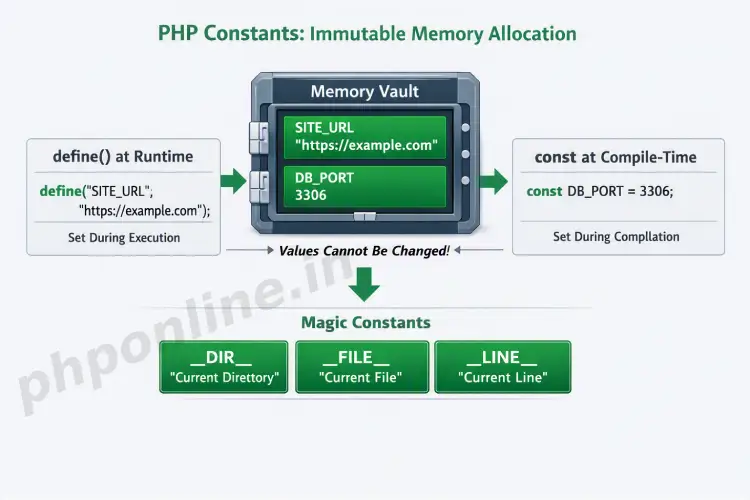
Overview: Understanding PHP Constants & Immutable Memory
Quick PHP Constants Summary:
- Immutable Values: Once a constant is defined in server memory, its value cannot be changed, re-assigned, or undefined during script execution.
- No Dollar Sign Prefix: Unlike standard variables, constant identifiers do not use the dollar sign (
$) prefix (e.g.,SITE_NAMEvs.$siteName). - Global Availability: Constants automatically possess global scope and can be accessed anywhere across your application without using the
globalkeyword. - Two Declaration Methods: Created using the runtime function
define()or the compile-time keywordconst. - Magic Constants: PHP includes 8 special predefined constants (such as
__DIR__and__FILE__) that dynamically change based on their execution context.
Welcome to Lesson 9 of our structured web development course[cite: 99]. Following our previous tutorial on Easy PHP Numbers Guide: 8 Essential Math Functions & Rules[cite: 153], you now understand how to perform arithmetic operations, round floats, and generate random numbers. The final vital step in Module 2 is mastering immutable data storage using PHP constants.
In software architecture, certain application settings—such as database connection credentials, API endpoint URLs, payment gateway keys, or mathematical ratios—must remain strictly fixed throughout a user’s web request. Storing configuration settings inside standard variables introduces the risk of accidental modification during runtime.
In this comprehensive PHP constants guide, we will examine declaration syntax using define() versus const, constant arrays, global accessibility rules, magic constants, and industry best practices for configuration management.
Prerequisites Before Creating Constants
To test the hands-on code examples in this PHP constants tutorial, verify that your development environment meets these basic requirements:
- Active Web Server: Running installation of Apache or Nginx with PHP 8.x+ (configured via XAMPP, Homebrew, or Terminal).
- Code Editor: A modern IDE such as Visual Studio Code or PhpStorm.
- Memory Foundations: Understanding of variables, scopes, and scalar data types.
If you need to review variable memory scopes or naming conventions, visit our previous guide on Easy PHP Variables Guide: Complete Types & Scope Tutorial[cite: 124].
1. Defining Constants: define() vs. const
PHP provides two distinct mechanisms for creating PHP constants: the built-in define() function and the const language keyword. While both create immutable identifiers, they operate differently under the hood.
A. Defining Constants with define()
The define() function creates a constant at runtime. By convention, constant names are always written in uppercase letters with words separated by underscores:
<?php
// Syntax: define(name, value)
define("SITE_URL", "https://phponline.in");
define("MAX_LOGIN_ATTEMPTS", 5);
define("IS_MAINTENANCE_MODE", false);

echo "Welcome to " . SITE_URL . "<br>";
echo "Max Allowed Logins: " . MAX_LOGIN_ATTEMPTS;
?>
Want to test this code live? Try running it in our PHP Online Compiler.
B. Defining Constants with const
The const keyword creates a constant at compile-time. It is cleaner to read and is required when defining constants inside Object-Oriented classes or namespaces:
<?php
// Defining global constants using const
const API_VERSION = "v2.1";
const DEFAULT_CURRENCY = "USD";

echo "API Version: " . API_VERSION . "<br>";
echo "Currency: " . DEFAULT_CURRENCY;
?>
Want to test this code live? Try running it in our PHP Online Compiler.
2. Key Differences: define() vs. const
Selecting between define() and const depends on execution context and application structure. Here is a direct technical comparison:
| Feature / Criteria | define() Function | const Keyword |
|---|---|---|
| Execution Timing | Executed at runtime (when the line is reached). | Parsed at compile-time (before script execution). |
| Conditional Usage | Can be used inside if blocks, loops, or functions. | Cannot be used inside conditional blocks or functions. |
| Class / OOP Context | Cannot be used inside Class definitions. | Mandatory for defining Class constants (e.g., Class::CONSTANT). |
| Expression Values | Accepts complex runtime function calls as values. | Accepts only static scalar expressions evaluated at compile-time. |
| Execution Performance | Marginally slower due to function call evaluation. | Marginally faster because it is resolved during compilation. |
Conditional Execution Example
<?php
$environment = "production";

// Allowed: define() inside a conditional control block
if ($environment === "production") {
    define("DEBUG_MODE", false);
} else {
    define("DEBUG_MODE", true);
}

// Invalid: const cannot be wrapped inside conditional if statements!
// if ($environment === "production") { const DEBUG = false; } // Syntax Error!
?>
Want to test this code live? Try running it in our PHP Online Compiler.
3. Constant Arrays in Modern PHP
Since PHP 7.0+, you can store Array data structures inside constants using either define() or const. Array constants are ideal for storing fixed configuration lists, such as allowed user roles or supported file extensions:
<?php
// Defining an array constant using define()
define("ALLOWED_FILE_TYPES", ["jpg", "png", "pdf", "docx"]);

// Defining an array constant using const
const SUPPORTED_USER_ROLES = [
    "admin" => "Full Access",
    "editor" => "Content Editing",
    "subscriber" => "Read Only"
];

// Accessing array constant elements
echo "Primary Allowed File: " . ALLOWED_FILE_TYPES[0] . "<br>";
echo "Admin Role Description: " . SUPPORTED_USER_ROLES['admin'];
?>
Want to test this code live? Try running it in our PHP Online Compiler.
4. Global Scope & Constant Accessibility
One of the greatest benefits of PHP constants is that they are automatically global across your entire application. Once defined, a constant can be read from inside any function, class, or included file without needing the global keyword or global arrays:
<?php
define("DATABASE_NAME", "app_production_db");

function connectToDatabase() {
    // Constant is accessed directly inside local function scope without 'global'
    echo "Connecting to database: " . DATABASE_NAME;
}

connectToDatabase();
?>
Want to test this code live? Try running it in our PHP Online Compiler.
5. Exploring PHP Magic Constants
PHP features 8 predefined special constants called Magic Constants. They are named with double underscore prefixes and suffixes (e.g., __NAME__). Unlike standard constants, magic constants dynamically update their value based on where they are executed in your codebase:
| Magic Constant | Returned Value / Description | Common Use Case |
|---|---|---|
__LINE__ | The current line number in the executing script file. | Logging errors and debugging execution paths. |
__FILE__ | The full absolute path and filename of the executing file. | Building secure absolute file inclusions. |
__DIR__ | The directory path of the current file (equivalent to dirname(__FILE__)). | Loading template partials and configuration files. |
__FUNCTION__ | The name of the current function being executed. | Tracing nested function calls in log files. |
__CLASS__ | The full class name including namespace of the current object. | OOP diagnostics and factory patterns. |
__METHOD__ | The class method name being executed. | Method-level performance logging. |
__NAMESPACE__ | The name of the current code namespace. | Dynamic class autoloading. |
Magic Constants Example
<?php
echo "Executing line number: " . __LINE__ . "<br>";
echo "Current File Path: " . __FILE__ . "<br>";
echo "Current Directory Path: " . __DIR__;
?>
Want to test this code live? Try running it in our PHP Online Compiler.
Troubleshooting Common PHP Constant Errors
| Observed Error / Issue | Probable Cause | Recommended Solution |
|---|---|---|
Error: Cannot redeclare constant ... | Attempting to define a constant name that has already been registered in memory. | Check if defined before declaring using if (!defined('NAME')) { define('NAME', 'value'); }. |
Parse error: syntax error, unexpected 'const' | Attempting to use the const keyword inside a function or conditional if block. | Use define() for conditional runtime declarations instead of const. |
Warning: Undefined constant "..." | Accessing a constant before it has been defined, or misspelling the identifier name. | Confirm spelling and verify that the constant definition file is loaded prior to execution. |
| Attempting to modify constant causes fatal error | Assigning a new value to a constant (e.g., SITE_URL = "new"). | Constants are strictly immutable. If a value needs to change during execution, use a standard variable instead. |
Frequently Asked Questions (FAQ)
Q1: What are PHP constants and why are they used?
PHP constants are immutable memory identifiers used to store values that must not change during script execution (such as database credentials, API keys, or application settings). Unlike variables, constants cannot be redefined or re-assigned once initialized.
Q2: What is the main difference between define() and const in PHP?
The define() function defines constants at runtime and can be wrapped inside conditional if blocks or functions. The const keyword defines constants at compile-time, executes faster, and is required when creating Class constants in Object-Oriented Programming.
Q3: Do PHP constants use a dollar sign ($) prefix?
No. Constants do not use the dollar sign ($) prefix. They are defined and accessed using plain uppercase identifiers (e.g., SITE_NAME rather than $SITE_NAME).
Q4: Are PHP constants globally accessible across scripts?
Yes. Once defined, constants automatically possess global scope throughout the entire request lifecycle and can be accessed inside any function, class, or included file without requiring the global keyword.
Next Steps & Official References
Consult official technical standards on the PHP Official Constants Manual (php.net).
Ready to move to Module 3? Proceed directly to the first lesson in Module 3: Next Lesson: PHP Operators (Arithmetic, Logical & Comparison) →
# Summary
Here is what you've learned in this lesson:
- Easy PHP Constants Guide: 3 Differences Between Define & Const
- Overview: Understanding PHP Constants & Immutable Memory
- Prerequisites Before Creating Constants
- 1. Defining Constants: define() vs. const
- 2. Key Differences: define() vs. const
- 3. Constant Arrays in Modern PHP
- 4. Global Scope & Constant Accessibility
- 5. Exploring PHP Magic Constants
- Troubleshooting Common PHP Constant Errors
- Frequently Asked Questions (FAQ)
- Next Steps & Official References
Continue to the next lesson and learn more about PHP Operators.