
PHP Conditional Statements
Easy PHP Conditional Statements Guide: 4 Decision Types & Examples
Master control flow logic with this complete PHP conditional statements guide. Learn if, else, elseif, switch, match expressions, and practical code examples.
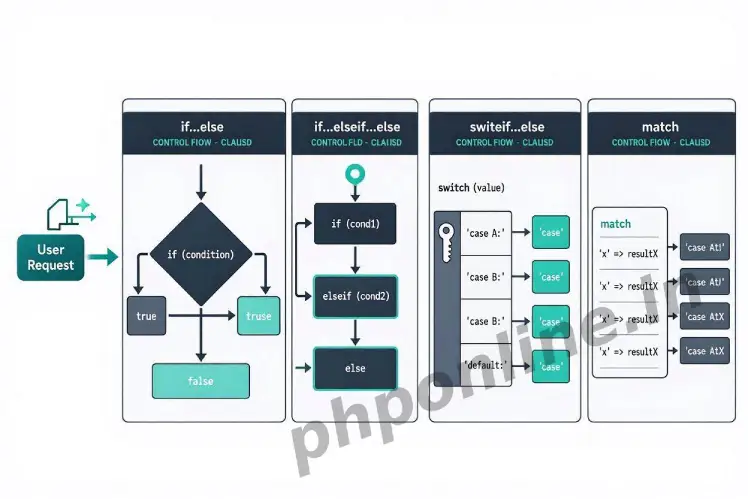
Overview: Understanding PHP Conditional Statements & Control Flow
Quick PHP Conditional Statements Summary:
- Control Flow Engine: Conditional statements allow backend scripts to make decisions, executing specific blocks of code based on whether a boolean condition evaluates to
trueorfalse. - 4 Decision Constructs: PHP provides
if,if...else,if...elseif...else, and the multi-branchswitchstatement. - Modern PHP 8 Match Expression: Introduced in PHP 8.0, the
matchexpression offers strict type identity matching, returns values directly, and replaces bulkyswitchstatements. - Alternative Syntax for HTML Templates: Colon syntax (e.g.,
if (...): ... endif;) cleanly embeds conditional control structures inside HTML templates without cluttering code with curly braces. - Short-Hand Conditionals: Ternary operators (
? :) and Null Coalescing operators (??) allow single-line conditional evaluation and default value assignments.
Welcome to Lesson 11 of our structured web development course. Following our previous lesson on Easy PHP Operators Guide: 7 Core Types & Examples, you now understand how to compare operands using comparison operators (==, ===, !=, <=>) and combine boolean expressions with logical operators (&&, ||, !). The next essential step in backend software engineering is directing execution paths using PHP conditional statements.
Without conditional logic, a computer program executes sequentially line-by-line from top to bottom every single time. Conditional statements grant your web application intelligence—allowing it to display personalized user dashboards when logged in, decline invalid payment transactions, restrict admin areas based on user roles, or display search results dynamically.
In this comprehensive PHP conditional statements tutorial, we will explore all 4 decision structures, modern PHP 8 match expressions, alternative template syntax, nested logic best practices, and performance optimization rules.
Prerequisites Before Writing Conditional Logic
To test the hands-on code examples in this PHP conditional statements guide, verify that your development environment meets these basic requirements:
- Active Web Server: Running installation of Apache or Nginx with PHP 8.x+ (configured via XAMPP, Homebrew, or Terminal).
- Code Editor: A modern IDE such as Visual Studio Code or PhpStorm.
- Core Foundations: Solid understanding of boolean data types, comparison operators, and logical operators.
If you need to review how strict identity (===) and logical AND/OR operators work, visit our previous guide on Easy PHP Operators Guide: 7 Core Types & Examples.
1. The ‘if’ Statement (Single Conditional Branch)
The if statement is the simplest form of conditional control. It executes a block of code only if the specified condition evaluates to true. If the condition evaluates to false, the code block inside the curly braces is completely bypassed.
Basic ‘if’ Syntax
<?php
$accountBalance = 150.00;
$itemPrice = 99.99;

// Executes ONLY if account balance is greater than or equal to item price
if ($accountBalance >= $itemPrice) {
    echo "Purchase Approved! Thank you for your order.<br>";
}
?>
Want to test this code live? Try running it in our PHP Online Compiler.
2. The ‘if…else’ Statement (Dual-Branch Logic)
When you need your application to execute one block of code when a condition is true and a fallback block when the condition is false, use the if...else statement.
Basic ‘if…else’ Syntax
<?php
$userIsLoggedIn = false;

if ($userIsLoggedIn === true) {
    echo "Welcome back to your member dashboard!<br>";
} else {
    echo "Access Denied. Please log in to access course materials.<br>";
}
?>
Want to test this code live? Try running it in our PHP Online Compiler.
3. The ‘if…elseif…else’ Statement (Multi-Branch Logic)
When your application must evaluate more than two possible conditions, use the if...elseif...else statement. The parser tests conditions sequentially from top to bottom. As soon as one condition evaluates to true, PHP executes that specific block and skips evaluating all remaining branches.
Multi-Branch Example: Student Grade Evaluation
<?php
$score = 85;

if ($score >= 90) {
    $grade = "A (Excellent)";
} elseif ($score >= 80) {
    $grade = "B (Very Good)";
} elseif ($score >= 70) {
    $grade = "C (Good)";
} elseif ($score >= 60) {
    $grade = "D (Satisfactory)";
} else {
    $grade = "F (Needs Improvement)";
}

echo "Final Student Grade: " . $grade;
?>
Want to test this code live? Try running it in our PHP Online Compiler.
4. The ‘switch’ Statement for Multi-Choice Branching
When you need to compare a single variable or expression against many different possible constant values, chaining multiple elseif blocks can become messy. The switch statement evaluates the expression once and compares the result against a series of case blocks.
Essential Switch Elements:
case: Specifies a target value to compare against the expression.break: Prevents “fall-through” execution into subsequent cases once a match is found.default: Optional fallback block executed if no case matches the expression.
<?php
$userRole = "editor";

switch ($userRole) {
    case "admin":
        $permissions = "Full Administrative Access (Read, Write, Delete, System Settings)";
        break;
    case "editor":
        $permissions = "Content Editing Access (Read, Write, Publish)";
        break;
    case "subscriber":
        $permissions = "Subscriber Access (Read Only)";
        break;
    default:
        $permissions = "Guest Access (Public Pages Only)";
        break;
}

echo "User Role Permissions: " . $permissions;
?>
Want to test this code live? Try running it in our PHP Online Compiler.
Caution on Switch Fall-Through: If you omit the break statement at the end of a case block, PHP will continue executing code in subsequent case blocks even if their conditions do not match!
5. Modern PHP 8 ‘match’ Expression
PHP 8.0 introduced the match expression as a modern, superior alternative to switch. The match expression provides several major advantages over traditional switch statements:
- Strict Equality (===): Uses strict type matching (unlike
switch, which uses loose==comparison). - Returns Values Directly: Evaluates directly to a return value that can be assigned to a variable.
- No Break Required: Executes only the matched arm without requiring
breakstatements (no risk of accidental fall-through). - Exhaustive Checks: Throws an
UnhandledMatchErrorif no arm matches and nodefaultarm is provided.
<?php
$httpStatusCode = 404;

// Modern PHP 8 match expression
$statusMessage = match ($httpStatusCode) {
    200, 201 => "Request Successful",
    400 => "Bad Request",
    401, 403 => "Unauthorized Access",
    404 => "Resource Not Found",
    500 => "Internal Server Error",
    default => "Unknown HTTP Status Code"
};

echo "HTTP Response: " . $statusMessage;
?>
Want to test this code live? Try running it in our PHP Online Compiler.
6. Alternative Syntax for HTML Template Views
When embedding PHP conditional statements directly inside HTML layout files, using standard curly braces ({ }) often leads to messy, unreadable template views. PHP offers an alternative colon-based syntax specifically designed for template files.
| Standard Curly Brace Syntax | Alternative Colon Syntax (Template Friendly) |
|---|---|
if ($cond) { ... } else { ... } | if ($cond): ... else: ... endif; |
if ($cond) { ... } elseif ($c2) { ... } | if ($cond): ... elseif ($c2): ... endif; |
Alternative Syntax Example in HTML
<?php
$userIsLoggedIn = true;
$hasActiveSubscription = true;
$userName = "Sarah Jenkins";
?>

<!-- HTML View Template -->
<div class="user-portal">
    <?php if ($userIsLoggedIn && $hasActiveSubscription): ?>
        <h2>Welcome to Premium Portal, <?= htmlspecialchars($userName, ENT_QUOTES, 'UTF-8') ?>!</h2>
        <p>Your subscription is active. Access all lessons below.</p>
    <?php elseif ($userIsLoggedIn): ?>
        <h2>Welcome, <?= htmlspecialchars($userName, ENT_QUOTES, 'UTF-8') ?>!</h2>
        <p style="color: orange;">Your subscription has expired. Please renew to unlock content.</p>
    <?php else: ?>
        <h2>Welcome, Guest!</h2>
        <p>Please log in or register to view course materials.</p>
    <?php endif; ?>
</div>
Want to test this code live? Try running it in our PHP Online Compiler.
Comparison Summary: Decision Structure Options
| Structure Name | Comparison Type Used | Returns Value? | Best Application Scenario |
|---|---|---|---|
| if / else / elseif | Custom expressions (loose or strict) | No | Complex conditions with logical AND/OR checks or ranges. |
| switch | Loose comparison (==) | No | Matching a single variable against many discrete scalar options (PHP 7.x legacy). |
| match (PHP 8+) | Strict identity (===) | Yes | Modern, clean, single-variable value mapping without fall-through bugs. |
| Ternary Operator (?:) | Custom boolean check | Yes | Single-line conditional variable assignment (e.g., $status = $active ? 'On' : 'Off';). |
Troubleshooting Common Conditional Errors
| Observed Error / Issue | Probable Cause | Recommended Solution |
|---|---|---|
Condition always evaluates to true unexpectedly | Accidentally using assignment operator = instead of comparison operator == or === (e.g., if ($x = 5)). | Always use double == or strict triple === comparison inside conditional checks. |
Multiple cases execute inside a switch statement | Omitting the mandatory break; statement at the end of a case block. | Add break; at the end of every case block, or upgrade to PHP 8 match expressions. |
Parse error: syntax error, unexpected 'else' | Placing a semicolon immediately after the if(...) condition header (e.g., if ($x > 5); { ... }). | Remove trailing semicolons from if(...), elseif(...), and else header lines. |
UnhandledMatchError in PHP 8 | No arm in a match expression matched the input value and no default arm was defined. | Always include a default => ... arm in match expressions to handle fallback values safely. |
Frequently Asked Questions (FAQ)
Q1: What are PHP conditional statements and why are they used?
PHP conditional statements are control flow structures used to perform different actions based on whether a specified logical condition evaluates to true or false. They allow backend software to make dynamic decisions during request execution.
Q2: What is the main difference between switch and the PHP 8 match expression?
The switch statement uses loose comparison (==), requires manual break statements to prevent fall-through bugs, and does not return a value directly. The PHP 8 match expression uses strict comparison (===), returns values directly, requires no break statements, and throws an error if unmatched values are not handled by a default arm.
Q3: What is alternative syntax in PHP conditional statements?
Alternative syntax replaces curly braces with colons and explicit closing tags (e.g., if ($cond): ... endif;). It is primarily used when embedding PHP conditional logic inside HTML templates to improve template readability.
Q4: Why shouldn’t you use a single equals sign (=) inside an if condition?
Using a single equals sign ($x = 5) performs an assignment operation rather than a comparison check. It overwrites the variable $x with 5 and evaluates the assignment result as truthy, causing the if block to execute unexpectedly every time.
Next Steps & Official References
Consult official technical standards on the PHP Official Control Structures Manual (php.net).
Ready for the next lesson in sequence? Proceed directly to the final lesson in Module 3: Next Lesson: PHP Loops (while, do-while, for, foreach) →
# Summary
Here is what you've learned in this lesson:
- Easy PHP Conditional Statements Guide: 4 Decision Types & Examples
- Overview: Understanding PHP Conditional Statements & Control Flow
- Prerequisites Before Writing Conditional Logic
- 1. The 'if' Statement (Single Conditional Branch)
- 2. The 'if...else' Statement (Dual-Branch Logic)
- 3. The 'if...elseif...else' Statement (Multi-Branch Logic)
- 4. The 'switch' Statement for Multi-Choice Branching
- 5. Modern PHP 8 'match' Expression
- 6. Alternative Syntax for HTML Template Views
- Comparison Summary: Decision Structure Options
- Troubleshooting Common Conditional Errors
- Frequently Asked Questions (FAQ)
- Next Steps & Official References
Continue to the next lesson and learn more about PHP Loops.