
PHP Sessions and Cookies
Easy PHP Sessions and Cookies Guide: 4 Key Security Differences
Master state management with this complete PHP sessions and cookies guide. Learn setcookie, session_start, session security, fixation defense, and user authentication.
Estimated Read Time: 19 Minutes | Category: PHP Web Development
Overview: Understanding PHP Sessions and Cookies & State Management
Quick PHP Sessions and Cookies Summary:
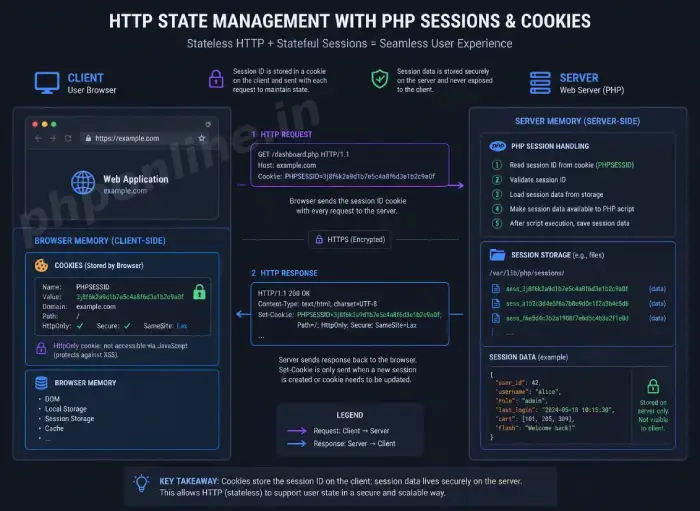
- Stateless HTTP Protocol: Web servers treat every HTTP request as completely independent. PHP sessions and cookies provide state persistence across multiple page requests.
- Client-Side Cookies: Small text data files stored directly inside the user’s web browser, useful for non-sensitive preferences like theme settings or “Remember Me” tokens.
- Server-Side Sessions: Secure server memory files containing sensitive user data (login status, user IDs, shopping cart items) linked to the browser via a unique session ID cookie.
- Session Initialization: Every page accessing session data must invoke
session_start()at the top of the script before rendering any HTML output. - Session Security Hardening: Defend against session hijacking and fixation by enforcing
HttpOnlycookies, SSL-onlySecureflags, and callingsession_regenerate_id(true)on login.
Welcome to Lesson 18 of our structured web development course. Following our previous tutorial on Easy PHP Form Validation Guide: 3 Security Steps & Examples, you now understand how to validate user inputs, sanitize text against XSS attacks, and protect forms with CSRF tokens. The next critical milestone in full-stack web development is tracking user state using PHP sessions and cookies.
By default, the HTTP protocol that powers the World Wide Web is completely stateless. This means a web server forgets who a visitor is the instant a web page finishes loading. Without state management mechanisms, a user would have to enter their username and password on every single page click!
In this comprehensive PHP sessions and cookies guide, we will explore the architectural differences between cookies and sessions, setcookie() parameter configurations, $_SESSION superglobal operations, session lifecycle destruction, session security hardening, and complete login session authentication examples.
Prerequisites Before Managing User Sessions
To test the hands-on code examples in this PHP sessions and cookies tutorial, verify that your development environment meets these basic requirements:
- Active Web Server: Running installation of Apache or Nginx with PHP 8.x+ (configured via XAMPP, Homebrew, or Terminal).
- Code Editor: A modern IDE such as Visual Studio Code or PhpStorm.
- Form & Superglobal Foundations: Solid understanding of HTML forms, HTTP POST requests, and
$_POSTsuperglobals.
If you need to review how input validation and sanitization protect form data before initializing sessions, visit our previous guide on Easy PHP Form Validation Guide: 3 Security Steps & Examples.
1. Cookies vs. Sessions: Architectural Comparison
While both mechanisms allow web applications to remember user states across multiple requests, they differ fundamentally in storage location, capacity, and security:
| Feature / Criteria | HTTP Cookies | PHP Sessions |
|---|---|---|
| Storage Location | Stored on the user’s client machine inside browser storage. | Stored securely on the web server (linked via a session ID cookie). |
| Data Security | Insecure for sensitive data (users can inspect or modify local cookies). | Highly secure (users cannot view or alter raw session data stored on the server). |
| Storage Capacity | Limited to ~4KB per individual cookie. | Limited only by the web server’s memory allocation settings. |
| Expiration Control | Persists until a specified timestamp expires or browser cache is cleared. | Terminates when the browser closes, or when session_destroy() is invoked. |
| Access Mechanism | Read via the $_COOKIE superglobal array. | Read and written via the $_SESSION superglobal array. |
2. Working with HTTP Cookies in PHP
A cookie is a key-value text pair created by the server and sent to the client’s browser inside HTTP response headers. The browser sends the cookie back to the server on every subsequent page request to the same domain.
A. Creating Cookies with setcookie()
In PHP, cookies are created using the built-in setcookie() function. Because cookies are transmitted inside HTTP headers, setcookie() must be called before any HTML markup or text output is sent to the browser:
setcookie(string $name, string $value = "", array $options = []);Parameters for Secure Cookie Creation:
name: The name/key identifier of the cookie (e.g.,"user_theme").value: The string value stored inside the cookie (e.g.,"dark_mode").expires: Expiration timestamp in seconds (e.g.,time() + 86400 * 30for 30 days). Passing0creates a session-only cookie that expires when the browser closes.path: Server path where the cookie is available (use"/"for domain-wide availability).domain: Domain or subdomain where the cookie is active.secure: Iftrue, the cookie is transmitted strictly over HTTPS encrypted connections.httponly: Iftrue, prevents client-side JavaScript (likedocument.cookie) from reading the cookie, effectively shielding it from XSS attacks.samesite: Restricts cross-site cookie transmission (values:'Lax','Strict', or'None').
B. Creating, Reading, and Deleting Cookies Example
<?php
// Step 1: Setting a cookie valid for 7 days with security flags
$cookieOptions = [
    'expires' => time() + (86400 * 7), // Expiration: 7 days
    'path' => '/',                     // Available across entire domain
    'domain' => '',                    // Current host domain
    'secure' => true,                  // Transmit over HTTPS only
    'httponly' => true,                // Block JavaScript XSS access
    'samesite' => 'Lax'                // Mitigate cross-site request forgery
];

setcookie("user_theme", "dark_mode", $cookieOptions);

// Step 2: Reading cookie value via $_COOKIE superglobal
if (isset($_COOKIE['user_theme'])) {
    $theme = htmlspecialchars($_COOKIE['user_theme'], ENT_QUOTES, 'UTF-8');
    echo "Active User Theme: " . $theme . "<br>";
} else {
    echo "No custom theme cookie detected.<br>";
}

// Step 3: Deleting a cookie (set expiration timestamp to a past time)
// setcookie("user_theme", "", time() - 3600, "/");
?>
Want to test this code live? Try running it in our PHP Online Compiler.
3. Working with PHP Sessions
A session creates a secure temporary file on the web server. When a session starts, PHP generates a unique 32-character hexadecimal session ID string (e.g., PHPSESSID=a8f9c1b2...) and sends it to the browser as a cookie.
When the browser makes subsequent requests, it passes the PHPSESSID cookie back. PHP reads the ID, locates the corresponding session data file on the server disk, and automatically populates the $_SESSION superglobal array.
A. Initializing Sessions with session_start()
To create or resume an existing session, invoke session_start() at the very beginning of your PHP script before any HTML output:
<?php
// Must be invoked before any HTML output
session_start();

// Storing data inside $_SESSION superglobal array
$_SESSION['user_id'] = 1042;
$_SESSION['username'] = "alex_mercer";
$_SESSION['role'] = "Administrator";

echo "Session initialized for user: " . $_SESSION['username'];
?>
Want to test this code live? Try running it in our PHP Online Compiler.
B. Destroying Sessions Completely
When a user logs out of an application, you must clear all session variables and destroy the session file on the server completely:
<?php
session_start();

// Step 1: Unset all session variables in memory
$_SESSION = array();

// Step 2: Delete the session cookie in browser
if (ini_get("session.use_cookies")) {
    $params = session_get_cookie_params();
    setcookie(
        session_name(),
        '',
        time() - 42000,
        $params["path"],
        $params["domain"],
        $params["secure"],
        $params["httponly"]
    );
}

// Step 3: Destroy the server session storage file
session_destroy();

echo "User session logged out and destroyed successfully.";
?>
4. Session Security: Defending Against Fixation & Hijacking
Because session IDs dictate user access, sessions are primary targets for malicious attackers. Implementing session security hardening is vital for web applications.
A. Preventing Session Fixation with session_regenerate_id()
Session Fixation occurs when an attacker tricks a user into logging in using a known session ID. To block session fixation, always regenerate the session ID immediately upon successful user authentication using session_regenerate_id(true):
<?php
session_start();

// Simulating successful login authentication check
$loginSuccessful = true;

if ($loginSuccessful) {
    // Regenerate session ID and delete old session file
    session_regenerate_id(true);

    $_SESSION['authenticated'] = true;
    $_SESSION['user_id'] = 501;
}
?>
B. Configuring Secure Session Cookie Parameters
Configure PHP session cookies with strict security flags prior to invoking session_start():
<?php
// Configure secure session cookie options BEFORE session_start()
session_set_cookie_params([
    'lifetime' => 0,            // Expire when browser closes
    'path' => '/',
    'domain' => '',
    'secure' => true,         // Send over HTTPS only
    'httponly' => true,       // Block JavaScript XSS access
    'samesite' => 'Strict'    // Prevent CSRF transmission
]);

session_start();
?>
5. Complete Real-World Login Session System
Below is a complete, working authentication system demonstrating session initialization, user credential checking, login persistence, dashboard access verification, and secure session destruction:
<?php
declare(strict_types=1);

// Configure security flags before session startup
session_set_cookie_params([
    'lifetime' => 0,
    'path' => '/',
    'secure' => false, // Set to true in HTTPS production
    'httponly' => true,
    'samesite' => 'Lax'
]);

session_start();

// Dummy database credentials
$validUser = "admin@phponline.in";
$validPassHash = password_hash("SecretPass123!", PASSWORD_DEFAULT);

$action = $_GET['action'] ?? 'dashboard';
$error = "";

// Handle Login Submission
if ($_SERVER['REQUEST_METHOD'] === 'POST' && isset($_POST['do_login'])) {
    $inputEmail = trim($_POST['email'] ?? '');
    $inputPassword = $_POST['password'] ?? '';

    if ($inputEmail === $validUser && password_verify($inputPassword, $validPassHash)) {
        // Prevent Session Fixation
        session_regenerate_id(true);

        $_SESSION['is_logged_in'] = true;
        $_SESSION['user_email'] = $inputEmail;
        $_SESSION['login_time'] = time();

        header("Location: ?action=dashboard");
        exit;
    } else {
        $error = "Invalid login email or password!";
    }
}

// Handle Logout Action
if ($action === 'logout') {
    $_SESSION = [];
    if (ini_get("session.use_cookies")) {
        $params = session_get_cookie_params();
        setcookie(session_name(), '', time() - 42000, $params["path"], $params["domain"], $params["secure"], $params["httponly"]);
    }
    session_destroy();
    header("Location: ?action=login");
    exit;
}
?>

<!-- HTML View Rendering -->
<h2>PHP Session Authentication Portal</h2>

<?php if (isset($_SESSION['is_logged_in']) && $_SESSION['is_logged_in'] === true): ?>
    <div style="background-color: #d4edda; color: #155724; padding: 15px;">
        <h3>Welcome to Member Dashboard!</h3>
        <p>Logged in as: <strong><?= htmlspecialchars($_SESSION['user_email'], ENT_QUOTES, 'UTF-8'); ?></strong></p>
        <p>Session Active Since: <?= date("Y-m-d H:i:s", $_SESSION['login_time']); ?></p>
        <a href="?action=logout" style="color: #721c24; font-weight: bold;">Log Out of Account</a>
    </div>
<?php else: ?>
    <?php if (!empty($error)): ?>
        <div style="background-color: #f8d7da; color: #721c24; padding: 10px; margin-bottom: 10px;">
            <?= $error; ?>
        </div>
    <?php endif; ?>

    <form action="" method="POST">
        <label>Email Address:</label><br>
        <input type="email" name="email" value="admin@phponline.in" required><br><br>

        <label>Password:</label><br>
        <input type="password" name="password" value="SecretPass123!" required><br><br>

        <button type="submit" name="do_login">Log In</button>
    </form>
<?php endif; ?>
Want to test this code live? Try running it in our PHP Online Compiler.
Troubleshooting Common Session and Cookie Errors
| Observed Error / Issue | Probable Cause | Recommended Solution |
|---|---|---|
Warning: Cannot modify header information - headers already sent | Invoking session_start() or setcookie() after HTML tags, spaces, or echo output. | Move session_start() and setcookie() calls to line 1 of your file before any HTML or output. |
Cookie value is not accessible immediately in $_COOKIE | $_COOKIE superglobal populates on the subsequent page request after client browser returns it. | Read cookies on the next HTTP request or assign local variables temporarily for immediate script use. |
| Session data resets / clears on every page refresh | Missing session_start() on secondary pages, or incorrect domain/path settings in session cookies. | Call session_start() on every PHP file that needs access to $_SESSION data. |
setcookie() fails over HTTPS connection | Setting 'secure' => true option on a local HTTP development server (like localhost). | Set 'secure' => false during local development, and enable true in HTTPS production. |
Frequently Asked Questions (FAQ)
Q1: What are PHP sessions and cookies and why are they used?
PHP sessions and cookies are state management mechanisms used to persist user data across multiple HTTP web requests. Cookies store non-sensitive text data in the user’s browser, while sessions store sensitive data securely on the web server linked via a unique session ID.
Q2: What is the main difference between cookies and sessions in PHP?
Cookies store small data files directly on the client’s web browser, making them visible to users. Sessions store user data securely on the web server disk, making them hidden from clients and suitable for sensitive user login states.
Q3: Why must session_start() be called before any HTML output?
session_start() sends HTTP response headers to transmit the session ID cookie (PHPSESSID) to the client’s browser. Because HTTP protocol requires headers to precede all body output, calling session_start() after HTML output triggers a “Headers already sent” fatal warning.
Q4: How do you prevent Session Fixation security attacks in PHP?
Prevent Session Fixation attacks by calling session_regenerate_id(true) immediately upon successful user authentication. This replaces the old session ID with a new random session key and deletes the old session file on the server.
Next Steps & Official References
Consult official technical standards on the PHP Official Session Management Manual (php.net).
Ready for the next lesson in sequence? Proceed directly to the final lesson in Module 5: Next Lesson: Working with Files & File Uploads Securely →
# Summary
Here is what you've learned in this lesson:
- Easy PHP Sessions and Cookies Guide: 4 Key Security Differences
- Overview: Understanding PHP Sessions and Cookies & State Management
- Prerequisites Before Managing User Sessions
- 1. Cookies vs. Sessions: Architectural Comparison
- 2. Working with HTTP Cookies in PHP
- 3. Working with PHP Sessions
- 4. Session Security: Defending Against Fixation & Hijacking
- 5. Complete Real-World Login Session System
- Troubleshooting Common Session and Cookie Errors
- Frequently Asked Questions (FAQ)
- Next Steps & Official References
Continue to the next lesson and learn more about PHP File Handling.