
PHP Syntax Overview
Master backend development with this complete PHP syntax overview guide. Learn basic tags, statements, variable rules, comments, case sensitivity, and common errors.
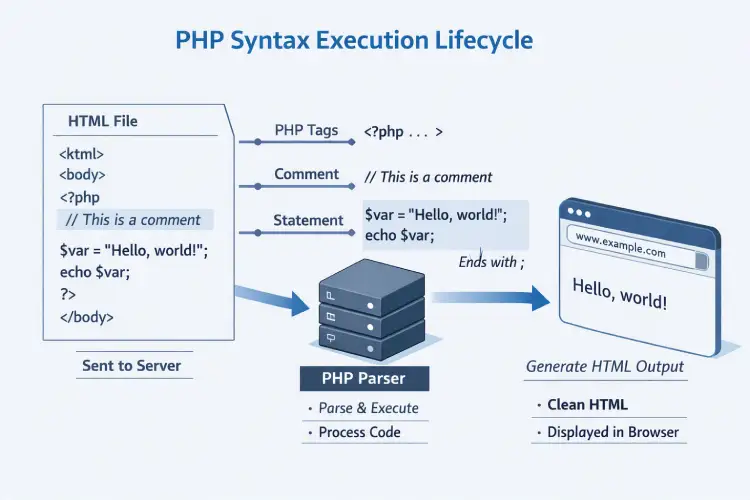
Overview: Complete PHP Syntax Overview & Key Rules
Quick PHP Syntax Overview Checklist:
- Opening & Closing Tags: Always enclose backend instructions inside standard
<?php ... ?>tags so the server parser recognizes execution blocks. - Statement Termination: Terminate every individual instruction line with a mandatory semicolon (
;) to avoid fatal parse errors. - Case Sensitivity Rules: Language keywords (e.g.,
echo,if,while) are case-insensitive, but variable identifiers are strictly case-sensitive. - Code Commenting: Use
//or#for single-line notes and/* ... */for multi-line documentation blocks. - Embedding in HTML: PHP scripts seamlessly blend inside standard HTML files without breaking layout structure.
Welcome to Lesson 3 of our structured Web Development course. Following our previous tutorial on Easy PHP Installation Guide: Complete Step-by-Step Setup[cite: 79, 107], you now have a fully functioning local web development environment running Apache and PHP. The next fundamental step is mastering syntax rules.
Syntax refers to the strict set of structural rules that dictate how programs must be written and interpreted by the execution engine. Gaining a solid PHP syntax overview is essential for any aspiring software developer. Without understanding syntax rules, the PHP parser cannot interpret your instructions, leading to script execution failures and syntax errors.
In this comprehensive PHP syntax overview, we break down core execution tags, statement termination rules, whitespace handling, case-sensitivity mechanics, comment types, and practical strategies for embedding dynamic code inside plain HTML markup.
Prerequisites Before Learning PHP Syntax Rules
To follow along with the hands-on code snippets in this PHP syntax overview tutorial, ensure your environment meets these basic requirements:
- Active Local Web Server: An active installation of Apache or Nginx running PHP 8.x+ (via XAMPP, Homebrew, or native Terminal)[cite: 111].
- Text Editor or IDE: A modern code editor such as Visual Studio Code, PhpStorm, or Sublime Text equipped with syntax highlighting.
- Basic Web Structure Knowledge: Elementary understanding of HTML markup tags like
<h1>,<p>, and<body>.
How the PHP Parser Interprets Code Blocks
When a web client requests a file ending in .php, the web server passes the document to the PHP preprocessor engine. The parser scans the file sequentially from top to bottom. It ignores standard HTML markup until it encounters an opening PHP delimiter tag.
Once an opening tag is detected, the engine executes the contained logic, evaluates dynamic functions or database queries, and outputs pure text or HTML markup. As soon as a closing tag is reached, the parser drops back into plain HTML rendering mode. This dual-mode mechanism is what allows developers to embed dynamic backend script logic inside static web templates smoothly.
1. Standard Opening and Closing Tags
The official, fully portable standard for opening and closing a PHP code block uses <?php and ?>:
<?php
// Standard PHP opening tag above
echo "This statement is executed directly by the PHP engine.";
// Standard PHP closing tag below
?>
Best Practice Note: If a PHP file contains only pure backend PHP code (such as a class definition, configuration file, or function library) with no embedded HTML markup, it is standard practice across modern frameworks (such as Laravel and Symfony) to omit the closing ?> tag completely. Omitted closing tags prevent accidental trailing whitespace or newline characters from being sent to the browser, which can corrupt HTTP headers or cookie sessions.
2. Short Echo Tags
PHP provides a specialized shorthand tag specifically designed to output dynamic expression values directly into HTML templates without typing the full echo keyword:
<!-- Full syntax method -->
<p>Welcome back, <?php echo "John Doe"; ?></p>

<!-- Short echo tag shorthand equivalent -->
<p>Welcome back, <?= "John Doe" ?></p>
The short echo tag <?= ... ?> is enabled by default in all modern releases (PHP 7.4+ and 8.x+) and is widely used in template views for cleaner HTML presentation.
Statement Termination & Semicolon Rules
A statement in PHP is an individual instruction telling the server to perform an action—such as displaying text, calculating a mathematical formula, assigning a value to a variable, or triggering a function call.
The Mandatory Semicolon (;)
In PHP, every statement must strictly end with a semicolon (;). The semicolon acts as a explicit delimiter, informing the preprocessor engine that the current instruction is complete and that parsing can proceed to the next command.
<?php
// Three distinct statements, each terminated by a semicolon
$siteName = "PHPOnline";
$visitorCount = 1250;
echo "Site Name: " . $siteName;
?>
If you forget to place a semicolon at the end of a statement line, the parser attempts to combine the current line with the subsequent instruction line. This results in a fatal Parse error: syntax error, unexpected... halting script execution completely.
Whitespace Insensitivity
The PHP engine is whitespace-insensitive. This means extra spaces, tabs, and newline line-breaks are completely ignored by the parser during execution:
<?php
// The parser evaluates both statement styles identically:

// Style A: Single line
$x = 10; $y = 20; echo $x + $y;

// Style B: Multi-line formatted
$x = 10;
$y = 20;
echo $x + $y;
?>
Even though whitespace is ignored by the parser, structuring your code with clean indentation and consistent line breaks is vital for developer readability and team collaboration.
Case Sensitivity Rules in PHP
Understanding case sensitivity is a common stumbling block for beginners studying a PHP syntax overview guide. PHP applies case-sensitivity rules selectively depending on the language construct being evaluated.
1. Language Keywords and Functions (Case-Insensitive)
Built-in language keywords (such as echo, if, else, while, function, class) as well as user-defined and built-in function names are completely case-insensitive:
<?php
// All three echo statements below are completely valid and execute identically:
echo "Option 1<br>";
ECHO "Option 2<br>";
EcHo "Option 3<br>";

// User-defined functions are also case-insensitive:
function calculateTotal() {
    return 100;
}

echo CALCULATETOTAL(); // Executes calculateTotal() successfully
?>
2. Variable Names (Strictly Case-Sensitive)
In contrast to keywords and function names, all variable identifiers in PHP are strictly case-sensitive. The dollar sign prefix followed by different letter cases points to separate memory allocations:
<?php
$userAge = 25;
$UserAge = 30;
$USERAGE = 35;

// Demonstrating three unique variable values:
echo $userAge; // Outputs: 25
echo $UserAge; // Outputs: 30
echo $USERAGE; // Outputs: 35

// Attempting to access an uninitialized case variation causes a warning:
echo $userage; // Triggers: Warning: Undefined variable $userage
?>
Code Commenting Types and Best Practices
Comments are non-executable explanatory notes placed inside source code. The PHP engine completely ignores comment text during parsing. Adding meaningful comments helps clarify complex business logic, document custom function parameters, and assist other developers who review your codebase.
1. Single-Line Comments
Single-line comments are used for brief notes or temporary line-level debugging. PHP supports two single-line comment styles:
<?php
// This is a standard single-line comment using double forward slashes

# This is an alternative single-line comment using a hash symbol

$totalPrice = 150.00; // Comments can also be appended at the end of a code line
?>
2. Multi-Line Comments
Multi-Line comments allow you to write multi-paragraph explanations or temporarily disable multi-line code blocks during testing. They begin with /* and end with */:
<?php
/*
  This is a multi-line comment block.
  It can span multiple lines without needing
  comment symbols on every single line.
  Ideal for describing algorithm workflows.
*/

$taxRate = 0.08;
?>
3. DocBlock Documentation Comments
DocBlocks are specialized multi-line comments used by automatic documentation tools (like PHPDocumentor) and modern IDEs to provide contextual hover tooltips, type hint checks, and parameter details:
<?php
/**
 * Calculates the total order amount including sales tax.
 *
 * @param float $subtotal The base price before taxes.
 * @param float $taxRate The tax percentage to apply.
 * @return float The final calculated order total.
 */
function calculateOrderTotal(float $subtotal, float $taxRate): float {
    return $subtotal + ($subtotal * $taxRate);
}
?>
Practical Example: Embedding PHP Logic in HTML
Below is a complete, realistic example demonstrating how to mix structural PHP tags, conditional logic, dynamic variables, and sanitized output inside an HTML web template:
<?php
declare(strict_types=1);

// Application state variables
$pageTitle = "PHP Syntax Overview Guide";
$userIsLoggedIn = true;
$accountType = "Premium Student";
$activeCourses = ["PHP Introduction", "PHP Installation", "PHP Syntax Overview"];
?>

<!-- Static HTML Document Structure -->
<h1><?php echo $pageTitle; ?></h1>

<?php if ($userIsLoggedIn): ?>
    <p>Welcome back, Valued User! Status: <strong><?= $accountType ?></strong></p>

    <h3>Your Active Enrolled Lessons:</h3>
    <ul>
        <?php foreach ($activeCourses as $courseName): ?>
            <li><?php echo htmlspecialchars($courseName, ENT_QUOTES, 'UTF-8'); ?></li>
        <?php endforeach; ?>
    </ul>
<?php else: ?>
    <p>Please log in to view your lesson portal.</p>
<?php endif; ?>
Troubleshooting Common Syntax Errors
When learning syntax rules in this PHP syntax overview, encountering parse warnings or fatal execution errors is a natural part of coding[cite: 108]. Use this reference table to identify and fix common syntax mistakes quickly:
| Syntax Error | Probable Cause | Recommended Solution |
|---|---|---|
Parse error: syntax error, unexpected... | Missing semicolon (;) on the previous statement, or unmatched string quote/closing bracket. | Inspect the line number reported in the error message along with the line directly above it for missing semicolons. |
Warning: Undefined variable $... | Accessing a variable before declaring it, or misspelling variable letter casing. | Check variable spelling and confirm case sensitivity rules match your variable initialization line. |
Parse error: syntax error, unexpected end of file | Forgotten closing bracket (}) in a function/loop or missing closing endif; / endforeach; tag. | Trace all opening curly braces and conditional logic blocks to ensure every block closes properly. |
Fatal error: Call to undefined function... | Typo in the function name or missing require/include file statement. | Verify function spelling or check that the target source file defining the function is loaded correctly. |
Frequently Asked Questions (FAQ)
Q1: Why is understanding a PHP syntax overview essential for beginners?
Mastering a solid PHP syntax overview is essential because syntax defines the exact structural rules required by the PHP preprocessor engine. Understanding syntax prevents fatal execution errors, improves code readability, and forms the foundation for writing secure, production-ready web applications.
Q2: Are semicolons strictly required at the end of every PHP statement?
Yes. Semicolons are mandatory statement delimiters in PHP. Every individual statement line must end with a semicolon (;). The only technical exception is the final line immediately preceding a closing ?> tag, but keeping semicolons on every line is considered standard best practice.
Q3: Can I write plain HTML directly inside a PHP code block?
No. Raw HTML markup cannot be written inside an active <?php ... ?> code block without triggering a parse error. HTML must either be printed using output constructs (like echo) or placed outside the closing ?> tag.
Q4: What is the difference between single-line and multi-line comments in PHP?
Single-line comments start with // or # and automatically end at the newline break. Multi-line comments start with /* and end with */, allowing you to comment out large code blocks or write multi-paragraph notes spanning multiple lines.
Next Steps & Official References
Explore language specifications and formal parsing rules on the official PHP Basic Syntax Manual (php.net)[cite: 10].
Ready for the next lesson in sequence? Proceed directly to: Next Lesson: PHP Echo and Print Language Constructs →
# Summary
Here is what you've learned in this lesson:
- Overview: Complete PHP Syntax Overview & Key Rules
- Prerequisites Before Learning PHP Syntax Rules
- How the PHP Parser Interprets Code Blocks
- Statement Termination & Semicolon Rules
- Case Sensitivity Rules in PHP
- Code Commenting Types and Best Practices
- Practical Example: Embedding PHP Logic in HTML
- Troubleshooting Common Syntax Errors
- Frequently Asked Questions (FAQ)
- Next Steps & Official References
Continue to the next lesson and learn more about Understanding PHP Warning: POST Content-Length Exceeds Limit.