
PHP Strings
Easy PHP Strings Guide: 7 Essential Functions & Examples
Master text manipulation with this complete PHP strings guide. Learn single vs double quotes, string concatenation, interpolation, and 7 core string functions.
Estimated Read Time: 18 Minutes | Category: PHP Web Development
Overview: Understanding PHP Strings & Text Manipulation
Quick PHP Strings Summary:
- Definition: A string is a sequence of contiguous bytes or characters (letters, numbers, symbols, and spaces) enclosed inside quote delimiters.
- Quote Enclosure: Single quotes (
' ') treat text as literal string characters, while double quotes (" ") parse variables dynamically. - String Concatenation: Strings are merged together using the dot operator (
.) or the assignment concatenation operator (.=). - Rich Built-in Ecosystem: PHP provides over 100 native functions to calculate string lengths, search substrings, replace text, and alter character casing.
- Multibyte Awareness: Standard string functions operate on single-byte characters; multibyte functions (
mb_*) handle international UTF-8 characters safely.
Welcome to Lesson 7 of our structured web development course. Following our previous tutorial on Easy PHP Data Types Guide: 4 Core Categories & Examples, you now understand how server memory categorizes variables into scalar, compound, and special types. The next vital step in backend development is mastering text handling using PHP strings.
In web software development, almost every user interaction involves string manipulation—whether you are reading submitted form inputs, formatting email notifications, building SQL query statements, or rendering dynamic HTML output.
In this comprehensive PHP strings guide, we will explore single vs double quote execution rules, string concatenation methods, HEREDOC/NOWDOC syntax, multi-byte character safety, and 7 core built-in functions used in production applications daily.
Prerequisites Before Working with Strings
To follow along with the hands-on code examples in this PHP strings tutorial, verify that your environment meets these basic requirements:
- Active Web Server: Running installation of Apache or Nginx with PHP 8.x+ (configured via XAMPP, Homebrew, or Terminal).
- Code Editor: A modern IDE such as Visual Studio Code or PhpStorm.
- Core Foundations: Understanding of variables, data types, and output constructs (
echoandprint).
If you need to review how scalar data types are classified in server memory, visit our previous guide on Easy PHP Data Types Guide: 4 Core Categories & Examples.
1. Declaring PHP Strings: Single Quotes vs. Double Quotes
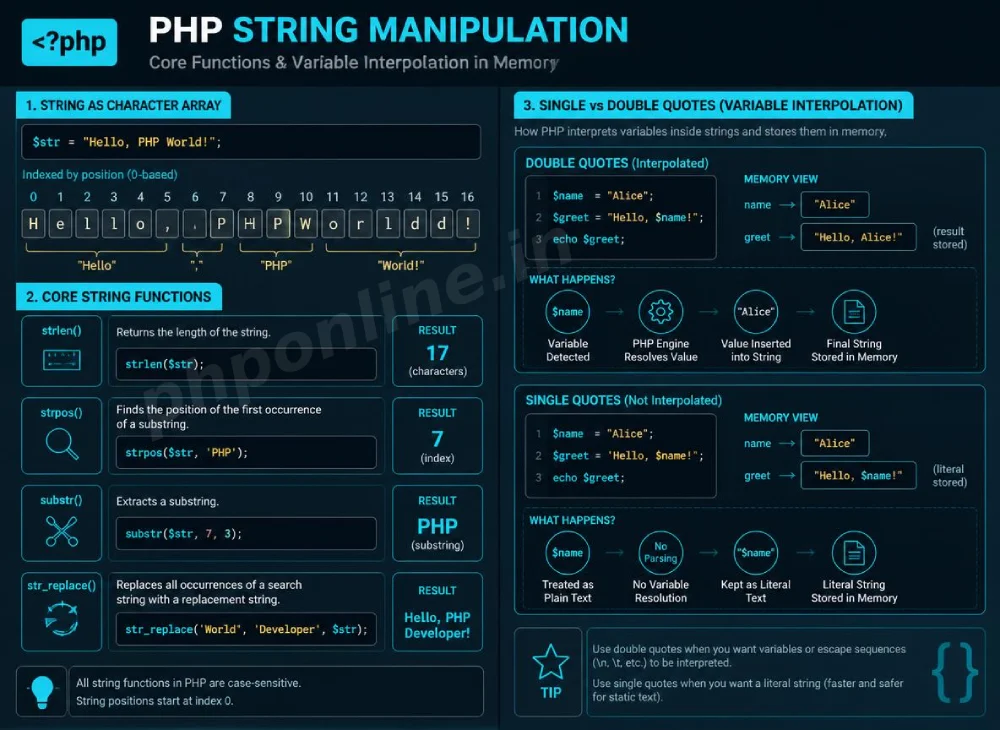
In PHP, you can create string variables by enclosing text within single quotation marks (' ') or double quotation marks (" "). However, the PHP engine processes these two quote types differently during runtime parsing.
A. Single-Quoted Strings (Literal Interpretation)
Single-quoted strings are interpreted literally by the preprocessor engine. Any variables or escape sequences placed inside single quotes (except for escaped single quotes \' and backslashes \\) are printed exactly as written:
<?php
$framework = "Laravel";

// Single quotes do NOT parse variables
echo 'I am learning $framework web development.<br>';
// Outputs: I am learning $framework web development.

// Escaping single quotes inside a single-quoted string
echo 'It\'s a fantastic day to learn backend programming.';
?>
B. Double-Quoted Strings (Variable Interpolation)
Double-quoted strings enable variable interpolation and process special escape sequences (such as newline \n or tab \t). When the parser encounters a dollar sign inside double quotes, it evaluates the variable value directly:
<?php
$framework = "Laravel";

// Double quotes evaluate and parse variable values
echo "I am learning $framework web development.<br>";
// Outputs: I am learning Laravel web development.

// Complex variable interpolation using curly braces
$itemCount = 5;
echo "You have {$itemCount} active notifications in your portal.";
?>
2. String Concatenation and Joining Methods
In PHP, joining two or more strings together is called concatenation. Unlike languages like JavaScript or Python that use the plus sign (+), PHP uses the dot operator (.) for string concatenation.
The Concatenation Operator (.) and Assignment Operator (.=)
<?php
$firstName = "James";
$lastName = "Bond";

// Merging strings using the dot operator
$fullName = $firstName . " " . $lastName;
echo "Agent Name: " . $fullName . "<br>";

// Append concatenation using the .= operator
$greeting = "Hello";
$greeting .= ", ";
$greeting .= $firstName;
$greeting .= "!";

echo $greeting; // Outputs: Hello, James!
?>
Important Caution: Using the plus sign (+) between two strings causes PHP to attempt numeric addition. If the strings contain non-numeric text, PHP triggers an error or evaluates the operation to zero.
3. Advanced Multiline Strings: HEREDOC and NOWDOC
When you need to define large multi-line text blocks or template structures containing multiple quotes without constant backslash escaping, PHP provides **HEREDOC** and **NOWDOC** syntax delimiters.
A. HEREDOC Syntax (Behaves like Double Quotes)
HEREDOC blocks support variable interpolation and are defined using <<<EOT:
<?php
$username = "Sarah";
$courseName = "PHP Strings Masterclass";

// HEREDOC multiline block
$emailTemplate = <<<EOD
<div class="email-body">
    <h2>Welcome, $username!</h2>
    <p>Thank you for enrolling in the <strong>$courseName</strong>.</p>
</div>
EOD;

echo $emailTemplate;
?>
B. NOWDOC Syntax (Behaves like Single Quotes)
NOWDOC blocks do not evaluate variables. They are defined by wrapping the opening identifier in single quotes <<<'EOT':
<?php
// NOWDOC multiline block (no variable interpolation)
$codeSnippet = <<<'CODE'
In PHP, variables look like $variableName and strings use . for concatenation.
CODE;

echo $codeSnippet;
?>
4. Master the 7 Essential Built-in PHP String Functions
PHP includes a vast library of native string functions. Below are 7 of the most essential functions used constantly in real-world web applications:
1. strlen() — Calculating String Length
The strlen() function returns the total character length (byte count) of a string:
<?php
$password = "SecretPassword123";
$length = strlen($password);

echo "Password Length: " . $length . " characters."; // Outputs: 17
?>
2. str_word_count() — Counting Words
The str_word_count() function counts the number of individual words contained within a string:
<?php
$headline = "Mastering Backend Development with PHP Strings";
echo "Word Count: " . str_word_count($headline); // Outputs: 6
?>
3. strpos() — Finding Substring Position
The strpos() function searches for the first occurrence of a substring inside a string and returns its 0-based index position. If the substring is not found, it returns FALSE:
<?php
$email = "user@phponline.in";
$atSymbolPosition = strpos($email, "@");

if ($atSymbolPosition !== false) {
    echo "'@' symbol located at index position: " . $atSymbolPosition; // Outputs: 4
}
?>
4. str_replace() — Replacing Substrings
The str_replace() function replaces all occurrences of a search term with a replacement string:
<?php
$sentence = "I love coding in Python!";
$updatedSentence = str_replace("Python", "PHP", $sentence);

echo $updatedSentence; // Outputs: I love coding in PHP!
?>
5. substr() — Extracting Substrings
The substr() function extracts a specified portion of a string based on a starting position index and an optional length parameter:
<?php
$serialCode = "PROD-2026-9941";
// Extract 4 characters starting from index position 5
$yearCode = substr($serialCode, 5, 4);

echo "Product Year: " . $yearCode; // Outputs: 2026
?>
6. strtolower() and strtoupper() — Changing Case
These functions convert all characters in a string to lower case or upper case:
<?php
$userInput = "John.Doe@Example.com";

$normalizedEmail = strtolower($userInput);
$upperTitle = strtoupper("welcome");

echo "Normalized Email: " . $normalizedEmail . "<br>"; // john.doe@example.com
echo "Uppercase Heading: " . $upperTitle; // WELCOME
?>
7. trim() — Stripping Whitespace
The trim() function removes unnecessary spaces, tabs, and newline characters from both the beginning and end of a string (vital for cleaning form inputs):
<?php
$rawUsername = "   alex_mercer   ";
$cleanUsername = trim($rawUsername);

echo "Clean Length: " . strlen($cleanUsername); // Outputs: 11
?>
Quick Reference Table: Core PHP String Functions
| Function Name | Sample Syntax | Returned Output / Effect | Common Use Case |
|---|---|---|---|
strlen() | strlen("PHP") | 3 | Validating minimum password or field lengths. |
strpos() | strpos("hello", "e") | 1 | Checking if an email contains `@` or domain names. |
str_replace() | str_replace("a", "b", "cat") | "cbt" | Sanitizing bad words, template place-holder tags. |
substr() | substr("abcdef", 0, 3) | "abc" | Truncating preview text for blog excerpt summaries. |
strtolower() | strtolower("ADMIN") | "admin" | Normalizing username and email logins for DB lookup. |
trim() | trim(" text ") | "text" | Cleaning accidental trailing spaces from form inputs. |
explode() | explode(",", "a,b,c") | ["a", "b", "c"] | Converting comma-separated values into a PHP Array. |
Troubleshooting Common String Errors
| Observed Error / Issue | Probable Cause | Recommended Solution |
|---|---|---|
| Variable name prints as text instead of evaluating | Encapsulating string inside single quotes (' ') instead of double quotes (" "). | Use double quotes (" ") for variable interpolation, or concatenate using the dot operator (.). |
Fatal error: Uncaught TypeError: Unsupported operand types | Attempting to concatenate strings using the plus sign (+) instead of the dot operator (.). | Replace + with the dot operator (.) for string merging in PHP. |
strpos() returning 0 causes conditional to fail | The substring is at position 0, but evaluated as loose false with == operator. | Always use strict comparison operators (!== false) when checking strpos() results. |
| Special non-English characters return wrong lengths | Standard strlen() counts byte sizes rather than UTF-8 multi-byte characters. | Use multibyte string extension functions such as mb_strlen() for internationalized text. |
Frequently Asked Questions (FAQ)
Q1: What are PHP strings and how are they defined?
PHP strings are ordered sequences of characters used to represent text in backend software. They are defined by enclosing text within single quotes (' '), double quotes (" "), HEREDOC syntax, or NOWDOC syntax delimiters.
Q2: What is the difference between single quotes and double quotes in PHP strings?
Single quotes treat all text literally and do not parse variable names inside them. Double quotes perform variable interpolation, replacing variable placeholders (such as $username) with their actual stored memory values.
Q3: How do you concatenate strings in PHP?
Strings in PHP are concatenated using the dot operator (.) or appended using the concatenation assignment operator (.=). Unlike other programming languages, the plus sign (+) is reserved strictly for numeric addition.
Q4: Why should I use mb_strlen() instead of strlen() for some PHP strings?
The standard strlen() function measures string length in bytes rather than character counts. For international languages containing UTF-8 multibyte characters (such as Japanese, Arabic, or accented European vowels), using mb_strlen() ensures accurate character length calculations.
Next Steps & Official References
Consult official technical standards on the PHP Official String Types & Functions Manual (php.net).
Ready for the next lesson in sequence? Proceed directly to the next lesson in Module 2: Next Lesson: PHP Numbers, Integers & Math Functions →
# Summary
Here is what you've learned in this lesson:
- Easy PHP Strings Guide: 7 Essential Functions & Examples
- Overview: Understanding PHP Strings & Text Manipulation
- Prerequisites Before Working with Strings
- 1. Declaring PHP Strings: Single Quotes vs. Double Quotes
- 2. String Concatenation and Joining Methods
- 3. Advanced Multiline Strings: HEREDOC and NOWDOC
- 4. Master the 7 Essential Built-in PHP String Functions
- Quick Reference Table: Core PHP String Functions
- Troubleshooting Common String Errors
- Frequently Asked Questions (FAQ)
- Next Steps & Official References
Continue to the next lesson and learn more about PHP A to Z Function References.