
PHP Arrays
Easy PHP Arrays Guide: 3 Core Types & Examples
Master structured data storage with this complete PHP arrays guide. Learn indexed arrays, associative arrays, multidimensional arrays, and core manipulation functions.
Overview: Understanding PHP Arrays & Structured Data Storage
Quick PHP Arrays Summary:
- Ordered Collections: An array is a compound data type that stores multiple values or key-value pairs under a single variable name.
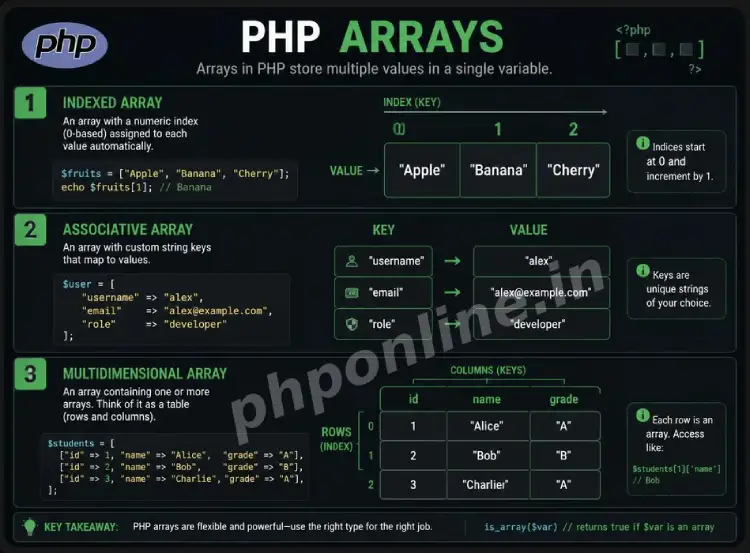
- 3 Primary Types: PHP supports Indexed Arrays (numeric keys), Associative Arrays (named keys), and Multidimensional Arrays (nested arrays).
- Flexible Element Types: A single PHP array can store mixed data types—such as integers, floats, strings, booleans, and nested arrays—simultaneously.
- Dynamic Resizing: PHP arrays automatically grow or shrink in memory as elements are added or removed without requiring manual memory pre-allocation.
- Traversing Array Elements: The
foreachloop is specifically optimized for reading indexed values and key-value pairs from arrays.
Welcome to Lesson 14 of our structured web development course. Following our previous tutorial on Easy PHP Functions Guide: 5 Core Concepts & Examples, you now understand how to package reusable logic into modular user-defined functions. The next essential step in backend software engineering is managing complex datasets using PHP arrays.
In web software architecture, applications rarely deal with isolated single variables. Web applications process lists of products, collections of registered user profiles, shopping cart line items, or multi-row query results returned from MySQL databases. Instead of creating hundreds of separate variables (e.g., $user1, $user2, $user3), arrays let you encapsulate entire datasets cleanly inside a single variable container.
In this comprehensive PHP arrays guide, we will explore indexed arrays, associative key-value structures, multidimensional matrix arrays, array short-syntax initialization, element modification rules, traversal loops, and production best practices.
Prerequisites Before Working with Arrays
To test the hands-on code examples in this PHP arrays tutorial, verify that your development environment meets these basic requirements:
- Active Web Server: Running installation of Apache or Nginx with PHP 8.x+ (configured via XAMPP, Homebrew, or Terminal).
- Code Editor: A modern IDE such as Visual Studio Code or PhpStorm.
- Core Foundations: Understanding of variables, data types, and
foreachloops.
If you need to review how foreach loops iterate over arrays, visit our previous guide on Easy PHP Loops Guide: 4 Iteration Types & Examples.
1. Indexed Arrays (Numeric Keys)
An indexed array stores elements in a sequential list where each element is automatically assigned a numeric position index starting at 0.
Creating and Accessing Indexed Arrays
Modern PHP uses square bracket short syntax [] (introduced in PHP 5.4) to define arrays, replacing the legacy array() construct:
<?php
// Defining an indexed array using square bracket short syntax
$programmingLanguages = ["PHP", "JavaScript", "Python", "SQL", "HTML"];

// Accessing array elements using 0-based numeric indexes
echo "First Language: " . $programmingLanguages[0] . "<br>"; // Outputs: PHP
echo "Third Language: " . $programmingLanguages[2] . "<br>"; // Outputs: Python

// Appending a new element to the end of the array
$programmingLanguages[] = "CSS";

// Inspecting array length using count()
echo "Total Languages Stored: " . count($programmingLanguages);
?>
Want to test this code live? Try running it in our PHP Online Compiler.
2. Associative Arrays (Named Keys)
An associative array uses custom named strings or integers as keys instead of automatic numeric indexes. Associative arrays map descriptive key names to corresponding values using the double arrow operator (=>), making them ideal for representing structured records like database rows or user profiles.
Creating and Accessing Associative Arrays
<?php
// Defining an associative array representing a student record
$studentRecord = [
    "student_id" => 1024,
    "first_name" => "Rachel",
    "last_name" => "Green",
    "email" => "rachel@phponline.in",
    "is_enrolled" => true
];

// Accessing values using string keys
echo "Student Name: " . $studentRecord['first_name'] . " " . $studentRecord['last_name'] . "<br>";
echo "Contact Email: " . $studentRecord['email'] . "<br>";

// Modifying an existing key value
$studentRecord['is_enrolled'] = false;

// Adding a new key-value pair dynamically
$studentRecord['course'] = "PHP Backend Engineering";

echo "Enrolled Status: " . ($studentRecord['is_enrolled'] ? "Active" : "Inactive");
?>
Want to test this code live? Try running it in our PHP Online Compiler.
3. Multidimensional Arrays (Nested Arrays)
A multidimensional array is an array that contains one or more nested arrays as its elements. Multidimensional arrays are used to store complex matrix data, tabular records, or JSON API payloads containing multiple rows and columns.
Creating and Accessing Multidimensional Arrays
<?php
// Defining a 2D multidimensional array (Array of Associative User Profiles)
$userDatabase = [
    [
        "id" => 1,
        "name" => "Alex Mercer",
        "role" => "Lead Architect",
        "skills" => ["PHP", "MySQL", "Docker"]
    ],
    [
        "id" => 2,
        "name" => "Sarah Connor",
        "role" => "Security Engineer",
        "skills" => ["Linux", "Python", "Cryptography"]
    ]
];

// Accessing nested array values using multiple square brackets [][]
echo "User #1 Name: " . $userDatabase[0]['name'] . "<br>";
echo "User #2 Primary Skill: " . $userDatabase[1]['skills'][0] . "<br>";

// Traversing a multidimensional array with nested foreach loops
echo "<h3>Team Roster & Skillsets:</h3>";
foreach ($userDatabase as $user) {
    echo "<p><strong>" . $user['name'] . "</strong> (" . $user['role'] . ")<br>";
    echo "Skills: " . implode(", ", $user['skills']) . "</p>";
}
?>
Want to test this code live? Try running it in our PHP Online Compiler.
4. Debugging and Inspecting PHP Arrays
Because echo and print cannot output array structures directly (triggering an “Array to string conversion” warning), PHP provides specialized debugging functions to inspect array contents in memory:
print_r($array): Outputs human-readable array indexes and values.var_dump($array): Outputs comprehensive structural details including array size, key data types, and value lengths.
<?php

$sampleData = ["id" => 5, "title" => "PHP Arrays Guide", "published" => true];
// Wrapping output in HTML
 tags formats array indentation cleanly
echo "<pre>";
print_r($sampleData);
echo "</pre>";
?>
Want to test this code live? Try running it in our PHP Online Compiler.
Comparison Summary: 3 PHP Array Classifications
| Array Type | Index / Key System | Sample Syntax | Primary Application Scenario |
|---|---|---|---|
| Indexed Array | Automatic 0-based integers (0, 1, 2…) | ["PHP", "SQL", "JS"] | Ordered lists of items where sequence position matters (e.g., tags, categories). |
| Associative Array | Custom descriptive strings or keys | ["name" => "Alex", "age" => 28] | Single structured entity records (e.g., a user profile or configuration setting). |
| Multidimensional Array | Nested numeric or string indexes | [ ["id" => 1], ["id" => 2] ] | Complex tabular datasets, matrix tables, or multi-row MySQL query results. |
Troubleshooting Common PHP Array Errors
| Observed Error / Issue | Probable Cause | Recommended Solution |
|---|---|---|
Warning: Array to string conversion | Attempting to output an array directly using echo or print. | Use print_r() or var_dump() for debugging, or reference specific keys (e.g., echo $arr[0]). |
Warning: Undefined array key "..." | Accessing an array index or string key that does not exist in the array. | Check key existence before reading using isset($arr['key']) or the Null Coalescing operator ($arr['key'] ?? 'default'). |
Fatal error: Uncaught TypeError: Cannot access offset... | Attempting to access a scalar variable (like a string or boolean) using array bracket syntax. | Verify variable status using is_array($var) before executing array offset calls. |
Modifying array value inside foreach loop has no effect | By default, foreach operates on a local copy of array values. | Pass array values by reference using an ampersand (e.g., foreach ($arr as &$val)) to modify the source array directly. |
Frequently Asked Questions (FAQ)
Q1: What are PHP arrays and why are they used?
PHP arrays are compound data structures used to store multiple values or key-value pairs under a single variable name. They eliminate the need for individual scalar variables, allowing developers to manage structured datasets, product catalogs, and database results cleanly.
Q2: What is the difference between an indexed array and an associative array in PHP?
An indexed array uses automatic, 0-based numeric integers (0, 1, 2…) as element position keys. An associative array uses custom named strings as descriptive keys (e.g., "email" => "user@example.com") to map values logically.
Q3: How do you add new elements to an existing PHP array?
To append a new element to an indexed array, use empty bracket syntax: $array[] = "New Value"; or array_push($array, "New Value");. For associative arrays, assign a value to a new string key: $array['new_key'] = "New Value";.
Q4: How do you safely check if an array key exists in PHP?
You can safely check if a specific key exists using array_key_exists('key', $array) or isset($array['key']). Using these checks prevents “Undefined array key” warnings when working with dynamic form or API data.
Next Steps & Official References
Consult official technical standards on the PHP Official Array Types Manual (php.net).
Ready for the next lesson in sequence? Proceed directly to the final lesson in Module 4: Next Lesson: Core PHP Array Manipulation Functions →
# Summary
Here is what you've learned in this lesson:
- Easy PHP Arrays Guide: 3 Core Types & Examples
- Overview: Understanding PHP Arrays & Structured Data Storage
- Prerequisites Before Working with Arrays
- 1. Indexed Arrays (Numeric Keys)
- 2. Associative Arrays (Named Keys)
- 3. Multidimensional Arrays (Nested Arrays)
- 4. Debugging and Inspecting PHP Arrays
- Comparison Summary: 3 PHP Array Classifications
- Troubleshooting Common PHP Array Errors
- Frequently Asked Questions (FAQ)
- Next Steps & Official References
Continue to the next lesson and learn more about PHP Array Functions.