
PHP MySQL PDO
Easy PHP MySQL PDO Guide: 3 Secure Database Steps
Master secure database connectivity with this complete PHP MySQL PDO guide. Learn PDO connection setup, error handling modes, prepared statements, and security.
Estimated Read Time: 20 Minutes | Category: PHP Web Development
Overview: Understanding PHP MySQL PDO & Database Connectivity
Quick PHP MySQL PDO Summary:
- Universal Database Abstraction: PDO (PHP Data Objects) is a lightweight, consistent database abstraction interface that allows PHP applications to connect securely to MySQL and over 12 other relational database engines.
- Superior Security Architecture: Unlike legacy functions, PDO natively supports prepared statements with parameterized queries, eliminating SQL Injection vulnerabilities completely.
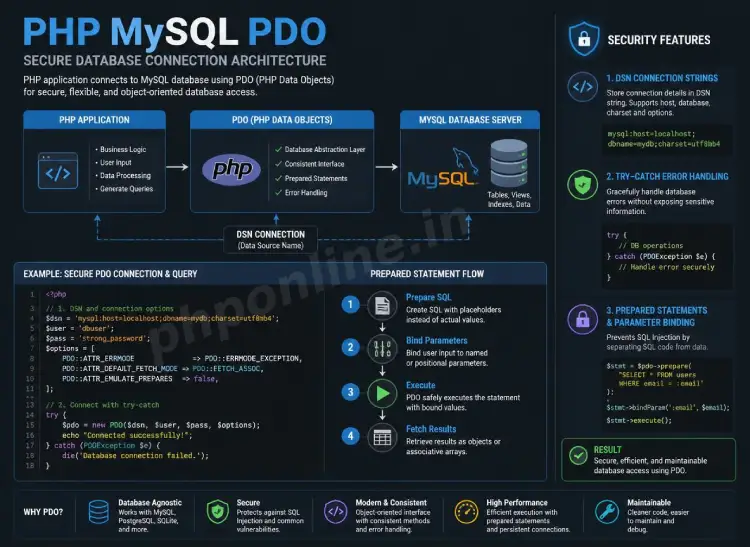
- DSN Connection String: Connections are established by instantiating a PDO object using a Data Source Name (DSN) string containing host, database name, port, and character set specifications.
- Object-Oriented Error Handling: PDO handles database execution errors cleanly using Object-Oriented
PDOExceptiontry-catch blocks and configurable error modes. - Prepared Parameter Binding: Separates SQL query logic from user-supplied data inputs using named parameters (
:placeholder) or positional parameters (?).
Welcome to Lesson 20 of our structured web development course, marking the beginning of Module 6: Database Integration & Modern PHP. Following our previous tutorial on Easy PHP File Handling Guide: 5 Essential File Operations & Uploads, you now understand how to read and write files on the server disk securely. The next major milestone in full-stack backend software engineering is connecting applications to relational database management systems using PHP MySQL PDO.
Static files are useful for logs and temporary media, but enterprise web applications—such as e-commerce stores, user management systems, forums, and content portals—require structured, relational data persistence. Relational databases like MySQL allow you to index millions of records, execute rapid search queries, enforce data integrity constraints, and manage relationships across tables.
In this comprehensive PHP MySQL PDO tutorial, we will explore why PDO is preferred over legacy extension interfaces, DSN connection string configuration, try-catch exception handling, prepared statements, and production database security rules.
Prerequisites Before Connecting to Databases
To test the hands-on code examples in this PHP MySQL PDO guide, verify that your development environment meets these basic requirements:
- Active Local Database Server: Running installation of Apache and MySQL/MariaDB with PHP 8.x+ (configured via XAMPP, Homebrew, or Terminal).
- Database Management Tool: Access to phpMyAdmin, MySQL Workbench, or command-line MySQL shell.
- Core PHP Foundations: Solid understanding of variables, functions, try-catch exception blocks, and associative arrays.
If you need to review how input validation protects form data before querying databases, visit our previous guide on Easy PHP Form Validation Guide: 3 Security Steps & Examples.
1. Why Choose PDO Over MySQLi and Legacy Extensions?
Historically, PHP provided three different extension interfaces for interacting with MySQL databases: legacy mysql_* functions (removed in PHP 7.0), mysqli_* (MySQL Improved), and PDO (PHP Data Objects).
| Feature / Criteria | Legacy mysql_* (Removed) | MySQLi Extension | PHP Data Objects (PDO) |
|---|---|---|---|
| Database Support | MySQL Only | MySQL Only | Universal (MySQL, PostgreSQL, SQLite, Oracle, SQL Server, etc.) |
| Programming Paradigm | Procedural Only | Procedural & Object-Oriented | Object-Oriented Only |
| Prepared Statements | Not Supported (Vulnerable to SQLi) | Supported (Complex syntax) | Natively Supported (Clean, named parameters) |
| Named Parameter Binding | No | No (Positional ? only) | Yes (e.g., :username, :email) |
| Industry Recommendation | Deprecated / Removed | Legacy MySQL Projects | Modern Production Standard |
Learning PHP MySQL PDO equips you with universal database skills. If your application ever migrates from MySQL to PostgreSQL or SQLite in the future, you only need to update the connection string—your query logic and prepared statements remain 100% identical!
2. Connecting to MySQL using PDO and DSN Strings
Establishing a database connection using PDO requires instantiating a new instance of the PDO core class. The constructor accepts three primary arguments: a Data Source Name (DSN) string, the database username, and the database password.
Understanding the DSN String Structure
The Data Source Name (DSN) tells PDO which database driver to use and specifies server network coordinates:
$dsn = "mysql:host=localhost;dbname=my_app_db;charset=utf8mb4;port=3306";mysql:Specifies the database driver driver type.host=localhost: The database server hostname or IP address (e.g.,127.0.0.1).dbname=my_app_db: The specific target database schema name.charset=utf8mb4: Sets character encoding to full UTF-8 (supporting emojis and international characters).port=3306: Optional port number (3306 is the standard MySQL port).
Creating a Robust Connection Script with Try-Catch
Database connection attempts can fail if credentials are wrong or if the server is offline. Wrapping the PDO connection inside a try-catch exception block prevents sensitive database passwords from leaking onto error screens:
<?php
declare(strict_types=1);

// Database credentials
$dbHost = "127.0.0.1";
$dbName = "phponline_demo";
$dbUser = "root";
$dbPass = ""; // Default XAMPP password is empty

// DSN Connection String
$dsn = "mysql:host={$dbHost};dbname={$dbName};charset=utf8mb4";

// Recommended PDO Configuration Options
$pdoOptions = [
    PDO::ATTR_ERRMODE            => PDO::ERRMODE_EXCEPTION, // Throw exceptions on SQL errors
    PDO::ATTR_DEFAULT_FETCH_MODE => PDO::FETCH_ASSOC,       // Fetch records as associative arrays
    PDO::ATTR_EMULATE_PREPARES   => false,                  // Enforce native prepared statements
];

try {
    // Instantiate PDO connection object
    $pdo = new PDO($dsn, $dbUser, $dbPass, $pdoOptions);
    echo "Successfully connected to MySQL database using PDO!<br>";
} catch (PDOException $e) {
    // Log real error to server log file and display clean user message
    error_log("Database Connection Error: " . $e->getMessage());
    die("Database Connection Failed. Please try again later.");
}
?>
Want to test this code live? Try running it in our PHP Online Compiler.
3. Recommended PDO Configuration Modes
Configuring PDO attributes during instantiation establishes strict security and data handling defaults across all subsequent queries:
PDO::ATTR_ERRMODE => PDO::ERRMODE_EXCEPTION: Instructs PDO to throwPDOExceptionobjects whenever an SQL error occurs. This allows you to catch database execution errors cleanly.PDO::ATTR_DEFAULT_FETCH_MODE => PDO::FETCH_ASSOC: Configures query results to return as clean associative arrays indexed by column names (e.g.,$row['email']) rather than duplicated numeric arrays.PDO::ATTR_EMULATE_PREPARES => false: Disables simulated prepared statements, forcing MySQL to perform true native parameter binding on the database server.
4. Executing Secure Prepared Statements (Preventing SQLi)
SQL Injection (SQLi) is a fatal web application vulnerability that occurs when untrusted user inputs are concatenated directly into raw SQL query strings. Attackers inject malicious SQL commands to bypass login forms, dump entire user databases, or delete database tables.
A. The Dangerous Unsafe Way (Raw Query Concatenation)
// UNSAFE VULNERABLE CODE - NEVER DO THIS!
// If $userEmail contains " ' OR '1'='1 ", the attacker dumps all user records!
$sql = "SELECT * FROM users WHERE email = '" . $_POST['email'] . "'";
$result = $pdo->query($sql);
B. The Safe PDO Way (Prepared Statements with Named Parameters)
Prepared statements eliminate SQL Injection completely by sending the SQL query template to the database server first without data. The server compiles the SQL logic structure, and user data is bound separately in a second step. The database engine treats parameter values strictly as literal strings, never as executable code:
<?php
// Step 1: SQL Template with Named Parameter Placeholder (:email)
$sql = "SELECT id, username, email, account_status FROM users WHERE email = :email";

// Step 2: Prepare query on database server
$stmt = $pdo->prepare($sql);

// Step 3: Execute query passing bound data array
$userInputEmail = "alex@phponline.in";
$stmt->execute(['email' => $userInputEmail]);

// Step 4: Fetch record
$userRecord = $stmt->fetch();

if ($userRecord) {
    echo "User Account Found: " . htmlspecialchars($userRecord['username'], ENT_QUOTES, 'UTF-8') . "<br>";
    echo "Status: " . $userRecord['account_status'];
} else {
    echo "No matching user record found.";
}
?>
Want to test this code live? Try running it in our PHP Online Compiler.
5. Complete Production Database Helper Class
Below is a complete, reusable database connection class implementing Singleton pattern principles, prepared statements, and error handling for production applications:
<?php
declare(strict_types=1);

class DatabaseConnection {
    private static ?PDO $instance = null;

    // Private constructor prevents direct instantiation
    private function __construct() {}

    public static function getInstance(): PDO {
        if (self::$instance === null) {
            $host = "127.0.0.1";
            $db   = "phponline_demo";
            $user = "root";
            $pass = "";
            $charset = "utf8mb4";

            $dsn = "mysql:host={$host};dbname={$db};charset={$charset}";
            $options = [
                PDO::ATTR_ERRMODE            => PDO::ERRMODE_EXCEPTION,
                PDO::ATTR_DEFAULT_FETCH_MODE => PDO::FETCH_ASSOC,
                PDO::ATTR_EMULATE_PREPARES   => false,
            ];

            try {
                self::$instance = new PDO($dsn, $user, $pass, $options);
            } catch (PDOException $e) {
                error_log("Database Connection Error: " . $e->getMessage());
                throw new Exception("System Error: Unable to establish database connection.");
            }
        }

        return self::$instance;
    }
}

// Reusable Usage Example:
try {
    $db = DatabaseConnection::getInstance();

    // Fetching multiple user rows
    $stmt = $db->prepare("SELECT username, email FROM users WHERE account_status = :status");
    $stmt->execute(['status' => 'active']);
    $activeUsers = $stmt->fetchAll();

    echo "<h3>Active System Users (" . count($activeUsers) . "):</h3><ul>";
    foreach ($activeUsers as $user) {
        echo "<li>" . htmlspecialchars($user['username'], ENT_QUOTES, 'UTF-8') . " (" . htmlspecialchars($user['email'], ENT_QUOTES, 'UTF-8') . ")</li>";
    }
    echo "</ul>";

} catch (Exception $e) {
    echo "<p style='color: red;'>" . $e->getMessage() . "</p>";
}
?>
Want to test this code live? Try running it in our PHP Online Compiler.
Troubleshooting Common PHP MySQL PDO Errors
| Observed Error / Exception | Probable Cause | Recommended Solution |
|---|---|---|
PDOException: SQLSTATE[HY000] [2002] Connection refused | MySQL database server service is stopped, offline, or listening on an incorrect port. | Open XAMPP / Terminal and start MySQL service (confirm port is 3306). |
PDOException: SQLSTATE[HY000] [1045] Access denied for user... | Incorrect database username or password supplied inside DSN instantiation call. | Verify database credentials in your configuration file or reset root MySQL password. |
PDOException: SQLSTATE[3D000] [1046] No database selected | Omitting dbname=... parameter from DSN string or target database doesn’t exist. | Check database name spelling inside DSN string and ensure database schema is created in MySQL. |
PDOException: SQLSTATE[42S02] Base table or view not found | SQL query references a table name that does not exist in the active database. | Verify table name spelling and confirm table exists inside phpMyAdmin/MySQL shell. |
Frequently Asked Questions (FAQ)
Q1: What is PHP MySQL PDO and why is it recommended?
PHP MySQL PDO (PHP Data Objects) is a lightweight, object-oriented database abstraction interface used to connect PHP applications securely to MySQL and other database engines. It is recommended because it supports universal database compatibility and native prepared statements to eliminate SQL Injection attacks.
Q2: What is the main difference between PDO and MySQLi in PHP?
MySQLi works strictly with MySQL databases only. PDO works universally with over 12 different database systems (MySQL, PostgreSQL, SQLite, etc.) and supports cleaner named parameter binding (e.g., :username) in prepared statements.
Q3: How do prepared statements in PDO protect against SQL Injection?
Prepared statements separate SQL query templates from user-supplied data input. The database compiles the SQL structure first, and user input is bound separately as literal values. This prevents user inputs from altering the execution structure of SQL commands.
Q4: Why should database connection code be wrapped in a try-catch block?
Wrapping connection calls inside try-catch exception blocks catches PDOException objects when database server connections fail. This prevents PHP from printing raw stack traces on web pages, which can expose database usernames, passwords, and host IP addresses.
Next Steps & Official References
Consult official technical standards on the PHP Official PDO Reference Manual (php.net).
Ready for the next lesson in sequence? Proceed directly to the next lesson in Module 6: Next Lesson: Secure CRUD Database Operations (Create, Read, Update, Delete) →
# Summary
Here is what you've learned in this lesson:
- Easy PHP MySQL PDO Guide: 3 Secure Database Steps
- Overview: Understanding PHP MySQL PDO & Database Connectivity
- Prerequisites Before Connecting to Databases
- 1. Why Choose PDO Over MySQLi and Legacy Extensions?
- 2. Connecting to MySQL using PDO and DSN Strings
- 3. Recommended PDO Configuration Modes
- 4. Executing Secure Prepared Statements (Preventing SQLi)
- 5. Complete Production Database Helper Class
- Troubleshooting Common PHP MySQL PDO Errors
- Frequently Asked Questions (FAQ)
- Next Steps & Official References
Continue to the next lesson and learn more about PHP CRUD Operations.