
PHP File Handling
Easy PHP File Handling Guide: 5 Essential File Operations & Uploads
Master server file operations with this complete PHP file handling guide. Learn fopen, fread, fwrite, secure $_FILES uploads, validation, and permissions.
Estimated Read Time: 20 Minutes | Category: PHP Web Development
Overview: Understanding PHP File Handling & Server Storage
Quick PHP File Handling Summary:
- Server File System Access: File handling allows PHP backend scripts to read, write, create, append, and delete files stored directly on the web server disk.
- Core I/O Stream Functions: File operations use low-level functions like
fopen(),fread(),fwrite(), andfclose(), or high-level utilities likefile_get_contents()andfile_put_contents(). - Handling File Uploads: HTTP file uploads are submitted via HTML forms with
enctype="multipart/form-data"and processed through the$_FILESsuperglobal array. - File Security Checkpoints: Uploaded files must be rigorously validated against allowed MIME types, extension whitelists, size limits, and stored outside the public web root using
move_uploaded_file(). - File Permissions (CHMOD): Server directory write permissions dictate whether PHP can successfully create or modify local files.
Welcome to Lesson 19 of our structured web development course, marking the final lesson in Module 5: Dynamic Web Forms & Security. Following our previous tutorial on Easy PHP Sessions and Cookies Guide: 4 Key Security Differences, you now understand how to persist user authentication states securely. The next essential milestone in server-side software engineering is interacting with local storage using PHP file handling.
In full-stack web applications, storing data in memory is temporary and clears as soon as a request finishes. While databases handle structured relational records, file systems process unstructured binary or text data—such as user profile avatars, PDF invoices, CSV data exports, error log files, and application cache files.
In this comprehensive PHP file handling tutorial, we will explore file read/write modes, high-level and low-level file I/O operations, the $_FILES superglobal array structure, secure file upload processing, validation checks, and production safety practices.
Prerequisites Before Interacting with Files
To test the hands-on code examples in this PHP file handling guide, verify that your development environment meets these basic requirements:
- Active Web Server: Running installation of Apache or Nginx with PHP 8.x+ (configured via XAMPP, Homebrew, or Terminal).
- Code Editor: A modern IDE such as Visual Studio Code or PhpStorm.
- Form & Superglobal Foundations: Understanding of HTML forms, HTTP POST submissions, and array structures.
If you need to review how input validation and HTTP POST requests operate, visit our previous guide on Easy PHP Form Validation Guide: 3 Security Steps & Examples.
1. Reading Files in PHP: High-Level vs. Low-Level Methods
PHP provides two distinct approaches for reading files from server disk storage: high-level single-line convenience functions and low-level stream handle functions.
A. High-Level File Reading: file_get_contents() and readfile()
For quick operations where you need to read an entire text or configuration file into a string, use file_get_contents(). To output a file directly to the browser buffer (such as serving an image or PDF), use readfile():
<?php
$filePath = "sample.txt";

// Verify file existence before reading
if (file_exists($filePath)) {
    // Read entire file content into a string
    $fileContent = file_get_contents($filePath);
    echo "<h3>File Contents:</h3><pre>" . htmlspecialchars($fileContent, ENT_QUOTES, 'UTF-8') . "</pre>";
} else {
    echo "Target file does not exist.";
}
?>
Want to test this code live? Try running it in our PHP Online Compiler.
B. Low-Level Stream Reading: fopen(), fread(), fgets(), fclose()
When dealing with large files (like 100MB log files) that cannot fit into server RAM all at once, open a file handle with fopen() and process the file line-by-line using fgets():
<?php
$filePath = "app_logs.txt";

if (file_exists($filePath)) {
    // Open file stream in read-only mode ('r')
    $fileHandle = fopen($filePath, "r");

    echo "<h3>Processing Log File Line-by-Line:</h3><ul>";
    // Read line-by-line until End-Of-File (feof) is reached
    while (!feof($fileHandle)) {
        $line = fgets($fileHandle);
        if ($line !== false) {
            echo "<li>" . htmlspecialchars($line, ENT_QUOTES, 'UTF-8') . "</li>";
        }
    }
    echo "</ul>";

    // Always close open file handles to free system resources!
    fclose($fileHandle);
}
?>
Want to test this code live? Try running it in our PHP Online Compiler.
2. Writing and Appending Files in PHP
When creating or updating files on the server disk, you must specify the correct mode flag inside fopen(), or use file_put_contents().
Summary Table of File Open Modes (fopen):
| Mode Flag | Mode Name | Pointer Position | File Creation / Truncation Behavior |
|---|---|---|---|
"r" | Read Only | Beginning of file | Returns false if file does not exist. Does not create files. |
"w" | Write Only | Beginning of file | Creates file if missing. Truncates (erases) existing content! |
"a" | Append Only | End of file | Creates file if missing. Preserves existing content and appends to end. |
"x" | Create Only | Beginning of file | Creates file strictly. Returns false if file already exists. |
Writing and Appending Code Examples
<?php
// Method 1: Appending log entries using file_put_contents() with FILE_APPEND flag
$logMessage = "[" . date("Y-m-d H:i:s") . "] User login attempt successful.\n";
file_put_contents("activity.log", $logMessage, FILE_APPEND | LOCK_EX);

// Method 2: Creating and writing to a file using fopen() and fwrite()
$fileHandle = fopen("welcome_notice.txt", "w"); // Mode 'w' overwrites existing data
if ($fileHandle) {
    $text = "Welcome to PHPOnline Student Storage!\nThis file was generated dynamically.";
    fwrite($fileHandle, $text);
    fclose($fileHandle); // Close stream handle
    echo "File created and updated successfully.";
}
?>
Want to test this code live? Try running it in our PHP Online Compiler.
3. Secure HTTP File Uploads with $_FILES
Allowing users to upload files to your server introduces significant security risks if not managed properly. To process file uploads in PHP, the HTML form must meet two mandatory requirements:
- The form must use
method="POST". - The form tag must include
enctype="multipart/form-data".
Anatomy of the $_FILES Superglobal Array
When a file is submitted, PHP stores metadata inside the $_FILES 2D associative array:
$_FILES['input_name']['name']: Original filename on the client machine (e.g.,"avatar.png").$_FILES['input_name']['type']: MIME type reported by browser (e.g.,"image/png"). Never trust this value blindly!$_FILES['input_name']['tmp_name']: Temporary storage path on the server where the uploaded file is held during request execution.$_FILES['input_name']['error']: Error code integer (0 =UPLOAD_ERR_OKon success).$_FILES['input_name']['size']: Total file size in bytes.
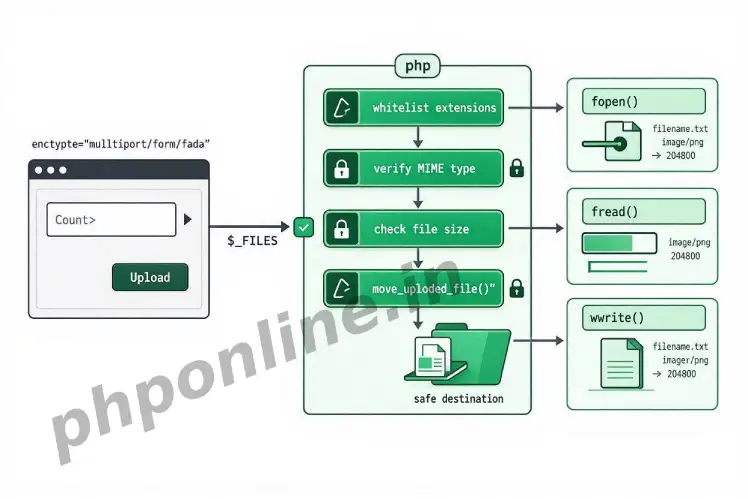
4. Step-by-Step File Upload Security Pipeline
To prevent malicious users from uploading executable PHP scripts (like web shells), every file upload script must enforce a strict four-step security check:
- Upload Error Check: Verify that
$_FILES['file']['error'] === UPLOAD_ERR_OK. - File Size Validation: Enforce maximum file size limits (e.g., max 2MB).
- Extension Whitelisting: Validate file extension against a safe array whitelist (e.g.,
['jpg', 'jpeg', 'png', 'pdf']). - MIME Type Inspection: Use PHP’s
finfo_file()function to inspect actual binary headers rather than relying on browser-reported extensions. - Safe Filename Obfuscation: Generate a unique, random filename using
bin2hex(random_bytes(16))to prevent path traversal and overwriting existing files. - Secure Storage Movement: Use
move_uploaded_file()to move the file from temporary storage to a secure directory outside the public web root.
5. Complete Production-Grade File Upload Script
Below is a complete, working single-file upload script demonstrating security validation, MIME checking, unique file renaming, and error feedback:
<?php
declare(strict_types=1);

$uploadStatusMessage = "";
$uploadSuccess = false;

// Process file upload on POST request
if ($_SERVER['REQUEST_METHOD'] === 'POST' && isset($_POST['upload_btn'])) {

    // Check if file was selected
    if (isset($_FILES['user_document']) && $_FILES['user_document']['error'] === UPLOAD_ERR_OK) {

        $fileTmpPath = $_FILES['user_document']['tmp_name'];
        $fileName = $_FILES['user_document']['name'];
        $fileSize = $_FILES['user_document']['size'];

        // 1. Enforce Maximum File Size Limit (Max 2MB = 2 * 1024 * 1024 bytes)
        $maxSizeBytes = 2 * 1024 * 1024;
        if ($fileSize > $maxSizeBytes) {
            $uploadStatusMessage = "Error: File size exceeds the maximum limit of 2MB.";
        } else {

            // 2. Validate File Extension Against Whitelist
            $fileExtension = strtolower(pathinfo($fileName, PATHINFO_EXTENSION));
            $allowedExtensions = ['jpg', 'jpeg', 'png', 'pdf'];

            if (!in_array($fileExtension, $allowedExtensions, true)) {
                $uploadStatusMessage = "Error: Invalid file format. Only JPG, PNG, and PDF files are permitted.";
            } else {

                // 3. Inspect Actual Binary MIME Type using Fileinfo Extension
                $finfo = finfo_open(FILEINFO_MIME_TYPE);
                $mimeType = finfo_file($finfo, $fileTmpPath);
                finfo_close($finfo);

                $allowedMimeTypes = ['image/jpeg', 'image/png', 'application/pdf'];

                if (!in_array($mimeType, $allowedMimeTypes, true)) {
                    $uploadStatusMessage = "Error: Security check failed. File MIME type is invalid.";
                } else {

                    // 4. Generate Obfuscated Unique Filename to Prevent Overwriting
                    $newFileName = bin2hex(random_bytes(16)) . '.' . $fileExtension;

                    // Destination directory (Ensure folder exists with CHMOD 0755 permissions!)
                    $uploadDir = __DIR__ . '/uploads/';
                    if (!is_dir($uploadDir)) {
                        mkdir($uploadDir, 0755, true);
                    }

                    $destinationPath = $uploadDir . $newFileName;

                    // 5. Move File from Temporary Path to Secure Target Path
                    if (move_uploaded_file($fileTmpPath, $destinationPath)) {
                        $uploadSuccess = true;
                        $uploadStatusMessage = "File uploaded successfully! Saved securely as: " . $newFileName;
                    } else {
                        $uploadStatusMessage = "Error: Failed to move file to destination directory. Check folder permissions.";
                    }
                }
            }
        }
    } else {
        $uploadStatusMessage = "Error: Please select a valid file to upload.";
    }
}
?>

<!-- Secure File Upload HTML Form Interface -->
<h2>Secure Document & Avatar Upload Portal</h2>

<?php if (!empty($uploadStatusMessage)): ?>
    <div style="background-color: <?= $uploadSuccess ? '#d4edda' : '#f8d7da'; ?>; color: <?= $uploadSuccess ? '#155724' : '#721c24'; ?>; padding: 15px; margin-bottom: 20px;">
        <?= htmlspecialchars($uploadStatusMessage, ENT_QUOTES, 'UTF-8'); ?>
    </div>
<?php endif; ?>

<!-- Mandatory: method="POST" and enctype="multipart/form-data" -->
<form action="" method="POST" enctype="multipart/form-data">
    <label for="user_document">Select File to Upload (JPG, PNG, PDF | Max 2MB):</label><br><br>
    <input type="file" id="user_document" name="user_document" required><br><br>

    <button type="submit" name="upload_btn">Upload File Securely</button>
</form>
Want to test this code live? Try running it in our PHP Online Compiler.
Troubleshooting Common PHP File Handling Errors
| Observed Error / Issue | Probable Cause | Recommended Solution |
|---|---|---|
Warning: fopen(...): Failed to open stream: Permission denied | The web server user (e.g., www-data or nobody) lacks write permissions on the target directory. | Grant write permissions to the uploads directory using terminal command chmod 755 uploads or chmod 775 uploads. |
$_FILES array is completely empty after submission | Omitting enctype="multipart/form-data" from the HTML <form> tag or file size exceeds post_max_size in php.ini. | Add enctype="multipart/form-data" to your form tag and verify upload_max_filesize limits in php.ini. |
move_uploaded_file() returns false without errors | The file was not uploaded via HTTP POST, or the temporary directory is full/inaccessible. | Verify that is_uploaded_file() passes and check temporary directory storage availability. |
| Uploaded PHP files execute malicious commands on server | Storing uploaded files inside the public web directory allowing direct URL execution (e.g., uploads/shell.php). | Disable script execution in the upload folder using a .htaccess file (php_flag engine off) or store uploads outside public_html. |
Frequently Asked Questions (FAQ)
Q1: What is PHP file handling and why is it essential?
PHP file handling is the backend process of creating, reading, writing, updating, deleting, and managing files on the web server disk. It allows web applications to process uploaded avatars, generate downloadable PDF invoices, read log files, and store unstructured content.
Q2: Why must HTML file upload forms use enctype=”multipart/form-data”?
The enctype="multipart/form-data" attribute instructs the web browser to split form data and binary file data into multiple MIME payload streams. Without this attribute, the browser sends only the string filename, and the $_FILES array remains empty.
Q3: What is the function of move_uploaded_file() in PHP?
move_uploaded_file() securely transfers an uploaded file from its temporary server directory (stored in $_FILES['file']['tmp_name']) to a permanent destination folder. It verifies that the file was uploaded via a legitimate HTTP POST request before moving it.
Q4: How do you prevent malicious file upload exploits in PHP?
Prevent file upload security vulnerabilities by enforcing extension whitelists, checking true binary MIME types with finfo_file(), restricting file size limits, renaming files to random obfuscated names, and storing uploads outside the public web root directory.
Next Steps & Official References
Consult official technical standards on the PHP Official File System Manual (php.net).
Ready to move to Module 6? Proceed directly to the first lesson in Module 6: Next Lesson: Connecting to MySQL Databases via PDO →
# Summary
Here is what you've learned in this lesson:
- Easy PHP File Handling Guide: 5 Essential File Operations & Uploads
- Overview: Understanding PHP File Handling & Server Storage
- Prerequisites Before Interacting with Files
- 1. Reading Files in PHP: High-Level vs. Low-Level Methods
- 2. Writing and Appending Files in PHP
- 3. Secure HTTP File Uploads with $_FILES
- 4. Step-by-Step File Upload Security Pipeline
- 5. Complete Production-Grade File Upload Script
- Troubleshooting Common PHP File Handling Errors
- Frequently Asked Questions (FAQ)
- Next Steps & Official References
Continue to the next lesson and learn more about PHP MySQL PDO.