
PHP Functions
Easy PHP Functions Guide: 5 Core Concepts & Examples
Master reusable backend code blocks with this complete PHP functions guide. Learn syntax, parameters, return values, type hinting, and anonymous functions.
Overview: Understanding PHP Functions & Code Reusability
Quick PHP Functions Summary:
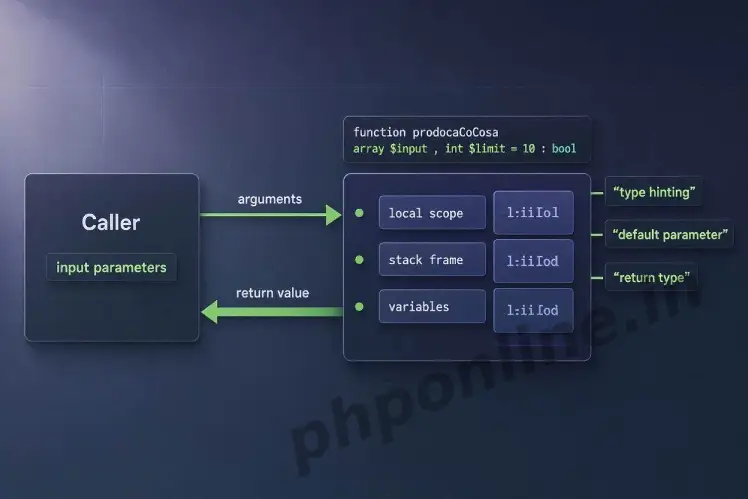
- DRY Principle (Don’t Repeat Yourself): Functions package statements into self-contained, named blocks that can be executed repeatedly from anywhere in your codebase.
- Parameter Flexibility: Functions accept input arguments by value, by reference (using
&), or with default fallback values. - Return Values: Functions compute logic and return data back to the calling script using the
returnkeyword. - Strict Type Hinting: Modern PHP allows developers to enforce argument data types and return types for enhanced backend reliability.
- Anonymous & Arrow Functions: PHP 7.4+ supports inline closures and compact arrow functions (
fn() => expr) for callback processing.
Welcome to Lesson 13 of our structured web development course, marking the beginning of Module 4: Functions & Data Structures[cite: 3]. Following our previous tutorial on Easy PHP Loops Guide: 4 Iteration Types & Examples, you now understand how to automate repetitive tasks using while, for, and foreach loops[cite: 204]. The next fundamental evolution in backend engineering is modularizing logic using PHP functions[cite: 93].
In software architecture, copying and pasting identical code across multiple pages creates a maintenance nightmare. If business rules change (such as calculating tax rates or validating passwords), updated logic must be edited in every single file. User-defined functions solve this problem by wrapping logic into centralized, named procedures that can be invoked repeatedly across your entire application.
In this comprehensive PHP functions guide, we will explore declaration syntax, argument passing, return types, strict type hinting, variable scoping, anonymous closures, arrow functions, and production best practices.
Prerequisites Before Creating Functions
To test the hands-on code examples in this PHP functions tutorial, verify that your development environment meets these basic requirements:
- Active Web Server: Running installation of Apache or Nginx with PHP 8.x+ (configured via XAMPP, Homebrew, or Terminal)[cite: 111, 112].
- Code Editor: A modern IDE such as Visual Studio Code or PhpStorm.
- Core Foundations: Solid understanding of variables, data types, and logic branching.
If you need to review how local and global variable scopes operate inside code blocks, visit our previous guide on Easy PHP Variables Guide: Complete Types & Scope Tutorial[cite: 100].
1. Basic Function Syntax & Execution
A user-defined function in PHP begins with the function keyword, followed by a unique function name, parentheses () for parameter declarations, and a code block enclosed in curly braces {}.
Function Naming Rules:
- Function names must start with a letter or an underscore (
_), never a number. - Function names can contain letters, numbers, and underscores (e.g.,
calculateTax_v2()). - Function names are case-insensitive in PHP (e.g.,
myFunction()andMYFUNCTION()invoke the same block), though using consistent camelCase or snake_case is standard practice.
<?php
// Defining a basic user-defined function
function displayWelcomeBanner() {
    echo "<h3 style='color: #0073aa;'>Welcome to the PHPOnline Student Portal!</h3>";
    echo "<p>Learn backend development step-by-step.</p>";
}

// Invoking (calling) the function
displayWelcomeBanner();
?>
Want to test this code live? Try running it in our PHP Online Compiler.
2. Passing Arguments: Value vs. Reference
Functions can accept input variables called parameters (or arguments). When invoking the function, you pass values into these parameter slots.
A. Passing Arguments by Value (Default Behavior)
By default, arguments are passed by value. This means PHP passes a copy of the variable into the function. Any modifications made to the parameter inside the function do not affect the original variable outside:
<?php
function addBonusPoints($currentScore) {
    $currentScore += 50; // Modifies local copy only
    echo "Inside Function Score: " . $currentScore . "<br>";
}

$userScore = 100;
addBonusPoints($userScore); // Pass by value

echo "Outside Function Original Score: " . $userScore; // Remains 100
?>
Want to test this code live? Try running it in our PHP Online Compiler.
B. Passing Arguments by Reference (&)
When you need a function to modify the original variable directly, prefix the parameter name with an ampersand (&). This passes the memory reference rather than a copy:
<?php
// Parameter prefixed with & to pass by reference
function applyDiscount(&$price, $discountAmount) {
    $price -= $discountAmount; // Modifies the original memory location directly
}

$productPrice = 120.00;
applyDiscount($productPrice, 20.00);

echo "Updated Product Price: $" . $productPrice; // Outputs: $100.00
?>
Want to test this code live? Try running it in our PHP Online Compiler.
3. Default Parameters & Named Arguments
PHP allows you to assign default fallback values to parameters. If the caller does not supply an argument for that parameter, the default value is automatically used.
A. Default Parameter Values
<?php
function formatUserGreeting($name, $role = "Student") {
    echo "User: " . $name . " — Account Role: " . $role . "<br>";
}

formatUserGreeting("Sarah");                   // Uses default "Student"
formatUserGreeting("Alex", "Administrator"); // Overrides default with "Administrator"
?>
Rule: Always place default parameters at the end of the parameter list. Placing mandatory parameters after default parameters causes syntax warnings.
B. Named Arguments (PHP 8.0+)
Introduced in PHP 8.0, named arguments allow you to pass values into a function based on the parameter name rather than its exact positional order:
<?php
function createInvoice($customerName, $subtotal, $taxRate = 0.07, $discount = 0.0) {
    $tax = $subtotal * $taxRate;
    return ($subtotal + $tax) - $discount;
}

// Passing arguments using parameter names (skipping default $taxRate)
$total = createInvoice(
    customerName: "John Doe",
    subtotal: 200.00,
    discount: 15.00
);

echo "Final Invoice Total: $" . $total;
?>
Want to test this code live? Try running it in our PHP Online Compiler.
4. Return Values & Return Type Declarations
Functions process inputs and pass data back to the calling script using the return statement. As soon as a return statement executes, the function stops processing immediately and exits.
A. Returning Data Values
<?php
function calculateRectangleArea($width, $height) {
    return $width * $height; // Passes computed integer/float back
}

$area = calculateRectangleArea(10, 5);
echo "Computed Area: " . $area . " sq units.";
?>
B. Return Type Declarations & Strict Typing
PHP allows developers to declare strict scalar parameter types and return data types. Adding declare(strict_types=1); at the very top of your script enforces strict type safety:
<?php
declare(strict_types=1); // Enforces strict type checking

// Function strictly requires float parameters and returns a float
function calculateTax(float $amount, float $rate): float {
    return $amount * $rate;
}

$taxTotal = calculateTax(150.50, 0.08);
echo "Tax Total: $" . number_format($taxTotal, 2);
?>
Want to test this code live? Try running it in our PHP Online Compiler.
5. Anonymous Functions (Closures) & Arrow Functions
An anonymous function (or closure) is a function without a specified name. Anonymous functions are frequently used as callback arguments inside built-in array functions (like array_map() or array_filter()).
A. Anonymous Functions & Closures
<?php
// Anonymous function assigned to a variable
$greetUser = function($name) {
    return "Hello, " . $name . "!";
};

echo $greetUser("Alex") . "<br>";

// Using 'use' keyword to import variables from parent scope into closure
$siteName = "PHPOnline";
$showPortal = function() use ($siteName) {
    echo "Welcome to " . $siteName;
};

$showPortal();
?>
B. Arrow Functions (PHP 7.4+)
Arrow functions offer a short syntax for writing clean one-liner closures. They automatically capture outer scope variables without needing the use keyword:
<?php
$multiplier = 3;
$numbers = [1, 2, 3, 4, 5];

// Arrow function syntax: fn(params) => expr
$scaledNumbers = array_map(fn($n) => $n * $multiplier, $numbers);

echo "<pre>";
print_r($scaledNumbers);
echo "</pre>";
?>
Want to test this code live? Try running it in our PHP Online Compiler.
Summary Table: Core Concepts of PHP Functions
| Feature / Concept | Sample Syntax | Core Purpose & Behavior |
|---|---|---|
| Basic Function | function name() { ... } | Defines a reusable, named block of backend code statements. |
| Pass by Value | function test($arg) | Passes a local copy of the variable into the function (original unchanged). |
| Pass by Reference | function test(&$arg) | Passes the original memory reference so function changes modify the caller variable. |
| Type Hinting | function test(int $x): string | Enforces strict data types for parameters and returned values. |
| Named Arguments | func(paramName: $val) | Allows passing arguments out of order using explicit parameter names (PHP 8.0+). |
| Arrow Functions | fn($x) => $x * 2 | Compact syntax for single-line closures that capture outer variables automatically. |
Troubleshooting Common PHP Function Errors
| Observed Error / Issue | Probable Cause | Recommended Solution |
|---|---|---|
Fatal error: Cannot redeclare function... | Defining two functions with the exact same name in the same global scope. | Ensure function names are unique or wrap declarations in if (!function_exists('name')) { ... } checks. |
TypeError: Argument 1 passed must be of type... | Passing a variable of an incorrect data type to a function with type hinting enabled. | Ensure passed variables match declared parameter types or cast types explicitly (e.g., (float)$val). |
Warning: Undefined variable $... inside function | Attempting to access a global variable inside a function without importing it. | Pass the global variable into the function as an argument or import it using the global keyword. |
Function returns null when a value was expected | Forgetting to include the return keyword at the end of the calculation block. | Ensure the function explicitly executes return $result; before exiting. |
Frequently Asked Questions (FAQ)
Q1: What are PHP functions and why are they important?
PHP functions are self-contained, reusable blocks of code designed to perform specific backend tasks. They eliminate redundant code, improve application maintainability, and allow developers to organize complex logic into modular procedures.
Q2: What is the difference between passing arguments by value and by reference in PHP?
Passing arguments by value passes a copy of the variable into the function, keeping the original variable unchanged. Passing by reference (using &$variable) passes the actual variable memory reference, allowing the function to modify the caller’s variable directly.
Q3: How does type hinting work in PHP functions?
Type hinting specifies the expected data type (such as int, string, float, array, or bool) for function parameters and return values. When strict typing is enabled (declare(strict_types=1);), passing an incorrect type causes PHP to throw a TypeError.
Q4: What are arrow functions in PHP?
Arrow functions (introduced in PHP 7.4) offer a short, clean syntax for writing single-line closures using the fn(params) => expression syntax. They automatically capture variables from the parent scope without requiring the explicit use keyword.
Next Steps & Official References
Consult official technical standards on the PHP Official Functions Manual (php.net)[cite: 21].
Ready for the next lesson in sequence? Proceed directly to the next lesson in Module 4: Next Lesson: PHP Arrays (Indexed, Associative & Multidimensional) →
# Summary
Here is what you've learned in this lesson:
- Easy PHP Functions Guide: 5 Core Concepts & Examples
- Overview: Understanding PHP Functions & Code Reusability
- Prerequisites Before Creating Functions
- 1. Basic Function Syntax & Execution
- 2. Passing Arguments: Value vs. Reference
- 3. Default Parameters & Named Arguments
- 4. Return Values & Return Type Declarations
- 5. Anonymous Functions (Closures) & Arrow Functions
- Summary Table: Core Concepts of PHP Functions
- Troubleshooting Common PHP Function Errors
- Frequently Asked Questions (FAQ)
- Next Steps & Official References
Continue to the next lesson and learn more about PHP Arrays.