
PHP Loops
Easy PHP Loops Guide: 4 Iteration Types & Examples
Master iteration logic with this complete PHP loops guide. Learn while, do-while, for, foreach loops, break, continue statements, and practical code examples.
Overview: Understanding PHP Loops & Iteration Control
Quick PHP Loops Summary:
- Repetitive Task Automation: Loops execute a block of code repeatedly for a specified number of times or as long as a boolean condition remains
true. - 4 Core Loop Structures: PHP provides
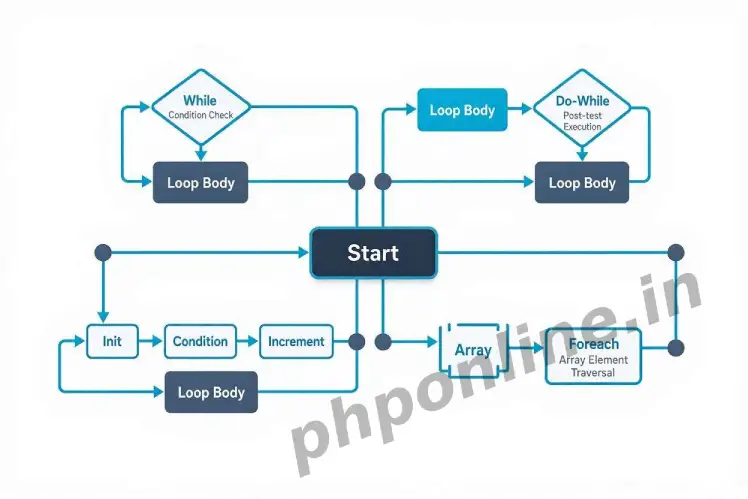
while(pre-test condition),do-while(post-test condition),for(counter-controlled), andforeach(array-specific iteration). - Array Traversal Engine: The
foreachloop is specifically optimized for traversing indexed and associative arrays without managing manual counter variables. - Loop Control Jump Statements: The
breakstatement terminates loop execution immediately, whilecontinueskips the current iteration and jumps to the next cycle. - Preventing Infinite Loops: Always ensure the loop condition eventually evaluates to
falseor hits an explicit exit statement to avoid crashing server memory.
Welcome to Lesson 12 of our structured web development course, marking the final lesson in Module 3: Operators & Logic Control. Following our previous tutorial on Easy PHP Conditional Statements Guide: 4 Decision Types & Examples, you now understand how to direct execution paths using if, else, switch, and match expressions. The next essential step in backend software engineering is repeating operations efficiently using PHP loops.
In software engineering, writing repetitive code manually is inefficient, error-prone, and unmaintainable. Imagine fetching 100 database records, reading lines from a text file, rendering a dynamic HTML table of user orders, or sending bulk notification emails. Instead of copying and pasting the same code 100 times, you write a single loop that executes 100 times automatically.
In this comprehensive PHP loops tutorial, we will explore all 4 iteration structures, loop control jump statements (break and continue), nested loop patterns, array iteration techniques, and strategies for avoiding infinite loop memory crashes.
Prerequisites Before Writing Iteration Logic
To test the hands-on code examples in this PHP loops guide, verify that your development environment meets these basic requirements:
- Active Web Server: Running installation of Apache or Nginx with PHP 8.x+ (configured via XAMPP, Homebrew, or Terminal).
- Code Editor: A modern IDE such as Visual Studio Code or PhpStorm.
- Core Foundations: Solid understanding of variables, comparison operators, and increment/decrement operators (
++$x,$x++).
If you need to review how arithmetic increment operators or logical comparison operators work, visit our previous guide on Easy PHP Operators Guide: 7 Core Types & Examples.
1. The ‘while’ Loop (Condition-First Iteration)
The while loop is a pre-test conditional loop. It checks the specified condition before executing the code block inside its body. As long as the condition evaluates to true, the loop continues to execute. If the condition evaluates to false on the very first check, the code inside the loop body is never executed.
Basic ‘while’ Loop Syntax
<?php
$counter = 1;

// Loop continues as long as $counter is less than or equal to 5
while ($counter <= 5) {
    echo "Processing Batch Order Item #" . $counter . "<br>";

    // Crucial step: Increment the counter variable to prevent an infinite loop!
    $counter++;
}
?>
Want to test this code live? Try running it in our PHP Online Compiler.
Infinite Loop Warning: If you forget to increment or modify the condition variable (e.g., omitting $counter++), the condition remains true forever. This causes an infinite loop, consuming server CPU resources until PHP reaches its maximum execution time limit.
2. The ‘do-while’ Loop (Post-Condition Iteration)
The do-while loop is a post-test conditional loop. Unlike the standard while loop, a do-while loop executes the code block inside its body first, and then checks the condition at the end of the iteration cycle.
Because the condition check occurs at the bottom, a do-while loop is guaranteed to execute its code block at least once, even if the condition is false from the start.
Basic ‘do-while’ Loop Syntax
<?php
$attempts = 6;

// Code block runs once BEFORE checking the condition
do {
    echo "Login Attempt #" . $attempts . " executed.<br>";
    $attempts++;
} while ($attempts <= 5);

// Even though $attempts (6) is greater than 5, the block executed once!
?>
Want to test this code live? Try running it in our PHP Online Compiler.
3. The ‘for’ Loop (Counter-Controlled Iteration)
When you know in advance exactly how many times a code block should execute, the for loop is the cleanest and most compact choice. It consolidates counter initialization, condition evaluation, and counter updating into a single line header.
Structure of a ‘for’ Loop Header:
for (init counter; test condition; increment counter) {
    // Code to execute on each iteration
}- init counter: Initializes the loop counter variable (evaluated once at the beginning).
- test condition: Evaluated before every iteration. If
true, the loop continues; iffalse, the loop terminates. - increment counter: Updates the counter variable at the end of every iteration.
Basic ‘for’ Loop Example
<?php
// Generating a mathematical multiplication table for 5
$number = 5;

for ($i = 1; $i <= 10; $i++) {$result = $number * $i;
    echo "{$number} x {$i} = {$result}<br>";
}
?>
Want to test this code live? Try running it in our PHP Online Compiler.
4. The ‘foreach’ Loop (Array Traversal)
The foreach loop is specifically designed for iterating over PHP arrays and objects. It automatically steps through every element in an array from start to finish without requiring you to manually track array indexes or check array lengths.
A. Iterating Over Indexed Arrays (Value Only)
<?php
$frameworks = ["Laravel", "Symfony", "CodeIgniter", "Yii2"];

// Iterating over values
foreach ($frameworks as$framework) {
    echo "Active Backend Framework: " . $framework . "<br>";
}
?>
Want to test this code live? Try running it in our PHP Online Compiler.
B. Iterating Over Associative Arrays (Key and Value)
When working with associative arrays (key-value pairs), the foreach loop can extract both the array key and its corresponding value simultaneously using the $key => $value syntax:
<?php
$userProfile = [
    "Username" => "alex_mercer",
    "Email" => "alex@phponline.in",
    "Role" => "Senior Developer",
    "Account Status" => "Active Member"
];

// Iterating over key-value pairs
foreach ($userProfile as $fieldLabel => $fieldValue) {
    echo "<strong>" . $fieldLabel . ":</strong> " . $fieldValue . "<br>";
}
?>
Want to test this code live? Try running it in our PHP Online Compiler.
5. Loop Control Statements: ‘break’ and ‘continue’
PHP provides two special control flow statements that alter standard loop behavior during execution: break and continue.
A. The ‘break’ Statement (Immediate Exit)
The break statement terminates execution of the current loop immediately. The parser exits the loop and jumps directly to the first line of code following the loop structure:
<?php
// Searching for a specific number in a loop
for ($i = 1; $i <= 10; $i++) {
    if ($i === 6) {
        echo "Target number 6 located! Terminating loop early.<br>";
        break; // Stops the loop completely when $i equals 6
    }
    echo "Checking index: " . $i . "<br>";
}
?>
B. The ‘continue’ Statement (Skip Current Iteration)
The continue statement skips the remainder of the current loop iteration and immediately jumps to the condition evaluation step for the next cycle:
<?php
// Printing odd numbers only by skipping even numbers
for ($i = 1; $i <= 10; $i++) {
    if ($i % 2 === 0) {
        continue; // Skips even numbers and proceeds to the next loop cycle
    }
    echo "Odd Number: " . $i . "<br>";
}
?>
Want to test this code live? Try running it in our PHP Online Compiler.
Summary Comparison of All 4 PHP Loop Types
| Loop Type | Condition Check Timing | Guaranteed Executions | Best Use Case Scenario |
|---|---|---|---|
| while | Pre-test (Before block) | 0 times | Iterating while an external condition remains true (e.g., reading database rows). |
| do-while | Post-test (After block) | 1 time minimum | Tasks that must execute at least once before checking conditions (e.g., menu prompts). |
| for | Pre-test (Before block) | 0 times | Counter-based loops with a known, fixed iteration count. |
| foreach | Automatic element check | 0 times | Traversing indexed arrays, associative arrays, and iterable data objects. |
Troubleshooting Common PHP Loop Errors
| Observed Error / Issue | Probable Cause | Recommended Solution |
|---|---|---|
Script freezes or crashes with Maximum execution time exceeded | An infinite loop caused by forgetting to update counter variables (e.g., missing $i++). | Ensure every while or for loop has a clear termination condition that eventually becomes false. |
Warning: Invalid argument supplied for foreach() | Passing a non-array variable (like null, an integer, or boolean) to a foreach loop. | Validate array status before looping using if (is_array($data)) { foreach(...) }. |
| Loop executes 1 fewer or 1 extra time (Off-By-One Error) | Incorrect boundary comparison operators (e.g., using < instead of <=). | Check initial counter start values ($i = 0 vs $i = 1) and boundary operators carefully. |
Modifying array values inside foreach doesn’t change original array | By default, foreach works on a copy of array values, not the original references. | Pass values by reference using an ampersand (e.g., foreach ($array as &$value)) to modify directly. |
Frequently Asked Questions (FAQ)
Q1: What are PHP loops and why are they used in programming?
PHP loops are control flow structures used to execute a block of code repeatedly as long as a specified condition remains true. They eliminate repetitive code, allowing developers to process array datasets, database query results, and automated tasks efficiently.
Q2: What is the difference between a while loop and a do-while loop?
A while loop checks its condition before executing the code block (executing 0 or more times). A do-while loop executes its code block first before checking the condition at the end, guaranteeing that the code inside executes at least once.
Q3: When should you use a foreach loop instead of a for loop?
Use a foreach loop whenever you are working with PHP arrays or iterable objects, as it automatically traverses elements without requiring manual index counters. Use a for loop when performing counter-controlled iterations where the exact number of cycles is known beforehand.
Q4: How do break and continue statements affect loop execution?
The break statement terminates loop execution completely and exits the loop structure immediately. The continue statement skips the remainder of the current iteration and jumps directly to the next loop iteration cycle.
Next Steps & Official References
Consult official technical standards on the PHP Official Control Structures Manual (php.net).
Ready to move to Module 4? Proceed directly to the first lesson in Module 4: Next Lesson: PHP User-Defined Functions & Type Hinting →
# Summary
Here is what you've learned in this lesson:
- Easy PHP Loops Guide: 4 Iteration Types & Examples
- Overview: Understanding PHP Loops & Iteration Control
- Prerequisites Before Writing Iteration Logic
- 1. The 'while' Loop (Condition-First Iteration)
- 2. The 'do-while' Loop (Post-Condition Iteration)
- 3. The 'for' Loop (Counter-Controlled Iteration)
- 4. The 'foreach' Loop (Array Traversal)
- 5. Loop Control Statements: 'break' and 'continue'
- Summary Comparison of All 4 PHP Loop Types
- Troubleshooting Common PHP Loop Errors
- Frequently Asked Questions (FAQ)
- Next Steps & Official References
Continue to the next lesson and learn more about PHP Functions.