
PHP Echo Print
Easy PHP Echo Print Guide: Complete Beginner Tutorial & Differences
Master web output with this complete PHP echo print tutorial. Learn key differences, performance comparisons, parameter rules, and hands-on code examples.
Overview: Understanding PHP Echo Print Language Constructs
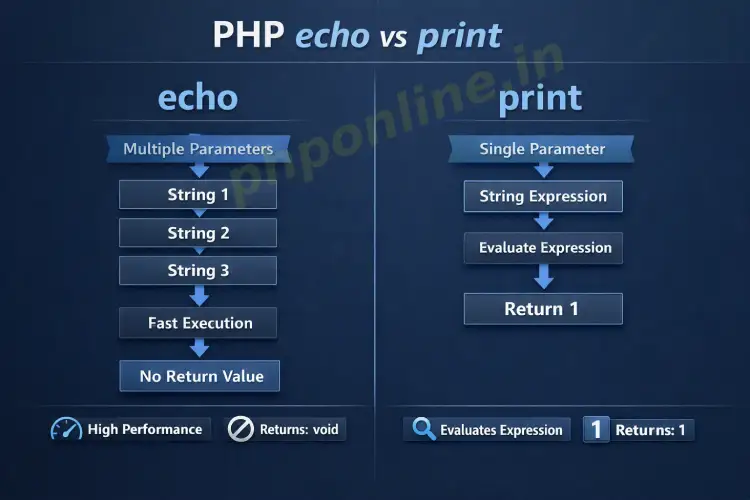
Quick PHP Echo Print Summary:
- Language Constructs: Both
echoandprintare built-in language constructs, not true functions, meaning parentheses are completely optional. - Parameter Handling: The
echoconstruct accepts multiple comma-separated string parameters, whereasprintaccepts only a single string argument. - Return Values:
echoreturns no value (void), whileprintalways returns an integer value of1(making it usable inside complex logical expressions). - Execution Performance:
echoexecutes marginally faster because it does not generate or process a return value.
Welcome to Lesson 4 of our structured web development course. Following our previous lesson on Easy PHP Syntax Overview: Complete Beginner Guide & Examples, you now understand how the server parses opening tags and executes statements. The next essential step is mastering how to send server output directly to a client’s web browser.
In backend web development, displaying dynamically generated text, rendering HTML elements, and inspecting variable contents are daily tasks. In PHP, the two primary mechanisms used to output data to the screen are echo and print.
In this comprehensive PHP echo print guide, we will explore the syntax, execution mechanics, key performance differences, parameter rules, and practical security practices for rendering dynamic browser content cleanly.
Prerequisites Before Outputting Server Data
To follow along with the code snippets in this PHP echo print tutorial, ensure your setup meets these basic requirements:
- Active Local Web Server: A running installation of Apache or Nginx with PHP 8.x+ (configured via XAMPP, Homebrew, or Terminal).
- Code Editor: A modern IDE such as Visual Studio Code or PhpStorm.
- Syntax Foundations: Familiarity with opening tags (
<?php ... ?>) and statement semicolons.
If you need to review local server installation steps, visit our tutorial on Easy PHP Installation Guide: Complete Step-by-Step Setup.
1. The PHP Echo Construct Explained
The echo statement is the most widely used output mechanism in PHP web development. Because it is a language construct rather than a function, you can write it with or without parentheses surrounding the output argument.
Basic Echo Usage and Syntax
Here are standard examples displaying string literals and HTML elements using echo:
<?php
// Standard output without parentheses
echo "Welcome to PHPOnline!<br>";

// Output using optional parentheses
echo("Learning PHP echo print constructs is simple.<br>");

// Outputting structural HTML markup directly
echo "<h3 style='color: #0073aa;'>Dynamic Heading Rendered via Echo</h3>";
?>
Passing Multiple Parameters to Echo
A unique feature of the echo construct is its ability to accept multiple string parameters separated by commas. The parser outputs each argument sequentially without requiring prior string concatenation:
<?php
$firstName = "Alex";
$lastName = "Mercer";
$role = "Full-Stack Developer";

// Passing multiple comma-separated arguments directly to echo
echo "User: ", $firstName, " ", $lastName, " — Role: ", $role, "<br>";
?>
Passing multiple arguments using commas is slightly faster and uses less temporary server memory than concatenating strings with the dot operator (.), because the preprocessor does not need to merge strings in memory before rendering.
2. The PHP Print Construct Explained
Like echo, the print statement is a language construct used to output text and HTML to the browser window. Parentheses are also optional when using print.
Basic Print Usage and Syntax
<?php
// Standard output using print
print "Displaying output via print construct.<br>";

// Output using optional parentheses
print("Print statement executing successfully.<br>");
?>
Return Value Behavior of Print
The primary functional difference between echo and print is that print always returns an integer value of 1. This allows print to participate in evaluation expressions, ternary logic, and conditional operations where an execution status is required:
<?php
// Demonstrating the return value of print
$result = print("Testing print return execution.<br>");

// $result now contains the integer value 1
echo "The value returned by the print statement is: " . $result; // Outputs: 1
?>
However, because print must always compute and pass back a return integer value, it cannot accept multiple comma-separated arguments. Attempting to pass multiple comma-separated parameters to print triggers a fatal syntax error.
Comprehensive Comparison: PHP Echo vs Print
Understanding the exact technical differences between these two constructs helps you select the correct tool for your backend scripts:
| Feature / Criteria | echo Construct | print Construct |
|---|---|---|
| Parameter Limit | Accepts multiple string arguments separated by commas (e.g., echo $a, $b, $c;). | Accepts strictly a single string argument. Passing commas causes a syntax error. |
| Return Value | Has no return value (void execution). | Always returns an integer value of 1. |
| Expression Usage | Cannot be used inside complex expressions or conditional evaluations. | Can be embedded inside expressions, ternary statements, and logical tests. |
| Execution Speed | Marginally faster because it skips return value generation. | Marginally slower due to setting the return status integer. |
| Industry Usage | Used in over 95% of web development codebases and modern templates. | Used selectively when expression evaluation is required. |
Outputting Variables and Interpolation Rules
When using PHP echo print constructs to display variables, string quote encapsulation dictates whether variable values are evaluated dynamically or printed as literal text.
Double Quotes (” “) vs Single Quotes (‘ ‘)
PHP parses variables placed inside double quotes directly (a process called variable interpolation). Text enclosed in single quotes is treated as literal text, and variable names are printed as plain text strings:
<?php
$topic = "Web Security";

// Double Quotes: Evaluates and prints the variable value
echo "Today we are studying $topic.<br>";
// Outputs: Today we are studying Web Security.

// Single Quotes: Treats $topic as literal characters
echo 'Today we are studying $topic.<br>';
// Outputs: Today we are studying $topic.
?>
Outputting Complex Variables with Print_r and Var_dump
Neither echo nor print can display complex data structures like arrays or objects directly. Attempting to echo an array results in an “Array to string conversion” warning. For debugging complex variables, use print_r() or var_dump():
<?php
$frameworks = ["Laravel", "Symfony", "CodeIgniter"];

// Incorrect: Causes Warning
// echo $frameworks;

// Correct Debugging Output:
echo "<pre>";
print_r($frameworks);
echo "</pre>";
?>
Practical Example: Building Dynamic HTML Output
Below is a complete, real-world example demonstrating how to safely mix PHP echo print constructs, variable interpolation, conditional statements, and HTML escaping inside a web template:
<?php
declare(strict_types=1);

// User profile data
$userName = "Sarah Connor";
$subscriptionActive = true;
$completedLessons = 4;
$totalLessons = 20;

// Calculating progress percentage
$progressPercentage = ($completedLessons / $totalLessons) * 100;
?>

<!-- User Dashboard Portal -->
<h2>Student Learning Portal</h2>

<?php
// Outputting welcome banner using echo interpolation
echo "<p>Welcome back, <strong>" . htmlspecialchars($userName, ENT_QUOTES, 'UTF-8') . "</strong>!</p>";

// Using print in a conditional evaluation
if ($subscriptionActive) {
    print "<p style='color: green;'>Account Status: Active Member</p>";
} else {
    print "<p style='color: red;'>Account Status: Subscription Expired</p>";
}

// Displaying calculated metrics with comma-separated echo parameters
echo "<p>Progress: ", $completedLessons, " of ", $totalLessons, " lessons completed (", $progressPercentage, "%).</p>";
?>
Troubleshooting Common Echo & Print Errors
Use this troubleshooting table to quickly identify and fix common output errors when rendering pages:
| Observed Error | Probable Cause | Recommended Solution |
|---|---|---|
Warning: Array to string conversion | Attempting to display an array variable using echo or print. | Use a loop to print individual array elements or use print_r($array) for debugging. |
Parse error: syntax error, unexpected ',' | Passing multiple comma-separated parameters to a print statement. | Switch the print keyword to echo, which natively supports multiple parameters. |
| Variable name prints literally instead of showing value | Encapsulating variables inside single quotes (' ') instead of double quotes (" "). | Change string quotes to double quotes (" ") or concatenate using dots (.). |
| HTML tags display as plain text on screen | Wrapping HTML output inside htmlspecialchars() unnecessarily. | Only apply htmlspecialchars() to dynamic user text inputs, not to raw static HTML tags. |
Frequently Asked Questions (FAQ)
Q1: What is the main difference between echo and print in PHP?
The primary differences are that echo can accept multiple string parameters separated by commas and returns no value, while print accepts only a single string argument and always returns an integer value of 1. Furthermore, echo executes slightly faster.
Q2: Why is echo faster than print in PHP script execution?
echo is marginally faster because it operates purely as an output instruction without generating or setting a return status value in memory. print must generate an integer return value of 1 for expression evaluation, adding minor processing overhead.
Q3: Are parentheses required when using echo or print?
No. Both echo and print are language constructs rather than functions, making parentheses optional (e.g., echo "Hello"; is identical to echo("Hello");). However, omitting parentheses is standard developer convention.
Q4: Can I pass multiple comma-separated string arguments to print?
No. Attempting to pass multiple comma-separated parameters to a print statement triggers a fatal parse error. If you need to output multiple arguments without string concatenation, you must use echo.
Next Steps & Official References
Consult official specifications on the PHP Official Echo Language Construct Manual (php.net).
Ready for the next module? Proceed directly to the first lesson in Module 2: Next Lesson: PHP Variables, Declaration Rules & Scope →
# Summary
Here is what you've learned in this lesson:
- Easy PHP Echo Print Guide: Complete Beginner Tutorial & Differences
- Overview: Understanding PHP Echo Print Language Constructs
- Prerequisites Before Outputting Server Data
- 1. The PHP Echo Construct Explained
- 2. The PHP Print Construct Explained
- Comprehensive Comparison: PHP Echo vs Print
- Outputting Variables and Interpolation Rules
- Practical Example: Building Dynamic HTML Output
- Troubleshooting Common Echo & Print Errors
- Frequently Asked Questions (FAQ)
- Next Steps & Official References