
HTML Document Structure
Easy HTML Document Structure Guide: 4 Essential Structural Tags
Master web page architecture with this complete HTML document structure guide. Learn DOCTYPE declarations, head metadata, body elements, and semantic markup.
Estimated Read Time: 19 Minutes | Category: Web Development Fundamentals
Overview: Understanding HTML Document Structure & Page Skeleton
Quick HTML Document Structure Summary:
- Page Blueprint: The HTML document structure defines the essential scaffolding required by web browsers to interpret and render a web page correctly.
- DOCTYPE Declaration: Every modern document begins with
<!DOCTYPE html>to instruct the browser renderer to use HTML5 standards mode. - The Root Element: The
<html>element wraps all content on the page and specifies the primary document language via thelangattribute. - Head vs. Body Division: The
<head>tag contains non-visible metadata, titles, character encodings, and CSS links, while the<body>tag holds all user-visible text, media, and layout elements. - Character Encoding & Viewport: Declaring
<meta charset="UTF-8">and viewport settings ensures proper character rendering and mobile responsiveness.
Welcome to Lesson 2 of our structured Web Development curriculum. Following our previous lesson on Easy HTML Introduction Guide: 5 Core Web Concepts & Examples, you now understand how browsers parse markup tags into visual web pages. The next vital step in front-end development is constructing a valid, standards-compliant HTML document structure.
Just as a skyscraper requires a solid steel skeleton before interior walls, plumbing, and windows can be installed, a web page requires a standardized document structure before headings, paragraphs, forms, or images can be rendered safely. Operating without a standardized structural wrapper causes browsers to guess layout rules, leading to broken rendering on mobile screens, corrupted characters, and SEO indexing penalties.
In this comprehensive HTML document structure guide, we will break down the HTML5 DOCTYPE, the root container, metadata configuration inside the head section, the visible body tree, essential meta tags, and production-ready HTML template examples.
Prerequisites Before Building Document Structures
To test the hands-on code examples in this HTML document structure tutorial, verify that your development environment meets these basic requirements:
- Web Browser: A modern browser such as Google Chrome, Mozilla Firefox, Microsoft Edge, or Apple Safari.
- Code Editor: A text editor such as Visual Studio Code, Sublime Text, or Notepad++.
- Core Foundations: Elementary understanding of HTML opening tags, closing tags, and attributes.
If you need to review the basic definition of markup tags versus elements, visit our previous guide on Easy HTML Introduction Guide: 5 Core Web Concepts & Examples.
1. The Complete HTML Document Structure Blueprint
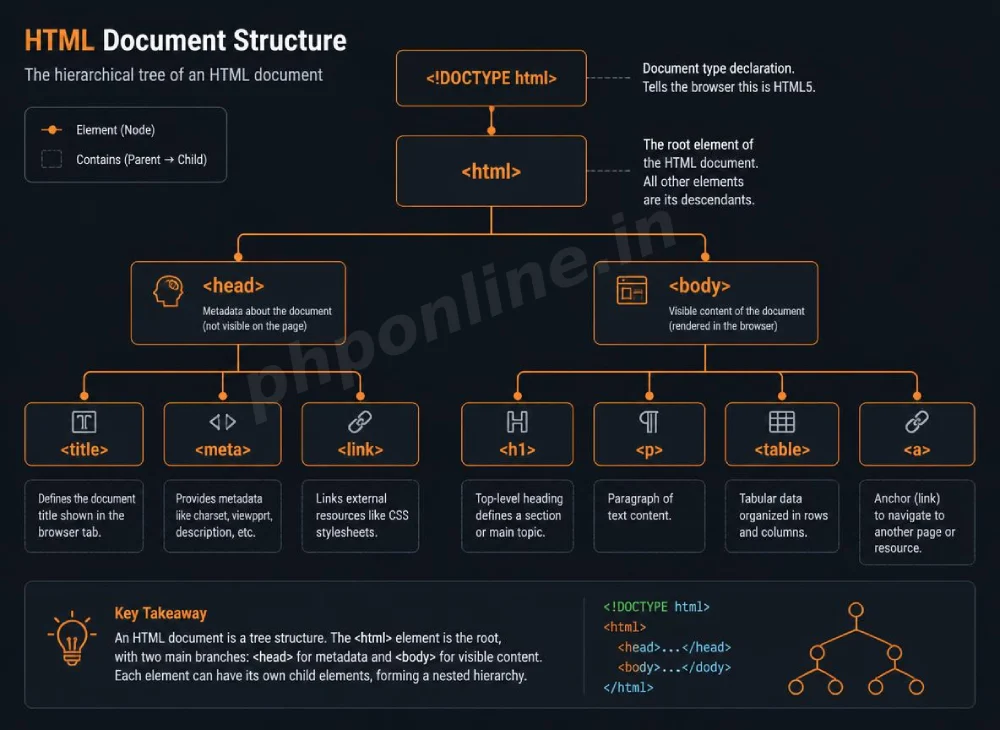
Every valid HTML5 web page follows a strict hierarchical tree structure. Below is the complete standard template used by professional web developers worldwide:
<!DOCTYPE html>
<html lang="en">
<head>
    <!-- Technical Metadata -->
    <meta charset="UTF-8">
    <meta name="viewport" content="width=device-width, initial-scale=1.0">
    <meta name="description" content="A complete guide to understanding HTML document structure.">

    <!-- Browser Tab Title -->
    <title>Standard HTML Document Structure Example</title>
</head>
<body>

    <!-- Visible Web Page Content -->
    <h1>Mastering HTML Document Structure</h1>
    <p>This content is housed inside the visible body container of the webpage.</p>

</body>
</html>
Want to test this HTML structural code live? Try running it in our Online Code Editor & Compiler.
2. Step-by-Step Breakdown of Structural Components
A. The DOCTYPE Declaration (<!DOCTYPE html>)
The <!DOCTYPE html> statement is an instruction to the web browser indicating the version of HTML used in the document. In modern web development, declaring <!DOCTYPE html> at line 1 instructs browsers to parse the page using full **HTML5 Standards Mode**.
If you omit the DOCTYPE declaration, browsers enter Quirks Mode—an legacy emulation state that attempts to render pages according to outdated 1990s browser standards, resulting in inconsistent CSS layouts and broken visual styling.
B. The Root Container (<html lang=”en”>)
The <html> element is the top-level root element that encapsulates all other tags on the web page. It should always include the lang attribute to specify the primary language of the text content (e.g., lang="en" for English, lang="es" for Spanish).
Declaring the primary document language helps search engines index content for language-specific queries and enables screen readers to choose the correct pronunciation voice for visually impaired users.
C. The Head Section (<head>)
The <head> element serves as a container for non-visible administrative instructions and technical metadata. Nothing written inside the <head> block is displayed directly on the visual page canvas (except for the document title shown in the browser tab).
Common tags placed inside the <head> container include:
<meta>: Defines character sets, viewport scaling, page descriptions, and author credits.<title>: Sets the title text displayed in browser tabs and search engine results.<link>: Connects external resources such as CSS stylesheets and favicons to the document.<script>: Embeds or links external JavaScript files.
D. The Body Section (<body>)
The <body> element contains all the visual elements displayed to visitors when they load a webpage. All text headings, paragraphs, images, tables, hyperlinks, audio, video, and dynamic forms must be placed inside the <body> container.
3. Crucial Metadata Tags Every Document Needs
Metadata tags provide search engines, social media platforms, and mobile devices with critical directives regarding how a document should be indexed and scaled.
| Metadata Tag Syntax | Primary Function & Purpose | Impact if Omitted |
|---|---|---|
<meta charset="UTF-8"> | Specifies UTF-8 character encoding, supporting all international letters, numbers, and special symbols. | Accented characters, non-English text, and emojis render as broken gibberish symbols (e.g., ). |
<meta name="viewport" content="width=device-width, initial-scale=1.0"> | Configures mobile responsiveness by setting screen width to match device width and setting initial zoom scale. | Mobile devices render web pages as tiny desktop views requiring manual pinch-to-zoom. |
<meta name="description" content="..."> | Provides a 150-160 character summary of page content for search engines. | Search engines automatically pull random text snippets from the body to display in search results. |
4. Semantic Layout Elements Inside the Body
In modern HTML5 document structure, placing all visual elements inside non-semantic <div> wrappers is considered bad practice. HTML5 introduces semantic layout tags that describe their precise structural meaning to search engines:
<!DOCTYPE html>
<html lang="en">
<head>
<meta charset="UTF-8">
<meta name="viewport" content="width=device-width, initial-scale=1.0">
<title>Semantic HTML Document Structure</title>
</head>
<body>
<!-- Header Navigation Area -->
<header>
<h1>PHPOnline Learning Hub</h1>
<nav>
<a href="https://phponline.in/tutorials/html/html-introduction/">HTML Intro</a> |
<a href="https://phponline.in/tutorials/html/html-document-structure/">Document Structure</a>
</nav>
</header>
<!-- Main Content Column -->
<main>
<h2>Understanding Semantic Elements</h2>
<p>Semantic tags describe their meaning to both developer and browser.</p>
</main>
<!-- Footer Area -->
<footer>
<p>© 2026 PHPOnline Platform. All Rights Reserved.</p>
</footer>
</body>
</html>Want to test this HTML code live? Try running it in our Online Code Editor & Compiler.
What Is HTML Basic Structure
HTML basic structure is the fixed format of an HTML document that browsers recognize and follow.
It defines:
- Document type
- Page container
- Page information
- Visible content
Every valid HTML page must follow this structure.
Why HTML Basic Structure Is Important
Importance of HTML Structure
| Reason | Explanation |
|---|---|
| Browser Compatibility | Ensures correct display |
| SEO Friendly | Helps search engines understand pages |
| Clean Code | Easy to read and maintain |
| Required Standard | Used in all websites |
| Beginner Friendly | Reduces errors |
Complete HTML Basic Structure Example
Below is a complete and correct HTML page structure:
Example Code
<!DOCTYPE html>
<html>
<head>
    <title>HTML Basic Structure</title>
</head>
<body>

<h1>Welcome to HTML</h1>
<p>This is a basic HTML page structure.</p>

</body>
</html>
Output
Welcome to HTML
This is a basic HTML page structure.
Parts of HTML Basic Structure
HTML structure is made up of several parts.
Structure Overview
| Part | Description |
|---|---|
<!DOCTYPE> | Declares HTML5 document |
<html> | Root element |
<head> | Page information |
<title> | Browser tab title |
<body> | Visible content |
DOCTYPE Declaration
Example
<!DOCTYPE html>
Explanation
- Declares the document as HTML5
- Always written at the top
- Helps browsers follow standards
Output
DOCTYPE does not show any visible output.
<html> Tag
Example
<html>
    <body>
        <p>Hello HTML</p>
    </body>
</html>
Explanation
- Root container of the page
- Wraps all HTML elements
Output
Hello HTML
<head> Tag
The <head> tag stores information about the page.
Example
<head>
    <title>My Web Page</title>
</head>
Explanation
- Contains metadata
- Content inside
<head>is not visible
Output
My Web Page (shown on browser tab)
<title> Tag
Example
<title>HTML Structure Example</title>
Explanation
- Displays page title on browser tab
- Important for SEO
- Required for every page
Output
HTML Structure Example (browser tab)
<body> Tag
Example
<body>
    <h1>Main Content</h1>
    <p>This content appears on the webpage.</p>
</body>
Explanation
- Contains all visible content
- Text, images, and links are written here
Output
Main Content
This content appears on the webpage.
HTML Structure Summary Table
| Tag | Purpose | Visible |
|---|---|---|
<!DOCTYPE> | HTML version declaration | No |
<html> | Root container | Yes |
<head> | Page info | No |
<title> | Tab title | Yes (tab) |
<body> | Page content | Yes |
HTML Structure With Comments
Example
<!DOCTYPE html>
<html>
<head>
    <!-- Page title -->
    <title>My First HTML Page</title>
</head>
<body>

    <!-- Main heading -->
    <h1>Hello World</h1>

    <!-- Paragraph -->
    <p>This is my first HTML page.</p>

</body>
</html>
Output
Hello World
This is my first HTML page.
Visual Representation of HTML Structure
<!DOCTYPE html>
<html>
   <head>
      Page Title and Meta Information
   </head>
   <body>
      Visible Web Content
   </body>
</html>
Common HTML Structure Mistakes
| Mistake | Result |
|---|---|
| Missing DOCTYPE | Browser compatibility issues |
Writing content in <head> | Content not visible |
No <title> | Poor SEO |
| Unclosed tags | Page errors |
| Wrong tag order | Invalid HTML |
HTML basic structure, HTML page structure, HTML skeleton, HTML document structure, HTML structure for beginners
HTML Structure Is Universal
The basic HTML structure is the same for:
- Small websites
- Large applications
- Static pages
- Dynamic pages
Only the content inside <body> changes.
Troubleshooting Common Document Structure Errors
| Observed Structural Issue | Probable Cause | Recommended Solution |
|---|---|---|
| Web page renders incorrectly in legacy Internet Explorer/Edge modes | Missing or misspelled <!DOCTYPE html> declaration on line 1, causing Quirks Mode. | Place <!DOCTYPE html> as the absolute first line of your document before any whitespace. |
| Page title displays as raw filename in browser tab | Missing or improperly nested <title> tag inside the <head> section. | Ensure <title>Your Title</title> is placed inside the <head> ... </head> block. |
Visible text content placed inside <head> section | Placing paragraph or heading tags above the opening <body> tag. | Move all visual content (headings, paragraphs, links) into the <body> section. |
| Search engines fail to detect site language | Omitting the lang attribute from the root <html> tag. | Update root tag to include language codes (e.g., <html lang="en">). |
Frequently Asked Questions (FAQ)
Q1: What is an HTML document structure and why is it important?
An HTML document structure is the standardized hierarchical framework required for every web page. It informs web browsers how to parse content using modern HTML5 standards mode, sets metadata, configures mobile viewports, and separates non-visible head information from visual body content.
Q2: What happens if I forget to include <!DOCTYPE html>?
If you omit the <!DOCTYPE html> declaration, browsers enter “Quirks Mode.” In Quirks Mode, browsers render content using legacy, outdated rendering rules from the 1990s, leading to broken CSS layouts, font rendering issues, and cross-browser inconsistencies.
Q3: What is the main difference between the <head> and <body> tags?
The <head> tag contains non-visible metadata, character set declarations, scripts, and links to CSS stylesheets. The <body> tag contains all visible content displayed on the screen, including text, images, forms, and tables.
Q4: Why is the <meta name=”viewport” …> tag necessary?
The viewport meta tag instructs mobile web browsers to scale web page dimensions to fit the screen width of the user’s mobile device. Without it, mobile browsers display web pages as tiny, unreadable desktop layouts requiring manual zoom.
Next Steps & Official References
Consult official technical standards on the MDN Official HTML Getting Started Guide (mozilla.org).
Ready for the next lesson? Proceed directly to the next lesson in Module 1: Next Lesson: HTML Headings, Paragraphs & Text Formatting →
# Summary
Here is what you've learned in this lesson:
- Easy HTML Document Structure Guide: 4 Essential Structural Tags
- Overview: Understanding HTML Document Structure & Page Skeleton
- Prerequisites Before Building Document Structures
- 1. The Complete HTML Document Structure Blueprint
- 2. Step-by-Step Breakdown of Structural Components
- 3. Crucial Metadata Tags Every Document Needs
- 4. Semantic Layout Elements Inside the Body
- What Is HTML Basic Structure
- Why HTML Basic Structure Is Important
- Complete HTML Basic Structure Example
- Parts of HTML Basic Structure
- DOCTYPE Declaration
- <html> Tag
- <head> Tag
- <title> Tag
- <body> Tag
- HTML Structure Summary Table
- HTML Structure With Comments
- Visual Representation of HTML Structure
- Common HTML Structure Mistakes
- HTML Structure Is Universal
- Troubleshooting Common Document Structure Errors
- Frequently Asked Questions (FAQ)
- Next Steps & Official References
Continue to the next lesson and learn more about HTML Introduction.