
HTML Introduction
Easy HTML Introduction Guide: 5 Core Web Concepts & Examples
Master web development with this complete HTML introduction guide. Learn markup tags, document structure, elements, attributes, and browser rendering.
Estimated Read Time: 18 Minutes | Category: Web Development Fundamentals
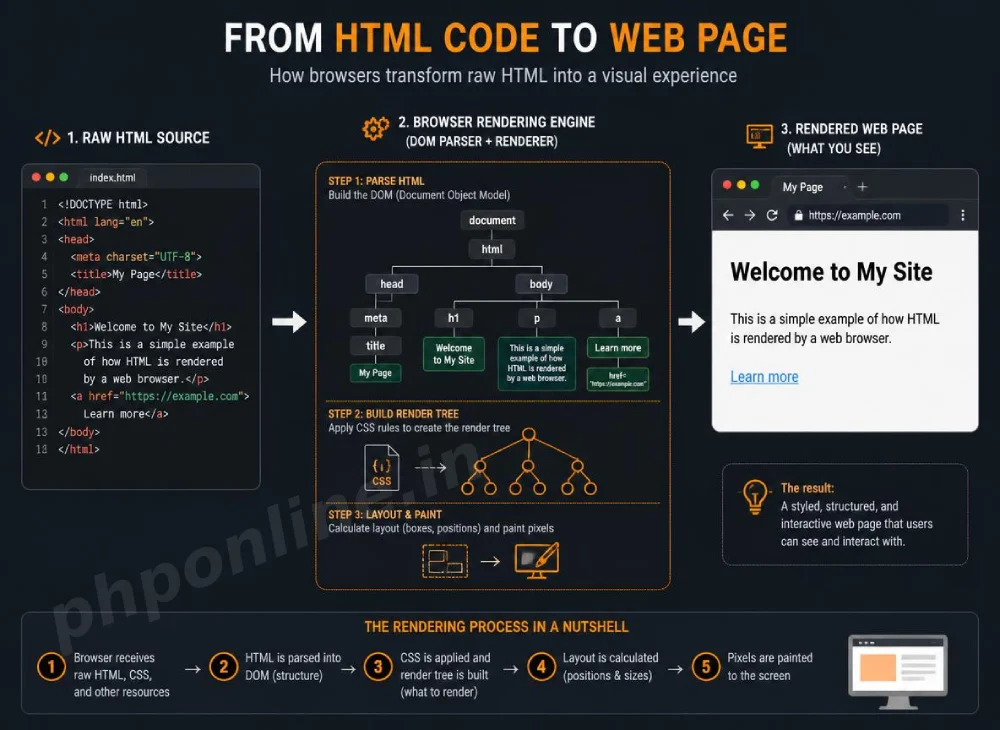
Overview: Complete HTML Introduction & Web Standards
Quick HTML Introduction Summary:
- Web Markup Backbone: HTML (HyperText Markup Language) is the standard markup language used to create and structure web pages across the internet.
- Tag-Based Architecture: Web browsers read HTML tags (such as
<h1>,<p>, and<a>) to render text, images, forms, and media elements on screen. - Client-Side Processing: HTML code is interpreted directly inside the user’s web browser (Chrome, Firefox, Safari, Edge) without requiring compilation.
- The Core Web Triad: HTML provides content structure, CSS controls visual styling, and JavaScript enables dynamic interactive behavior.
- Semantic Meaning: Modern HTML5 uses descriptive tags that give structural meaning to search engines and accessibility screen readers.
Welcome to Lesson 1 of our structured Web Development curriculum. If you have already explored backend engineering in our Best PHP Tutorial for Beginners, you know that backend scripts execute logic on the server and send rendered output back to the client. The language that displays that output inside the browser is HTML, making this HTML introduction the foundational baseline for all web development.
Every website on the internet—from simple personal blogs to complex platforms like Google, YouTube, and Amazon—relies on HTML as its structural backbone. Without HTML, web browsers would not know how to display text headings, organize paragraphs, render images, embed videos, or create clickable navigation links.
In this comprehensive HTML introduction guide, we will explore markup syntax, the history of HTML5, how web browsers parse documents, HTML tags versus elements, attributes, and basic document architecture.
Prerequisites Before Learning HTML
To follow along with the hands-on code examples in this HTML introduction tutorial, you only need two basic tools installed on your computer:
- Web Browser: A modern web browser such as Google Chrome, Mozilla Firefox, Microsoft Edge, or Apple Safari.
- Text Editor: A code editor like Visual Studio Code, Sublime Text, Notepad++, or Atom.
1. What Is HTML? Understanding HyperText Markup Language
To understand this HTML introduction deeply, let us break down what each term in HyperText Markup Language represents:
- HyperText: Refers to clickable web links (hyperlinks) that connect web pages to one another across the internet. Clicking hypertext allows users to navigate seamlessly across different documents and domains.
- Markup: Refers to the special annotations (tags) placed around raw text to tell the browser how that text should be formatted, structured, or displayed.
- Language: A standardized system of tags and syntax rules maintained by the World Wide Web Consortium (W3C) and WHATWG to ensure web pages display consistently across all browsers globally.
2. How Web Browsers Render HTML Markup
When a user types a web address into a browser or opens a local index.html file, the web browser acts as an interpreter. It reads the raw HTML source code line-by-line from top to bottom, builds an internal structural tree called the Document Object Model (DOM), and renders the visual web page on the screen.
The Web Development Triad: HTML, CSS, and JavaScript
Modern web development relies on three core technologies working together in harmony:
| Technology | Primary Role | Real-World Analogy (Building a House) |
|---|---|---|
| HTML | Defines page structure, content layout, text, images, and links. | The wooden or concrete structural frame and walls. |
| CSS | Controls visual appearance, colors, fonts, margins, and responsive layouts. | The interior paint, wallpaper, decor, and styling. |
| JavaScript | Adds interactive behavior, animations, form validation, and dynamic updates. | The electrical wiring, plumbing, and automated doors. |
3. HTML Syntax: Tags, Elements, and Attributes
A critical concept in this HTML introduction is understanding the distinction between HTML tags, elements, and attributes.
A. HTML Tags
Tags are keywords enclosed inside angle brackets (< and >). Tags usually come in pairs: an opening tag (e.g., <p>) that marks the start of an element, and a closing tag containing a forward slash (e.g., </p>) that marks the end.
B. HTML Elements
An HTML element consists of the opening tag, the inner content between the tags, and the closing tag:
<!-- Complete HTML Element Example -->
<p>This entire statement is an HTML paragraph element.</p>
Empty Elements (Self-Closing): Some HTML elements do not contain text content or closing tags. These are called empty or self-closing elements (such as <img> for images, <br> for line breaks, and <hr> for horizontal rules).
C. HTML Attributes
Attributes provide additional information or configuration parameters to HTML elements. Attributes are always placed inside the opening tag as key-value pairs (e.g., name="value"):
<!-- Element with href attribute -->
<a href="https://phponline.in" target="_blank" title="Visit Homepage">Visit PHPOnline Platform</a>
4. Basic First HTML Document Example
Below is a complete, minimal HTML5 document demonstrating essential structural tags:
<!DOCTYPE html>
<html lang="en">
<head>
<meta charset="UTF-8">
<meta name="viewport" content="width=device-width, initial-scale=1.0">
<title>My First HTML Web Page</title>
</head>
<body>
<h1>Welcome to Web Development!</h1>
<p>This is my very first paragraph written using standard HTML tags.</p>
<a href="https://phponline.in/tutorials/php/php-tutorial/">Proceed to Backend PHP Tutorials →</a>
</body>
</html>Want to test this HTML markup code live? Try running it in our Online Code Editor & Compiler.
5. Breakdown of Document Structure Tags
| Tag Identifier | Structural Purpose & Description |
|---|---|
<!DOCTYPE html> | Mandatory declaration telling the web browser that the document uses the modern HTML5 standard. |
<html> | The root container element that wraps all content on the entire web page. |
<head> | Contains metadata, character encodings, viewport settings, page titles, and CSS links (hidden from visible page body). |
<title> | Defines the page title displayed in browser tabs and search engine search result snippets. |
<body> | Contains all visible content (headings, paragraphs, images, tables, forms) displayed to the user on screen. |
What Is HTML
HTML stands for HyperText Markup Language.
It is the standard language used to create web pages.
HTML tells the browser:
- What content to display
- How content is structured
- Where text, images, and links appear
Why HTML Is Important
HTML is important because it is the base of all websites.
Importance of HTML
| Reason | Explanation |
|---|---|
| Web Structure | Creates page layout |
| Browser Friendly | Understood by all browsers |
| Easy to Learn | Beginner-friendly language |
| Required Skill | Needed for CSS, JS, PHP |
| Universal | Works on all devices |
Without HTML, web pages cannot exist.
How HTML Works
HTML works in a simple way.
HTML Working Process
| Step | Description |
|---|---|
| 1 | Developer writes HTML code |
| 2 | Code is saved as .html file |
| 3 | Browser reads the file |
| 4 | Browser displays content |
HTML does not run like a program.
It is read and rendered by the browser.
HTML File Extension
HTML files are saved using:
.html.htm
Example
index.html
about.html
contact.html
Browsers open these files and display the content.
First Look at HTML Code
Example
<h1>Welcome to HTML</h1>
<p>This is an HTML introduction.</p>
Output
Welcome to HTML
This is an HTML introduction.
Explanation of the Example
| Tag | Purpose |
|---|---|
<h1> | Creates a heading |
<p> | Creates a paragraph |
HTML uses tags to define content.
HTML Tags Introduction
HTML tags are written inside angle brackets.
Example
<p>This is a paragraph</p>
Tag Breakdown
| Part | Meaning |
|---|---|
<p> | Opening tag |
</p> | Closing tag |
| Content | Text inside tags |
Most HTML tags have opening and closing tags.
HTML Is Not Case Sensitive
HTML tags can be written in:
- Uppercase
- Lowercase
Example
<H1>Hello</H1>
<h1>Hello</h1>
Both produce the same output.
Best practice: Always use lowercase.
HTML Is Platform Independent
HTML works on:
| Platform | Supported |
|---|---|
| Windows | Yes |
| macOS | Yes |
| Linux | Yes |
| Mobile | Yes |
Any device with a browser can display HTML.
HTML Needs Other Technologies
HTML alone creates structure, but modern websites also use:
| Technology | Purpose |
|---|---|
| HTML | Structure |
| CSS | Design |
| JavaScript | Interactivity |
HTML is always the starting point.
Simple HTML Page Example
Example Code
<!DOCTYPE html>
<html>
<head>
    <title>HTML Introduction</title>
</head>
<body>

<h1>HTML Intro</h1>
<p>HTML is easy to learn.</p>

</body>
</html>
Output
HTML Intro
HTML is easy to learn.
Where HTML Is Used
HTML is used in:
- Websites
- Web applications
- Email templates
- Online documentation
- Mobile apps (WebView)
Advantages of HTML
| Advantage | Benefit |
|---|---|
| Simple Syntax | Easy to understand |
| Free | Open standard |
| Browser Support | Works everywhere |
| Beginner Friendly | No coding experience needed |
Troubleshooting Common Beginner HTML Errors
| Observed Issue / Error | Probable Cause | Recommended Solution |
|---|---|---|
| Text styling leaks across the entire web page | Forgetting to include a closing tag (e.g., writing <h1>Header without </h1>). | Ensure every opening tag has a corresponding closing tag with a slash (</tag>). |
| Images or links break on published server | Misspelling file paths, upper/lower case mismatches, or using local disk paths (e.g., C:\file.jpg). | Use clean relative file paths (e.g., images/photo.jpg) and match character casing strictly. |
| Non-English characters or emojis render as corrupted symbols | Missing character set declaration inside the <head> block. | Include <meta charset="UTF-8"> inside the <head> section of every HTML file. |
| Web page appears tiny or unreadable on mobile phones | Missing viewport metadata tag for responsive mobile screens. | Include <meta name="viewport" content="width=device-width, initial-scale=1.0"> inside the <head> tag. |
Frequently Asked Questions (FAQ)
Q1: What is an HTML introduction and why is learning HTML necessary?
An HTML introduction teaches the fundamental markup language used to structure web pages across the internet. Learning HTML is necessary for anyone building websites, web applications, or digital content because HTML provides the structural markup that browsers render into text, links, forms, and layout elements.
Q2: Is HTML considered a programming language?
No. HTML is a markup language, not a programming language. Programming languages (like PHP, JavaScript, or Python) perform logic, loops, conditional checks, and calculations. HTML is used exclusively to annotate and structure text content for visual presentation in browsers.
Q3: What is the difference between an HTML tag and an HTML element?
An HTML tag consists of a keyword inside angle brackets (e.g., <p> or </p>). An HTML element encompasses the entire unit—from the opening tag through the enclosed inner content to the closing tag (e.g., <p>Sample Text</p>).
Q4: Do all HTML tags require a closing tag?
No. Most HTML tags require closing tags, but some elements are “void” or “self-closing” elements that do not enclose content. Examples include <img> (image), <br> (line break), <hr> (horizontal rule), and <input> (form field).
Next Steps & Official References
Consult official technical web standards on the MDN Official HTML Documentation (mozilla.org).
Ready for the next lesson in sequence? Proceed directly to the next lesson in Module 1: Next Lesson: Complete HTML Document Structure & Metadata →
# Summary
Here is what you've learned in this lesson:
- Easy HTML Introduction Guide: 5 Core Web Concepts & Examples
- Overview: Complete HTML Introduction & Web Standards
- Prerequisites Before Learning HTML
- 1. What Is HTML? Understanding HyperText Markup Language
- 2. How Web Browsers Render HTML Markup
- 3. HTML Syntax: Tags, Elements, and Attributes
- 4. Basic First HTML Document Example
- 5. Breakdown of Document Structure Tags
- What Is HTML
- Why HTML Is Important
- How HTML Works
- HTML File Extension
- First Look at HTML Code
- Explanation of the Example
- HTML Tags Introduction
- HTML Is Not Case Sensitive
- HTML Is Platform Independent
- HTML Needs Other Technologies
- Simple HTML Page Example
- Where HTML Is Used
- Advantages of HTML
- Troubleshooting Common Beginner HTML Errors
- Frequently Asked Questions (FAQ)
- Next Steps & Official References
Continue to the next lesson and learn more about HTML5 Cheat Sheet — Complete Tag Reference & Examples.