
HTML Headings and Paragraphs
Easy HTML Headings and Paragraphs Guide: 6 Hierarchy Levels & Examples
Master web text formatting with this complete HTML headings and paragraphs guide. Learn H1 to H6 tag hierarchy, paragraph formatting, line breaks, and SEO best practices.
Estimated Read Time: 19 Minutes | Category: Web Development Fundamentals
Overview: Understanding HTML Headings and Paragraphs & Text Structure
Quick HTML Headings and Paragraphs Summary:
- Core Text Architecture: Headings and paragraphs form the primary structural backbone for rendering text content on web pages.
- 6 Heading Levels (H1 to H6): HTML provides six levels of headings, ranging from
<h1>(highest structural importance) to<h6>(lowest structural importance). - Paragraph Containers (<p>): Paragraph elements wrap blocks of body text and automatically introduce top and bottom margin spacing in web browsers.
- Line Breaks (<br>) and Rules (<hr>): The
<br>tag forces a manual line break without starting a new paragraph, while<hr>creates a thematic visual divider. - SEO & Accessibility Hierarchy: Search engine crawlers and screen readers rely on logical heading order (never skip from H1 directly to H4) to parse document outlines.
Welcome to Lesson 3 of our structured Web Development curriculum. Following our previous lesson on Easy HTML Document Structure Guide: 4 Essential Structural Tags, you now understand how to build standard page scaffolding using DOCTYPE, head, and body tags[cite: 330]. The next vital step in front-end design is structuring written text using HTML headings and paragraphs.
When reading books, newspapers, or digital articles, human eyes naturally scan titles, subheadings, and distinct text blocks to absorb information efficiently. If a webpage displayed thousands of words as one continuous wall of unformatted text, visitors would leave immediately. Properly implemented headings and paragraphs organize information logically for human readers, search engine indexers, and assistive screen reader technologies.
In this comprehensive HTML headings and paragraphs guide, we will explore the H1-H6 heading hierarchy scale, paragraph element behavior, whitespace collapsing rules, line break controls, thematic dividers, SEO heading rules, and hands-on code examples.
Prerequisites Before Structuring Text Content
To test the hands-on code examples in this HTML headings and paragraphs tutorial, verify that your development environment meets these basic requirements:
- Web Browser: A modern web browser such as Google Chrome, Mozilla Firefox, Microsoft Edge, or Apple Safari.
- Code Editor: A text editor such as Visual Studio Code, Sublime Text, or Notepad++.
- Core Foundations: Understanding of standard HTML document structure tags (
<html>,<head>,<body>)[cite: 330].
If you need to review how page metadata and body containers are configured, visit our previous guide on Easy HTML Document Structure Guide: 4 Essential Structural Tags.
1. The 6 Levels of HTML Headings (H1 through H6)
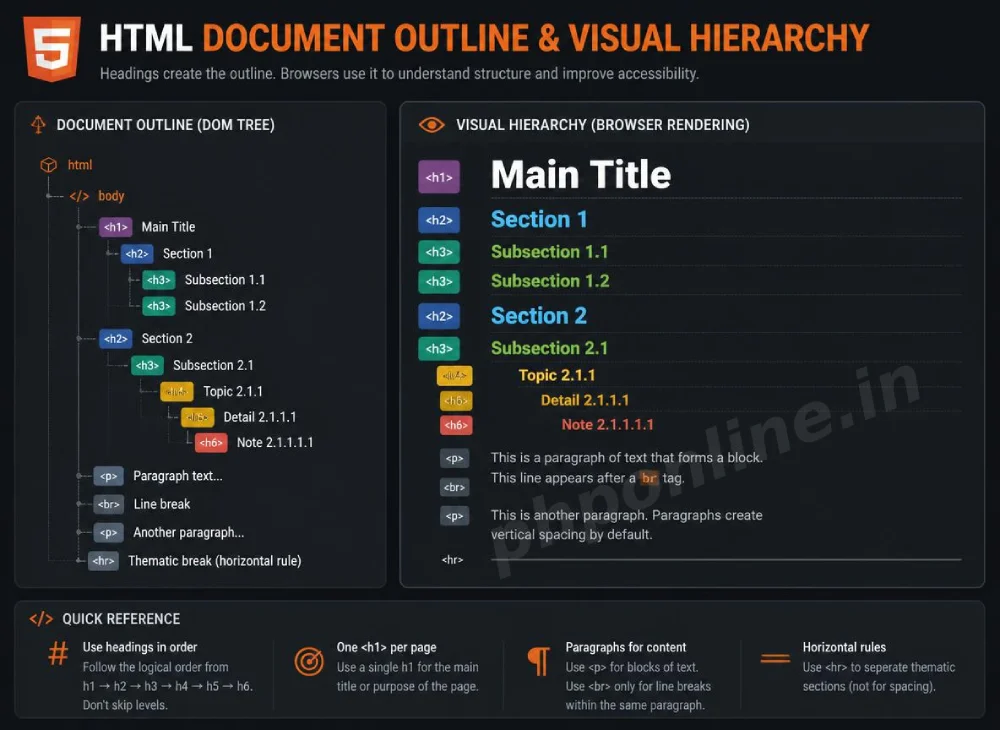
HTML defines six levels of heading elements using the tags <h1>, <h2>, <h3>, <h4>, <h5>, and <h6>. By default, browsers render higher-level headings in larger, bolder fonts:
<h1>Heading Level 1 — Primary Page Title</h1>
<h2>Heading Level 2 — Main Section Header</h2>
<h3>Heading Level 3 — Subsection Header</h3>
<h4>Heading Level 4 — Minor Subsection Header</h4>
<h5>Heading Level 5 — Low-Level Subheader</h5>
<h6>Heading Level 6 — Lowest Importance Subheader</h6>
Want to test this HTML markup live? Try running it in our Online HTML Editor.
Best Practices for HTML Heading Hierarchy & SEO
Search engines like Google evaluate heading tags to understand the core topic of a web page[cite: 8]. Adhere to these strict SEO guidelines when structuring headings:
- Single H1 per Page: Include strictly one
<h1>tag per webpage representing the primary page topic or title[cite: 8]. - Sequential Nesting: Maintain strict numerical order. Never skip heading levels (e.g., do not jump directly from an
<h2>to an<h4>without an intermediate<h3>). - Do Not Use Headings for Font Styling: Never use heading tags simply to make text bold or large. Use CSS font properties for visual styling and reserve heading tags strictly for structural outline meaning.
- Include Target Keywords: Naturally embed relevant focus keywords inside your
<h1>and<h2>subheadings to improve search engine rankings[cite: 8, 38, 58].
2. Working with HTML Paragraphs (<p>)
Paragraphs are defined using the <p> tag. The paragraph element is a block-level container, meaning web browsers automatically add a blank vertical margin before and after every paragraph block to separate written thoughts cleanly.
Basic Paragraph Example
<p>This is the first paragraph of text on our web page. Web browsers automatically add vertical margin spacing around this block.</p>

<p>This is a second separate paragraph. Notice how the browser automatically places it on a new line with vertical separation.</p>
Want to test this HTML markup live? Try running it in our Online HTML Editor.
3. White Space Collapsing in HTML Text
A unique characteristic of HTML text rendering is whitespace collapsing. When a web browser parses raw HTML source code, it automatically reduces multiple consecutive spaces, tabs, or newlines inside a <p> tag into a single space character:
<!-- Source Code with Multiple Spaces and Line Breaks -->
<p>
    This text      contains       multiple spaces
    and      several line
    breaks.
</p>

<!-- Browser Output Rendered on Screen: -->
<!-- "This text contains multiple spaces and several line breaks." -->
If you need to preserve exact spaces and line breaks (such as when displaying poem stanzas or source code snippets), wrap text inside the <pre> (preformatted text) tag instead of a <p> tag.
4. Line Breaks (<br>) and Horizontal Rules (<hr>)
When formatting text, you will frequently need to force a line break without starting a new paragraph block, or insert a visual horizontal divider between topics.
A. The Line Break Tag (<br>)
The <br> tag is an empty (self-closing) element that forces the browser to jump to a new line immediately within the same paragraph. It is ideal for street addresses, poem lines, and contact signatures:
<p>
    PHPOnline Platform Headquarters<br>
    123 Tech Campus Way<br>
    Suite 400<br>
    Web City, CA 90210
</p>
Want to test this HTML markup live? Try running it in our Online HTML Editor.
Caution: Do not use consecutive <br><br><br> tags to create large vertical gaps between page sections. Use CSS margin and padding properties to control layout spacing.
B. The Horizontal Rule Tag (<hr>)
The <hr> tag is an empty (self-closing) element that renders a horizontal divider line across the page. In semantic HTML5, <hr> represents a thematic break between distinct sections or topics:
<h2>Section 1: Frontend Development</h2>
<p>Frontend development focuses on everything users see and interact with in their web browsers.</p>

<hr>

<h2>Section 2: Backend Development</h2>
<p>Backend development focuses on server logic, database connectivity, and security.</p>
Want to test this HTML markup live? Try running it in our Online HTML Editor.
5. Complete Text Formatting Page Example
Below is a complete, well-structured webpage demonstrating proper usage of headings, paragraphs, line breaks, and thematic horizontal dividers:
<!DOCTYPE html>
<html lang="en">
<head>
    <meta charset="UTF-8">
    <meta name="viewport" content="width=device-width, initial-scale=1.0">
    <title>HTML Headings and Paragraphs Practice Page</title>
</head>
<body>

    <h1>Comprehensive Guide to Modern Web Architecture</h1>
    <p>Published by PHPOnline Educational Platform | Category: Web Fundamentals</p>

    <hr>

    <h2>Module 1: Introduction to Web Design</h2>
    <p>
        Web design is the process of creating visually engaging, accessible, and structured digital interfaces across desktop and mobile devices.
    </p>

    <h3>Key Component 1: HTML Markup</h3>
    <p>
        HTML provides the structural scaffolding for web content.<br>
        It allows browsers to render text, images, and links cleanly.
    </p>

    <h3>Key Component 2: CSS Styling</h3>
    <p>
        CSS manages visual presentation, layout margins, colors, and responsive screen scaling.
    </p>

    <hr>

    <h2>Contact Information</h2>
    <p>
        Have questions about our course syllabus? Reach out to our support team:<br>
        Email: support@phponline.in<br>
        Hours: Monday – Friday (9:00 AM – 5:00 PM)
    </p>

</body>
</html>
Want to test this HTML markup live? Try running it in our Online HTML Editor.
Summary Comparison: Text Structuring Elements
| Tag Syntax | Element Category | Visual Display Effect | Primary Semantic Purpose |
|---|---|---|---|
<h1> | Block Element | Extra large bold text (Top level) | Defines the single main title or primary topic of a webpage. |
<h2> – <h6> | Block Element | Decreasing bold text scale | Defines major sub-sections and minor nested topic headers. |
<p> | Block Element | Regular body text with vertical margins | Groups sentences together into distinct readable paragraph blocks. |
<br> | Inline Void Element | Forces immediate line wrap | Inserts manual line breaks inside addresses, poems, or forms. |
<hr> | Block Void Element | Renders a horizontal dividing line | Represents a thematic transition or break between major topics. |
Troubleshooting Common Text Formatting Errors
| Observed Text Issue | Probable Cause | Recommended Solution |
|---|---|---|
| Multiple headings render at identical font sizes on screen | CSS stylesheet rules overriding default heading sizes, or accidental duplicate tags. | Inspect elements in browser Developer Tools to verify heading level hierarchy. |
| Line breaks inside code editor don’t appear on the published webpage | Relying on physical Enter key line breaks inside a <p> tag without using <br>. | Use explicit <br> tags for line breaks or wrap distinct sentences in separate <p> containers. |
| Entire document text displays in huge bold font | Omitting the closing tag on an <h1> or <h2> tag (e.g., <h1>Title without </h1>). | Ensure every opening heading tag has a corresponding closing tag (</h1>). |
| Search engines flag page with “Multiple H1 tags” warning | Using more than one <h1> tag on a single webpage. | Keep strictly one <h1> tag per page for main title, and convert lower section titles to <h2>. |
Frequently Asked Questions (FAQ)
Q1: What are HTML headings and paragraphs and why are they important?
HTML headings and paragraphs are fundamental markup elements used to structure text content on webpages. Headings (H1 to H6) establish a clear topic hierarchy, while paragraphs (<p>) group body sentences into readable text blocks, optimizing readability for human users, screen readers, and search engine crawlers[cite: 8].
Q2: How many H1 headings should be used on a single webpage?
Standard SEO best practice requires using strictly **one** <h1> heading per webpage[cite: 8]. The H1 heading represents the primary title of the document. Sub-sections throughout the page should use <h2>, <h3>, and lower-level headings sequentially[cite: 8, 38, 58].
Q3: What is the difference between a paragraph (<p>) and a line break (<br>)?
A paragraph (<p>) is a block-level container that creates a separate text section with automatic top and bottom vertical margin spacing. A line break (<br>) is an inline void element that simply shifts text to the next line immediately within the same paragraph block without adding extra margin spacing.
Q4: Why doesn’t HTML display multiple consecutive spaces or line breaks?
Web browsers apply a rule called “whitespace collapsing,” which automatically reduces multiple consecutive spaces, tabs, and newline breaks in source code down to a single space character. To force extra line breaks, use <br>, or use CSS margin properties for layout spacing.
Next Steps & Official References
Consult official technical web standards on the MDN Official Heading Elements Documentation (mozilla.org).
Ready for the next lesson in sequence? Proceed directly to the final lesson in Module 1: Next Lesson: HTML Text Formatting Tags (strong, em, mark, code) →
# Summary
Here is what you've learned in this lesson:
- Easy HTML Headings and Paragraphs Guide: 6 Hierarchy Levels & Examples
- Overview: Understanding HTML Headings and Paragraphs & Text Structure
- Prerequisites Before Structuring Text Content
- 1. The 6 Levels of HTML Headings (H1 through H6)
- 2. Working with HTML Paragraphs (<p>)
- 3. White Space Collapsing in HTML Text
- 4. Line Breaks (<br>) and Horizontal Rules (<hr>)
- 5. Complete Text Formatting Page Example
- Summary Comparison: Text Structuring Elements
- Troubleshooting Common Text Formatting Errors
- Frequently Asked Questions (FAQ)
- Next Steps & Official References
Continue to the next lesson and learn more about HTML Formatting Tags.