
JavaScript Syntax & Variables
Easy JavaScript Syntax and Variables Guide: 5 Core Rules & Examples
Master modern script fundamentals with this complete JavaScript syntax and variables guide. Learn let, const, var, block scope, hoisting, and naming rules.
Estimated Read Time: 21 Minutes | Category: Web Development Fundamentals
Overview: Understanding JavaScript Syntax and Variables & Data Storage
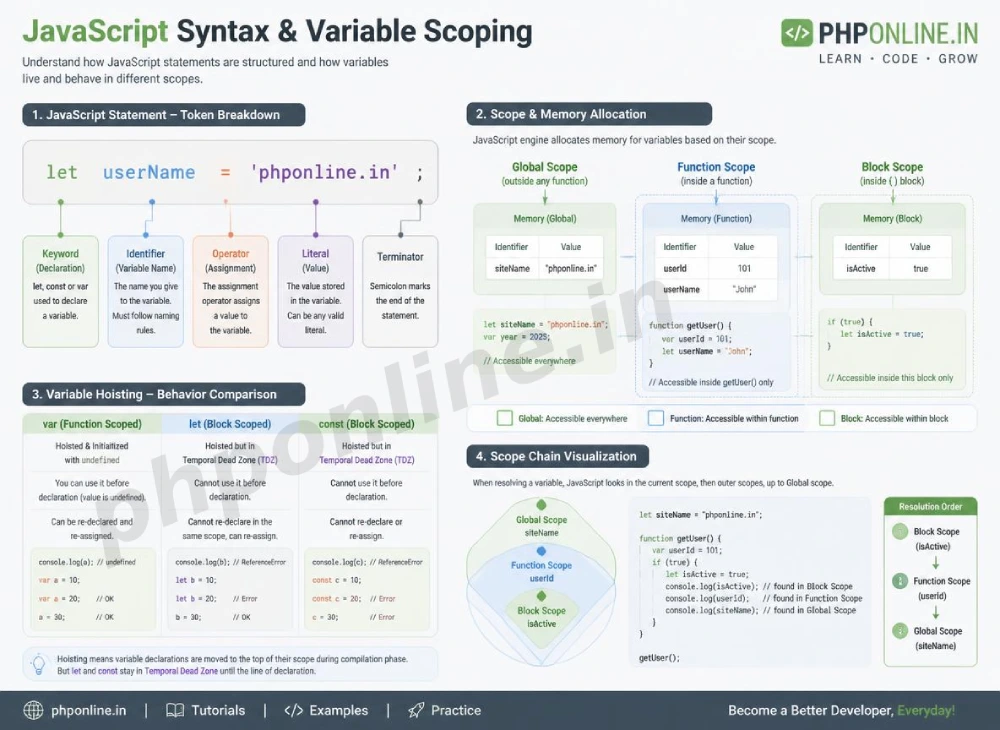
Quick JavaScript Syntax and Variables Summary:
- Structural Grammar: JavaScript syntax defines the exact set of structural rules, statement formats, and keyword conventions required to write valid, executable scripts.
- Data Containers (Variables): Variables act as named memory containers that store, retrieve, and manipulate data values throughout application execution.
- Modern Declaration Keywords: Modern ES6+ JavaScript uses
constfor immutable constant references andletfor re-assignable block-scoped variables, replacing legacyvar. - Scope Boundaries: Variable accessibility is constrained by scope levels: Global Scope (accessible everywhere), Function Scope (inside functions), and Block Scope (inside
{}curly braces). - Hoisting Mechanics: JavaScript hoists variable declarations to the top of their scope during compilation, though
letandconstremain uninitialized inside a Temporal Dead Zone (TDZ).
Welcome to Lesson 2 of our structured Web Development curriculum. Following our previous lesson on Easy JavaScript Introduction Guide: 5 Core Programming Concepts & Examples, you now understand how web browsers execute client-side scripts to manipulate the DOM. The next fundamental step in mastering front-end programming is understanding JavaScript syntax and variables.
Just as human languages follow grammatical rules to form coherent sentences, programming languages rely on strict syntax to give unambiguous instructions to computer execution engines. Variables form the bedrock of programming logic—allowing your scripts to memorize user inputs, calculate dynamic shopping cart totals, track user login states, and pass data between functions.
In this comprehensive JavaScript syntax and variables guide, we will explore statement structures, case sensitivity, comment formats, variable keywords (`let`, `const`, `var`), naming rules, scope boundaries, hoisting behavior, and hands-on code examples.
Prerequisites Before Declaring Variables
To test the hands-on code examples in this JavaScript syntax and variables tutorial, verify that your development environment meets these basic requirements:
- Web Browser: A modern web browser with Developer Tools (Google Chrome, Mozilla Firefox, Microsoft Edge, or Apple Safari).
- Code Editor: A text editor such as Visual Studio Code, Sublime Text, or Notepad++.
- JavaScript Foundations: Understanding of basic browser console debugging and script tag placement.
If you need to review how script tags embed into HTML documents, visit our previous guide on Easy JavaScript Introduction Guide: 5 Core Programming Concepts & Examples.
1. Core Rules of JavaScript Syntax
JavaScript syntax specifies how code statements, expressions, and literals are written so that browser engines (like Chrome’s V8) can parse them without throwing syntax errors.
A. Statements and Semicolons
A JavaScript program is a list of executable **statements**. Statements perform actions and are typically written on separate lines. While JavaScript features Automatic Semicolon Insertion (ASI), ending every statement explicitly with a semicolon (;) is considered an essential best practice:
// Two distinct JavaScript statements terminated with semicolons
let userAge = 25;
console.log(userAge);
B. Case Sensitivity
JavaScript is strictly **case-sensitive**. Keywords, function names, and variable identifiers must match exact letter casing. For example, myVariable, myvariable, and MYVARIABLE are treated as three completely separate memory references:
let score = 100;
let Score = 200; // Completely different variable from 'score'!
C. Code Comments
Comments explain code logic to human developers and are ignored completely by the JavaScript engine:
// Single-line comment: Explains the statement below
let taxRate = 0.08;

/* Multi-line comment:
   Used for lengthy explanations
   or temporarily disabling code blocks.
*/
Want to test these syntax rules live? Try running your code in our Online Code Editor.
2. Declaring Variables: let, const, and var
JavaScript provides three keywords to declare variables: const, let, and var. Choosing the correct keyword prevents accidental data overwrites and memory leaks.
1. const (Constant Declarations) — Modern Recommended Default
The const keyword creates a read-only, constant reference to a value. Variables declared with const **cannot be reassigned** and **must be initialized immediately** upon declaration:
// Declaring a constant reference
const API_URL = "https://api.phponline.in/v1";
// API_URL = "https://other.com"; // ❌ TypeError: Assignment to constant variable!
Best Practice Rule: Use const by default for all variable declarations unless you know the variable’s value must change later in the script.
2. let (Block-Scoped Variables) — Re-assignable Values
The let keyword declares a re-assignable, block-scoped variable. Use let when a variable’s stored value will change during execution (such as loop counters, calculation totals, or status toggles):
// Declaring a re-assignable variable using let
let currentScore = 0;
currentScore = 15; // ✅ Valid reassignment!
currentScore = currentScore + 10; // Result: 25
3. var (Legacy Function-Scoped Variable) — Discouraged in Modern JS
The var keyword was the original variable declaration method prior to ES6 (2015). var is function-scoped rather than block-scoped and permits duplicate re-declarations, which introduces subtle bugs in modern applications:
// Legacy var declaration (Avoid in modern code)
var userRole = "Admin";
var userRole = "Guest"; // ❌ Duplicate re-declaration allowed without warning!
Want to test these variable declarations live? Try running them in our Online Code Editor.
3. Variable Naming Rules and Conventions
When creating variable identifiers in JavaScript, you must adhere to strict technical naming rules:
Mandatory Naming Rules:
- Variable names can contain letters (a-z, A-Z), digits (0-9), underscores (
_), and dollar signs ($). - Variable names **must begin** with a letter, an underscore (
_), or a dollar sign ($). They **cannot start with a number** (e.g.,let 1user = "Alex";is invalid!). - Variable names cannot use reserved JavaScript keywords (such as
let,class,function,return, orif).
Recommended Coding Conventions:
- camelCase (Standard): Combine words by lowercasing the first word and capitalizing subsequent words (e.g.,
firstName,cartTotalAmount,isUserLoggedIn). - UPPERCASE_SNAKE_CASE (Global Constants): Use uppercase letters separated by underscores for fixed configuration constants (e.g.,
MAX_LOGIN_ATTEMPTS,DATABASE_PORT). - Descriptive Names: Use clear, self-explanatory names rather than cryptic single letters (e.g., use
userEmailAddressinstead ofx).
4. Variable Scope: Global vs. Function vs. Block Scope
**Scope** defines the accessibility boundary of a variable within your code.
| Scope Classification | Declaration Keywords | Accessibility Region | Lifespan Boundary |
|---|---|---|---|
| Global Scope | const, let, var (outside functions/blocks) | Accessible everywhere throughout the entire script file. | Persists as long as the web page remains open. |
| Function Scope | var, const, let (inside a function) | Accessible strictly *inside* the declaring function body. | Destroyed when function execution completes. |
| Block Scope | const, let (inside {} curly braces) | Accessible strictly *inside* the enclosed {} block (e.g., if blocks, for loops). | Destroyed when execution exits the {} block. |
Block Scope Code Example:
if (true) {
    let blockScopedVar = "I exist only inside this block!";
    var functionScopedVar = "I leak outside this block!";
}

// console.log(blockScopedVar); // ❌ ReferenceError: blockScopedVar is not defined
console.log(functionScopedVar); // ❌ Prints string! (Demonstrates why var is dangerous)
5. Variable Hoisting Mechanics and the Temporal Dead Zone
**Hoisting** is JavaScript’s default compilation behavior of moving variable and function declarations to the top of their containing scope prior to code execution.
However, var, let, and const behave differently when hoisted:
varvariables are hoisted and initialized with a value ofundefined. Accessing avarvariable before its declaration line returnsundefinedwithout throwing an error.letandconstvariables are hoisted but remain **uninitialized** in a region called the **Temporal Dead Zone (TDZ)**. Accessing aletorconstvariable before its declaration line throws a strictReferenceError!
// Hoisting Behavior with var
console.log(legacyVar); // Prints: undefined
var legacyVar = "Hello";

// Hoisting Behavior with let
// console.log(modernLet); // ❌ ReferenceError: Cannot access 'modernLet' before initialization!
let modernLet = "World";
Want to test hosting mechanics live? Try running your code in our Online Code Editor.
Summary Comparison: const vs. let vs. var
| Feature / Property | const | let | var (Legacy) |
|---|---|---|---|
| Scope Level | Block Scope ({}) | Block Scope ({}) | Function Scope |
| Re-assignment Allowed? | No (Immutable reference) | Yes | Yes |
| Duplicate Re-declaration? | No (Syntax Error) | No (Syntax Error) | Yes (Permitted) |
| Initialization Required? | Yes (Must assign value at declaration) | No (Defaults to undefined) | No (Defaults to undefined) |
| Temporal Dead Zone (TDZ)? | Yes (Safe) | Yes (Safe) | No (Hoists as undefined) |
| Primary Application Scenario | Default choice: Constants, functions, DOM elements, objects, arrays. | Re-assignable values: Counters, calculation totals, state flags. | Avoid in modern ES6+ code. |
6. Complete Hands-on Demonstration Example
Below is a complete, working HTML document featuring variable declarations, camelCase naming, block scoping, constant configuration, and interactive console logging combined:
<!DOCTYPE html>
<html lang="en">
<head>
    <meta charset="UTF-8">
    <meta name="viewport" content="width=device-width, initial-scale=1.0">
    <title>JavaScript Syntax and Variables Demonstration</title>

    <style>
        body {
            font-family: Arial, sans-serif;
            background-color: #f4f6f9;
            color: #333;
            padding: 30px;
            max-width: 600px;
            margin: 0 auto;
        }

        .calculator-card {
            background-color: #ffffff;
            border: 1px solid #e0e0e0;
            border-radius: 8px;
            padding: 25px;
            box-shadow: 0 4px 12px rgba(0,0,0,0.05);
        }

        .btn-calc {
            background-color: #0073aa;
            color: #ffffff;
            border: none;
            padding: 10px 20px;
            font-size: 15px;
            border-radius: 4px;
            cursor: pointer;
            margin-top: 15px;
        }

        .result-display {
            margin-top: 15px;
            padding: 12px;
            background-color: #e8f5e9;
            color: #2e7d32;
            font-weight: bold;
            border-radius: 4px;
        }
    </style>
</head>
<body>

    <div class="calculator-card">
        <h2>E-Commerce Order Calculator</h2>
        <p>Item Price: <strong>$50.00</strong> | Tax Rate: <strong>8%</strong></p>

        <button id="add-item-btn" class="btn-calc">Add Item to Cart</button>

        <div id="summary-output" class="result-display">
            Items in Cart: 0 | Total Cost: $0.00
        </div>
    </div>

    <script>
        // 1. Declare Global Configuration Constants using const
        const ITEM_PRICE = 50.00;
        const TAX_RATE = 0.08;

        // 2. Declare Re-assignable State Variables using let
        let itemCount = 0;
        let totalCost = 0.00;

        // 3. Target DOM elements
        const addButton = document.getElementById("add-item-btn");
        const summaryOutput = document.getElementById("summary-output");

        // 4. Attach Click Event Listener
        addButton.addEventListener("click", function() {
            // Increment item counter
            itemCount = itemCount + 1;

            // Block-scoped calculation inside event handler
            const subtotal = itemCount * ITEM_PRICE;
            const calculatedTax = subtotal * TAX_RATE;
            totalCost = subtotal + calculatedTax;

            // Update DOM Output
            summaryOutput.textContent = `Items in Cart: ${itemCount} | Total Cost: $${totalCost.toFixed(2)}`;

            // Log calculation state to developer console
            console.log(`Cart Updated -> Count: ${itemCount}, Total: $${totalCost.toFixed(2)}`);
        });
    </script>

</body>
</html>
Want to test this JavaScript calculator code live? Try running it in our Online Code Editor.
Validating HTML and JavaScript Code Standards
Attempting to reassign a const variable, accessing variables outside their block scope, or forgetting parentheses will trigger runtime exceptions.
Before publishing your web page scripts, validate your code syntax using our automated PHPOnline HTML Validator Tool.
Troubleshooting Common Syntax and Variable Errors
| Observed Script Error | Probable Cause | Recommended Solution |
|---|---|---|
| Uncaught TypeError: Assignment to constant variable | Attempting to reassign a new value to a variable declared with const. | Change the declaration keyword from const to let if the variable’s value needs to change. |
| Uncaught ReferenceError: Cannot access ‘x’ before initialization | Attempting to access a let or const variable before its declaration line (Temporal Dead Zone). | Move variable declarations to the top of the block or function scope before accessing them. |
| Uncaught SyntaxError: Invalid or unexpected token | Misspelled reserved keywords, unclosed quote strings, or using invalid characters in variable names. | Check statement syntax in Developer Console (F12) and validate code using our HTML Validator Tool. |
| Uncaught SyntaxError: Identifier ‘x’ has already been declared | Declaring two variables with the exact same name inside the same scope block using let or const. | Ensure variable names are unique within their local scope block. |
Frequently Asked Questions (FAQ)
Q1: What are JavaScript syntax and variables and why are they fundamental?
JavaScript syntax and variables are the structural grammar and memory storage mechanisms of script programming. Syntax dictates how statements are written correctly, while variables store and manipulate dynamic application data during execution.
Q2: What is the main difference between let, const, and var in JavaScript?
const creates an immutable reference to a value and cannot be reassigned. let creates a re-assignable variable scoped to the immediate {} block. var is a legacy keyword that creates function-scoped variables and permits duplicate re-declarations.
Q3: What is the Temporal Dead Zone (TDZ) in JavaScript?
The Temporal Dead Zone is the period between the entering of a scope block and the execution of a let or const variable declaration line. Accessing a variable while it resides inside the TDZ triggers a ReferenceError.
Q4: What variable naming convention is recommended for JavaScript?
The standard naming convention for JavaScript variables and functions is **camelCase** (e.g., userFirstName, calculateTotalCost). Fixed configuration constants use uppercase snake case (e.g., MAX_RETRY_COUNT).
Next Steps & Official References
Consult official technical web standards on the MDN Official JavaScript Grammar & Types Guide (mozilla.org).
Before publishing your web page layouts, validate your code syntax using our PHPOnline HTML Validator Tool.
Ready for the next lesson in sequence? Proceed directly to the next lesson in Module 1: Next Lesson: JavaScript Data Types (Primitives vs. Objects) & Operators →
# Summary
Here is what you've learned in this lesson:
- Easy JavaScript Syntax and Variables Guide: 5 Core Rules & Examples
- Overview: Understanding JavaScript Syntax and Variables & Data Storage
- Prerequisites Before Declaring Variables
- 1. Core Rules of JavaScript Syntax
- 2. Declaring Variables: let, const, and var
- 3. Variable Naming Rules and Conventions
- 4. Variable Scope: Global vs. Function vs. Block Scope
- 5. Variable Hoisting Mechanics and the Temporal Dead Zone
- Summary Comparison: const vs. let vs. var
- 6. Complete Hands-on Demonstration Example
- Validating HTML and JavaScript Code Standards
- Troubleshooting Common Syntax and Variable Errors
- Frequently Asked Questions (FAQ)
- Next Steps & Official References
Continue to the next lesson and learn more about JavaScript Data Types.