
JavaScript Objects
Easy JavaScript Objects Guide: 5 Core Property Concepts & Examples
Master key-value data modeling with this complete JavaScript objects guide. Learn object literals, methods, dot vs bracket notation, destructuring, and JSON parsing.
Estimated Read Time: 23 Minutes | Category: Web Development Fundamentals
Overview: Understanding JavaScript Objects & JSON Data Modeling
Quick JavaScript Objects Summary:
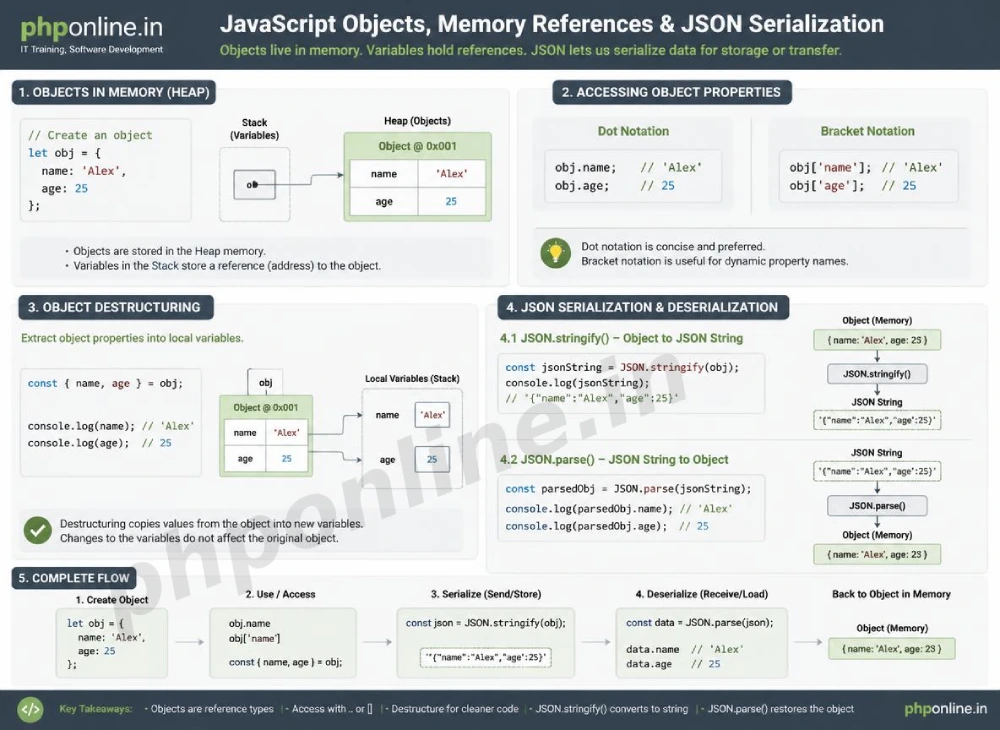
- Key-Value Entity Containers: A JavaScript object is a fundamental reference data structure used to group related properties (key-value pairs) and methods (functions) into a single entity.
- Property Accessing Mechanics: Properties inside objects can be accessed using either **Dot Notation** (
object.property) or **Bracket Notation** (object["property"]). - Object Methods & the “this” Keyword: Functions defined inside an object are called methods, utilizing the
thiskeyword to reference the calling object’s internal properties. - ES6 Object Destructuring: ES6 destructuring provides a clean, concise syntax to unpack object properties directly into distinct local variables.
- JSON Data Interchange: JSON (JavaScript Object Notation) is a lightweight text-based data format used to transmit structured data between client browsers and backend web servers using
JSON.stringify()andJSON.parse().
Welcome to Lesson 7 of our structured Web Development curriculum, marking the final lesson in Module 2: Control Flow & Data Structures. Following our previous tutorial on Easy JavaScript Arrays Guide: 10 Essential Array Methods & Examples, you now understand how zero-indexed array lists organize sequential items. The next essential milestone in modern software engineering is modeling complex real-world entities using JavaScript objects and JSON.
While arrays store ordered lists of values, objects model entity relationships using descriptive keys. In real-world web development, user accounts, product catalogs, shopping cart sessions, and database API responses are structured as objects. Understanding object property manipulation, destructuring, and JSON parsing is crucial for working with modern REST APIs and full-stack frameworks.
In this comprehensive JavaScript objects guide, we will explore object literal syntax, property access methods, object methods, ES6 destructuring, object iteration, JSON serialization (`JSON.parse` and `JSON.stringify`), object immutability, and hands-on code examples.
Prerequisites Before Modeling Data Objects
To test the hands-on code examples in this JavaScript objects tutorial, verify that your development environment meets these basic requirements:
- Web Browser: A modern web browser with Developer Tools (Google Chrome, Mozilla Firefox, Microsoft Edge, or Apple Safari).
- Code Editor: A text editor such as Visual Studio Code, Sublime Text, or Notepad++.
- Data Structure Foundations: Understanding of primitive vs. reference types, variables (`const`, `let`), and functions.
If you need to review how reference data types allocate heap memory differently from primitive values, visit our previous guide on Easy JavaScript Data Types Guide: 8 Essential Data Types & Examples.
1. Creating Objects & Accessing Properties (Dot vs. Bracket Notation)
The most common way to create an object in JavaScript is using the **Object Literal** syntax: enclosing key-value pairs inside curly braces {}.
// Creating an Object Literal
const userProfile = {
    username: "alex_mercer",
    email: "alex@phponline.in",
    accountAge: 25,
    isVerified: true
};
Accessing and Modifying Properties:
You can read, update, or add object properties using two different syntaxes:
- Dot Notation (
object.key): Clean and easy to read; used when the property key name is known and contains no special characters. - Bracket Notation (
object["key"]): Mandatory when the property name is stored inside a variable, contains spaces, or uses special hyphenated keys.
// 1. Reading Properties via Dot Notation
console.log(userProfile.username); // Prints: "alex_mercer"

// 2. Reading Properties via Bracket Notation
console.log(userProfile["email"]); // Prints: "alex@phponline.in"

// 3. Bracket Notation with Dynamic Variables
const propertyToRead = "accountAge";
console.log(userProfile[propertyToRead]); // Prints: 25

// 4. Modifying and Adding New Properties
userProfile.accountAge = 26;            // Updates existing property
userProfile.preferredLanguage = "PHP";  // Dynamically adds new property
console.log(userProfile);
Want to test object literal syntax live? Try running your code in our Online Code Editor.
2. Object Methods and the “this” Keyword
When a function is assigned as a property value inside an object, it is called a **Method**. Methods allow objects to perform actions and encapsulate state behavior.
Inside an object method, the this keyword refers to the **calling object instance**, granting the method access to sister properties inside the same object:
const bankAccount = {
    accountHolder: "Sarah Connor",
    balance: 1500.00,

    // Object Method
    deposit: function(amount) {
        this.balance += amount; // Using 'this' to reference internal balance
        return `Deposited $${amount}. New Balance: $${this.balance}`;
    },

    // ES6 Method Shorthand Syntax
    withdraw(amount) {
        if (amount > this.balance) {
            return "Transaction Denied: Insufficient Funds!";
        }
        this.balance -= amount;
        return `Withdrew $${amount}. Remaining Balance: $${this.balance}`;
    }
};

console.log(bankAccount.deposit(500));  // "Deposited $500. New Balance: $2000"
console.log(bankAccount.withdraw(300)); // "Withdrew $300. Remaining Balance: $1700"
Want to test object methods live? Try running your code in our Online Code Editor.
3. ES6 Object Destructuring and Spread Operator
ES6 introduced powerful features to simplify working with objects:
A. Object Destructuring
Destructuring allows you to unpack properties from objects directly into distinct local variables using matching key names:
const courseData = {
    courseTitle: "PHP 8 & MySQL Engineering",
    durationHours: 40,
    rating: 4.9
};

// Unpacking object properties into local variables cleanly
const { courseTitle, rating } = courseData;
console.log(courseTitle); // Prints: "PHP 8 & MySQL Engineering"
console.log(rating);      // Prints: 4.9
B. Object Spread Operator (...)
The spread operator (...) allows you to clone objects shallowly or merge multiple objects together into a single combined entity:
const defaultSettings = { theme: "light", showNotifications: true };
const userSettings = { theme: "dark" };

// Merging objects (userSettings overrides defaultSettings keys)
const finalSettings = { ...defaultSettings, ...userSettings };
console.log(finalSettings); // { theme: "dark", showNotifications: true }
4. Working with JSON (JavaScript Object Notation)
**JSON** is a lightweight, human-readable text format used globally to exchange data between web servers and browser applications.
JSON vs. JavaScript Object Differences:
- In JSON, **all keys and string values must be enclosed in double quotes (
"...")**. - JSON cannot contain methods (functions), undefined values, or comments.
The Two Mandatory JSON Processing Methods:
| JSON Method | Input Target | Return Output | Primary Application Scenario |
|---|---|---|---|
JSON.stringify(object) | JavaScript Memory Object | Formatted JSON Text String | Serializing objects to send payload data across network HTTP requests or save to localStorage. |
JSON.parse(jsonString) | Formatted JSON Text String | JavaScript Memory Object | Deserializing raw JSON API responses received from web servers into usable JS objects. |
JSON Code Example:
// 1. A standard JavaScript Object
const studentObject = {
    id: 101,
    name: "Alex Mercer",
    courses: ["HTML", "CSS", "JS"]
};

// 2. Serializing JS Object to JSON String (for Network Transmission)
const jsonPayloadString = JSON.stringify(studentObject);
console.log(typeof jsonPayloadString); // Prints: "string"
console.log(jsonPayloadString);        // '{"id":101,"name":"Alex Mercer","courses":["HTML","CSS","JS"]}'

// 3. Deserializing JSON String back into a JS Object (API Data Receipt)
const parsedObject = JSON.parse(jsonPayloadString);
console.log(typeof parsedObject); // Prints: "object"
console.log(parsedObject.name);   // Prints: "Alex Mercer"
Want to test JSON serialization live? Try running your code in our Online Code Editor.
Summary Comparison of Core Object Operations
| Operation / Method | Sample Syntax | Return Type | Primary Application Scenario |
|---|---|---|---|
| Dot Access | obj.username | Property Value | Reading or writing properties when key names are static. |
| Bracket Access | obj[variableKey] | Property Value | Reading properties dynamically using variable keys or keys with spaces. |
| Destructuring | const { name } = obj; | Local Variables | Extracting specific properties cleanly into standalone variables. |
Object.keys(obj) | Object.keys(userProfile) | Array of Strings | Extracting an array list of all property key names from an object. |
Object.values(obj) | Object.values(userProfile) | Array of Values | Extracting an array list of all property values from an object. |
JSON.stringify() | JSON.stringify(obj) | JSON String | Serializing data objects into text strings for network transfer. |
JSON.parse() | JSON.parse(jsonText) | JS Memory Object | Deserializing text strings from server APIs back into usable objects. |
5. Complete Hands-on Interactive Demonstration Example
Below is a complete, working HTML document featuring user object modeling, destructuring, JSON stringification, DOM rendering, and interactive state management combined:
<!DOCTYPE html>
<html lang="en">
<head>
    <meta charset="UTF-8">
    <meta name="viewport" content="width=device-width, initial-scale=1.0">
    <title>JavaScript Objects and JSON Demonstration</title>

    <style>
        body {
            font-family: Arial, sans-serif;
            background-color: #f4f6f9;
            color: #333;
            padding: 30px;
            max-width: 650px;
            margin: 0 auto;
        }

        .profile-card {
            background-color: #ffffff;
            border: 1px solid #e0e0e0;
            border-radius: 8px;
            padding: 25px;
            box-shadow: 0 4px 12px rgba(0,0,0,0.05);
        }

        .action-group {
            display: flex;
            gap: 10px;
            margin-top: 20px;
        }

        .btn-action {
            flex: 1;
            background-color: #0073aa;
            color: #ffffff;
            border: none;
            padding: 10px 15px;
            font-size: 14px;
            border-radius: 4px;
            cursor: pointer;
        }

        .json-preview {
            margin-top: 15px;
            padding: 12px;
            background-color: #212529;
            color: #f8f9fa;
            font-family: monospace;
            border-radius: 4px;
            white-space: pre-wrap;
            word-break: break-all;
        }
    </style>
</head>
<body>

    <div class="profile-card">
        <h2 style="color: #0073aa; margin-bottom: 10px;">Student Account Object Model</h2>

        <div id="profile-details" style="line-height: 1.8;">
            <!-- Object Properties Rendered Here -->
        </div>

        <div class="action-group">
            <button id="level-up-btn" class="btn-action">Level Up Student</button>
            <button id="serialize-btn" class="btn-action" style="background-color: #2e7d32;">Serialize to JSON</button>
        </div>

        <div id="json-output" class="json-preview" style="display: none;">
            <!-- JSON String Payload Displayed Here -->
        </div>
    </div>

    <script>
        // 1. Model Real-World Entity as a JavaScript Object
        const studentProfile = {
            studentId: 10045,
            fullName: "Alex Mercer",
            courseTrack: "Web Engineering",
            skillLevel: 1,
            isEnrolled: true,

            // Method to increment level state
            incrementLevel() {
                this.skillLevel += 1;
                return this.skillLevel;
            }
        };

        // 2. Target DOM Elements
        const profileDetails = document.getElementById("profile-details");
        const levelUpBtn = document.getElementById("level-up-btn");
        const serializeBtn = document.getElementById("serialize-btn");
        const jsonOutput = document.getElementById("json-output");

        // 3. Render Profile using ES6 Destructuring
        function renderProfileUI() {
            // Unpack properties via Object Destructuring
            const { studentId, fullName, courseTrack, skillLevel, isEnrolled } = studentProfile;

            profileDetails.innerHTML = `
                <strong>Student ID:</strong> ${studentId}<br>
                <strong>Name:</strong> ${fullName}<br>
                <strong>Course Track:</strong> ${courseTrack}<br>
                <strong>Current Skill Level:</strong> ${skillLevel}<br>
                <strong>Status:</strong> ${isEnrolled ? "Active Student" : "Inactive"}
            `;
        }

        // 4. Handle Level Up Action
        levelUpBtn.addEventListener("click", () => {
            studentProfile.incrementLevel(); // Call object method
            renderProfileUI();
            console.log("Updated object state:", studentProfile);
        });

        // 5. Handle JSON Serialization Action
        serializeBtn.addEventListener("click", () => {
            // Convert JS Object to JSON String
            const jsonText = JSON.stringify(studentProfile, null, 2);

            jsonOutput.style.display = "block";
            jsonOutput.textContent = `JSON Payload String:\n${jsonText}`;
            console.log("Serialized JSON Payload:", jsonText);
        });

        // Initial Render
        renderProfileUI();
    </script>

</body>
</html>
Want to test this JavaScript objects code live? Try running it in our Online Code Editor.
Validating HTML and JavaScript Code Standards
Syntax errors inside JSON text strings (such as using single quotes instead of double quotes) will cause JSON.parse() to fail with a runtime exception.
Before publishing your web page layouts, validate your code syntax using our automated PHPOnline HTML Validator Tool.
Troubleshooting Common Object and JSON Errors
| Observed Script Bug | Probable Cause | Recommended Solution |
|---|---|---|
| Uncaught TypeError: Cannot read properties of undefined (reading ‘x’) | Attempting to access a property on a key reference that evaluates to undefined or null. | Use optional chaining (object?.property) to safely access nested object keys. |
| Uncaught SyntaxError: Unexpected token in JSON at position x | Passing malformed JSON text into JSON.parse() (e.g., single quotes around keys or trailing commas). | Ensure all JSON keys and string values use double quotes ("...") without trailing commas. |
Object method returns undefined for internal properties | Writing an object method as an Arrow Function, which breaks lexical this binding to the calling object. | Use standard method syntax (method() {}) instead of arrow functions when referencing this. |
Object property access via variable key returns undefined | Accidentally using dot notation (obj.variableKey) instead of bracket notation (obj[variableKey]). | Use bracket notation (obj[keyVariable]) whenever key names are stored inside variables. Validate code with our HTML Validator Tool. |
Frequently Asked Questions (FAQ)
Q1: What are JavaScript objects and why are they fundamental?
JavaScript objects are reference data structures that group related properties (key-value pairs) and methods into single entities. They are fundamental because they allow developers to model real-world entities (like users, products, and cart sessions) and parse structured JSON responses from web server APIs.
Q2: What is the main difference between Dot Notation and Bracket Notation?
Dot notation (obj.key) is cleaner and used when key names are static and known beforehand. Bracket notation (obj["key"]) is required when accessing property keys dynamically via variables or when key names contain spaces or hyphens.
Q3: What is the difference between JSON.stringify() and JSON.parse()?
JSON.stringify() converts a JavaScript memory object into a formatted JSON text string for network transmission. JSON.parse() converts a JSON text string received from an API back into a usable JavaScript memory object.
Q4: Why shouldn’t ES6 arrow functions be used as object methods?
Arrow functions do not create their own this context; they inherit this lexically from the surrounding scope. Using an arrow function as an object method prevents this from pointing to the object instance, breaking internal property references.
Course Progress & Official References
Congratulations on completing Module 2: Control Flow & Data Structures! You now possess comprehensive skills spanning control flow decision branching, loops (`for`, `while`), array manipulation pipelines (`map`, `filter`, `reduce`), object properties, methods, and JSON serialization.
Consult official technical web standards on the MDN Official JavaScript Working with Objects Guide (mozilla.org).
Before publishing your web page layouts, validate your code syntax using our PHPOnline HTML Validator Tool.
Ready to move to Module 3? Proceed directly to the first lesson in Module 3: Next Lesson: JavaScript DOM Manipulation (Selecting Elements, Modifying Content & Attributes) →
# Summary
Here is what you've learned in this lesson:
- Easy JavaScript Objects Guide: 5 Core Property Concepts & Examples
- Overview: Understanding JavaScript Objects & JSON Data Modeling
- Prerequisites Before Modeling Data Objects
- 1. Creating Objects & Accessing Properties (Dot vs. Bracket Notation)
- 2. Object Methods and the "this" Keyword
- 3. ES6 Object Destructuring and Spread Operator
- 4. Working with JSON (JavaScript Object Notation)
- Summary Comparison of Core Object Operations
- 5. Complete Hands-on Interactive Demonstration Example
- Validating HTML and JavaScript Code Standards
- Troubleshooting Common Object and JSON Errors
- Frequently Asked Questions (FAQ)
- Course Progress & Official References
Continue to the next lesson and learn more about JavaScript DOM Manipulation.