
JavaScript Promises and Async Await
Easy JavaScript Promises and Async Await Guide: 3 Core Async Concepts & Examples
Master asynchronous programming with this complete JavaScript promises and async await guide. Learn pending, fulfilled, and rejected promise states, then-catch, and async/await syntax.
Estimated Read Time: 24 Minutes | Category: Web Development Fundamentals
Overview: Understanding Asynchronous JavaScript, Promises & Async/Await
Quick Asynchronous JavaScript Summary:
- Non-Blocking Single Thread: JavaScript executes code on a single thread. Asynchronous programming allows long-running operations (like server data requests, file uploads, or timers) to run in the background without freezing the user interface.
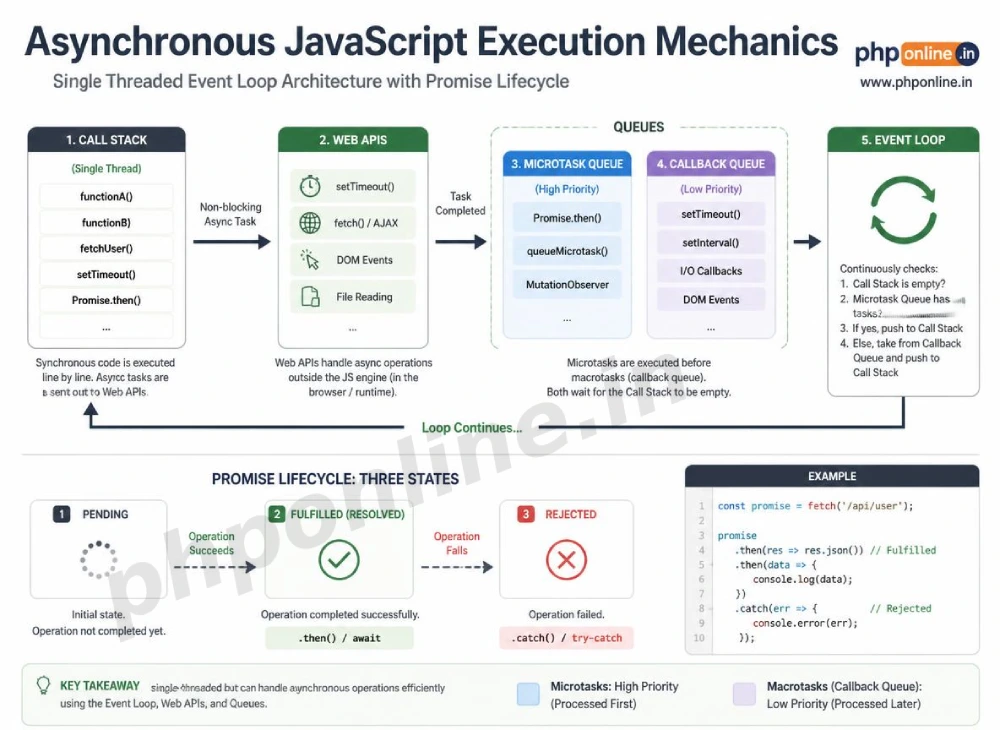
- The Event Loop & Microtasks: The browser Event Loop manages asynchronous execution by offloading background web tasks and queuing resolved callbacks into the Microtask Queue.
- JavaScript Promises: A Promise is an object representing the eventual completion (or failure) of an asynchronous operation and its resulting value across three states:
Pending,Fulfilled, andRejected. - Modern Async/Await Syntax: Introduced in ES2017,
asyncandawaitkeywords provide a clean, synchronous-looking syntax built on top of native promises, eliminating nested “callback hell.” - Error Handling: Asynchronous errors are handled cleanly using
.catch()blocks on traditional promises or standardtry...catchblocks insideasyncfunctions.
Welcome to Lesson 10 of our structured Web Development curriculum, marking the beginning of Module 4: Asynchronous JavaScript & Modern Features. Following our previous tutorial on Easy JavaScript Events Guide: 5 Core Propagation Mechanics & Examples, you now understand how user mouse clicks, keypresses, and form submissions trigger DOM event handlers. The next critical milestone in modern full-stack development is handling asynchronous time-delayed operations using a complete JavaScript promises and async await architecture.
In traditional synchronous programming, every line of code executes sequentially—blocking the next line until the current line completes. If a website attempts to fetch data from an external database or server API synchronously, the entire browser window freezes until the data payload arrives. Asynchronous JavaScript solves this problem by executing time-consuming network operations in the background while keeping the user interface responsive.
In this comprehensive JavaScript promises and async await guide, we will explore the browser Event Loop, the 3 Promise states (`Pending`, `Fulfilled`, `Rejected`), chaining with `.then()`, `.catch()`, and `.finally()`, refactoring to ES2017 `async`/`await`, concurrent execution with `Promise.all()`, error handling, and hands-on code examples.
Prerequisites Before Learning Asynchronous Code
To test the hands-on code examples in this JavaScript promises and async await tutorial, verify that your development environment meets these basic requirements:
- Web Browser: A modern web browser with Developer Tools (Google Chrome, Mozilla Firefox, Microsoft Edge, or Apple Safari).
- Code Editor: A text editor such as Visual Studio Code, Sublime Text, or Notepad++.
- Functions & Callbacks Foundations: Understanding of ES6 arrow functions, parameters, return statements, and DOM manipulation.
If you need to review how ES6 arrow functions return values before passing them into promise handlers, visit our previous guide on Easy JavaScript Functions Guide: 5 Core Declaration Types & Examples.
1. Asynchronous Execution and the Event Loop
JavaScript is a **single-threaded** language, meaning it can execute only one instruction at a time on its primary **Call Stack**.
To execute background operations (such as HTTP network requests or timers) without freezing the UI thread, JavaScript relies on the browser’s Web APIs and the **Event Loop**:
- Call Stack: Executes synchronous functions sequentially.
- Web APIs: Browser-provided background threads handling timers (
setTimeout), DOM events, and HTTP requests (fetch). - Microtask Queue: A high-priority queue holding resolved Promise callbacks (
.then(),awaitcontinuations). - Event Loop: Continually checks if the Call Stack is empty. When empty, it pushes pending callbacks from the Microtask Queue into the Call Stack for execution.
// Synchronous vs. Asynchronous Execution Demonstration
console.log("1. First Synchronous Statement");

setTimeout(() => {
    console.log("2. Asynchronous Timer Callback (Executes AFTER stack clears)");
}, 0);

console.log("3. Second Synchronous Statement");

// Console Output Order:
// 1. First Synchronous Statement
// 3. Second Synchronous Statement
// 2. Asynchronous Timer Callback
2. JavaScript Promises and the 3 Promise States
A **Promise** is a proxy object representing a value that may not be known immediately when the promise is created.
The 3 Mutual Exclusive Promise States:
| Promise State | Description & Operational Condition | Transition State |
|---|---|---|
Pending | Initial state; the asynchronous operation is still executing in the background. | Waiting for resolution or rejection. |
Fulfilled | The operation completed successfully, returning a resolved data value. | Settled state (Triggers .then() or await). |
Rejected | The operation failed or encountered an error, returning a rejection reason. | Settled state (Triggers .catch() or try...catch). |
Constructing a Custom Promise:
A custom promise is created using the new Promise() constructor, which accepts an executor function with two callback arguments: resolve and reject:
// Creating a Promise Constructor Instance
const checkServerStatus = new Promise((resolve, reject) => {
    let isServerOnline = true;

    setTimeout(() => {
        if (isServerOnline) {
            resolve("Server connection established successfully!"); // Fulfills Promise
        } else {
            reject("Error 500: Server is currently offline.");      // Rejects Promise
        }
    }, 1500);
});
Want to test promise creation live? Try running your code in our Online Code Editor.
3. Chaining Promises with .then(), .catch(), and .finally()
To consume values produced by a settled Promise, attach consumer handler methods:
.then(onFulfilled): Executes when the promise transitions to theFulfilledstate..catch(onRejected): Executes when the promise transitions to theRejectedstate..finally(onSettled): Executes unconditionally once the promise settles, regardless of whether it succeeded or failed (ideal for clearing loading spinners).
// Consuming Promises via Method Chaining
checkServerStatus
    .then((successMessage) => {
        console.log(`Success: ${successMessage}`);
        return "Parsing database payload..."; // Returns a new chained value
    })
    .then((stepTwoMessage) => {
        console.log(stepTwoMessage);
    })
    .catch((errorMessage) => {
        console.error(`Failure: ${errorMessage}`);
    })
    .finally(() => {
        console.log("Operation Settled: Cleared loading status.");
    });
4. Modern Async/Await Syntax (ES2017)
While .then() chaining is powerful, chaining multiple asynchronous operations together can lead to verbose, difficult-to-read code.
ES2017 introduced the async and await keywords, providing a clean syntax that allows asynchronous code to be written and read like standard synchronous code.
Rules of Async/Await:
- The
asynckeyword is placed before a function declaration (e.g.,async function fetchData()). It forces the function to return a Promise automatically. - The
awaitkeyword can be used **only inside an async function** (or top-level modules). It pauses function execution until the awaited Promise settles. - Error handling inside
asyncfunctions uses traditional synchronoustry...catchblocks.
// Asynchronous Helper Function returning a Promise
const fetchUserData = () => {
    return new Promise((resolve) => {
        setTimeout(() => resolve({ userId: 101, username: "alex_mercer" }), 1000);
    });
};

// Modern Async/Await Refactoring with try...catch
async function getUserProfile() {
    try {
        console.log("Initiating asynchronous fetch request...");

        // Pause execution until fetchUserData Promise fulfills
        const user = await fetchUserData();

        console.log(`User Profile Retrieved: ${user.username} (ID: ${user.userId})`);
    } catch (error) {
        console.error(`An error occurred during fetch: ${error}`);
    } finally {
        console.log("Async operation completed.");
    }
}

getUserProfile();
Want to test async/await live? Try running your code in our Online Code Editor.
5. Concurrent Execution: Promise.all vs. Promise.race
When you need to execute multiple independent asynchronous tasks simultaneously, running them sequentially with multiple await statements creates unnecessary delays. JavaScript provides static combinator methods to manage concurrent promises:
A. Promise.all() — Parallel Execution
Executes an array of promises concurrently and waits for **all** of them to fulfill. It returns an array of all resolved values. If *any single promise rejects*, the entire Promise.all() call immediately rejects:
const fetchPosts = () => new Promise(resolve => setTimeout(() => resolve("Posts Loaded"), 1000));
const fetchComments = () => new Promise(resolve => setTimeout(() => resolve("Comments Loaded"), 1500));

async function loadDashboardParallel() {
    try {
        // Execute both requests concurrently in parallel!
        const [posts, comments] = await Promise.all([fetchPosts(), fetchComments()]);
        console.log(`${posts} & ${comments}`); // Total wait time: 1.5s (instead of 2.5s sequentially!)
    } catch (error) {
        console.error("One of the parallel requests failed!");
    }
}

loadDashboardParallel();
B. Promise.race() — First Settled Winner
Accepts an array of promises and settles as soon as the **first promise** in the array settles (fulfills or rejects):
const fastServer = new Promise(resolve => setTimeout(() => resolve("Fast Server Response"), 500));
const slowServer = new Promise(resolve => setTimeout(() => resolve("Slow Server Response"), 2000));

async function getFastestResponse() {
    const winner = await Promise.race([fastServer, slowServer]);
    console.log(`Winner: ${winner}`); // Prints: "Fast Server Response"
}

getFastestResponse();
Summary Comparison: .then() Chaining vs. Async/Await
| Feature / Characteristic | Traditional .then() Chaining | Modern Async / Await |
|---|---|---|
| Syntax Style | Method chaining with nested callback returns. | Synchronous-looking sequential code layout. |
| Error Handling | Attached .catch(error => {}) blocks. | Standard try...catch blocks. |
| Code Readability | Can become complex when handling deeply nested conditions. | Excellent: Clean, highly readable, and maintainable. |
| Execution Engine | Built on native Promises. | Syntactic sugar built on top of native Promises. |
| Primary Application Scenario | Simple single promises or inline reactive streams. | Modern Standard: API data fetching, database operations, multi-step tasks. |
6. Complete Hands-on Interactive Demonstration Example
Below is a complete, working HTML document featuring simulated asynchronous database requests, loading UI state toggling, modern `async`/`await` execution, `try…catch` error handling, and DOM rendering combined:
<!DOCTYPE html>
<html lang="en">
<head>
<meta charset="UTF-8">
<meta name="viewport" content="width=device-width, initial-scale=1.0">
<title>JavaScript Promises and Async/Await Demonstration</title>
<style>
body {
font-family: Arial, sans-serif;
background-color: #f4f6f9;
color: #333;
padding: 30px;
max-width: 650px;
margin: 0 auto;
}
.async-card {
background-color: #ffffff;
border: 1px solid #e0e0e0;
border-radius: 8px;
padding: 25px;
box-shadow: 0 4px 12px rgba(0,0,0,0.05);
}
.controls-group {
display: flex;
gap: 10px;
margin-bottom: 20px;
}
.btn-async {
flex: 1;
background-color: #0073aa;
color: #ffffff;
border: none;
padding: 12px;
font-size: 14px;
border-radius: 4px;
cursor: pointer;
font-weight: bold;
}
.btn-fail {
background-color: #d32f2f;
}
.btn-async:disabled {
background-color: #cccccc;
cursor: not-allowed;
}
.display-panel {
margin-top: 15px;
padding: 15px;
background-color: #f8f9fa;
border: 1px solid #e9ecef;
border-radius: 4px;
min-height: 80px;
}
.status-loading {
color: #f57c00;
font-weight: bold;
}
.status-success {
color: #2e7d32;
font-weight: bold;
}
.status-error {
color: #c62828;
font-weight: bold;
}
</style>
</head>
<body>
<div class="async-card">
<h2 style="color: #0073aa; margin-bottom: 15px;">Async / Await Simulated API Pipeline</h2>
<div class="controls-group">
<button id="fetch-success-btn" class="btn-async">Fetch Order Data (Success)</button>
<button id="fetch-fail-btn" class="btn-async btn-fail">Fetch Order Data (Simulate Error)</button>
</div>
<div id="output-panel" class="display-panel">
Click a button above to initiate an asynchronous Promise request...
</div>
</div>
<script>
// Target DOM Elements
const fetchSuccessBtn = document.querySelector("#fetch-success-btn");
const fetchFailBtn = document.querySelector("#fetch-fail-btn");
const outputPanel = document.querySelector("#output-panel");
// 1. Simulated Server API Function Returning a Custom Promise
function simulateApiRequest(shouldSucceed) {
return new Promise((resolve, reject) => {
setTimeout(() => {
if (shouldSucceed) {
resolve({
orderId: "ORD-99824",
item: "PHP & JavaScript Course Access",
amount: "$49.99",
timestamp: new Date().toLocaleTimeString()
});
} else {
reject("Error 503: Database connection timeout. Request aborted.");
}
}, 2000); // Simulated 2-second network delay
});
}
// 2. Master Async Function handling loading UI, awaiting Promise, and error handling
async function processOrderRequest(shouldSucceed) {
// Update UI to Loading State and Disable Buttons
outputPanel.innerHTML = `<span class="status-loading">&bull; Connecting to server... Awaiting Promise fulfillment (2s delay)...</span>`;
setButtonsDisabled(true);
try {
// Pause execution asynchronously until the Promise fulfills
const orderData = await simulateApiRequest(shouldSucceed);
// Display Success Output
outputPanel.innerHTML = `
<div class="status-success">✓ Promise Fulfilled Successfully!</div>
<div style="margin-top: 8px;">
<strong>Order ID:</strong> ${orderData.orderId}<br>
<strong>Item Purchased:</strong> ${orderData.item}<br>
<strong>Total Paid:</strong> ${orderData.amount}<br>
<strong>Settled At:</strong> ${orderData.timestamp}
</div>
`;
console.log("Async request fulfilled:", orderData);
} catch (errorMessage) {
// Catch Rejections
outputPanel.innerHTML = `
<div class="status-error">✗ Promise Rejected!</div>
<div style="margin-top: 8px;">${errorMessage}</div>
`;
console.error("Async request rejected:", errorMessage);
} finally {
// Re-enable UI Buttons unconditionally when settled
setButtonsDisabled(false);
}
}
// Helper function to toggle button disabled state
function setButtonsDisabled(isDisabled) {
fetchSuccessBtn.disabled = isDisabled;
fetchFailBtn.disabled = isDisabled;
}
// 3. Attach Event Listeners
fetchSuccessBtn.addEventListener("click", () => processOrderRequest(true));
fetchFailBtn.addEventListener("click", () => processOrderRequest(false));
</script>
</body>
</html>Want to test this async/await pipeline code live? Try running it in our Online Code Editor.
Validating HTML and JavaScript Code Standards
Attempting to use the await keyword inside a standard non-async function will trigger a syntax parsing exception.
Before publishing your web page layouts, validate your code syntax using our automated PHPOnline HTML Validator Tool.
Troubleshooting Common Asynchronous JavaScript Errors
| Observed Async Bug | Probable Cause | Recommended Solution |
|---|---|---|
| Uncaught SyntaxError: await is only valid in async functions | Placing the await keyword inside a standard function that lacks the async prefix. | Add the async keyword before the parent function declaration: async function myFunc(). |
Awaited variable returns Promise {<pending>} instead of data value | Forgetting to attach the await keyword when calling an asynchronous function returning a Promise. | Add the await keyword before the promise function call: const data = await fetchData(). |
| Uncaught (in promise) Error / Rejection message in console | A Promise rejected, but no .catch() block or try...catch wrapper was provided to handle the rejection. | Wrap await calls inside a try...catch block, or attach a .catch() handler. |
Multiple sequential await statements execute slowly in series | Awaiting independent asynchronous operations sequentially rather than running them concurrently. | Use Promise.all([p1, p2]) to run independent asynchronous tasks in parallel. Validate code with our HTML Validator Tool. |
Frequently Asked Questions (FAQ)
Q1: What are JavaScript promises and async await and why are they fundamental?
JavaScript promises and async await are asynchronous programming features used to handle time-delayed operations (such as HTTP requests and database queries) without blocking the browser UI thread. Promises manage state transitions (`Pending`, `Fulfilled`, `Rejected`), while `async`/`await` provides a clean, synchronous-looking syntax on top of promises.
Q2: What are the three states of a JavaScript Promise?
A Promise resides in one of three mutually exclusive states: Pending (initial state during operation execution), Fulfilled (the operation completed successfully, returning data), or Rejected (the operation failed, returning an error).
Q3: What is the main advantage of async/await over .then() chaining?
async`/`await eliminates complex nested .then() callback structures, allowing developers to write asynchronous code sequentially with standard try...catch error handling, dramatically improving readability and maintainability.
Q4: What is the difference between Promise.all() and Promise.race()?
Promise.all() waits for all promises in an array to fulfill concurrently and returns an array of results (rejecting if any single promise fails). Promise.race() settles as soon as the first promise in the array settles (whether fulfilled or rejected).
Next Steps & Official References
Consult official technical web standards on the MDN Official JavaScript Promise Reference (mozilla.org).
Before publishing your web page layouts, validate your code syntax using our PHPOnline HTML Validator Tool.
Ready for the final lesson in Module 4? Proceed directly to the final lesson in Module 4: Next Lesson: JavaScript Fetch API, AJAX & HTTP Requests →
# Summary
Here is what you've learned in this lesson:
- Easy JavaScript Promises and Async Await Guide: 3 Core Async Concepts & Examples
- Overview: Understanding Asynchronous JavaScript, Promises & Async/Await
- Prerequisites Before Learning Asynchronous Code
- 1. Asynchronous Execution and the Event Loop
- 2. JavaScript Promises and the 3 Promise States
- 3. Chaining Promises with .then(), .catch(), and .finally()
- 4. Modern Async/Await Syntax (ES2017)
- 5. Concurrent Execution: Promise.all vs. Promise.race
- Summary Comparison: .then() Chaining vs. Async/Await
- 6. Complete Hands-on Interactive Demonstration Example
- Validating HTML and JavaScript Code Standards
- Troubleshooting Common Asynchronous JavaScript Errors
- Frequently Asked Questions (FAQ)
- Next Steps & Official References
Continue to the next lesson and learn more about JavaScript Fetch API.