
JavaScript Fetch API
Easy JavaScript Fetch API Guide: 5 Core HTTP Request Steps & Examples
Master asynchronous server communication with this complete JavaScript Fetch API guide. Learn GET and POST requests, JSON response parsing, headers, and error handling.
Estimated Read Time: 24 Minutes | Category: Web Development Fundamentals
Overview: Understanding JavaScript Fetch API, AJAX & HTTP Communication
Quick JavaScript Fetch API Summary:
- Asynchronous Server Data Exchange: The JavaScript Fetch API is a modern, promise-based interface that allows browser scripts to send and receive HTTP requests (AJAX) asynchronously without requiring full web page reloads.
- Modern Replacement for XMLHttpRequest: `fetch()` replaces legacy, complex `XMLHttpRequest` objects with a clean, promise-driven syntax that integrates seamlessly with ES2017 `async`/`await`.
- HTTP Request Verbs: Supports all standard HTTP request methods, including `GET` (retrieving data), `POST` (submitting new records), `PUT` / `PATCH` (updating data), and `DELETE` (removing records).
- Response Object Parsing: A call to `fetch()` resolves to a `Response` object, requiring explicit parsing methods like `response.json()` or `response.text()` to extract usable body payloads.
- Strict Error Handling Logic: Unlike traditional AJAX, `fetch()` promises **do not reject on HTTP error status codes** (like 404 Not Found or 500 Server Error); developers must check the `response.ok` boolean property explicitly.
Welcome to Lesson 11 of our structured Web Development curriculum, marking the final master lesson in Module 4: Asynchronous JavaScript & Modern Features. Following our previous tutorial on Easy JavaScript Promises and Async Await Guide: 3 Core Async Concepts & Examples, you now understand how promises manage state transitions (`Pending`, `Fulfilled`, `Rejected`) and how `async`/`await` flattens asynchronous control flow. The ultimate milestone in full-stack frontend engineering is retrieving and sending data across the network using the JavaScript Fetch API.
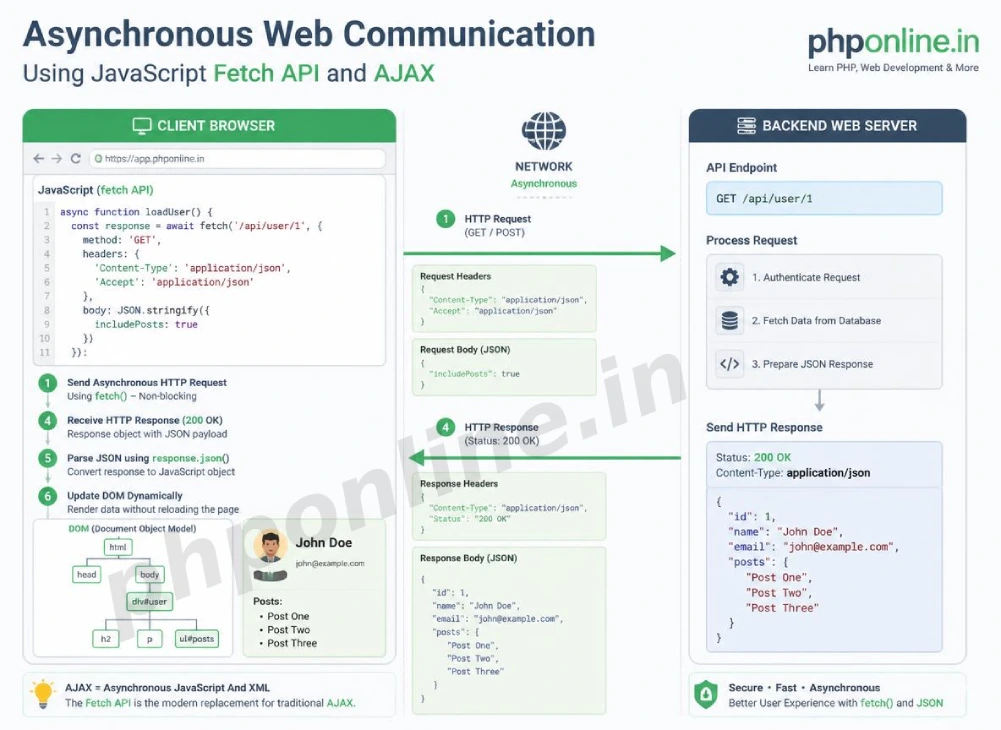
In early web development, submitting a form or requesting new page data required sending a full HTTP request that re-rendered the entire web page. AJAX (Asynchronous JavaScript and XML) revolutionized the web by allowing browsers to exchange small payloads of data in the background. The modern JavaScript Fetch API provides a standardized, promise-based engine that powers real-time search auto-suggestions, dynamic social media feeds, live chat notifications, and RESTful API integrations across single-page applications.
In this comprehensive JavaScript Fetch API guide, we will explore AJAX concepts, making GET and POST requests, parsing JSON response objects, checking `response.ok`, configuring HTTP headers, handling network vs HTTP status errors, and hands-on interactive code examples.
Prerequisites Before Making Network Requests
To test the hands-on code examples in this JavaScript Fetch API tutorial, verify that your development environment meets these basic requirements:
- Web Browser: A modern web browser with Developer Tools (Google Chrome, Mozilla Firefox, Microsoft Edge, or Apple Safari).
- Code Editor: A text editor such as Visual Studio Code, Sublime Text, or Notepad++.
- Asynchronous Foundations: Solid understanding of JavaScript Promises, ES2017 `async`/`await`, `try…catch` blocks, and JSON syntax.
If you need to review how `async` and `await` handle promise resolution before making network calls, visit our previous guide on Easy JavaScript Promises and Async Await Guide: 3 Core Async Concepts & Examples.
1. What Is AJAX and the Modern Fetch API?
**AJAX** (Asynchronous JavaScript and XML) is a web development technique that enables web pages to update asynchronously by exchanging data with a web server behind the scenes.
While legacy applications used the verbose `XMLHttpRequest` object to perform AJAX requests, modern web development relies exclusively on the **Fetch API**.
Key Advantages of the Fetch API:
- Promise-Based Architecture: Integrates directly with `.then()` chaining and ES2017 `async`/`await`.
- Clean Streamlined Syntax: Eliminates boilerplate event listener configuration required by `XMLHttpRequest`.
- Flexible Header and Body Controls: Provides standardized `Headers`, `Request`, and `Response` objects.
// Legacy XMLHttpRequest Approach (Verbose and complex)
var xhr = new XMLHttpRequest();
xhr.open("GET", "https://api.example.com/data");
xhr.onload = function() {
    console.log(JSON.parse(xhr.responseText));
};
xhr.send();

// Modern Fetch API Approach (Clean and promise-driven)
fetch("https://api.example.com/data")
    .then(response => response.json())
    .then(data => console.log(data));
Want to test fetch syntax live? Try running your code in our Online Code Editor.
2. Making GET Requests with fetch()
By default, calling fetch(url) executes an HTTP **GET request** to retrieve data from a specified endpoint.
The Two-Step Parsing Pipeline:
Executing a `fetch()` request involves two sequential promise steps:
- The initial `fetch(url)` call resolves to an HTTP **Response Object** representing the headers and status code.
- Call the asynchronous method
response.json()(orresponse.text()) to parse the raw incoming stream into a usable JavaScript data object.
// GET Request using Async/Await Syntax
async function getRandomUser() {
    try {
        // Step 1: Send GET request to a public API endpoint
        const response = await fetch("https://jsonplaceholder.typicode.com/users/1");

        // Step 2: Parse raw JSON stream into a JavaScript object
        const userData = await response.json();

        console.log(`User Name: ${userData.name}`);
        console.log(`User Email: ${userData.email}`);
    } catch (error) {
        console.error(`Network communication failed: ${error}`);
    }
}

getRandomUser();
3. Making POST, PUT, and DELETE Requests
To send data payload updates to a web server (such as submitting a registration form or creating an order record), pass an optional **Configuration Object** as the second argument to `fetch()`.
Configuration Object Parameters:
method: Specifies the HTTP verb (e.g.,"POST","PUT","PATCH","DELETE").headers: An object containing HTTP request headers (e.g., specifying"Content-Type": "application/json").body: The serialized payload string sent to the server (typically serialized viaJSON.stringify()).
// POST Request Example: Creating a new post resource
async function createNewPost() {
    const newPostData = {
        title: "Mastering the JavaScript Fetch API",
        body: "Learn asynchronous HTTP requests using modern fetch syntax.",
        userId: 101
    };

    try {
        const response = await fetch("https://jsonplaceholder.typicode.com/posts", {
            method: "POST",
            headers: {
                "Content-Type": "application/json",
                "Accept": "application/json"
            },
            body: JSON.stringify(newPostData) // Serializes JS Object to JSON String
        });

        const createdResource = await response.json();
        console.log("Resource created successfully on server:", createdResource);
    } catch (error) {
        console.error("Failed to post data:", error);
    }
}

createNewPost();
Want to test POST requests live? Try running your code in our Online Code Editor.
4. Proper Error Handling (Checking response.ok)
A crucial architectural detail of the Fetch API is how it handles errors:
The Fetch Error Catch: A `fetch()` promise **rejects only on true network failures** (such as losing internet connectivity or an invalid domain name). It **DOES NOT reject on HTTP error status codes** like `404 Not Found`, `401 Unauthorized`, or `500 Internal Server Error`!
To catch HTTP status errors properly, you must inspect the boolean property response.ok (which returns true if the HTTP status code is in the range `200–299`) or check response.status manually:
// Proper Error Handling Pattern with response.ok
async function fetchUserSafely(userId) {
    try {
        const response = await fetch(`https://jsonplaceholder.typicode.com/users/${userId}`);

        // Manually check if the HTTP status is outside 200-299
        if (!response.ok) {
            throw new Error(`HTTP Error Status: ${response.status} (${response.statusText})`);
        }

        const data = await response.json();
        console.log("Data fetched successfully:", data);

    } catch (error) {
        // Catches BOTH network failures AND thrown HTTP status errors!
        console.error(`Fetch API Error Encountered: ${error.message}`);
    }
}

// Requesting a non-existent user ID triggers HTTP 404, caught safely by our throw block!
fetchUserSafely(99999);
Summary Comparison of HTTP Request Methods in Fetch
| HTTP Verb | Fetch Configuration | Contains Request Body? | Primary Application Scenario |
|---|---|---|---|
GET | { method: "GET" } (Default) | No | Retrieving data, user profiles, or product catalogs from a server API. |
POST | { method: "POST", body: ... } | Yes | Submitting user registration forms, creating new database records, uploading files. |
PUT | { method: "PUT", body: ... } | Yes | Replacing an entire existing data record with updated property values. |
PATCH | { method: "PATCH", body: ... } | Yes | Modifying specific properties of an existing record without replacing the entire entity. |
DELETE | { method: "DELETE" } | Rarely | Removing a specific record or resource from the server database. |
5. Complete Hands-on Interactive Demonstration Example
Below is a complete, working HTML document featuring live public REST API data fetching, loading UI states, GET and POST execution pipelines, custom HTTP error checking (`response.ok`), DOM card rendering, and interactive console logging combined:
<!DOCTYPE html>
<html lang="en">
<head>
<meta charset="UTF-8">
<meta name="viewport" content="width=device-width, initial-scale=1.0">
<title>JavaScript Fetch API Demonstration</title>
<style>
body {
font-family: Arial, sans-serif;
background-color: #f4f6f9;
color: #333;
padding: 30px;
max-width: 650px;
margin: 0 auto;
}
.api-card {
background-color: #ffffff;
border: 1px solid #e0e0e0;
border-radius: 8px;
padding: 25px;
box-shadow: 0 4px 12px rgba(0,0,0,0.05);
}
.controls-group {
display: flex;
gap: 10px;
margin-bottom: 20px;
}
.btn-fetch {
flex: 1;
background-color: #0073aa;
color: #ffffff;
border: none;
padding: 12px;
font-size: 14px;
border-radius: 4px;
cursor: pointer;
font-weight: bold;
}
.btn-error {
background-color: #d32f2f;
}
.btn-fetch:disabled {
background-color: #cccccc;
cursor: not-allowed;
}
.data-display {
margin-top: 15px;
padding: 15px;
background-color: #f8f9fa;
border: 1px solid #e9ecef;
border-radius: 4px;
min-height: 100px;
}
.loading-text {
color: #f57c00;
font-weight: bold;
}
.error-text {
color: #c62828;
font-weight: bold;
}
.user-info-box {
line-height: 1.8;
}
</style>
</head>
<body>
<div class="api-card">
<h2 style="color: #0073aa; margin-bottom: 15px;">Live REST API Data Fetcher</h2>
<div class="controls-group">
<button id="fetch-user-btn" class="btn-fetch">GET User Profile (200 OK)</button>
<button id="trigger-404-btn" class="btn-fetch btn-error">Trigger HTTP 404 Error</button>
</div>
<div id="data-display" class="data-display">
Click a button above to initiate an asynchronous HTTP Fetch request...
</div>
</div>
<script>
// Target DOM Elements
const fetchUserBtn = document.querySelector("#fetch-user-btn");
const trigger404Btn = document.querySelector("#trigger-404-btn");
const dataDisplay = document.querySelector("#data-display");
// Master Asynchronous Fetch Function using Async/Await and response.ok handling
async function fetchUserData(endpointUrl) {
// Update UI to loading state and disable controls
dataDisplay.innerHTML = `<span class="loading-text">• Sending HTTP GET request to API server...</span>`;
toggleButtons(true);
try {
// Step 1: Issue HTTP Request
const response = await fetch(endpointUrl);
// Step 2: Check for HTTP Status Errors (404, 500, etc.)
if (!response.ok) {
throw new Error(`HTTP Status Error ${response.status}: ${response.statusText || 'Resource Not Found'}`);
}
// Step 3: Parse incoming JSON payload stream
const userData = await response.json();
// Step 4: Render retrieved data into the DOM
dataDisplay.innerHTML = `
<div class="user-info-box">
<h3 style="color: #0073aa; margin-bottom: 5px;">✓ ${userData.name}</h3>
<strong>Username:</strong> ${userData.username}<br>
<strong>Email Address:</strong> ${userData.email}<br>
<strong>City:</strong> ${userData.address.city}<br>
<strong>Company:</strong> ${userData.company.name}
</div>
`;
console.log("Fetch request successful. Received payload:", userData);
} catch (error) {
// Catch network failures and thrown HTTP status errors
dataDisplay.innerHTML = `
<div class="error-text">✗ Request Failed!</div>
<div style="margin-top: 8px;">${error.message}</div>
`;
console.error("Fetch request failed:", error.message);
} finally {
// Re-enable buttons when request settles
toggleButtons(false);
}
}
// Helper function to enable/disable buttons
function toggleButtons(isDisabled) {
fetchUserBtn.disabled = isDisabled;
trigger404Btn.disabled = isDisabled;
}
// Event Listeners
fetchUserBtn.addEventListener("click", () => {
fetchUserData("https://jsonplaceholder.typicode.com/users/1"); // Valid User API Endpoint
});
trigger404Btn.addEventListener("click", () => {
fetchUserData("https://jsonplaceholder.typicode.com/invalid_endpoint_99"); // Triggers 404 Error
});
</script>
</body>
</html>Want to test this live API fetch code? Try running it in our Online Code Editor.
Validating HTML and JavaScript Code Standards
Forgetting to serialize request body payloads using JSON.stringify() or omitting required HTTP headers will cause backend web servers to reject POST requests.
Before publishing your web page layouts, validate your code syntax using our automated PHPOnline HTML Validator Tool.
Troubleshooting Common Fetch API Errors
| Observed Fetch API Bug | Probable Cause | Recommended Solution |
|---|---|---|
| Failed to fetch / Access to fetch at ‘X’ has been blocked by CORS policy | **Cross-Origin Resource Sharing (CORS)** restriction. The target backend server is not configured to allow requests from your site domain. | Configure the backend server to include the Access-Control-Allow-Origin: * HTTP header, or route requests through a backend proxy. |
HTTP 404 error occurs, but execution enters the try block instead of catch | Fetch promises resolve successfully on HTTP status codes like 404 or 500, rejecting strictly on network failures. | Explicitly check if (!response.ok) { throw new Error(...); } inside the try block to force an error transition. |
| POST request payload arrives at the backend server as empty or unparsed data | Forgetting to set the request header "Content-Type": "application/json" or passing an un-serialized raw Object to `body`. | Set the "Content-Type": "application/json" header and wrap object body payloads in JSON.stringify(). |
| Uncaught (in promise) SyntaxError: Unexpected token ‘<‘ in JSON at position 0 | Calling response.json() on a server response that returned HTML error text (e.g., an HTML 404/500 page) instead of valid JSON text. | Check response.ok before calling response.json(), or inspect the response with response.text() first. Validate code with our HTML Validator Tool. |
Frequently Asked Questions (FAQ)
Q1: What is the JavaScript Fetch API and why is it fundamental?
The JavaScript Fetch API is a modern, promise-based interface that allows browser scripts to send and receive HTTP requests (AJAX) asynchronously. It is fundamental because it allows web applications to fetch server data, submit forms, and update DOM elements without full page reloads.
Q2: Why doesn’t fetch() reject promises on HTTP 404 or 500 status codes?
The Fetch API design specification considers an HTTP 404 or 500 response as a successfully completed HTTP transaction between client and server. A fetch promise rejects strictly on network failures (like loss of internet connection). Developers must inspect response.ok to catch HTTP status errors.
Q3: What is the difference between response.json() and response.text()?
response.json() parses an incoming raw JSON stream asynchronously into a usable JavaScript memory object. response.text() returns the raw text content of the response body as a simple string (ideal for reading raw HTML or plain text files).
Q4: How do you send JSON data payload in a POST request using fetch()?
To send JSON data in a POST request, configure the fetch options object with method: "POST", set the header "Content-Type": "application/json", and serialize the JavaScript data object into a JSON string using body: JSON.stringify(data).
Course Completion & Official References
Congratulations on completing the entire structured JavaScript tutorial series curriculum roadmap! You now possess comprehensive frontend engineering skills spanning syntax, variables, data types, functions, control flow, arrays, objects, JSON parsing, DOM manipulation, event delegation, Promises, async/await, and the Fetch API.
Consult official technical web standards on the MDN Official Using Fetch Guide (mozilla.org).
Before publishing your web page layouts, validate your code syntax using our PHPOnline HTML Validator Tool.
Return to Main Course Index or Backend Track: Revisit frontend foundations or advance to backend PHP & database engineering: Course Homepage: Best PHP & Web Development Tutorials →
# Summary
Here is what you've learned in this lesson:
- Easy JavaScript Fetch API Guide: 5 Core HTTP Request Steps & Examples
- Overview: Understanding JavaScript Fetch API, AJAX & HTTP Communication
- Prerequisites Before Making Network Requests
- 1. What Is AJAX and the Modern Fetch API?
- 2. Making GET Requests with fetch()
- 3. Making POST, PUT, and DELETE Requests
- 4. Proper Error Handling (Checking response.ok)
- Summary Comparison of HTTP Request Methods in Fetch
- 5. Complete Hands-on Interactive Demonstration Example
- Validating HTML and JavaScript Code Standards
- Troubleshooting Common Fetch API Errors
- Frequently Asked Questions (FAQ)
- Course Completion & Official References
Continue to the next lesson and learn more about How to Check if a String Contains a Specific Word in Python and Java.