
JavaScript Arrays
Easy JavaScript Arrays Guide: 10 Essential Array Methods & Examples
Master data collections with this complete JavaScript arrays guide. Learn array creation, indexing, push, pop, shift, unshift, splice, map, filter, and reduce.
Estimated Read Time: 23 Minutes | Category: Web Development Fundamentals
Overview: Understanding JavaScript Arrays & Sequential Collections
Quick JavaScript Arrays Summary:
- Ordered Data Collections: A JavaScript array is a zero-indexed, ordered collection of values that allows developers to store multiple data items inside a single variable reference.
- Dynamic Heterogeneous Storage: JavaScript arrays are dynamic and flexible, capable of holding mixed data types simultaneously (strings, numbers, booleans, objects, and nested sub-arrays).
- Mutating Stack/Queue Methods: Core mutating methods like
push(),pop(),shift(), andunshift()allow items to be added or removed from the ends of an array. - Functional Iteration Pipelines: Modern ES6 functional methods like
map(),filter(), andreduce()transform, filter, and aggregate array elements cleanly without raw counter loops. - Array Immutability: Non-mutating methods (such as
concat(),slice(), andmap()) return brand-new array instances, leaving original source arrays untouched.
Welcome to Lesson 6 of our structured Web Development curriculum. Following our previous tutorial on Easy JavaScript Conditionals and Loops Guide: 6 Core Control Flow Structures & Examples, you now understand how program decision-making and iteration loops operate. The next fundamental milestone in front-end software engineering is organizing, transforming, and searching data using JavaScript arrays and built-in array methods.
In real-world web applications, data rarely exists as isolated single variables. E-commerce shopping carts manage lists of selected products, social media feeds process arrays of user posts, and search bars filter through lists of database results. Arrays provide the core data structure needed to hold, sort, search, and render these sequential datasets dynamically in the browser DOM.
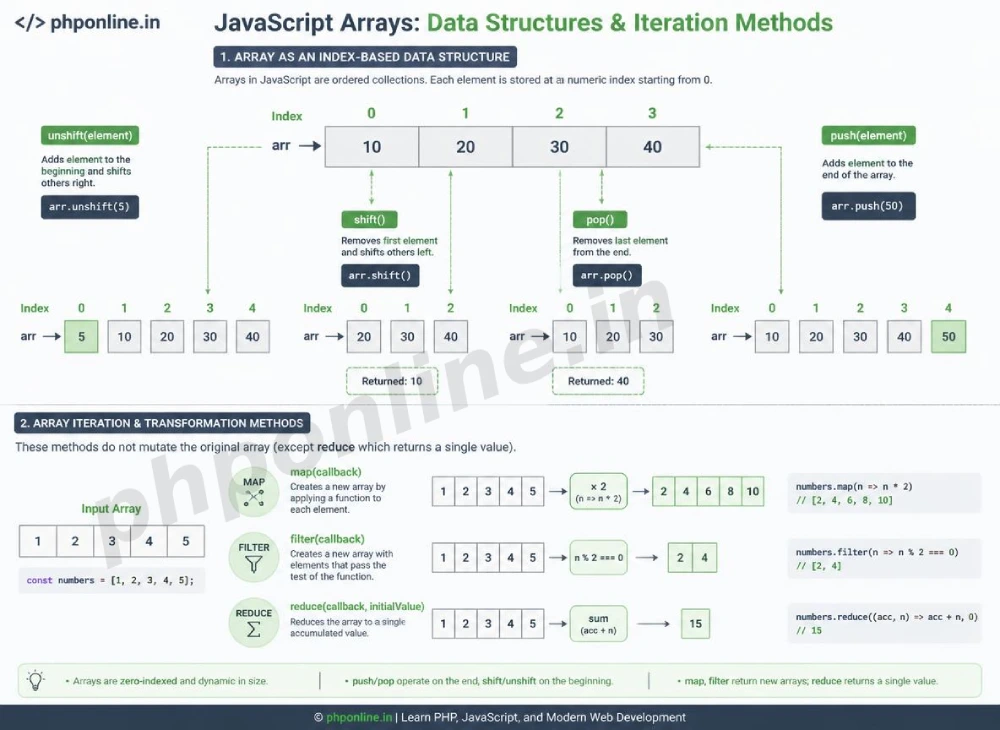
In this comprehensive JavaScript arrays guide, we will explore array literal syntax, zero-based indexing, stack/queue mutation methods (`push`, `pop`, `shift`, `unshift`), array slicing (`slice`, `splice`), modern functional methods (`map`, `filter`, `reduce`), array searching (`includes`, `find`), and hands-on code examples.
Prerequisites Before Processing Arrays
To test the hands-on code examples in this JavaScript arrays tutorial, verify that your development environment meets these basic requirements:
- Web Browser: A modern web browser equipped with Developer Tools (Google Chrome, Mozilla Firefox, Microsoft Edge, or Apple Safari).
- Code Editor: A text editor such as Visual Studio Code, Sublime Text, or Notepad++.
- Loop & Function Foundations: Understanding of variables (`let`, `const`), ES6 arrow functions, and `for…of` loops.
If you need to review how ES6 arrow functions pass callback logic into higher-order methods, visit our previous guide on Easy JavaScript Functions Guide: 5 Core Declaration Types & Examples.
1. Creating Arrays and Zero-Based Indexing
Arrays in JavaScript are created using square brackets [] (the Array Literal syntax). Elements inside an array are separated by commas and assigned numeric index positions starting from 0:
// Creating an Array of Strings
const programmingLanguages = ["JavaScript", "PHP", "HTML5", "CSS3"];

// Accessing Array Elements via Zero-Based Indexing
console.log(programmingLanguages[0]); // Prints: "JavaScript" (First element)
console.log(programmingLanguages[2]); // Prints: "HTML5" (Third element)

// Checking Total Array Length
console.log(programmingLanguages.length); // Prints: 4

// Accessing the Last Element in an Array
const lastLanguage = programmingLanguages[programmingLanguages.length - 1];
console.log(lastLanguage); // Prints: "CSS3"
Want to test array literals live? Try running your code in our Online Code Editor.
2. Adding and Removing Elements (Push, Pop, Shift, Unshift)
JavaScript provides four primary mutating methods to insert or remove items at the beginning or end of an array:
| Array Method | Operation Target | Return Value | Primary Application Scenario |
|---|---|---|---|
push(item) | Adds item(s) to the **end** of the array. | New array length count. | Adding new items to a shopping cart list or queue. |
pop() | Removes the **last** item from the end of the array. | The removed item value. | Undoing the last recorded user action (Stack behavior). |
unshift(item) | Adds item(s) to the **start** (index 0) of the array. | New array length count. | Prepending urgent notification messages to the top of a list. |
shift() | Removes the **first** item (index 0) from the array. | The removed item value. | Processing incoming user request queues in order (Queue behavior). |
Stack and Queue Operations Example:
let shoppingCart = ["Laptop", "Mouse"];

// 1. push(): Adds "Keyboard" to the end
shoppingCart.push("Keyboard");
console.log(shoppingCart); // ["Laptop", "Mouse", "Keyboard"]

// 2. pop(): Removes "Keyboard" from the end
let removedEndItem = shoppingCart.pop();
console.log(removedEndItem); // "Keyboard"

// 3. unshift(): Adds "Headphones" to the start (Index 0)
shoppingCart.unshift("Headphones");
console.log(shoppingCart); // ["Headphones", "Laptop", "Mouse"]

// 4. shift(): Removes "Headphones" from the start
let removedStartItem = shoppingCart.shift();
console.log(removedStartItem); // "Headphones"
Want to test array mutation methods live? Try running your code in our Online Code Editor.
3. Slicing and Splicing Arrays (slice vs. splice)
Developers often confuse slice() and splice() due to their similar names, but they have opposite immutability behaviors:
A. slice(start, end) — Non-Mutating Copy
The slice() method extracts a section of an array and returns a **brand-new array**, leaving the original array completely unchanged:
const allScores = [10, 20, 30, 40, 50];

// Extract elements from index 1 up to (but NOT including) index 4
const subScores = allScores.slice(1, 4);
console.log(subScores);  // Prints: [20, 30, 40]
console.log(allScores);  // Prints: [10, 20, 30, 40, 50] (Original unchanged!)
B. splice(start, deleteCount, item1, …) — Mutating Modification
The splice() method **modifies the original array directly** by deleting, replacing, or inserting items at any arbitrary index:
let months = ["Jan", "March", "April"];

// At index 1, delete 0 items, and insert "Feb"
months.splice(1, 0, "Feb");
console.log(months); // Prints: ["Jan", "Feb", "March", "April"]

// At index 3, delete 1 item ("April") and replace with "May"
months.splice(3, 1, "May");
console.log(months); // Prints: ["Jan", "Feb", "March", "May"]
4. Modern Functional Iteration Methods (map, filter, reduce)
ES6 introduced functional array processing methods that accept a callback function and execute clean transformations without writing manual for loops.
A. map(): Transforming Every Array Element
The map() method creates a new array populated with the results of calling a provided transformation function on every element in the calling array:
const basePrices = [10, 20, 30];

// Transform prices by calculating 10% sales tax on each item
const pricesWithTax = basePrices.map(price => price * 1.10);
console.log(pricesWithTax); // Prints: [11, 22, 33]
B. filter(): Extracting Specific Elements
The filter() method creates a new array filled with elements that pass a specified boolean test function:
const studentScores = [45, 82, 90, 58, 73];

// Filter scores to extract strictly passing grades (60 and above)
const passingScores = studentScores.filter(score => score >= 60);
console.log(passingScores); // Prints: [82, 90, 73]
Want to test map and filter live? Try running your code in our Online Code Editor.
C. reduce(): Aggregating Array Elements into a Single Value
The reduce() method executes a user-supplied “reducer” callback function on each element of the array, passing in the return value from the calculation on the preceding element. The final result is a **single aggregated value** (such as a total sum or average):
const cartItemPrices = [29.99, 9.99, 4.99];

// Calculate total cart sum starting with an initial accumulator value of 0
const totalCartSum = cartItemPrices.reduce((accumulator, currentPrice) => {
    return accumulator + currentPrice;
}, 0);

console.log(`Cart Total: $${totalCartSum.toFixed(2)}`); // Prints: Cart Total: $44.97
5. Searching and Inspecting Arrays
JavaScript provides built-in search methods to locate specific elements or verify data conditions:
includes(value): Returnstrueif an array contains a specified element, andfalseotherwise.indexOf(value): Returns the first index at which a given element can be found, or-1if it is not present.find(callback): Returns the **first element** in the array that satisfies a testing function.findIndex(callback): Returns the **index of the first element** that satisfies a testing function.some(callback): Returnstrueif **at least one element** satisfies a testing function.every(callback): Returnstrueif **all elements** satisfy a testing function.
const userAges = [18, 22, 15, 30];

// find(): Locate the first minor (under 18)
const firstMinor = userAges.find(age => age < 18);
console.log(firstMinor); // Prints: 15

// every(): Check if ALL users are adults (18+)
const allAdults = userAges.every(age => age >= 18);
console.log(allAdults); // Prints: false (because 15 is present)
Want to test search methods live? Try running your code in our Online Code Editor.
Summary Comparison of Top JavaScript Array Methods
| Method Name | Mutates Original Array? | Return Value | Primary Application Scenario |
|---|---|---|---|
push() / pop() | Yes | Length / Removed Item | Adding or removing elements at the end of an array. |
unshift() / shift() | Yes | Length / Removed Item | Adding or removing elements at the beginning of an array. |
splice() | Yes | Array of removed items | Inserting, deleting, or replacing items at arbitrary index positions. |
slice() | No | New sliced shallow copy array | Extracting a portion of an array without modifying the source. |
map() | No | New transformed array | Transforming every element in an array into a new structure. |
filter() | No | New filtered subset array | Extracting elements that satisfy a specific boolean criteria. |
reduce() | No | Single accumulated value | Summing, averaging, or grouping array data into a single output. |
6. Complete Hands-on Interactive Demonstration Example
Below is a complete, working HTML document featuring an interactive task management application demonstrating array mutations (`push`, `splice`), functional transformations (`filter`), DOM list rendering, and console logging combined:
<!DOCTYPE html>
<html lang="en">
<head>
    <meta charset="UTF-8">
    <meta name="viewport" content="width=device-width, initial-scale=1.0">
    <title>JavaScript Arrays Demonstration</title>

    <style>
        body {
            font-family: Arial, sans-serif;
            background-color: #f4f6f9;
            color: #333;
            padding: 30px;
            max-width: 650px;
            margin: 0 auto;
        }

        .todo-card {
            background-color: #ffffff;
            border: 1px solid #e0e0e0;
            border-radius: 8px;
            padding: 25px;
            box-shadow: 0 4px 12px rgba(0,0,0,0.05);
        }

        .input-group {
            display: flex;
            gap: 10px;
            margin-bottom: 20px;
        }

        .input-group input {
            flex: 1;
            padding: 10px;
            border: 1px solid #ccc;
            border-radius: 4px;
            font-size: 15px;
        }

        .btn-add {
            background-color: #0073aa;
            color: #ffffff;
            border: none;
            padding: 10px 20px;
            font-size: 15px;
            border-radius: 4px;
            cursor: pointer;
        }

        .task-list {
            list-style: none;
            padding: 0;
        }

        .task-item {
            display: flex;
            justify-content: space-between;
            align-items: center;
            padding: 10px 12px;
            background-color: #f8f9fa;
            border: 1px solid #e9ecef;
            border-radius: 4px;
            margin-bottom: 8px;
        }

        .btn-delete {
            background-color: #d32f2f;
            color: #ffffff;
            border: none;
            padding: 6px 12px;
            font-size: 12px;
            border-radius: 4px;
            cursor: pointer;
        }

        .stats-panel {
            margin-top: 15px;
            padding: 10px;
            background-color: #e3f2fd;
            color: #0d47a1;
            font-weight: bold;
            border-radius: 4px;
            text-align: center;
        }
    </style>
</head>
<body>

    <div class="todo-card">
        <h2 style="color: #0073aa; margin-bottom: 15px;">Array Task Manager Utility</h2>

        <div class="input-group">
            <input type="text" id="task-input" placeholder="Enter a new course task...">
            <button id="add-btn" class="btn-add">Add Task</button>
        </div>

        <ul id="task-list-ui" class="task-list">
            <!-- Dynamic Array Elements Rendered Here -->
        </ul>

        <div id="stats-box" class="stats-panel">
            Total Active Tasks: 0
        </div>
    </div>

    <script>
        // 1. Initialize Source Array Data Collection
        let tasksArray = ["Learn JavaScript Syntax", "Master Array Methods"];

        // 2. Target DOM Elements
        const taskInput = document.getElementById("task-input");
        const addBtn = document.getElementById("add-btn");
        const taskListUI = document.getElementById("task-list-ui");
        const statsBox = document.getElementById("stats-box");

        // 3. Render Function using map() and join()
        function renderTasksUI() {
            if (tasksArray.length === 0) {
                taskListUI.innerHTML = "<li style='text-align:center; color:#888;'>No tasks in array collection.</li>";
            } else {
                // Use map() to transform task strings into HTML list item strings
                const listItemsHTML = tasksArray.map((taskText, index) => {
                    return `
                        <li class="task-item">
                            <span>${index + 1}. ${taskText}</span>
                            <button class="btn-delete" onclick="removeTask(${index})">Delete</button>
                        </li>
                    `;
                }).join(""); // Join array of strings into a single HTML string

                taskListUI.innerHTML = listItemsHTML;
            }

            // Update stats container using array length property
            statsBox.textContent = `Total Active Tasks in Array: ${tasksArray.length}`;
        }

        // 4. Add Task Handler using push()
        addBtn.addEventListener("click", () => {
            const newText = taskInput.value.trim();
            if (newText !== "") {
                tasksArray.push(newText); // Mutates array by adding item to end
                taskInput.value = "";
                renderTasksUI();
                console.log("Task added to array. Updated array:", tasksArray);
            }
        });

        // 5. Delete Task Handler using splice()
        window.removeTask = function(index) {
            tasksArray.splice(index, 1); // Mutates array by removing 1 item at index
            renderTasksUI();
            console.log(`Task at index ${index} deleted. Updated array:`, tasksArray);
        };

        // Initial Render
        renderTasksUI();
    </script>

</body>
</html>
Want to test this JavaScript arrays code live? Try running it in our Online Code Editor.
Validating HTML and JavaScript Code Standards
Accessing out-of-bounds array indices returns undefined, while calling array methods on non-array variables triggers runtime exceptions.
Before publishing your web page layouts, validate your code syntax using our automated PHPOnline HTML Validator Tool.
Troubleshooting Common Array Errors
| Observed Array Bug | Probable Cause | Recommended Solution |
|---|---|---|
| Uncaught TypeError: x.map is not a function | Attempting to call map() on a variable that is an object, null, or undefined rather than a true Array. | Verify the variable is an array using Array.isArray(x) before invoking array iteration methods. |
Array element evaluation returns undefined | Off-by-one indexing error (e.g., trying to access array[array.length] instead of array[array.length - 1]). | Remember arrays are zero-indexed; the last valid index is always array.length - 1. |
| Original source array is unexpectedly modified after processing | Using mutating methods like splice() or sort() instead of non-mutating copy methods like slice() or map(). | Use spread operator syntax ([...originalArray]) or non-mutating functional methods to preserve source data. |
map() array returns an array filled with undefined values | Forgetting to explicitly return a transformed value inside the multi-line map() callback function block. | Ensure an explicit return statement is placed inside the map() callback function body. Validate code with our HTML Validator Tool. |
Frequently Asked Questions (FAQ)
Q1: What are JavaScript arrays and why are they fundamental?
JavaScript arrays are zero-indexed, sequential data collections used to store multiple data items inside a single variable. They are fundamental because they provide the core data structure required to hold, transform, filter, and render lists of data dynamically in web applications.
Q2: What is the main difference between slice() and splice() in JavaScript?
slice() is a non-mutating method that copies a section of an array into a new array, leaving the source array unchanged. splice() is a mutating method that modifies the original array directly by deleting, replacing, or inserting elements at specified indices.
Q3: What is the difference between map() and filter() in JavaScript?
map() transforms every element in an array into a new structure and returns a new array of identical length. filter() tests every element against a boolean condition and returns a new array containing only the elements that pass the test.
Q4: How does reduce() aggregate array elements into a single value?
reduce() executes a callback function on each array element, passing an accumulator variable from iteration to iteration. It aggregates all array elements down into a single output value (such as calculating a total sum or average).
Next Steps & Official References
Consult official technical web standards on the MDN Official JavaScript Array Reference (mozilla.org).
Before publishing your web page layouts, validate your code syntax using our PHPOnline HTML Validator Tool.
Ready for the final lesson in Module 2? Proceed directly to the final lesson in Module 2: Next Lesson: JavaScript Objects & JSON (Key-Value Pairs, Methods, Destructuring) →
# Summary
Here is what you've learned in this lesson:
- Easy JavaScript Arrays Guide: 10 Essential Array Methods & Examples
- Overview: Understanding JavaScript Arrays & Sequential Collections
- Prerequisites Before Processing Arrays
- 1. Creating Arrays and Zero-Based Indexing
- 2. Adding and Removing Elements (Push, Pop, Shift, Unshift)
- 3. Slicing and Splicing Arrays (slice vs. splice)
- 4. Modern Functional Iteration Methods (map, filter, reduce)
- 5. Searching and Inspecting Arrays
- Summary Comparison of Top JavaScript Array Methods
- 6. Complete Hands-on Interactive Demonstration Example
- Validating HTML and JavaScript Code Standards
- Troubleshooting Common Array Errors
- Frequently Asked Questions (FAQ)
- Next Steps & Official References