
JavaScript Conditionals and Loops
Easy JavaScript Conditionals and Loops Guide: 6 Core Control Flow Structures & Examples
Master code decision branching with this complete JavaScript conditionals and loops guide. Learn if-else, switch, ternary operators, for, while, and for-of loops.
Estimated Read Time: 23 Minutes | Category: Web Development Fundamentals
Overview: Understanding JavaScript Conditionals and Loops & Program Flow
Quick JavaScript Conditionals and Loops Summary:
- Program Execution Control: Control flow structures dictate the order in which JavaScript code statements execute, allowing scripts to make decisions and repeat repetitive tasks automatically.
- Conditional Branching: Conditional statements (
if,else if,else,switch, and the ternary operator) execute specific code blocks only when specified boolean expressions evaluate totrue. - Iterative Looping: Loops (
for,while,do...while,for...of, andfor...in) repeat a block of code multiple times as long as a loop condition remainstrue. - Loop Control Keywords: The
breakstatement terminates a loop immediately, while thecontinuestatement skips the current iteration and jumps directly to the next loop cycle. - Modern Array Traversal: The ES6
for...ofloop offers a clean, readable syntax for iterating over iterable data collections like arrays and strings.
Welcome to Lesson 5 of our structured Web Development curriculum, marking the beginning of Module 2: Control Flow & Data Structures. Following our previous tutorial on Easy JavaScript Functions Guide: 5 Core Declaration Types & Examples, you now understand how to organize reusable logic using traditional function declarations, expressions, and ES6 arrow functions. The next vital step in building dynamic scripts is controlling program decision-making using JavaScript conditionals and loops.
A program that executes sequentially from line 1 to the end without making decisions is static and inflexible. Real-world web applications must react dynamically based on changing data: verifying if a user password matches before granting access, calculating bulk discount tiers based on shopping cart items, or rendering a dynamic table row for every record fetched from a database.
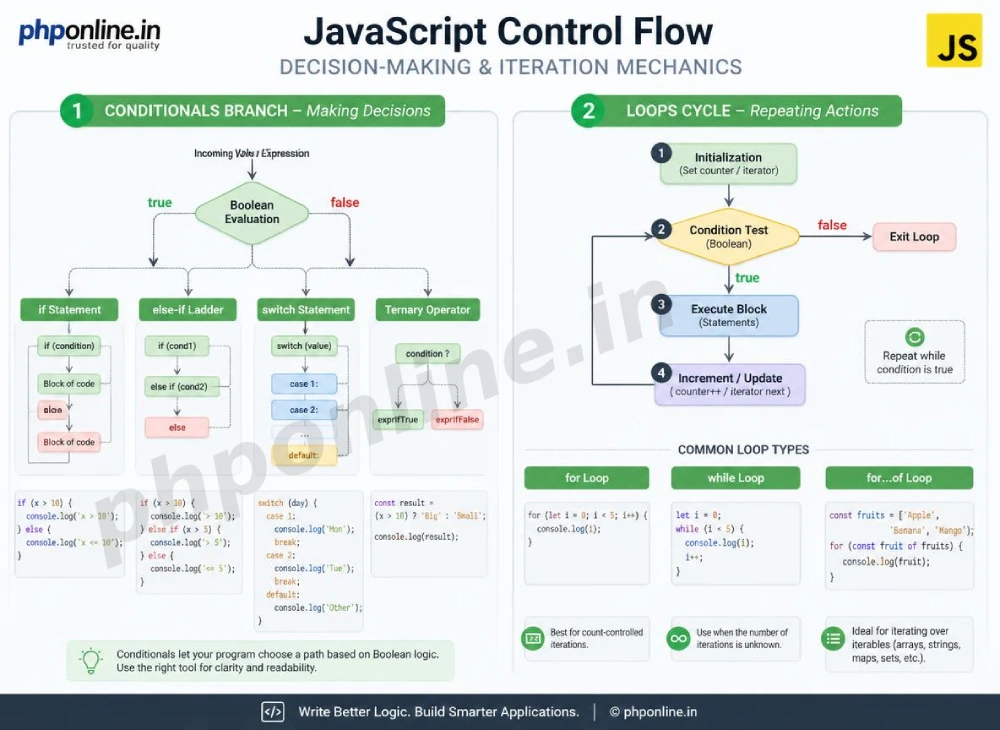
In this comprehensive JavaScript conditionals and loops guide, we will explore conditional branching (`if`, `else if`, `else`, `switch`, ternary `?:`), loop mechanics (`for`, `while`, `do…while`, `for…of`), loop control statements (`break`, `continue`), avoiding infinite loops, and hands-on code examples.
Prerequisites Before Controlling Execution Flow
To test the hands-on code examples in this JavaScript conditionals and loops tutorial, verify that your development environment meets these basic requirements:
- Web Browser: A modern web browser with Developer Tools (Google Chrome, Mozilla Firefox, Microsoft Edge, or Apple Safari).
- Code Editor: A text editor such as Visual Studio Code, Sublime Text, or Notepad++.
- JavaScript Foundations: Understanding of variables (`let`, `const`), comparison operators (`===`, `!==`), and functions.
If you need to review how functions return boolean values to drive conditional checks, visit our previous guide on Easy JavaScript Functions Guide: 5 Core Declaration Types & Examples.
1. Conditional Decision Branching in JavaScript
Conditional statements evaluate boolean expressions to decide which code block to run.
A. The if, else if, and else Structure
The if statement executes a block of code if its condition is true. If false, an optional else if tests a secondary condition, or an else block catches all remaining unhandled cases:
// User Access Control Example
let userRole = "Editor";

if (userRole === "Admin") {
    console.log("Full system access granted.");
} else if (userRole === "Editor") {
    console.log("Content publishing access granted.");
} else {
    console.log("Standard view-only access granted.");
}
B. The Switch Statement (Multi-Branch Value Matching)
When comparing a single expression against multiple potential constant values, a switch statement provides a cleaner, more readable alternative to long if...else if chains.
Crucial Rule: Always terminate each case block with a break; statement! Omitting break causes execution to “fall through” into subsequent case blocks regardless of whether their conditions match.
// Order Status Evaluator using Switch
let orderStatus = "shipped";

switch (orderStatus) {
    case "pending":
        console.log("Order received. Awaiting payment.");
        break;
    case "processing":
        console.log("Order is being packed in the warehouse.");
        break;
    case "shipped":
        console.log("Order is in transit with the courier.");
        break;
    default:
        console.log("Unknown order status.");
}
Want to test conditional branching live? Try running your code in our Online Code Editor.
C. The Ternary Operator (Short-hand Conditional)
The **Ternary Operator** (condition ? valueIfTrue : valueIfFalse) is the only JavaScript operator taking three operands. It serves as a concise, one-line shorthand for basic if...else assignments:
let userAge = 20;

// Traditional if-else assignment
let accessMessage;
if (userAge >= 18) {
    accessMessage = "Allowed";
} else {
    accessMessage = "Denied";
}

// Concise Ternary Operator Equivalent
let ternaryMessage = (userAge >= 18) ? "Allowed" : "Denied";
console.log(ternaryMessage); // Prints: Allowed
2. Repetitive Code Execution with Loops
Loops repeat a block of code as long as a specified condition evaluates to true.
A. The Traditional for Loop (Counter-Based Iteration)
The standard for loop consists of three expressions separated by semicolons: **Initialization → Condition → Incrementation**:
// Counting from 1 to 5
for (let i = 1; i <= 5; i++) {
    console.log(`Current Iteration: ${i}`);
}
B. The while Loop (Pre-Condition Evaluation)
A while loop checks its boolean condition *before* executing the loop body. It is ideal when you do not know in advance how many iterations will be required:
let diceRoll = 0;

// Loop continues until a 6 is rolled
while (diceRoll !== 6) {
    diceRoll = Math.floor(Math.random() * 6) + 1;
    console.log(`Rolled a: ${diceRoll}`);
}
C. The do…while Loop (Post-Condition Guarantee)
Unlike the standard while loop, a do...while loop checks its condition *after* executing the body. This guarantees that the loop block executes **at least once**, even if the condition is false from the start:
let attempts = 0;

do {
    console.log(`Attempt #${attempts + 1} executed.`);
    attempts++;
} while (attempts < 0); // Condition is false, but body ran once!
Want to test loops live? Try running your code in our Online Code Editor.
D. The ES6 for…of Loop (Iterable Collections)
The ES6 for...of loop provides a clean, modern syntax for iterating over iterable data collections such as Arrays, Strings, and NodeLists:
const techStack = ["HTML5", "CSS3", "JavaScript", "PHP 8"];

// Iterating over Array elements cleanly
for (const tech of techStack) {
    console.log(`Mastering: ${tech}`);
}
3. Loop Control Statements: break and continue
JavaScript provides two keywords to alter standard loop execution behavior:
break: Terminates the loop completely and transfers control to the statement following the loop block.continue: Skips the remaining code inside the current iteration and jumps directly to the next loop cycle test.
// Demonstrating break and continue
for (let i = 1; i <= 10; i++) {
    if (i === 3) {
        console.log(`Skipping number ${i} via continue`);
        continue; // Skips printing 3
    }

    if (i === 7) {
        console.log(`Stopping loop completely at ${i} via break`);
        break; // Exits loop entirely
    }

    console.log(`Processed number: ${i}`);
}
Want to test control keywords live? Try running your code in our Online Code Editor.
Summary Comparison of JavaScript Control Flow Structures
| Structure Name | Sample Syntax | Condition Check Time | Primary Application Scenario |
|---|---|---|---|
if...else | if (x > 5) { ... } else { ... } | Before block execution | General boolean decision branching with complex conditions. |
switch | switch (val) { case 1: ... break; } | Before block execution | Matching a single variable against multiple fixed discrete values. |
Ternary (?:) | let res = (age >= 18) ? "Yes" : "No"; | Inline assignment | Short, one-line variable assignments based on a single condition. |
for loop | for (let i=0; i<10; i++) { ... } | Before every iteration | Iterating a known, explicit number of counter-based times. |
while loop | while (isPending) { ... } | Before every iteration | Repeating code when the exact number of iterations is unknown. |
do...while | do { ... } while (condition); | After every iteration | Guaranteeing code executes at least once before testing condition. |
for...of | for (const item of array) { ... } | Automatic for each item | Modern, clean traversal over Array elements and iterable collections. |
4. Complete Hands-on Interactive Demonstration Example
Below is a complete, working HTML document featuring interactive form inputs, conditional discount calculations, for-loop rendering, DOM element updates, and console logging combined:
<!DOCTYPE html>
<html lang="en">
<head>
    <meta charset="UTF-8">
    <meta name="viewport" content="width=device-width, initial-scale=1.0">
    <title>JavaScript Conditionals and Loops Demonstration</title>

    <style>
        body {
            font-family: Arial, sans-serif;
            background-color: #f4f6f9;
            color: #333;
            padding: 30px;
            max-width: 600px;
            margin: 0 auto;
        }

        .checkout-card {
            background-color: #ffffff;
            border: 1px solid #e0e0e0;
            border-radius: 8px;
            padding: 25px;
            box-shadow: 0 4px 12px rgba(0,0,0,0.05);
        }

        .form-group {
            margin-bottom: 15px;
        }

        .form-group label {
            display: block;
            margin-bottom: 5px;
            font-weight: bold;
        }

        .form-group input, .form-group select {
            width: 100%;
            padding: 10px;
            border: 1px solid #ccc;
            border-radius: 4px;
            font-size: 16px;
        }

        .btn-calc {
            background-color: #0073aa;
            color: #ffffff;
            border: none;
            padding: 12px 20px;
            font-size: 15px;
            border-radius: 4px;
            cursor: pointer;
            width: 100%;
        }

        .output-box {
            margin-top: 20px;
            padding: 15px;
            background-color: #e8f5e9;
            color: #2e7d32;
            border-radius: 4px;
        }

        .item-list {
            margin-top: 10px;
            padding-left: 20px;
        }
    </style>
</head>
<body>

    <div class="checkout-card">
        <h2 style="color: #0073aa; margin-bottom: 15px;">Bulk Order Tier Pricing Calculator</h2>

        <div class="form-group">
            <label for="qty-input">Select Quantity:</label>
            <input type="number" id="qty-input" value="5" min="1" max="50">
        </div>

        <div class="form-group">
            <label for="membership-select">Membership Level:</label>
            <select id="membership-select">
                <option value="standard">Standard Member (0% Extra)</option>
                <option value="premium">Premium Member (10% Extra)</option>
                <option value="vip">VIP Gold Member (20% Extra)</option>
            </select>
        </div>

        <button id="calculate-btn" class="btn-calc">Calculate Order Summary</button>

        <div id="summary-result" class="output-box">
            Click calculate to evaluate order pricing tiers...
        </div>
    </div>

    <script>
        const BASE_UNIT_PRICE = 20.00;
        const qtyInput = document.getElementById("qty-input");
        const membershipSelect = document.getElementById("membership-select");
        const calculateBtn = document.getElementById("calculate-btn");
        const summaryResult = document.getElementById("summary-result");

        calculateBtn.addEventListener("click", () => {
            const quantity = parseInt(qtyInput.value) || 1;
            const membership = membershipSelect.value;

            // 1. Conditional Branching: Bulk Quantity Discount Percentage
            let bulkDiscountPercent = 0;
            if (quantity >= 20) {
                bulkDiscountPercent = 25; // 25% Off
            } else if (quantity >= 10) {
                bulkDiscountPercent = 15; // 15% Off
            } else if (quantity >= 5) {
                bulkDiscountPercent = 5;  // 5% Off
            } else {
                bulkDiscountPercent = 0;  // No Discount
            }

            // 2. Switch Statement: Additional Membership Discount
            let membershipDiscountPercent = 0;
            switch (membership) {
                case "premium":
                    membershipDiscountPercent = 10;
                    break;
                case "vip":
                    membershipDiscountPercent = 20;
                    break;
                default:
                    membershipDiscountPercent = 0;
            }

            // Calculate Totals
            const totalDiscountPercent = bulkDiscountPercent + membershipDiscountPercent;
            const rawSubtotal = quantity * BASE_UNIT_PRICE;
            const finalTotal = rawSubtotal - (rawSubtotal * (totalDiscountPercent / 100));

            // 3. Loop Execution: Generating Dynamic Itemized Summary
            let itemsHtml = "<ol class='item-list'>";
            for (let i = 1; i <= quantity; i++) {
                itemsHtml += `<li>Item #${i} processed ($${BASE_UNIT_PRICE.toFixed(2)})</li>`;
            }
            itemsHtml += "</ol>";

            // Update DOM Output
            summaryResult.innerHTML = `
                <strong>Order Calculations Complete:</strong><br>
                Total Quantity: ${quantity}<br>
                Total Discount Applied: ${totalDiscountPercent}%<br>
                <strong>Final Payable Total: $${finalTotal.toFixed(2)}</strong>
                <hr style="margin: 10px 0; border: 0; border-top: 1px solid #c8e6c9;">
                <div>Itemized Inventory Traversal:</div>
                ${itemsHtml}
            `;

            console.log(`Order Processed: Qty ${quantity}, Discount ${totalDiscountPercent}%, Total $${finalTotal.toFixed(2)}`);
        });
    </script>

</body>
</html>
Want to test this JavaScript conditionals and loops code live? Try running it in our Online Code Editor.
Validating HTML and JavaScript Code Standards
Omitting a loop counter incrementation statement (like i++ in a while loop) creates an infinite loop that freezes user web browser tabs.
Before publishing your web page scripts, validate your code syntax using our automated PHPOnline HTML Validator Tool.
Troubleshooting Common Control Flow Errors
| Observed Control Flow Bug | Probable Cause | Recommended Solution |
|---|---|---|
| Browser tab freezes or becomes completely unresponsive | An **Infinite Loop** where the termination condition is never reached or counter incrementation is missing. | Force close the browser tab, inspect loop conditions, and ensure counters increment toward the termination boundary. |
switch statement executes every single case block regardless of value match | Forgetting to terminate each case block with a break; statement. | Add break; to the end of every case block inside switch statements. |
if statement evaluates to true unexpectedly during value check | Accidentally using the assignment operator (=) instead of the comparison operator (===) inside condition parentheses. | Replace single assignment signs (=) with strict equality signs (===) inside conditions. |
Array loop skips elements or throws undefined indexing errors | Off-by-one errors in loop boundaries (e.g., using i <= array.length instead of i < array.length). | Use 0-based indexing boundaries (i < array.length) or switch to modern for...of loops. Validate code with our HTML Validator Tool. |
Frequently Asked Questions (FAQ)
Q1: What are JavaScript conditionals and loops and why are they fundamental?
JavaScript conditionals and loops are core control flow structures that manage program decision-making and iteration. Conditionals (like if...else and switch) execute code selectively based on conditions, while loops (like for and while) repeat tasks automatically without code redundancy.
Q2: What is the main difference between a while loop and a do…while loop in JavaScript?
A while loop tests its condition *before* executing the body, meaning it may execute zero times if the condition is false initially. A do...while loop tests its condition *after* executing the body, guaranteeing the loop code executes at least once.
Q3: Why should you use the strict equality operator (===) in conditional checks?
Using strict equality (===) ensures that both the value AND the data type match without performing implicit type coercion, preventing subtle comparison bugs caused by loose equality (==).
Q4: What is an infinite loop and how can you avoid it?
An infinite loop occurs when a loop’s termination condition never evaluates to false (or a counter fails to increment), causing the browser tab to freeze. You can avoid infinite loops by verifying that loop state variables increment correctly toward a reachable termination boundary.
Next Steps & Official References
Consult official technical web standards on the MDN Official JavaScript Control Flow Guide (mozilla.org).
Before publishing your web page layouts, validate your code syntax using our PHPOnline HTML Validator Tool.
Ready for the next lesson in sequence? Proceed directly to the next lesson in Module 2: Next Lesson: JavaScript Arrays & Array Methods (push, pop, map, filter, reduce) →
# Summary
Here is what you've learned in this lesson:
- Easy JavaScript Conditionals and Loops Guide: 6 Core Control Flow Structures & Examples
- Overview: Understanding JavaScript Conditionals and Loops & Program Flow
- Prerequisites Before Controlling Execution Flow
- 1. Conditional Decision Branching in JavaScript
- 2. Repetitive Code Execution with Loops
- 3. Loop Control Statements: break and continue
- Summary Comparison of JavaScript Control Flow Structures
- 4. Complete Hands-on Interactive Demonstration Example
- Validating HTML and JavaScript Code Standards
- Troubleshooting Common Control Flow Errors
- Frequently Asked Questions (FAQ)
- Next Steps & Official References