
JavaScript Events
Easy JavaScript Events Guide: 5 Core Propagation Mechanics & Examples
Master user interactivity with this complete JavaScript events guide. Learn addEventListener, event bubbling vs capturing, event delegation, and preventDefault.
Estimated Read Time: 23 Minutes | Category: Web Development Fundamentals
Overview: Understanding JavaScript Events & Interactive Triggers
Quick JavaScript Events Summary:
- User Interactivity Engine: JavaScript events are notifications dispatched by the browser when users interact with a webpage (mouse clicks, keyboard inputs, page scrolling, or form submissions).
- Event Listeners (addEventListener): Modern scripts register non-intrusive event listeners using
element.addEventListener("event", callback)to execute handling logic when triggers occur. - The Event Object: Event handlers automatically receive a parameter object (
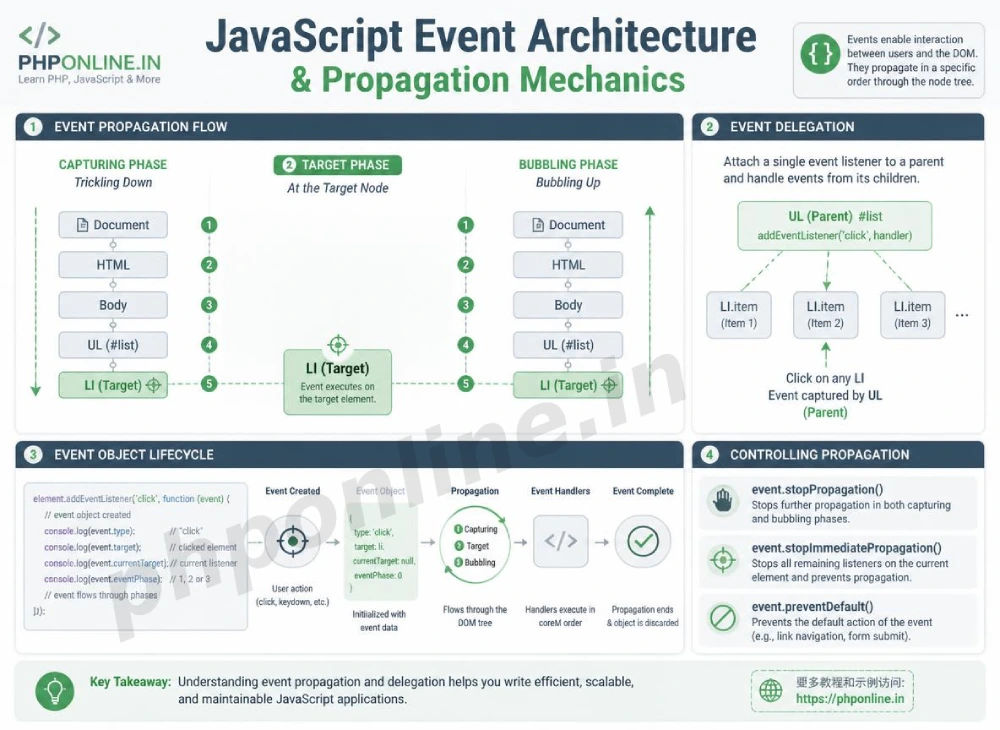
eorevent) containing useful metadata about the trigger (mouse coordinates, target elements, key codes). - Three Phases of Propagation: Events travel through three distinct phases: **Capturing Phase** (down the DOM tree), **Target Phase** (on the clicked node), and **Bubbling Phase** (bubbling up to parent nodes).
- Event Delegation Efficiency: Attaching a single event listener to a parent container allows you to manage events for present and future child elements efficiently.
Welcome to Lesson 9 of our structured Web Development curriculum, marking the final lesson in Module 3: DOM Manipulation & Event Handling. Following our previous tutorial on Easy JavaScript DOM Manipulation Guide: 5 Core Selection Methods & Examples, you now understand how to select, modify, create, and delete DOM tree nodes. The next essential milestone in web development is connecting those DOM elements to user interaction triggers using JavaScript events.
A static website merely displays content to visitors; an interactive web application reacts to user choices in real time. JavaScript events form the communication highway between human actions and code execution. Whether you are validating email fields on keypress, capturing button click triggers, preventing default form page reloads, or handling drag-and-drop actions, events empower web pages to respond intelligently.
In this comprehensive JavaScript events guide, we will explore event listener syntax, mouse/keyboard/form event categories, event object properties, event propagation (`bubbling` vs. `capturing`), `preventDefault()`, `stopPropagation()`, performance event delegation, and hands-on code examples.
Prerequisites Before Handling Events
To test the hands-on code examples in this JavaScript events tutorial, verify that your development environment meets these basic requirements:
- Web Browser: A modern web browser with Developer Tools (Google Chrome, Mozilla Firefox, Microsoft Edge, or Apple Safari).
- Code Editor: A text editor such as Visual Studio Code, Sublime Text, or Notepad++.
- DOM Selection Foundations: Understanding of `querySelector`, `textContent`, `classList`, and DOM nodes.
If you need to review how `querySelector` targets elements before attaching event listeners, visit our previous guide on Easy JavaScript DOM Manipulation Guide: 5 Core Selection Methods & Examples.
1. Modern Event Listeners (addEventListener)
In modern web engineering, event handling logic is attached using the addEventListener() method. This separates interactive JavaScript behavior from HTML structural markup cleanly.
Syntax of addEventListener:
// Modern Event Listener Syntax
targetElement.addEventListener(eventTypeString, callbackFunction, useCapture);
Why addEventListener Is Superior to Legacy Attributes:
- Multiple Handlers: Allows you to attach multiple independent event listeners to the exact same element without overriding existing logic.
- Clean Separation: Eliminates inline HTML event attributes (like
onclick="...") to preserve clean code standards. - Propagation Control: Grants granular control over event bubbling and capturing behavior phases.
// 1. Target the button element
const submitButton = document.querySelector("#submit-btn");

// 2. Attach an Event Listener for "click" events using an ES6 Arrow Function
submitButton.addEventListener("click", (event) => {
    console.log("Submit button clicked!");
});
Want to test event listeners live? Try running your code in our Online Code Editor.
2. Common JavaScript Event Categories
JavaScript categorizes events based on the device interaction origin:
A. Mouse Events
click: Triggers when an element is clicked.dblclick: Triggers when an element is double-clicked rapidly.mouseenter/mouseleave: Triggers when the mouse cursor enters or leaves an element box boundary.
B. Keyboard Events
keydown: Triggers when a key is first pressed down.keyup: Triggers when a pressed key is released.input: Triggers synchronously as the value of an<input>or<textarea>element changes.
C. Form Events
submit: Triggers when a form’s submit button is clicked or submitted via Enter.change: Triggers when an input, select, or checkbox value changes and loses focus.focus/blur: Triggers when an input element gains or loses cursor focus.
3. The Event Object and preventDefault()
When an event triggers, the browser automatically constructs a detailed **Event Object** and passes it as the first argument to the callback function.
Useful Event Object Properties:
event.target: References the exact DOM element node that triggered the event.event.type: Returns a string indicating the event type (e.g.,"click","keydown").event.key: Returns the character string of the key pressed during keyboard events.
Stopping Default Browser Behavior (preventDefault):
Certain HTML elements perform default browser actions when interacted with (for example, clicking a form submit button reloads the page, and clicking an anchor link navigates to a new URL). Calling event.preventDefault() cancels this default behavior, allowing JavaScript to handle processing asynchronously:
const loginForm = document.querySelector("#login-form");

loginForm.addEventListener("submit", (e) => {
    // Stop the browser from performing a full page refresh submit!
    e.preventDefault();

    // Read form input values asynchronously via JavaScript
    const emailInput = document.querySelector("#user-email").value;
    console.log(`Processing login for: ${emailInput}`);
});
Want to test preventDefault live? Try running your code in our Online Code Editor.
4. Event Propagation: Bubbling vs. Capturing
When an event triggers on an element nested deep inside the DOM tree, it doesn’t just execute on that single element. The event travels through three distinct propagation phases:
- Capturing Phase: The event trickles down from the root
documentnode through parent elements to the target node. - Target Phase: The event reaches the exact element node that was clicked.
- Bubbling Phase: The event “bubbles up” from the target element through all its parent container nodes back to the root
document.
By default, JavaScript event listeners execute during the **Bubbling Phase**.
Stopping Event Propagation (stopPropagation):
If you want to prevent a child element’s click event from bubbling up and triggering click listeners on parent containers, call event.stopPropagation():
const childButton = document.querySelector("#child-btn");

childButton.addEventListener("click", (e) => {
    e.stopPropagation(); // Stops the click event from bubbling up to parent divs!
    console.log("Child button clicked exclusively.");
});
5. High-Performance Event Delegation
When working with dynamic lists or large data tables containing dozens or hundreds of items, attaching an individual event listener to every single child item consumes excessive CPU memory and degrades performance.
**Event Delegation** is a performance technique where you attach a single event listener to a persistent **parent container**. Thanks to event bubbling, clicks on child elements bubble up to the parent, where event.target identifies which child item was clicked!
// Event Delegation Example
const parentList = document.querySelector("#shopping-list");

// Single event listener on parent container handles ALL current and future list items!
parentList.addEventListener("click", (e) => {
    // Verify if the clicked target is a button with class "btn-delete"
    if (e.target.classList.contains("btn-delete")) {
        const itemRow = e.target.closest("li");
        itemRow.remove(); // Delete item row
        console.log("Delegated delete action executed.");
    }
});
Want to test event delegation live? Try running your code in our Online Code Editor.
Summary Comparison of Event Properties and Methods
| Event Feature / Method | Type Category | Primary Behavior | Primary Application Scenario |
|---|---|---|---|
addEventListener() | Registration Method | Registers an event handler function on a target DOM node. | Non-intrusively binding interactive logic to UI elements. |
e.target | Event Property | References the exact DOM element node that dispatched the event. | Identifying specific target elements during event delegation. |
e.preventDefault() | Control Method | Cancels the browser’s default action for the event. | Preventing form page reloads and anchor link redirections. |
e.stopPropagation() | Control Method | Halts event propagation up or down the DOM tree. | Preventing child element clicks from triggering parent box click events. |
| Event Delegation | Design Pattern | Utilizes event bubbling to manage child events via a single parent. | Efficiently handling dynamic lists, tables, and filtered UI views. |
6. Complete Hands-on Interactive Demonstration Example
Below is a complete, working HTML document featuring form submission validation, `preventDefault()`, keyboard `input` tracking, event delegation on dynamic list items, and interactive console logging combined:
<!DOCTYPE html>
<html lang="en">
<head>
    <meta charset="UTF-8">
    <meta name="viewport" content="width=device-width, initial-scale=1.0">
    <title>JavaScript Events Demonstration</title>

    <style>
        body {
            font-family: Arial, sans-serif;
            background-color: #f4f6f9;
            color: #333;
            padding: 30px;
            max-width: 650px;
            margin: 0 auto;
        }

        .event-card {
            background-color: #ffffff;
            border: 1px solid #e0e0e0;
            border-radius: 8px;
            padding: 25px;
            box-shadow: 0 4px 12px rgba(0,0,0,0.05);
        }

        .form-group {
            margin-bottom: 15px;
        }

        .form-group label {
            display: block;
            margin-bottom: 5px;
            font-weight: bold;
        }

        .form-group input {
            width: 100%;
            padding: 10px;
            border: 1px solid #ccc;
            border-radius: 4px;
            font-size: 15px;
        }

        .btn-submit {
            background-color: #0073aa;
            color: #ffffff;
            border: none;
            padding: 10px 20px;
            font-size: 15px;
            border-radius: 4px;
            cursor: pointer;
            width: 100%;
        }

        .live-preview {
            font-size: 14px;
            color: #666;
            margin-top: 5px;
        }

        .delegated-list {
            list-style: none;
            padding: 0;
            margin-top: 20px;
        }

        .list-item {
            display: flex;
            justify-content: space-between;
            align-items: center;
            padding: 10px;
            background-color: #f8f9fa;
            border: 1px solid #e9ecef;
            border-radius: 4px;
            margin-bottom: 8px;
        }

        .btn-remove-item {
            background-color: #d32f2f;
            color: #fff;
            border: none;
            padding: 4px 8px;
            border-radius: 3px;
            cursor: pointer;
        }
    </style>
</head>
<body>

    <div class="event-card">
        <h2 style="color: #0073aa; margin-bottom: 15px;">Interactive Event Handler</h2>

        <!-- Form handling with preventDefault -->
        <form id="sample-form">
            <div class="form-group">
                <label for="username-field">Enter Username (Live Input Event):</label>
                <input type="text" id="username-field" placeholder="Type a username..." required>
                <div id="char-counter" class="live-preview">Character Count: 0</div>
            </div>

            <button type="submit" class="btn-submit">Add Item via Form Submit</button>
        </form>

        <!-- Container utilizing Event Delegation -->
        <h3 style="margin-top: 25px; font-size: 16px;">Delegated List Container:</h3>
        <ul id="delegated-parent-list" class="delegated-list">
            <li class="list-item">
                <span>Initial Sample Item</span>
                <button class="btn-remove-item">Delete</button>
            </li>
        </ul>
    </div>

    <script>
        // Target DOM Elements
        const sampleForm = document.querySelector("#sample-form");
        const usernameField = document.querySelector("#username-field");
        const charCounter = document.querySelector("#char-counter");
        const delegatedParentList = document.querySelector("#delegated-parent-list");

        // 1. Keyboard 'input' Event Listener for Live Counter
        usernameField.addEventListener("input", (e) => {
            // Read target input value length
            const textLength = e.target.value.length;
            charCounter.textContent = `Character Count: ${textLength}`;
        });

        // 2. Form 'submit' Event Listener using preventDefault
        sampleForm.addEventListener("submit", (e) => {
            e.preventDefault(); // Stop full page reload!

            const inputValue = usernameField.value.trim();
            if (inputValue !== "") {
                // Create new list item dynamically
                const newItem = document.createElement("li");
                newItem.classList.add("list-item");
                newItem.innerHTML = `
                    <span>${inputValue}</span>
                    <button class="btn-remove-item">Delete</button>
                `;

                // Append item to delegated parent container
                delegatedParentList.appendChild(newItem);

                // Reset form fields
                usernameField.value = "";
                charCounter.textContent = "Character Count: 0";
                console.log(`Form submitted asynchronously. Added: ${inputValue}`);
            }
        });

        // 3. High-Performance Event Delegation on Parent Container
        delegatedParentList.addEventListener("click", (e) => {
            // Check if the clicked target element contains the delete button class
            if (e.target.classList.contains("btn-remove-item")) {
                // Locate closest list item row and remove from DOM
                const parentRow = e.target.closest("li");
                parentRow.remove();
                console.log("Delegated event handler removed item successfully.");
            }
        });
    </script>

</body>
</html>
Want to test this JavaScript events code live? Try running it in our Online Code Editor.
Validating HTML and JavaScript Code Standards
Misspelling event names (like writing "onlick" instead of "click" inside addEventListener) will fail quietly without throwing errors.
Before publishing your web page layouts, validate your code syntax using our automated PHPOnline HTML Validator Tool.
Troubleshooting Common Event Handling Errors
| Observed Event Bug | Probable Cause | Recommended Solution |
|---|---|---|
| Form submission causes the entire web page to refresh instantly, erasing console logs | Forgetting to call e.preventDefault() inside the form’s submit event listener handler. | Add e.preventDefault() as the first statement in your submit event callback. |
| Event listener fails to fire when clicking an element | Misspelling the event name string (e.g., using "onclick" instead of "click") or selecting a null DOM node. | Use pure event strings without the "on" prefix (e.g., "click", "submit", "input"). |
| Clicking a button inside a modal closes the entire parent popup unexpectedly | **Event Bubbling** propagating the click event up to parent container click listeners. | Call e.stopPropagation() inside the child button click handler to halt upward event bubbling. |
| EventListener callback executes automatically on page load before the user clicks | Accidentally invoking the callback function with parentheses inside addEventListener (e.g., btn.addEventListener("click", myFunc())). | Pass the function name reference without parentheses: btn.addEventListener("click", myFunc). Validate code with our HTML Validator Tool. |
Frequently Asked Questions (FAQ)
Q1: What are JavaScript events and why are they fundamental?
JavaScript events are browser signals dispatched when user interactions occur (clicks, keypresses, scrolls, or form submits). They are fundamental because they allow developers to bind interactive code execution directly to user actions, creating dynamic web applications.
Q2: What is the main difference between event bubbling and event capturing?
Event capturing is the initial propagation phase where an event trickles down from the root document node to the target element. Event bubbling is the reverse phase where the event propagates upward from the target element back through parent containers to the root document.
Q3: What is Event Delegation in JavaScript and why is it recommended?
Event Delegation is a performance technique where a single event listener is attached to a parent container rather than multiple child items. Thanks to event bubbling, the parent handles events for all present and future child elements, saving memory and improving performance.
Q4: What does e.preventDefault() do in form event handlers?
e.preventDefault() cancels the browser’s default action for a triggered event. In form handling, it prevents the default full-page HTTP refresh, enabling JavaScript to process form validation and API submission asynchronously via AJAX.
Course Progress & Official References
Congratulations on completing Module 3: DOM Manipulation & Event Handling! You now possess expert skills spanning the Document Object Model, node selection (`querySelector`), element creation, `classList` toggling, event listeners, propagation mechanics (`bubbling`), and event delegation.
Consult official technical web standards on the MDN Official JavaScript Events Guide (mozilla.org).
Before publishing your web page layouts, validate your code syntax using our PHPOnline HTML Validator Tool.
Ready to move to Module 4? Proceed directly to the first lesson in Module 4: Next Lesson: Asynchronous JavaScript, Promises & Async/Await →
# Summary
Here is what you've learned in this lesson:
- Easy JavaScript Events Guide: 5 Core Propagation Mechanics & Examples
- Overview: Understanding JavaScript Events & Interactive Triggers
- Prerequisites Before Handling Events
- 1. Modern Event Listeners (addEventListener)
- 2. Common JavaScript Event Categories
- 3. The Event Object and preventDefault()
- 4. Event Propagation: Bubbling vs. Capturing
- 5. High-Performance Event Delegation
- Summary Comparison of Event Properties and Methods
- 6. Complete Hands-on Interactive Demonstration Example
- Validating HTML and JavaScript Code Standards
- Troubleshooting Common Event Handling Errors
- Frequently Asked Questions (FAQ)
- Course Progress & Official References
Continue to the next lesson and learn more about JavaScript Promises and Async Await.