
JavaScript DOM Manipulation
Easy JavaScript DOM Manipulation Guide: 5 Core Selection Methods & Examples
Master web page modification with this complete JavaScript DOM manipulation guide. Learn querySelector, element creation, attribute updates, and dynamic CSS styling.
Estimated Read Time: 23 Minutes | Category: Web Development Fundamentals
Overview: Understanding JavaScript DOM Manipulation & Page Interactivity
Quick JavaScript DOM Manipulation Summary:
- The Document Object Model (DOM): The DOM is a programming interface created by the browser that represents an HTML document as a tree structure of nodes and objects.
- Targeting Elements: JavaScript selects DOM elements using modern querying methods like
querySelector()andquerySelectorAll(), or legacy indexers likegetElementById(). - Modifying Content Safely: Use
textContentto update plain text safely, avoiding cross-site scripting (XSS) security risks associated withinnerHTML. - Dynamic Node Creation: New HTML elements are built in memory using
document.createElement()and inserted into the document tree usingappendChild()orprepend(). - Style & Attribute Control: JavaScript dynamically alters CSS styles via the
styleobject or toggles CSS classes using theclassListAPI (add,remove,toggle).
Welcome to Lesson 8 of our structured Web Development curriculum, marking the beginning of Module 3: DOM Manipulation & Event Handling. Following our previous tutorial on Easy JavaScript Objects Guide: 5 Core Property Concepts & Examples, you now understand how object key-value pairs, methods, and JSON serialization manage memory data. The next essential milestone in web development is bringing static web pages to life using JavaScript DOM manipulation.
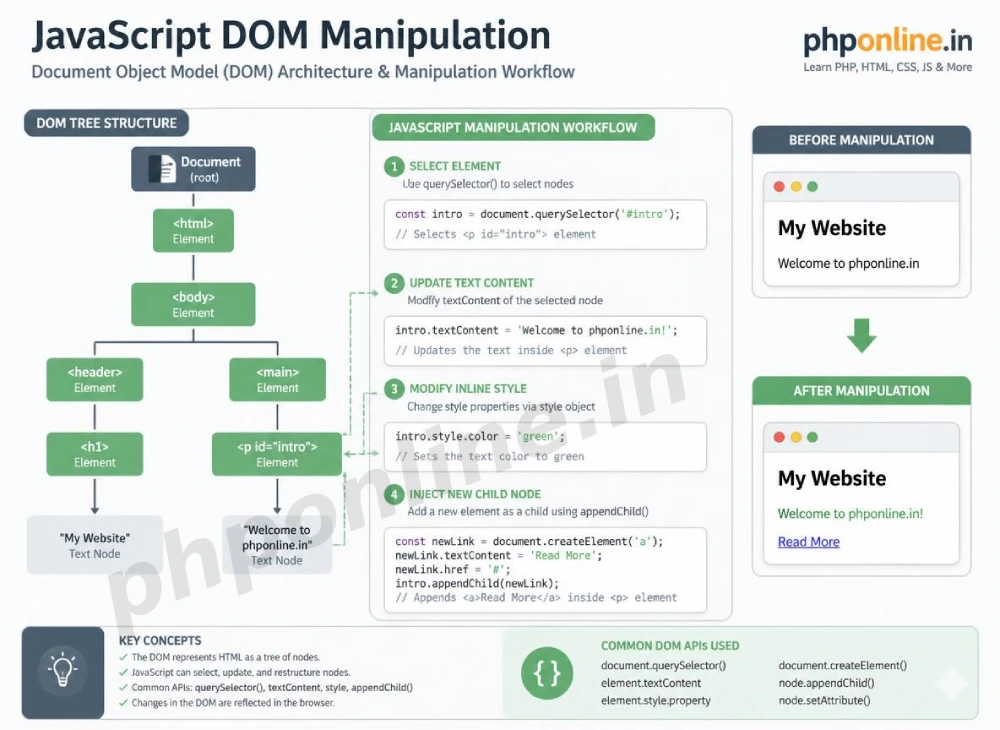
When a web browser loads an HTML document, it translates raw markup tags into a hierarchical object tree in memory called the Document Object Model (DOM). JavaScript DOM manipulation is the bridge that allows frontend scripts to interact with this memory tree—reading form input values, dynamically adding shopping cart items, toggling dark mode theme classes, and updating interface text without forcing a full browser page refresh.
In this comprehensive JavaScript DOM manipulation guide, we will explore DOM tree node structures, element selection methods (`querySelector`, `getElementById`), updating text vs. HTML (`textContent`, `innerHTML`), modifying attributes, classList manipulation, creating/deleting nodes, inline style modifications, and hands-on interactive code examples.
Prerequisites Before Manipulating the DOM
To test the hands-on code examples in this JavaScript DOM manipulation guide, verify that your development environment meets these basic requirements:
- Web Browser: A modern web browser with Developer Tools (Google Chrome, Mozilla Firefox, Microsoft Edge, or Apple Safari).
- Code Editor: A text editor such as Visual Studio Code, Sublime Text, or Notepad++.
- JavaScript & HTML Foundations: Understanding of basic HTML tags, CSS class selectors, variables (`const`, `let`), and functions.
If you need to review how HTML semantic layout containers form parent-child node relationships in the DOM tree, visit our previous guide on Easy HTML Semantic Layouts Guide: 7 Core Structural Tags & Examples.
1. What Is the Document Object Model (DOM)?
The **Document Object Model (DOM)** is an object-oriented representation of a web page document. When the browser parses an HTML document, it creates a hierarchical tree composed of individual **Nodes**:
- Document Node: The root entry point to the entire webpage (
document). - Element Nodes: Every HTML tag (
<html>,<body>,<h1>,<p>,<button>). - Attribute Nodes: Properties attached to HTML elements (
id,class,src,href). - Text Nodes: The raw textual content contained inside element tags.
// Document Root Entry Point
console.log(document.title); // Reads the current page title
console.log(document.body);  // References the <body> element node
2. Selecting DOM Elements (Legacy vs. Modern Query Selectors)
Before JavaScript can alter an element on screen, it must first locate and select that element from the DOM tree.
A. Modern Query Selectors (Recommended)
Modern JavaScript uses CSS selector syntax to target elements cleanly:
document.querySelector("selector"): Returns the **first element** in the document that matches the specified CSS selector string.document.querySelectorAll("selector"): Returns a static **NodeList collection** of all elements matching the CSS selector.
// Selecting via Modern CSS Selectors
const mainHeading = document.querySelector("#main-title");    // ID Selector
const primaryButton = document.querySelector(".btn-primary"); // Class Selector
const allCardItems = document.querySelectorAll(".card-item"); // NodeList of all matching classes
B. Legacy Selector Methods
Older DOM methods select elements specifically by ID, class name, or tag name:
// Legacy Selector Methods
const elementById = document.getElementById("main-title");
const elementsByClass = document.getElementsByClassName("card-item"); // HTMLCollection
const elementsByTag = document.getElementsByTagName("p");             // HTMLCollection
Want to test element selectors live? Try running your code in our Online Code Editor.
3. Modifying Element Content: textContent vs. innerHTML
Once an element node is selected, you can inspect or update its enclosed content using text or HTML properties:
| Content Property | Parsing Behavior | Security Risk Level | Primary Application Scenario |
|---|---|---|---|
textContent | Treats all input strictly as plain text, stripping out any HTML markup tags automatically. | Low (Safe): Protects against Cross-Site Scripting (XSS) attacks. | Updating text strings, status messages, username displays, and card headings. |
innerHTML | Parses and renders input strings as executable HTML elements and markup nodes. | High (XSS Risk): Vulnerable if untrusted user input is injected. | Injecting structured HTML templates or rich content formatted from internal server scripts. |
Content Update Code Example:
const statusHeader = document.querySelector("#status-header");

// 1. Safe Text Modification using textContent
statusHeader.textContent = "Account Registration Complete!";

// 2. Injecting HTML Markup using innerHTML
const containerBox = document.querySelector("#container");
containerBox.innerHTML = `
    <h3 style="color: #0073aa;">Success Notification</h3>
    <p>Your profile data has been updated in memory.</p>
`;
4. Modifying Attributes and CSS Classes
JavaScript can alter element attributes (such as image `src`, link `href`, or input `disabled` flags) and toggle CSS styling classes dynamically.
A. Managing HTML Attributes
setAttribute("name", "value"): Adds or updates an attribute on the selected element.getAttribute("name"): Reads the current value of an attribute.removeAttribute("name"): Deletes an attribute from the element.
const profileImage = document.querySelector("#user-avatar");

// Changing the image source attribute dynamically
profileImage.setAttribute("src", "images/avatar-updated.png");
profileImage.setAttribute("alt", "Updated User Profile Picture");
B. Controlling CSS Classes via classList API
Instead of writing raw inline styles, the recommended best practice is defining CSS classes in your stylesheet and toggling them dynamically in JavaScript using the classList API:
classList.add("class-name"): Adds one or more CSS classes to the element.classList.remove("class-name"): Removes one or more CSS classes.classList.toggle("class-name"): Toggles a class on or off (adds if missing, removes if present).classList.contains("class-name"): Returnstrueif the element possesses the class.
const cardBox = document.querySelector(".info-card");

// Toggle dark mode class dynamically
cardBox.classList.toggle("dark-theme");
Want to test attribute and class toggling live? Try running your code in our Online Code Editor.
5. Dynamic Node Creation, Insertion, and Deletion
JavaScript allows you to construct new DOM nodes entirely in memory and attach them into the document tree.
Three-Step Dynamic Element Creation:
- Create Node: Use
document.createElement("tagname")to instantiate a new element in memory. - Configure Node: Populate text, add classes, and assign attributes to the newly created element.
- Insert into DOM: Attach the configured element into the document tree using
appendChild(),prepend(), orbefore()/after().
// 1. Create a new list item element const newListItem = document.createElement("li"); // 2. Configure properties newListItem.textContent = "Module 3: JavaScript DOM Manipulation"; newListItem.classList.add("completed-item"); // 3. Append to an existing parentelement const courseList = document.querySelector("#course-list"); courseList.appendChild(newListItem); // Adds node to the end of the parent list // Deleting an Element Node const obsoleteItem = document.querySelector("#old-item"); obsoleteItem.remove(); // Removes element node from DOM tree directly
Summary Comparison of Core DOM Manipulation Methods
| DOM Method / Property | Target Category | Return Output | Primary Application Scenario |
|---|---|---|---|
querySelector() | Element Selection | First matching Element Node | Targeting single elements cleanly using modern CSS selector syntax. |
querySelectorAll() | Element Selection | Static NodeList collection | Selecting groups of elements to iterate over using forEach(). |
textContent | Content Modification | Plain text string | Safely updating text node values without XSS vulnerabilities. |
innerHTML | Content Modification | Parsed HTML string | Injecting structured HTML templates into container boxes. |
classList.toggle() | Class Manipulation | Boolean flag | Toggling visual component states (e.g., active tabs, dark mode, modal visibility). |
createElement() | Node Lifecycle | New Element Node | Instantiating new HTML elements in memory before DOM insertion. |
appendChild() | Node Lifecycle | Appended Child Node | Inserting newly created element nodes to the end of a parent container. |
6. Complete Hands-on Interactive Demonstration Example
Below is a complete, working HTML document featuring element selection, dynamic node creation, attribute editing, class toggling, element deletion, and interactive console logging combined:
<!DOCTYPE html> <html lang="en"> <head> <meta charset="UTF-8"> <meta name="viewport" content="width=device-width, initial-scale=1.0"> <title>JavaScript DOM Manipulation Demonstration</title> <style> body { font-family: Arial, sans-serif; background-color: #f4f6f9; color: #333; padding: 30px; max-width: 650px; margin: 0 auto; transition: background-color 0.3s ease, color 0.3s ease; } body.dark-mode { background-color: #121212; color: #f8f9fa; } .dom-card { background-color: #ffffff; border: 1px solid #e0e0e0; border-radius: 8px; padding: 25px; box-shadow: 0 4px 12px rgba(0,0,0,0.05); transition: background-color 0.3s ease; } body.dark-mode .dom-card { background-color: #1e1e1e; border-color: #333; } .controls-group { display: flex; gap: 10px; margin-bottom: 20px; } .btn-control { flex: 1; background-color: #0073aa; color: #ffffff; border: none; padding: 10px 15px; font-size: 14px; border-radius: 4px; cursor: pointer; } .btn-theme { background-color: #4a148c; } .dynamic-list { list-style: none; padding: 0; margin-top: 15px; } .list-node { display: flex; justify-content: space-between; align-items: center; padding: 10px 12px; background-color: #f8f9fa; border: 1px solid #e9ecef; border-radius: 4px; margin-bottom: 8px; color: #333; } body.dark-mode .list-node { background-color: #2a2a2a; border-color: #444; color: #fff; } .btn-remove { background-color: #d32f2f; color: #fff; border: none; padding: 4px 8px; border-radius: 3px; cursor: pointer; } </style> </head> <body> <div class="dom-card"> <h2 id="main-title" style="color: #0073aa; margin-bottom: 15px;">DOM Node Manager Utility</h2> <div class="controls-group"> <button id="add-node-btn" class="btn-control">Add Dynamic Node</button> <button id="toggle-theme-btn" class="btn-control btn-theme">Toggle Dark Mode</button> </div> <ul id="node-container" class="dynamic-list"> <!-- Dynamic DOM nodes generated via JavaScript --> </ul> </div> <script> // 1. Select Target DOM Elements using querySelector const mainTitle = document.querySelector("#main-title"); const addNodeBtn = document.querySelector("#add-node-btn"); const toggleThemeBtn = document.querySelector("#toggle-theme-btn"); const nodeContainer = document.querySelector("#node-container"); const bodyElement = document.body; let nodeCounter = 0; // 2. Add Dynamic Node Handler using createElement & appendChild addNodeBtn.addEventListener("click", () => { nodeCounter++; // Create newelement node const newNode = document.createElement("li"); newNode.classList.add("list-node"); // Populate content safely using textContent and innerHTML components newNode.innerHTML = ` <span>Dynamic Node #${nodeCounter} instantiated in memory</span> <button class="btn-remove">Delete</button> `; // Attach event listener to the newly created remove button const removeBtn = newNode.querySelector(".btn-remove"); removeBtn.addEventListener("click", () => { newNode.remove(); // Deletes node from DOM tree directly console.log(`Node #${nodeCounter} removed from DOM.`); }); // Append child node to parent list container nodeContainer.appendChild(newNode); console.log(`Node #${nodeCounter} appended to DOM tree.`); }); // 3. Toggle Dark Mode Handler using classList API toggleThemeBtn.addEventListener("click", () => { bodyElement.classList.toggle("dark-mode"); const isDark = bodyElement.classList.contains("dark-mode"); console.log(`Theme toggled. Dark mode active: ${isDark}`); }); </script> </body> </html>
Want to test this JavaScript DOM manipulation code live? Try running it in our Online Code Editor.
Validating HTML and JavaScript Code Standards
Attempting to access properties on a null element selection (e.g., calling addEventListener on an ID that doesn’t exist) will halt script execution.
Before publishing your web page layouts, validate your code syntax using our automated PHPOnline HTML Validator Tool.
Troubleshooting Common DOM Manipulation Errors
| Observed DOM Bug | Probable Cause | Recommended Solution |
|---|---|---|
| Uncaught TypeError: Cannot read properties of null (reading ‘addEventListener’) | The querySelector method failed to find a matching element in the DOM tree, returning null. | Verify CSS selector string spelling and confirm the script tag is executed after the HTML DOM finishes loading. |
querySelectorAll() fails to accept event listeners or innerHTML directly | querySelectorAll() returns a static NodeList collection rather than a single element node. | Iterate through the collection using forEach() to attach listeners to individual element nodes. |
innerHTML injection executes unwanted raw text or exposes security flaws | Using innerHTML to display user-supplied text input strings. | Replace innerHTML with textContent whenever handling plain user text to prevent XSS vulnerabilities. |
| Newly created elements do not respond to existing click event listeners | Event listeners were attached to static initial elements before new dynamic elements were instantiated in memory. | Attach event listeners directly upon element creation or use Event Delegation on the parent container. Validate code with our HTML Validator Tool. |
Frequently Asked Questions (FAQ)
Q1: What is JavaScript DOM manipulation and why is it fundamental?
JavaScript DOM manipulation is the process of selecting, modifying, creating, or deleting HTML element nodes inside the browser’s Document Object Model tree using scripts. It is fundamental because it enables dynamic user interfaces, interactive form handling, theme toggling, and single-page application updates without full page reloads.
Q2: What is the main difference between querySelector and getElementById?
querySelector() accepts any valid CSS selector string (IDs, classes, attributes, pseudo-classes) and returns the first matching element node. getElementById() is a legacy method that targets elements strictly by their unique id attribute string.
Q3: Why is textContent preferred over innerHTML for updating text?
textContent treats all input strictly as plain text, ensuring high execution performance and completely mitigating Cross-Site Scripting (XSS) vulnerabilities. innerHTML parses text strings as HTML markup, exposing security risks if handling un-sanitized user input.
Q4: How does classList.toggle() simplify CSS state management?
classList.toggle("class-name") automatically checks whether a specified CSS class exists on an element. If present, it removes it; if absent, it adds it. This eliminates manual if/else checks when toggling visual UI component states.
Next Steps & Official References
Consult official technical web standards on the MDN Official Introduction to the DOM (mozilla.org).
Before publishing your web page layouts, validate your code syntax using our PHPOnline HTML Validator Tool.
Ready for the final lesson in Module 3? Proceed directly to the final lesson in Module 3: Next Lesson: JavaScript Events, Event Listeners & Event Bubbling →
# Summary
Here is what you've learned in this lesson:
- Easy JavaScript DOM Manipulation Guide: 5 Core Selection Methods & Examples
- Overview: Understanding JavaScript DOM Manipulation & Page Interactivity
- Prerequisites Before Manipulating the DOM
- 1. What Is the Document Object Model (DOM)?
- 2. Selecting DOM Elements (Legacy vs. Modern Query Selectors)
- 3. Modifying Element Content: textContent vs. innerHTML
- 4. Modifying Attributes and CSS Classes
- 5. Dynamic Node Creation, Insertion, and Deletion
- Summary Comparison of Core DOM Manipulation Methods
- 6. Complete Hands-on Interactive Demonstration Example
- Validating HTML and JavaScript Code Standards
- Troubleshooting Common DOM Manipulation Errors
- Frequently Asked Questions (FAQ)
- Next Steps & Official References
Continue to the next lesson and learn more about JavaScript Events.