
JavaScript Functions
Easy JavaScript Functions Guide: 5 Core Declaration Types & Examples
Master reusable code blocks with this complete JavaScript functions guide. Learn function declarations, expressions, arrow functions, parameters, and return values.
Estimated Read Time: 23 Minutes | Category: Web Development Fundamentals
Overview: Understanding JavaScript Functions & Reusable Logic
Quick JavaScript Functions Summary:
- Reusable Logic Blocks: A JavaScript function is a self-contained block of code designed to perform a specific task, executed whenever it is invoked (called).
- DRY Principle (Don’t Repeat Yourself): Functions eliminate redundant code by allowing developers to write execution logic once and reuse it multiple times across an application.
- Inputs and Outputs: Functions accept input values called
parameters(or arguments) and process calculations to produce an output via thereturnstatement. - Declaration vs. Expression: Function Declarations are hoisted to the top of their scope, whereas Function Expressions and Arrow Functions are assigned to variables and evaluated at runtime.
- ES6 Arrow Functions: Modern ES6 syntax provides a concise arrow (
=>) syntax for writing cleaner functions with implicit return capabilities and lexicalthisbinding.
Welcome to Lesson 4 of our structured Web Development curriculum, marking the final lesson in Module 1: JavaScript Basics & Core Syntax. Following our previous tutorial on Easy JavaScript Data Types Guide: 8 Essential Data Types & Examples, you now understand primitive and reference memory allocation, operator mechanics, and strict equality testing. The next vital step in building modular scripts is organizing executable code using JavaScript functions.
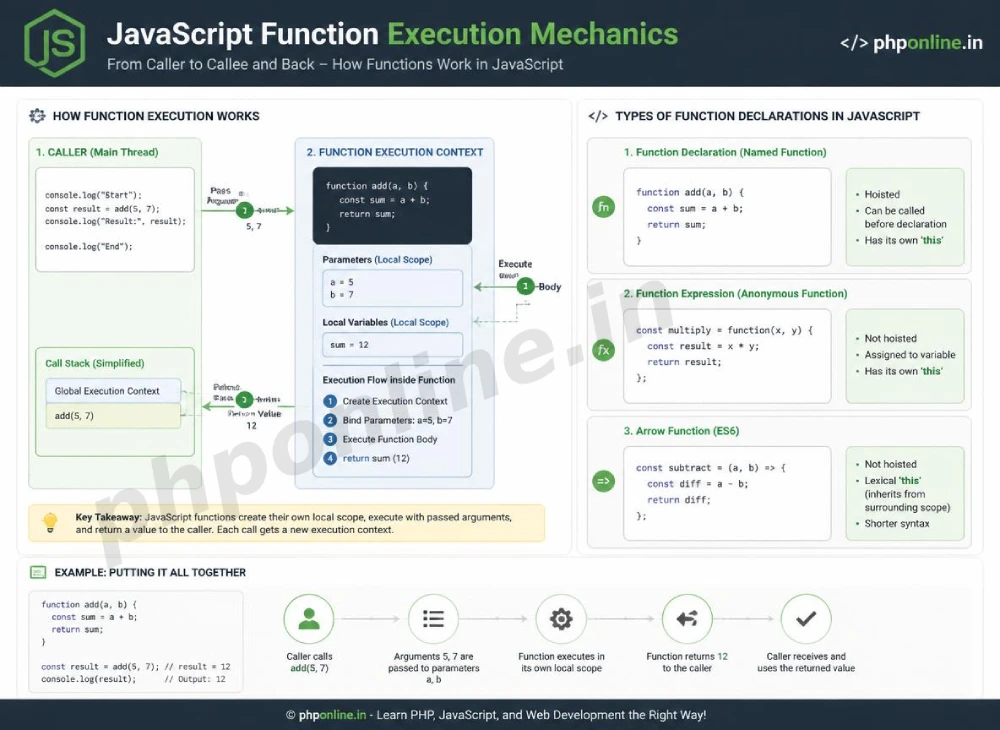
In software engineering, repeating the same lines of code across different parts of a codebase makes applications difficult to maintain, test, and debug. Functions solve this problem by encapsulating logic into named modules. Whether you need to calculate e-commerce tax rates, validate an email string, format timestamp dates, or handle a button click event, functions serve as the fundamental building blocks of JavaScript applications.
In this comprehensive JavaScript functions guide, we will explore function declarations, function expressions, parameter passing, default parameters, return statements, modern ES6 arrow functions, scope closures, and hands-on code examples.
Prerequisites Before Writing Functions
To test the hands-on code examples in this JavaScript functions tutorial, verify that your development environment meets these basic requirements:
- Web Browser: A modern web browser with Developer Tools (Google Chrome, Mozilla Firefox, Microsoft Edge, or Apple Safari).
- Code Editor: A text editor such as Visual Studio Code, Sublime Text, or Notepad++.
- Syntax & Data Type Foundations: Understanding of `let`/`const` variables, data types, and comparison operators.
If you need to review how data types and operators evaluate values before passing them into functions, visit our previous guide on Easy JavaScript Data Types Guide: 8 Essential Data Types & Examples.
1. Function Declarations (Traditional Named Functions)
A **Function Declaration** defines a named function using the function keyword, followed by a custom function name, parenthesized parameter list (), and an enclosed execution block in curly braces {}.
Syntax of a Function Declaration:
// Function Declaration
function greetUser(userName) {
    console.log(`Welcome back to PHPOnline, ${userName}!`);
}

// Function Invocation (Call)
greetUser("Alex"); // Prints: Welcome back to PHPOnline, Alex!
Hoisting Behavior of Function Declarations:
Function declarations are **hoisted** completely to the top of their enclosing scope during JavaScript’s compilation phase. This means you can safely call a function declaration in your code *before* its actual definition line:
// Invoking function BEFORE its declaration line (Hoisting in action!)
calculateTotal(100, 20); // Result: 120

function calculateTotal(subtotal, tax) {
    return subtotal + tax;
}
Want to test function hoisting live? Try running your code in our Online Code Editor.
2. Function Expressions (Anonymous & Named)
A **Function Expression** defines a function inside an expression by assigning it to a variable declared with const or let.
Unlike function declarations, function expressions are **not hoisted**. They reside inside the Temporal Dead Zone (TDZ) and cannot be called until execution reaches their variable assignment line:
// Function Expression assigned to a variable
const calculateDiscount = function(price, discountPercent) {
    return price - (price * (discountPercent / 100));
};

// Invocation must occur AFTER assignment line
let finalPrice = calculateDiscount(100, 20); // Result: 80
console.log(`Final Price: $${finalPrice}`);
3. Parameters, Arguments, and Default Values
Understanding the technical distinction between parameters and arguments is essential for clear coding communication:
- Parameters: The named variables listed inside the function definition parentheses
(). They act as local placeholders for incoming data. - Arguments: The actual raw data values passed into the function when it is invoked.
ES6 Default Parameter Values:
If a caller invokes a function without supplying an argument for a parameter, that parameter defaults to undefined. ES6 introduced **Default Parameters**, allowing you to set fallback values directly inside the parameter list:
// Function with ES6 Default Parameters
function createAccountUser(username, userRole = "Student", isActive = true) {
    return {
        username: username,
        role: userRole,
        status: isActive ? "Active" : "Inactive"
    };
}

// Calling function with 1 argument; parameters 2 and 3 use defaults
let user1 = createAccountUser("alex_mercer");
console.log(user1); // { username: "alex_mercer", role: "Student", status: "Active" }
Want to test default parameters live? Try running your code in our Online Code Editor.
4. The Return Statement and Execution Exit
The return statement specifies the value that a function outputs back to the caller.
Two Critical Rules of the return Statement:
- Immediate Execution Exit: As soon as JavaScript encounters a
returnstatement, function execution stops immediately. Any code statements placed below thereturnline are completely ignored (unreachable code). - Default Return Value: If a function completes execution without encountering an explicit
returnstatement, it automatically returnsundefined.
function multiplyNumbers(a, b) {
    return a * b; // Execution exits here!
    console.log("This line will NEVER execute!"); // Unreachable code
}

let result = multiplyNumbers(5, 4); // Result: 20
5. Modern ES6 Arrow Functions (() => {})
ES6 introduced **Arrow Functions**, providing a compact, modern syntax for writing functions using the fat arrow operator (=>).
Syntactic Refactoring from Traditional to Arrow Function:
// 1. Traditional Function Expression
const addTraditional = function(x, y) {
    return x + y;
};

// 2. ES6 Arrow Function Syntax (Standard Block)
const addArrow = (x, y) => {
    return x + y;
};

// 3. Concise Arrow Function with Implicit Return (Single Line)
const addConcise = (x, y) => x + y;
Key Advantages and Rules of Arrow Functions:
- Implicit Return: If an arrow function consists of a single expression, you can omit the curly braces
{}and thereturnkeyword. The expression result is returned automatically! - Single Parameter Parentheses: If an arrow function accepts exactly one parameter, you can omit the surrounding parentheses (e.g.,
x => x * 2). - Lexical this Binding: Arrow functions do not create their own
thiscontext; they inheritthislexically from their surrounding parent scope (ideal for event handlers and array callbacks).
Want to test arrow functions live? Try running your code in our Online Code Editor.
Summary Comparison: Function Declaration vs. Expression vs. Arrow Function
| Function Type | Sample Syntax | Hoisting Support? | Implicit Return? | Primary Application Scenario |
|---|---|---|---|---|
| Function Declaration | function sum(a,b) { return a+b; } | Yes (Full scope hoisting) | No | Top-level utility functions accessible anywhere in the script. |
| Function Expression | const sum = function(a,b) { ... }; | No (Temporal Dead Zone) | No | Assigning functions conditionally or encapsulating modular logic. |
| ES6 Arrow Function | const sum = (a,b) => a + b; | No (Temporal Dead Zone) | Yes (Single-line) | Modern Standard: Array callbacks (map/filter), event listeners, concise utilities. |
6. Complete Hands-on Interactive Demonstration Example
Below is a complete, working HTML document featuring traditional functions, ES6 arrow functions, default parameters, DOM manipulation, and interactive temperature conversion calculations combined:
<!DOCTYPE html>
<html lang="en">
<head>
<meta charset="UTF-8">
<meta name="viewport" content="width=device-width, initial-scale=1.0">
<title>JavaScript Functions Demonstration</title>
<style>
body {
font-family: Arial, sans-serif;
background-color: #f4f6f9;
color: #333;
padding: 30px;
max-width: 600px;
margin: 0 auto;
}
.converter-card {
background-color: #ffffff;
border: 1px solid #e0e0e0;
border-radius: 8px;
padding: 25px;
box-shadow: 0 4px 12px rgba(0,0,0,0.05);
}
.form-group {
margin-bottom: 15px;
}
.form-group label {
display: block;
margin-bottom: 5px;
font-weight: bold;
}
.form-group input {
width: 100%;
padding: 10px;
border: 1px solid #ccc;
border-radius: 4px;
font-size: 16px;
}
.btn-convert {
background-color: #0073aa;
color: #ffffff;
border: none;
padding: 12px 20px;
font-size: 15px;
border-radius: 4px;
cursor: pointer;
width: 100%;
}
.output-box {
margin-top: 20px;
padding: 15px;
background-color: #e8f5e9;
color: #2e7d32;
font-weight: bold;
border-radius: 4px;
text-align: center;
}
</style>
</head>
<body>
<div class="converter-card">
<h2 style="color: #0073aa; margin-bottom: 15px;">Temperature Converter Utility</h2>
<div class="form-group">
<label for="celsius-input">Enter Celsius (°C):</label>
<input type="number" id="celsius-input" value="25" placeholder="e.g. 25">
</div>
<button id="convert-btn" class="btn-convert">Convert to Fahrenheit</button>
<div id="result-box" class="output-box">
Result: 25°C = 77.0°F
</div>
</div>
<script>
// 1. Arrow Function with Implicit Calculation for Celsius to Fahrenheit
const convertCelsiusToFahrenheit = (celsius = 0) => (celsius * 9/5) + 32;
// 2. Helper Function to Format Display Message
function formatTemperatureMessage(celsiusVal, fahrenheitVal) {
return `Result: ${celsiusVal}°C = ${fahrenheitVal.toFixed(1)}°F`;
}
// 3. Target DOM Elements
const celsiusInput = document.getElementById("celsius-input");
const convertButton = document.getElementById("convert-btn");
const resultBox = document.getElementById("result-box");
// 4. Attach Event Listener using Arrow Function
convertButton.addEventListener("click", () => {
const rawValue = parseFloat(celsiusInput.value);
// Check if input is a valid number
if (isNaN(rawValue)) {
resultBox.textContent = "Error: Please enter a valid numerical temperature!";
resultBox.style.backgroundColor = "#ffebee";
resultBox.style.color = "#c62828";
return; // Early exit
}
// Perform Calculation using Arrow Function
const fahrenheitResult = convertCelsiusToFahrenheit(rawValue);
// Format and Display Output
resultBox.innerHTML = formatTemperatureMessage(rawValue, fahrenheitResult);
resultBox.style.backgroundColor = "#e8f5e9";
resultBox.style.color = "#2e7d32";
console.log(`Converted ${rawValue}°C to ${fahrenheitResult}°F`);
});
</script>
</body>
</html>Want to test this JavaScript functions code live? Try running it in our Online Code Editor.
Validating HTML and JavaScript Code Standards
Attempting to call an arrow function or function expression before its declaration line, or forgetting parameters, will trigger runtime exceptions.
Before publishing your web page layouts, validate your code syntax using our PHPOnline HTML Validator Tool.
Troubleshooting Common JavaScript Function Errors
| Observed Function Error | Probable Cause | Recommended Solution |
|---|---|---|
| Uncaught TypeError: myFunc is not a function | Calling a function expression or arrow function before its declaration line (hoisting TDZ error). | Move function expression assignments above the line where they are invoked, or use a traditional function declaration. |
Function returns undefined instead of calculated result | Forgetting to include the return statement inside a multi-line function block. | Add an explicit return keyword before the output calculation expression. |
Concise Arrow Function returns undefined when returning an Object literal | JavaScript engine misinterprets the object’s curly braces { key: val } as a function body block. | Wrap object literals in parentheses when using implicit return arrow functions: const getObj = () => ({ key: "val" }). |
Function arguments return NaN during math operations | Omitting required arguments during invocation, causing parameters to evaluate to undefined. | Use ES6 default parameter values (e.g., function calc(price = 0)). Validate code with our HTML Validator Tool. |
Frequently Asked Questions (FAQ)
Q1: What are JavaScript functions and why are they important?
JavaScript functions are reusable blocks of code designed to perform specific tasks. They are essential because they prevent code duplication (DRY principle), organize complex application logic into manageable modules, and allow scripts to handle user interaction events cleanly.
Q2: What is the main difference between a function declaration and a function expression?
A function declaration is hoisted completely to the top of its scope, allowing it to be invoked before its definition line in code. A function expression is assigned to a variable and is not hoisted, meaning it can only be called after its variable assignment line is executed.
Q3: How do ES6 arrow functions work and what is an implicit return?
Arrow functions provide a compact syntax using the fat arrow (=>) operator. An implicit return allows single-line arrow functions to omit the curly braces {} and the return keyword, returning the calculated expression result automatically.
Q4: What happens if you call a function with fewer arguments than parameters?
In JavaScript, any parameter that does not receive an argument during invocation evaluates to undefined unless a default parameter value was specified in the function signature (e.g., function greet(name = "Guest")).
Course Progress & Official References
Congratulations on completing Module 1: JavaScript Basics & Core Syntax! You now possess core JavaScript programming skills spanning browser execution engines, variables (`let`/`const`), data types, operator calculations, and function architectures.
Consult official technical web standards on the MDN Official JavaScript Functions Guide (mozilla.org).
Before publishing your web page layouts, validate your code syntax using our PHPOnline HTML Validator Tool.
Ready to move to Module 2? Proceed directly to the first lesson in Module 2: Next Lesson: JavaScript Conditionals (if/else, switch) & Loops (for, while) →
# Summary
Here is what you've learned in this lesson:
- Easy JavaScript Functions Guide: 5 Core Declaration Types & Examples
- Overview: Understanding JavaScript Functions & Reusable Logic
- Prerequisites Before Writing Functions
- 1. Function Declarations (Traditional Named Functions)
- 2. Function Expressions (Anonymous & Named)
- 3. Parameters, Arguments, and Default Values
- 4. The Return Statement and Execution Exit
- 5. Modern ES6 Arrow Functions (() => {})
- Summary Comparison: Function Declaration vs. Expression vs. Arrow Function
- 6. Complete Hands-on Interactive Demonstration Example
- Validating HTML and JavaScript Code Standards
- Troubleshooting Common JavaScript Function Errors
- Frequently Asked Questions (FAQ)
- Course Progress & Official References
Continue to the next lesson and learn more about JavaScript Arrays.