
CSS Introduction
Easy CSS Introduction Guide: 5 Core Styling Principles & Examples
Master web presentation with this complete CSS introduction guide. Learn Cascading Style Sheets syntax, inline vs internal vs external styles, and CSS3 principles.
Estimated Read Time: 19 Minutes | Category: Web Development Fundamentals
Overview: Complete CSS Introduction & Web Presentation
Quick CSS Introduction Summary:
- Visual Presentation Engine: CSS (Cascading Style Sheets) is the official W3C stylesheet language used to format the layout, colors, fonts, spacing, and visual appearance of HTML web documents.
- Separation of Concerns: CSS separates visual presentation logic from structural HTML content, keeping web page source code clean, lightweight, and maintainable.
- Three Implementation Methods: CSS styles can be applied as Inline Styles (inside HTML tags), Internal Styles (inside
<style>tags), or External Stylesheets (linked.cssfiles). - The Cascading Principle: CSS rules “cascade” down from top to bottom, resolving conflicting style declarations using specificity rules and source order precedence.
- Responsive Device Scaling: Modern CSS enables fluid, mobile-responsive layouts that adapt seamlessly across smartphone, tablet, and desktop screen displays.
Welcome to Lesson 1 of our structured CSS curriculum. If you have already completed our HTML Introduction Guide, you know that HTML provides the structural skeleton for web pages by defining headings, paragraphs, links, images, and forms. The next fundamental step in front-end engineering is controlling visual presentation using a complete CSS introduction.
Without CSS, every webpage on the internet would render as a plain, monochrome document with black Times New Roman text, blue underlined links, and left-aligned layout elements. CSS gives web developers complete creative control over typography, color schemes, background media, box margins, multi-column grid layouts, and smooth hover animations.
In this comprehensive CSS introduction tutorial, we will explore Cascading Style Sheet principles, visual presentation separation, the three ways to insert CSS into web pages, specificity inheritance, and hands-on code examples.
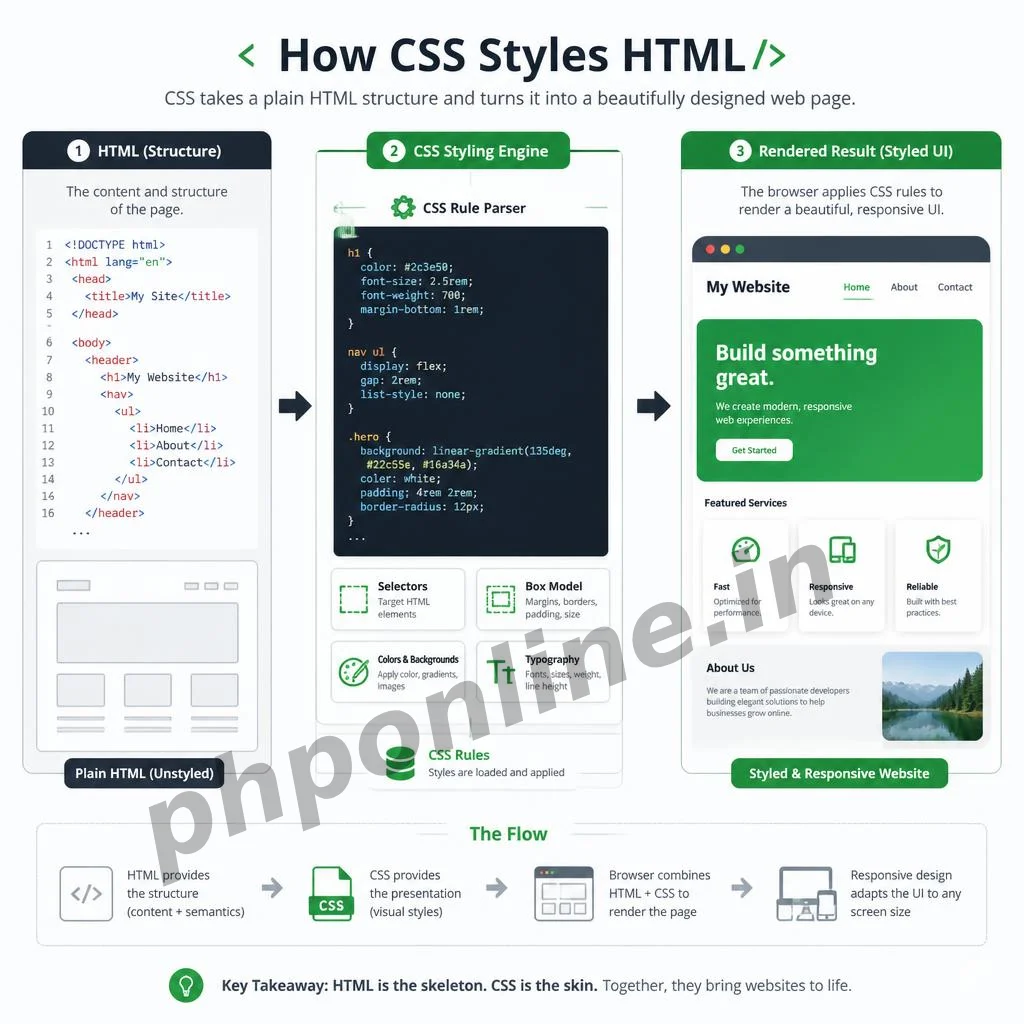
Prerequisites Before Learning CSS
To follow along with the hands-on code examples in this CSS introduction guide, verify that your development environment meets these basic requirements:
- Web Browser: A modern web browser such as Google Chrome, Mozilla Firefox, Microsoft Edge, or Apple Safari.
- Code Editor: A text editor such as Visual Studio Code, Sublime Text, or Notepad++.
- HTML Foundations: Solid understanding of standard HTML document structures, elements, and attributes.
If you need to review how semantic layout containers organize page structure before styling them, visit our previous guide on Easy HTML Semantic Layouts Guide: 7 Core Structural Tags & Examples.
1. What Is CSS? Understanding Cascading Style Sheets
To understand this CSS introduction deeply, let us break down what each term in Cascading Style Sheets represents:
- Cascading: Refers to the specific order of precedence rules that dictate how browsers resolve conflicting style declarations (for example, if an external stylesheet sets text to blue but an inline style sets it to red).
- Style: Refers to the visual properties applied to HTML elements, such as font families, background colors, border widths, padding spacing, and element alignment.
- Sheets: Refers to the document files (or code blocks) containing collections of styling rules that web browsers read to format web pages.
The Web Development Triad Revisited
In front-end development, HTML, CSS, and JavaScript perform distinct roles:
| Front-End Layer | Primary Function | Analogy (Human Body) | Sample Code Syntax |
|---|---|---|---|
| HTML | Defines page content structure and semantic meaning. | The Skeleton & Bones | <h1>Header Title</h1> |
| CSS | Controls visual appearance, layout, colors, and fonts. | The Skin, Clothing & Style | h1 { color: #0073aa; } |
| JavaScript | Adds dynamic interactivity, state logic, and animations. | The Nervous System & Muscles | element.addEventListener('click', ...); |
2. The 3 Ways to Insert CSS into HTML
There are three methods for adding CSS styling rules to an HTML document: **External Stylesheets**, **Internal Style Blocks**, and **Inline Styles**.
Method 1: External CSS Stylesheet (Best Practice)
In production web development, placing CSS code inside an external .css file is the industry gold standard. An external stylesheet allows you to change the visual design of an entire multi-page website by editing a single file.
Link external CSS files inside the <head> section of your HTML document using the <link> tag:
<!-- HTML File (index.html) -->
<!DOCTYPE html>
<html lang="en">
<head>
    <meta charset="UTF-8">
    <meta name="viewport" content="width=device-width, initial-scale=1.0">
    <title>External CSS Example</title>

    <!-- Linking External Stylesheet -->
    <link rel="stylesheet" href="css/style.css">
</head>
<body>
    <h1>Styled via External CSS</h1>
</body>
</html>
/* External CSS File (css/style.css) */
body {
background-color: #f4f6f9;
font-family: Arial, sans-serif;
}
h1 {
color: #0073aa;
text-align: center;
}Want to test this HTML and CSS markup live? Try running it in our Online HTML Editor.
Method 2: Internal CSS Style Block
Internal CSS is placed inside a <style> tag located within the <head> section of a single HTML document. It is useful for single-page landing sites or custom page-specific style overrides:
<!DOCTYPE html>
<html lang="en">
<head>
    <meta charset="UTF-8">
    <title>Internal CSS Example</title>

    <!-- Internal CSS Style Block -->
    <style>
        p {
            color: #333333;
            font-size: 18px;
            line-height: 1.6;
        }
    </style>
</head>
<body>
    <p>This paragraph is styled using internal CSS defined in the page head.</p>
</body>
</html>
Want to test this HTML and CSS markup live? Try running it in our Online HTML Editor.
Method 3: Inline CSS Styles (Discouraged for Bulk Use)
Inline CSS styles are applied directly to individual HTML opening tags using the style attribute. Inline styles should be used sparingly because they clutter HTML markup and ignore stylesheet inheritance:
<!-- Inline CSS Example -->
<h2 style="color: #e65100; background-color: #fff3e0; padding: 10px;">
    Notice: Inline CSS styling applied directly to this heading tag.
</h2>
3. Summary Comparison of CSS Insertion Methods
| Insertion Method | Location in Code | Maintainability | Primary Application Scenario |
|---|---|---|---|
| External Stylesheet | Separate .css file linked via <link> tag in <head> | Excellent (Centralized) | Production Standard: Managing styling across multi-page websites. |
| Internal Style Block | Inside <style> tag within the <head> section | Moderate | Single-page documents or unique page-level layout overrides. |
| Inline Style Attribute | Inside HTML element opening tag via style="..." attribute | Poor (Unmaintainable) | Quick testing or dynamic JavaScript inline style manipulations. |
4. Basic Structure of a CSS Rule Set
CSS formatting is written as a series of **Rule Sets**. A CSS rule set consists of a **Selector** pointing to the target HTML element, followed by a **Declaration Block** enclosed in curly braces {}:
/* CSS Rule Set Architecture */
selector {
    property: value;
    property: value;
}
Anatomy of a CSS Declaration:
- Selector: Identifies which HTML element(s) to style (e.g.,
h1,p,.button,#header). - Declaration Block: Contains one or more key-value pairs separated by semicolons
;. - Property: The specific visual style attribute being modified (e.g.,
color,font-size,margin). - Value: The parameter assigned to the property (e.g.,
#0073aa,16px,20px).
Basic CSS Rule Set Example
/* Targeting all paragraph elements */
p {
    color: #2c3e50;         /* Sets text color */
    font-size: 16px;         /* Sets font size */
    font-weight: bold;       /* Sets font weight */
    text-align: justify;     /* Aligns text edges */
}
5. Validating HTML and CSS Code Standards
Syntax errors such as missing semicolons in CSS declarations, unclosed HTML tags, or invalid color hex codes can cause web browsers to skip styling rules unexpectedly.
Before publishing web pages, always paste your HTML and CSS markup into automated verification tools like our PHPOnline HTML Validator Tool to verify compliance with W3C web standards.
Troubleshooting Common Beginner CSS Errors
| Observed Styling Issue | Probable Cause | Recommended Solution |
|---|---|---|
| External CSS file styles fail to render on screen | Incorrect file path in <link href="...">, missing rel="stylesheet", or misspelled .css extension. | Check relative folder paths and confirm rel="stylesheet" is present. Validate code using our HTML Validator Tool. |
| Entire CSS stylesheet breaks after a specific line | Omitting a closing curly brace } or missing a semicolon ; at the end of a property declaration. | Ensure every property declaration ends with a semicolon ; and every rule block closes with }. |
| Inline styles fail to override external CSS rules | Misspelled CSS property names (e.g., text-color instead of color). | Verify property names against official W3C standards (e.g., use color for text). |
| Styles update locally but changes do not appear live | Web browser caching an outdated version of the external style.css file. | Perform a hard browser refresh (Ctrl + F5 or Cmd + Shift + R). |
Frequently Asked Questions (FAQ)
Q1: What is a CSS introduction and why is CSS necessary for web design?
A CSS introduction teaches Cascading Style Sheets, the official language used to format the visual presentation, layout, colors, typography, and responsive scaling of HTML documents. CSS is necessary because HTML provides structural content only; CSS makes websites visually attractive and readable across desktop and mobile devices.
Q2: What is the difference between HTML and CSS?
HTML (HyperText Markup Language) defines page content, text headings, links, forms, and document structure. CSS (Cascading Style Sheets) controls how those HTML elements look visually on screen by defining colors, fonts, margins, backgrounds, and multi-column layouts.
Q3: What are the three ways to insert CSS into an HTML page?
The three ways to insert CSS are: 1. **External Stylesheets** (linking a separate .css file via <link> tag), 2. **Internal Style Blocks** (placing CSS inside <style> tags in the <head>), and 3. **Inline Styles** (adding style="..." attributes directly to HTML tags). External stylesheets are the industry best practice.
Q4: Why are external CSS stylesheets preferred over inline styles?
External stylesheets allow web developers to manage the visual design of an entire website from a single .css file. They reduce HTML file sizes, accelerate browser page loading through file caching, and keep source code clean and maintainable.
Next Steps & Official References
Consult official technical web standards on the MDN Official CSS Documentation (mozilla.org).
Before publishing your web page layouts, validate your code syntax using our PHPOnline HTML Validator Tool.
Ready for the next lesson in sequence? Proceed directly to the next lesson in Module 1: Next Lesson: CSS Syntax & Core Selectors (Element, Class, ID) →
# Summary
Here is what you've learned in this lesson:
- Easy CSS Introduction Guide: 5 Core Styling Principles & Examples
- Overview: Complete CSS Introduction & Web Presentation
- Prerequisites Before Learning CSS
- 1. What Is CSS? Understanding Cascading Style Sheets
- 2. The 3 Ways to Insert CSS into HTML
- 3. Summary Comparison of CSS Insertion Methods
- 4. Basic Structure of a CSS Rule Set
- 5. Validating HTML and CSS Code Standards
- Troubleshooting Common Beginner CSS Errors
- Frequently Asked Questions (FAQ)
- Next Steps & Official References
Continue to the next lesson and learn more about CSS Syntax and Selectors.