
CSS Colors and Backgrounds
Easy CSS Colors and Backgrounds Guide: 6 Core Color Formats & Examples
Master visual design with this complete CSS colors and backgrounds guide. Learn HEX, RGB, HSL, RGBA, CSS background images, gradients, and overlay properties.
Estimated Read Time: 20 Minutes | Category: Web Development Fundamentals
Overview: Understanding CSS Colors and Backgrounds & Visual Styling
Quick CSS Colors and Backgrounds Summary:
- Visual Aesthetics Engine: Color formats and background properties establish the visual atmosphere, brand identity, and readability of web documents.
- Diverse Color Formats: CSS supports Named Colors, Hexadecimal (
#0073aa), RGB (rgb(0, 115, 170)), and HSL (hsl(199, 100%, 33%)) notations. - Alpha Transparency: Using
rgba()orhsla()adds an alpha channel value between0.0(fully transparent) and1.0(fully opaque). - Background Layers: The
background-imageproperty renders raster or vector assets, controlled viabackground-size,background-repeat, andbackground-position. - CSS Gradients: Linear and radial gradients allow developers to create smooth color transitions purely in CSS without external image files.
Welcome to Lesson 3 of our structured Web Development curriculum. Following our previous lesson on Easy CSS Syntax and Selectors Guide: 5 Core Selector Types & Examples, you now understand how to target HTML DOM elements using element, class, ID, and combinator selectors. The next vital milestone in web design is mastering visual presentation using CSS colors and backgrounds.
Color is one of the most powerful elements in user interface design. It directs user attention to primary call-to-action buttons, establishes contrast for readable text typography, conveys emotional brand tones, and separates page layout sections visually. Combined with background images, patterns, and CSS gradients, background properties form the foundation of modern web aesthetics.
In this comprehensive CSS colors and backgrounds guide, we will explore digital color spaces (HEX, RGB, HSL), opacity transparency, background imagery, background positioning, linear/radial gradients, and hands-on code examples.
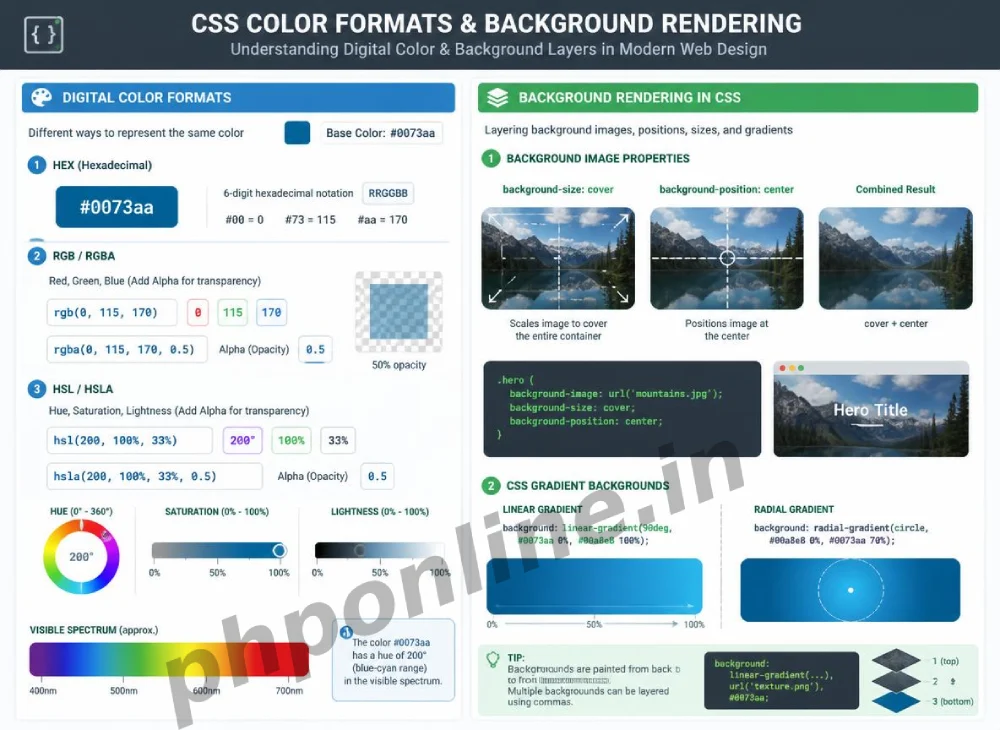
Prerequisites Before Applying Color Styles
To test the hands-on code examples in this CSS colors and backgrounds tutorial, verify that your development environment meets these basic requirements:
- Web Browser: A modern web browser such as Google Chrome, Mozilla Firefox, Microsoft Edge, or Apple Safari.
- Code Editor: A text editor such as Visual Studio Code, Sublime Text, or Notepad++.
- CSS Syntax Foundations: Understanding of CSS rule sets, properties, values, and class selectors.
If you need to review how class and ID selectors target specific page containers, visit our previous guide on Easy CSS Syntax and Selectors Guide: 5 Core Selector Types & Examples.
1. Digital Color Formats in CSS
CSS provides several ways to define color values. All digital screens mix Red, Green, and Blue light channels to produce millions of distinct shades.
A. Named Colors
CSS includes 140 standard color keywords (e.g., red, navy, coral, crimson). While convenient for quick testing, named colors offer limited options for exact brand palette matching:
h1 {
    color: navy;
}
B. Hexadecimal Notation (HEX)
Hexadecimal is the most widely used color format in web development. A Hex code begins with a hash symbol (#) followed by 6 hexadecimal characters (0-9 and A-F), representing Red, Green, and Blue pairs: #RRGGBB.
#000000: Pure Black (All channels off).#ffffff: Pure White (All channels at maximum).#ff0000: Pure Red (Red channel maximum, Green & Blue off).#0073aa: PHPOnline Brand Blue.
p {
    color: #0073aa;
}
C. RGB and RGBA (Red, Green, Blue, Alpha)
RGB notation defines color channels using integer values from 0 to 255: rgb(red, green, blue).
RGBA (Alpha Transparency): RGBA adds a 4th parameter called the Alpha channel (from 0.0 for 100% transparent to 1.0 for 100% opaque). This enables semi-transparent overlays and glassmorphism UI effects:
/* Solid RGB Blue */
.card-header {
    background-color: rgb(0, 115, 170);
}

/* Semi-Transparent RGBA Blue (50% Opacity) */
.overlay-box {
    background-color: rgba(0, 115, 170, 0.5);
}
Want to test this CSS code live or build custom styles automatically? Try running it in our Online CSS Editor or generate instant layout rules with our AI CSS Generator.
D. HSL and HSLA (Hue, Saturation, Lightness)
HSL represents color in a way that is intuitive for designers:
- Hue: Color degree on the color wheel from
0to360(0 = Red, 120 = Green, 240 = Blue). - Saturation: Color intensity percentage from
0%(grayscale) to100%(full vivid color). - Lightness: Light intensity percentage from
0%(complete black) to100%(complete white), where50%is normal lightness.
/* HSL Color Definition */
.accent-badge {
    background-color: hsl(199, 100%, 33%);
}

/* HSLA with 80% Opacity */
.tooltip-box {
    background-color: hsla(199, 100%, 33%, 0.8);
}
2. Working with CSS Background Properties
CSS background properties control the visual backdrop of any HTML block element.
A. background-color
Sets a solid color fill behind an element’s text and padding content:
.hero-banner {
    background-color: #f4f6f9;
}
B. background-image
Sets a raster image (JPEG, PNG, WebP) or vector graphic (SVG) as a background fill using the url() function:
.hero-section {
    background-image: url('images/hero-bg.webp');
}
C. background-repeat
By default, small background images repeat (tile) horizontally and vertically to fill container space. You can modify this behavior using background-repeat:
no-repeat: Displays the background image exactly once.repeat-x: Repeats the image horizontally only.repeat-y: Repeats the image vertically only.
.hero-section {
    background-image: url('images/pattern.png');
    background-repeat: no-repeat;
}
Want to test this CSS code live or build custom styles automatically? Try running it in our Online CSS Editor or generate instant layout rules with our AI CSS Generator.
D. background-size (cover vs. contain)
Controls how a background image scales inside its container box:
| Value Option | Scaling & Rendering Behavior | Primary Application Scenario |
|---|---|---|
cover | Scales image to fill the entire container box, cropping edges if necessary to eliminate empty spaces. | Industry Standard: Full-width hero banner sections and card backgrounds. |
contain | Scales image to fit entirely inside the box without cropping, leaving empty space if aspect ratios differ. | Displaying product images or site logos where cropping is unacceptable. |
auto (Default) | Renders the image at its original native pixel dimensions. | Small icon graphics and seamless repeating background textures. |
E. background-position
Sets the starting alignment coordinates of the background image (e.g., center, top right, bottom left, or explicit percentages/pixels):
.hero-section {
    background-image: url('images/banner.jpg');
    background-size: cover;
    background-position: center center;
}
3. CSS Gradients: Smooth Color Transitions
CSS gradients allow developers to render smooth transitions between two or more colors without requiring heavy image downloads. Gradients are treated as images in CSS and assigned to the background-image property.
A. Linear Gradients (linear-gradient)
Linear gradients transition colors along a straight directional line (e.g., to right, to bottom, or at a specific degree angle like 45deg):
/* Linear Gradient transitioning from Blue to Dark Purple at 135 degrees */
.gradient-card {
    background-image: linear-gradient(135deg, #0073aa, #4a148c);
    color: #ffffff;
    padding: 30px;
    border-radius: 8px;
}
Want to test this CSS code live or build custom styles automatically? Try running it in our Online CSS Editor or generate instant layout rules with our AI CSS Generator.
B. Radial Gradients (radial-gradient)
Radial gradients transition colors outward from a central origin point in a circular or elliptical pattern:
/* Radial Gradient expanding from center outward */
.radial-box {
    background-image: radial-gradient(circle, #0288d1, #01579b);
}
4. Complete Practical Web Banner Example
Below is a complete HTML and CSS document demonstrating color formats, background image scaling, RGBA transparent overlays, and linear gradients combined:
<!DOCTYPE html>
<html lang="en">
<head>
    <meta charset="UTF-8">
    <meta name="viewport" content="width=device-width, initial-scale=1.0">
    <title>CSS Colors and Backgrounds Demo</title>

    <style>
        * {
            margin: 0;
            padding: 0;
            box-sizing: border-box;
        }

        body {
            font-family: Arial, sans-serif;
            background-color: #f4f6f9;
            padding: 20px;
        }

        /* Hero Banner with Layered Gradient Overlay and Background Image */
        .hero-card {
            /* Layered Background: Semi-Transparent Linear Gradient OVER Background Image */
            background-image:
                linear-gradient(rgba(0, 115, 170, 0.85), rgba(74, 20, 140, 0.85)),
                url('https://images.unsplash.com/photo-1517694712202-14dd9538aa97?w=1200');
            background-size: cover;
            background-position: center;
            background-repeat: no-repeat;

            color: #ffffff;
            padding: 60px 30px;
            text-align: center;
            border-radius: 12px;
            box-shadow: 0 10px 20px rgba(0, 0, 0, 0.15);
        }

        .hero-card h1 {
            font-size: 32px;
            margin-bottom: 15px;
        }

        .hero-card p {
            font-size: 18px;
            margin-bottom: 25px;
            color: #e0f7fa;
        }

        /* Accent Call-To-Action Button using HEX and Hover States */
        .btn-cta {
            display: inline-block;
            background-color: #ff9800;
            color: #ffffff;
            padding: 12px 28px;
            text-decoration: none;
            font-weight: bold;
            border-radius: 6px;
            transition: background-color 0.3s ease;
        }

        .btn-cta:hover {
            background-color: #e65100;
        }
    </style>
</head>
<body>

    <div class="hero-card">
        <h1>Master Web Development with PHPOnline</h1>
        <p>Learn modern HTML5, CSS3, PHP 8, and MySQL PDO through interactive step-by-step guides.</p>
        <a href="#" class="btn-cta">Explore Course Curriculum</a>
    </div>

</body>
</html>
Want to test this CSS code live or build custom styles automatically? Try running it in our Online CSS Editor or generate instant layout rules with our AI CSS Generator.
Validating HTML and CSS Code Standards
Missing hash symbols (#) on Hex codes, invalid RGBA alpha values, or broken url() image paths can cause background styling to fail silently.
Before publishing web pages, always paste your HTML and CSS markup into automated verification tools like our PHPOnline HTML Validator Tool to verify compliance with W3C web standards.
Summary Comparison of Core Background Properties
| CSS Property | Sample Syntax | Default Value | Primary Application Scenario |
|---|---|---|---|
background-color | #0073aa / rgba(0,0,0,0.5) | transparent | Fills box background with a solid color or semi-transparent color overlay. |
background-image | url('photo.jpg') / linear-gradient(...) | none | Applies a raster image, SVG graphic, or CSS linear/radial color gradient. |
background-repeat | no-repeat / repeat-x | repeat | Prevents background images from tiling across container dimensions. |
background-size | cover / contain | auto | Scales background image to fill box dimensions completely or preserve ratios. |
background-position | center center / top right | 0% 0% | Aligns background image focus area relative to container edges. |
Troubleshooting Common Color and Background Errors
| Observed Styling Issue | Probable Cause | Recommended Solution |
|---|---|---|
| Background image fails to render on screen | Broken relative file path inside url('...'), or missing quotes/closing parentheses. | Check image path relative to the CSS file location. Validate syntax using our HTML Validator Tool. |
| Background image appears pixelated or stretched awkwardly | Using a small low-resolution image with background-size: cover; on a large desktop container. | Use high-resolution image assets (e.g., 1920px wide for hero banners) or SVG vector graphics. |
| Text is completely unreadable over a background image | Insufficient visual contrast between text color and background image colors. | Layer a semi-transparent RGBA dark overlay using linear-gradient(rgba(0,0,0,0.6), rgba(0,0,0,0.6)) over the image. |
opacity property makes text transparent alongside background | Using the CSS opacity property on a parent element, which affects all child elements. | Use background-color: rgba(...) instead of opacity to keep text 100% opaque. |
Frequently Asked Questions (FAQ)
Q1: What are CSS colors and backgrounds and why are they fundamental?
CSS colors and backgrounds are core visual properties used to format text colors, element fill colors, background images, patterns, and gradients. They establish visual hierarchy, contrast, brand identity, and readability across web pages.
Q2: What is the difference between HEX, RGB, and HSL color formats in CSS?
HEX uses a 6-character hexadecimal code (e.g., #0073aa). RGB uses integer light channel values from 0-255 (e.g., rgb(0, 115, 170)). HSL defines colors using Hue degree, Saturation percentage, and Lightness percentage (e.g., hsl(199, 100%, 33%)). All formats produce identical visual colors.
Q3: What is the difference between background-size: cover and background-size: contain?
background-size: cover scales an image to fill the entire container completely, cropping edges if aspect ratios differ. background-size: contain scales an image to fit entirely inside the container without cropping, leaving empty margins if ratios differ.
Q4: How do you create semi-transparent backgrounds in CSS without making text transparent?
Create semi-transparent backgrounds using RGBA or HSLA color functions (e.g., background-color: rgba(0, 0, 0, 0.5);). Do not use the CSS opacity property, as opacity makes the container and all enclosed text elements transparent together.
Next Steps & Official References
Consult official technical web standards on the MDN Official CSS Colors Reference (mozilla.org).
Before publishing your web page layouts, validate your code syntax using our PHPOnline HTML Validator Tool.
Ready for the final lesson in Module 1? Proceed directly to the final lesson in Module 1: Next Lesson: CSS Typography, Font Families & Web Fonts →
# Summary
Here is what you've learned in this lesson:
- Easy CSS Colors and Backgrounds Guide: 6 Core Color Formats & Examples
- Overview: Understanding CSS Colors and Backgrounds & Visual Styling
- Prerequisites Before Applying Color Styles
- 1. Digital Color Formats in CSS
- 2. Working with CSS Background Properties
- 3. CSS Gradients: Smooth Color Transitions
- 4. Complete Practical Web Banner Example
- Validating HTML and CSS Code Standards
- Summary Comparison of Core Background Properties
- Troubleshooting Common Color and Background Errors
- Frequently Asked Questions (FAQ)
- Next Steps & Official References
Continue to the next lesson and learn more about CSS Typography.