
Easy MySQL Introduction Guide: 5 Core Relational Database Concepts & Examples
Master relational database architecture with this complete MySQL introduction guide. Learn RDBMS concepts, SQL query execution, tables, primary keys, and server connections.
Overview: Understanding MySQL Introduction & Relational Databases
Quick MySQL Introduction Summary:
- Database Engine of the Web: MySQL is an open-source Relational Database Management System (RDBMS) that stores, organizes, and retrieves web application data using Structured Query Language (SQL).
- Client-Server Architecture: MySQL operates on a client-server model where backend application code (like PHP, Python, or Node.js) sends SQL commands to a central MySQL database server.
- Structured Tabular Data: Data in MySQL is organized into two-dimensional tables consisting of rows (records) and columns (fields/attributes) enforced by strict data type rules.
- Relational Keys & Integrity: Relationships between different tables are linked securely using Primary Keys (unique row identifiers) and Foreign Keys (cross-table references).
- Enterprise Performance & Security: MySQL powers over 70% of the modern web—including WordPress, Wikipedia, and enterprise platforms—due to its ACID compliance, high concurrency speed, and robust security encryption.
Welcome to Lesson 1 of our structured Database curriculum. If you have already explored our PHP Tutorial for Beginners and JavaScript Introduction Guide, you know that frontend scripts format visual interfaces while backend languages handle business logic. However, web applications also require a permanent memory bank to store user accounts, blog posts, e-commerce orders, and product catalogs securely. This is achieved through a comprehensive MySQL introduction.
Without a database, all application data stored inside temporary server memory variables is wiped out the moment a user closes their browser or a web server restarts. MySQL provides a persistent, organized, high-performance database storage layer. Whether you are building a simple contact form processor or a massive multi-vendor e-commerce platform, mastering MySQL is an essential requirement for backend software engineering.
In this comprehensive MySQL introduction tutorial, we will explore RDBMS architecture, tables, rows, columns, primary vs. foreign keys, client-server connections, basic SQL syntax, database normalization, and hands-on code examples.
Prerequisites Before Learning MySQL
To follow along with the hands-on concepts in this MySQL introduction guide, verify that your learning foundation meets these basic requirements:
- Web Development Concepts: Basic knowledge of how web browsers communicate with backend web servers.
- Backend Scripting Foundations: Basic familiarity with server-side languages like PHP or JavaScript Node.js.
- Text Editor or Terminal: Access to a local environment command line or web database tool like phpMyAdmin.
If you need to review how backend PHP scripts connect to database engines, visit our foundational guide on Best PHP Tutorial for Beginners: Master Modern PHP Step-by-Step.
1. What Is MySQL? RDBMS Architecture Explained
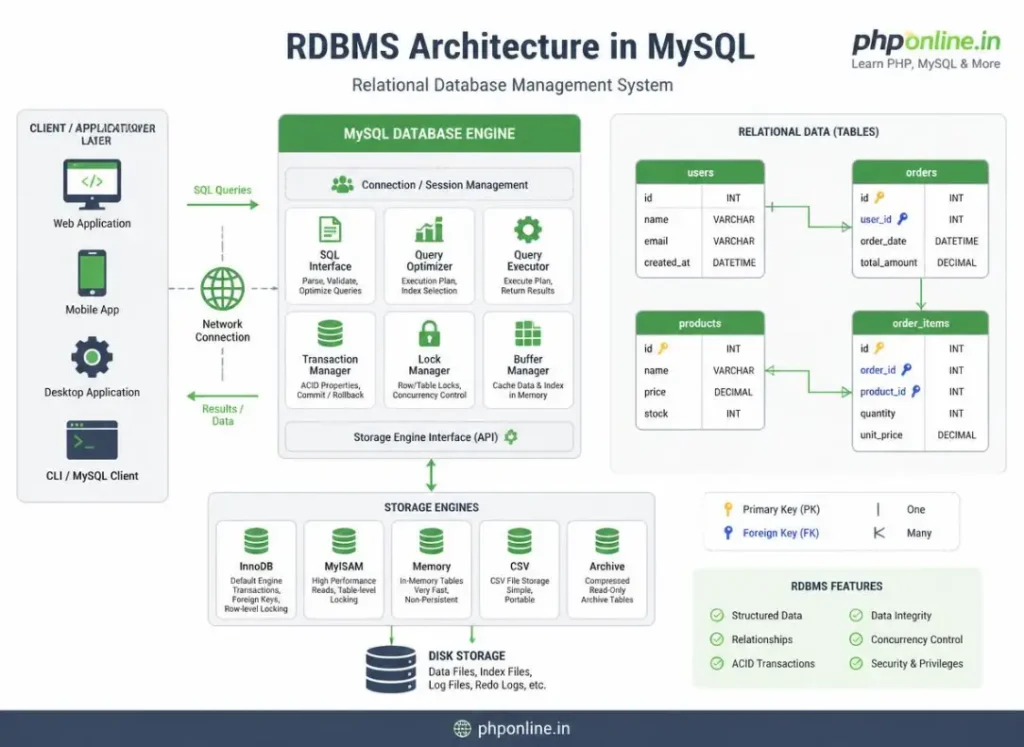
MySQL is an open-source Relational Database Management System (RDBMS) developed by Oracle Corporation. To understand MySQL, we must break down its three core functional components:
- Database: An organized digital container that holds structured data tables, indexes, and security permissions.
- Relational (RDBMS): Data is stored in separate tables linked together through mathematical relationships, rather than dumping all information into one massive file.
- Management System (Client-Server): Software that runs as a background service process, handling multiple concurrent data requests, user authentication, disk storage, and transaction locking.
Key Characteristics of MySQL:
- SQL Standard Support: Uses Structured Query Language (SQL) to execute data operations (
SELECT,INSERT,UPDATE,DELETE). - High Concurrency: Handles thousands of simultaneous database queries per second without locking up server resources.
- ACID Compliance: Ensures data reliability through Atomicity, Consistency, Isolation, and Durability across complex transaction sequences.
- Cross-Platform Compatibility: Runs natively across Linux, Windows, macOS, and cloud container environments.
2. Relational Database Concepts: Tables, Rows, Columns, and Keys
Relational databases organize information into a strict grid structure similar to a spreadsheet, but enforced with computational validation rules.
Core Structural Building Blocks:
- Tables (Entities): A named collection of related data entries (e.g., a
userstable or anorderstable). - Columns (Fields/Attributes): Vertical categories in a table that define specific data properties (e.g.,
user_id,email_address,created_at). Each column enforces a strict data type rule (such as Integer, Varchar string, or Datetime). - Rows (Records/Tuples): Horizontal individual entries representing a single, unique instance of data inside the table.
- Primary Key (PK): A unique column (or combination of columns) that guarantees every row in a table can be identified individually without duplicate ambiguity (e.g.,
user_id = 101). - Foreign Key (FK): A column in one table that points directly to the Primary Key of another table, creating a relational connection between them (e.g., an
orderstable containing auser_idcolumn).
Relational Database vs. NoSQL Comparison:
| Feature / Characteristic | Relational DB (MySQL) | NoSQL DB (e.g., MongoDB) |
|---|---|---|
| Data Storage Format | Structured 2D tables with strict rows and columns. | Unstructured JSON-like document collections. |
| Schema Definition | Strict Pre-defined Schema: Data types must be declared beforehand. | Dynamic Schema: Fields can vary from document to document. |
| Query Language | Standardized SQL (Structured Query Language). | Object-oriented proprietary query APIs. |
| Relationships & Joins | Excellent: Powerful native JOIN operations across tables. | Limited; requires manual application-level linking. |
| Primary Application Scenario | E-commerce carts, banking apps, user authentication, CMS platforms. | Real-time analytics, unstructured log streams, simple cache stores. |
3. How MySQL Communicates via SQL Commands
SQL (Structured Query Language) is the universal language used to communicate instructions to the MySQL database engine. SQL commands are categorized into four primary functional groups:
1. Data Definition Language (DDL) — Structural Controls
Used to create, modify, or delete database structural architecture:
CREATE DATABASE: Instantiates a new database container.CREATE TABLE: Defines a new table structure with specified column rules.ALTER TABLE: Modifies existing table columns or constraints.DROP TABLE: Completely deletes a table and all its stored records.
2. Data Manipulation Language (DML) — Record Operations (CRUD)
Used to insert, search, update, and delete individual data records:
INSERT INTO: Adds new rows of data into a table (Create).SELECT: Queries and retrieves stored records from one or more tables (Read).UPDATE: Modifies existing column values in specific rows (Update).DELETE FROM: Removes specific rows from a table (Delete).
3. Data Control Language (DCL) — Security Permissions
Used by system administrators to manage user access privileges (GRANT, REVOKE).
Want to test standard code syntax or validate script outputs? Try our Online Code Editor and verify markup using our HTML Validator Tool.
4. Basic SQL Query Syntax Preview
Below is a preview of standard SQL syntax used in MySQL to create a table, insert a record, and query the results:
-- 1. Create a relational 'users' table
CREATE TABLE users (
    user_id INT AUTO_INCREMENT PRIMARY KEY,
    username VARCHAR(50) NOT NULL,
    email_address VARCHAR(100) UNIQUE NOT NULL,
    created_at TIMESTAMP DEFAULT CURRENT_TIMESTAMP
);

-- 2. Insert a new record into the table
INSERT INTO users (username, email_address)
VALUES ('alex_mercer', 'alex@phponline.in');

-- 3. Query and retrieve all records from the table
SELECT user_id, username, email_address, created_at
FROM users
WHERE username = 'alex_mercer';
5. Summary Comparison of MySQL Architecture Components
| Component Name | Type Category | Primary Function | Real-World Example |
|---|---|---|---|
Database | Storage Container | Encapsulates all tables, views, and permissions for an application. | my_ecommerce_db |
Table | Data Entity Structure | Stores structured 2D grid records belonging to a single topic. | products table |
Primary Key | Column Constraint | Guarantees every row has an immutable, unique identifier. | product_id = 45 |
Foreign Key | Relational Link | Connects child records to a parent record in another table. | customer_id in orders table |
Storage Engine | Core Subsystem | Manages physical disk reads, memory caching, and row locking (e.g., InnoDB). | InnoDB Engine |
6. Complete Hands-on Demonstration Example
Below is a complete, working HTML and embedded JavaScript simulation demonstrating a MySQL relational database structure rendered visually in a web browser interface:
<!DOCTYPE html>
<html lang="en">
<head>
    <meta charset="UTF-8">
    <meta name="viewport" content="width=device-width, initial-scale=1.0">
    <title>MySQL Relational Table Simulation</title>

    <style>
        body {
            font-family: Arial, sans-serif;
            background-color: #f4f6f9;
            color: #333;
            padding: 30px;
            max-width: 700px;
            margin: 0 auto;
        }

        .db-card {
            background-color: #ffffff;
            border: 1px solid #e0e0e0;
            border-radius: 8px;
            padding: 25px;
            box-shadow: 0 4px 12px rgba(0,0,0,0.05);
        }

        .db-table {
            width: 100%;
            border-collapse: collapse;
            margin-top: 15px;
        }

        .db-table th, .db-table td {
            border: 1px solid #ddd;
            padding: 10px;
            text-align: left;
        }

        .db-table th {
            background-color: #0073aa;
            color: #ffffff;
        }

        .primary-key {
            font-weight: bold;
            color: #d32f2f;
        }

        .btn-query {
            background-color: #0073aa;
            color: #ffffff;
            border: none;
            padding: 10px 18px;
            font-size: 14px;
            border-radius: 4px;
            cursor: pointer;
            margin-top: 15px;
        }

        .status-box {
            margin-top: 15px;
            padding: 12px;
            background-color: #e8f5e9;
            color: #2e7d32;
            font-weight: bold;
            border-radius: 4px;
        }
    </style>
</head>
<body>

    <div class="db-card">
        <h2 style="color: #0073aa; margin-bottom: 10px;">MySQL RDBMS Table Structure Simulation</h2>
        <p>Target Table Name: <code>users_table</code> (Storage Engine: <strong>InnoDB</strong>)</p>

        <table class="db-table" id="users-grid">
            <thead>
                <tr>
                    <th>user_id (PK)</th>
                    <th>username</th>
                    <th>email_address</th>
                    <th>user_role</th>
                </tr>
            </thead>
            <tbody id="table-body">
                <tr>
                    <td class="primary-key">101</td>
                    <td>alex_mercer</td>
                    <td>alex@phponline.in</td>
                    <td>Admin</td>
                </tr>
                <tr>
                    <td class="primary-key">102</td>
                    <td>sarah_connor</td>
                    <td>sarah@phponline.in</td>
                    <td>Student</td>
                </tr>
            </tbody>
        </table>

        <button id="insert-btn" class="btn-query">Simulate SQL INSERT Statement</button>

        <div id="query-status" class="status-box" style="display: none;">
            <!-- Query Execution Status Displayed Here -->
        </div>
    </div>

    <script>
        const insertBtn = document.getElementById("insert-btn");
        const tableBody = document.getElementById("table-body");
        const queryStatus = document.getElementById("query-status");

        let nextUserId = 103;

        insertBtn.addEventListener("click", () => {
            // Create new simulated table row
            const newRow = document.createElement("tr");
            newRow.innerHTML = `
                <td class="primary-key">${nextUserId}</td>
                <td>john_doe_${nextUserId}</td>
                <td>john${nextUserId}@phponline.in</td>
                <td>Student</td>
            `;

            tableBody.appendChild(newRow);

            queryStatus.style.display = "block";
            queryStatus.textContent = `Executed: INSERT INTO users_table VALUES (${nextUserId}, 'john_doe_${nextUserId}', 'john${nextUserId}@phponline.in', 'Student'); -> Query OK, 1 row affected.`;

            nextUserId++;
            console.log("SQL Insert Query Simulated Successfully.");
        });
    </script>

</body>
</html>
Want to test this HTML layout code live? Try running it in our Online Code Editor.
Validating Code Standards & Testing
Writing malformed SQL query statements, omitting mandatory primary key constraints, or mismatched column data types will trigger database syntax exceptions.
Before publishing web application pages that interact with MySQL database scripts, test your frontend markup and inline scripts using our PHPOnline HTML Validator Tool.
Troubleshooting Common Beginner MySQL Errors
| Observed Database Error | Probable Cause | Recommended Solution |
|---|---|---|
| ERROR 1045 (28000): Access denied for user ‘root’@’localhost’ | Incorrect database user password supplied, or user lacks access permissions for the target database. | Verify root credentials in your database config file or reset MySQL root user passwords. |
| ERROR 1064 (42000): You have an error in your SQL syntax | Typo in SQL keywords, missing commas between column definitions, or unclosed string quotes. | Inspect the SQL query string near the flagged position for unclosed quotes or missing comma separators. |
| ERROR 1062 (23000): Duplicate entry ‘x’ for key ‘PRIMARY’ | Attempting to insert a row with a Primary Key value that already exists inside the table. | Ensure primary keys are set to AUTO_INCREMENT so MySQL manages unique integer sequences automatically. |
| ERROR 1146 (42S02): Table ‘database.table’ doesn’t exist | Misspelling table names or attempting to query a table before running the CREATE TABLE command. | Verify exact table spelling (MySQL table names can be case-sensitive on Linux systems). Validate code with our HTML Validator Tool. |
Frequently Asked Questions (FAQ)
Q1: What is a MySQL introduction and why is MySQL fundamental for web development?
A MySQL introduction covers the foundational concepts of relational database management systems (RDBMS). MySQL is fundamental for web development because it provides a secure, structured, high-performance database storage engine that allows web applications to store and retrieve data across user sessions.
Q2: What is the main difference between a Primary Key and a Foreign Key in MySQL?
A Primary Key is a unique column constraint that identifies every row in a single table individually. A Foreign Key is a column in a child table that references the Primary Key of a parent table, establishing a relational connection between them.
Q3: What is the difference between SQL and MySQL?
SQL (Structured Query Language) is the standardized query language used to interact with databases. MySQL is the actual software database server application (RDBMS) that executes SQL commands to process data disk reads and writes.
Q4: What does ACID compliance mean in MySQL databases?
ACID stands for Atomicity, Consistency, Isolation, and Durability. It is a set of database properties that guarantees financial and data transactions process reliably without corruption, even if server crashes or power failures occur during execution.
Next Steps & Official References
Consult official technical web standards on the MySQL Official Documentation & Reference Manual (dev.mysql.com).
Before publishing your web page layouts, validate your code syntax using our PHPOnline HTML Validator Tool.
Ready for the next lesson in sequence? Proceed directly to the next lesson in Module 1: Next Lesson: MySQL Installation, Local Server Setup & phpMyAdmin →
# Summary
Here is what you've learned in this lesson:
- Overview: Understanding MySQL Introduction & Relational Databases
- Prerequisites Before Learning MySQL
- 1. What Is MySQL? RDBMS Architecture Explained
- 2. Relational Database Concepts: Tables, Rows, Columns, and Keys
- 3. How MySQL Communicates via SQL Commands
- 4. Basic SQL Query Syntax Preview
- 5. Summary Comparison of MySQL Architecture Components
- 6. Complete Hands-on Demonstration Example
- Validating Code Standards & Testing
- Troubleshooting Common Beginner MySQL Errors
- Frequently Asked Questions (FAQ)
- Next Steps & Official References
Continue to the next lesson and learn more about Easy MySQL Installation Guide: 4 Step-by-Step Server Setup Methods.