
AI PHP code Fixer
🤖 AI PHP Code Fixer
Free AI PHP Code Fixer & Debugger Online
Debugging PHP scripts, finding missing semicolons, or optimizing complex database queries can consume hours of development time. Our free AI PHP code fixer acts as an instant, automated assistant designed specifically for developers, students, and webmasters. Whether you need to fix a fatal error, rewrite legacy code for PHP 8+, or audit your scripts for vulnerabilities, this free AI PHP code fixer delivers accurate solutions in seconds.
Why Use Our Free AI PHP Code Fixer?
Unlike standard syntax checkers, our free AI PHP code fixer understands context, business logic, and security standards. It does not just highlight errors—it rewrites your scripts following modern PSR coding guidelines.
- Instant Syntax & Error Correction: Identifies parse errors, missing syntax, undefined variables, and broken function calls.
- Code Explanation: Translates complex PHP logic, OOP classes, and regex patterns into plain, easy-to-understand language.
- Performance Optimization: Rewrites slow loops, unoptimized SQL queries, and heavy memory operations to speed up execution.
- Security Vulnerability Audit: Detects critical security risks like SQL Injection, Cross-Site Scripting (XSS), CSRF, and unsafe user inputs.
- PHP 8.x Compatibility Upgrade: Automatically updates legacy PHP 5.6/7.x syntax to modern PHP 8.2+ standards.
How to Use the Free AI PHP Code Fixer Online
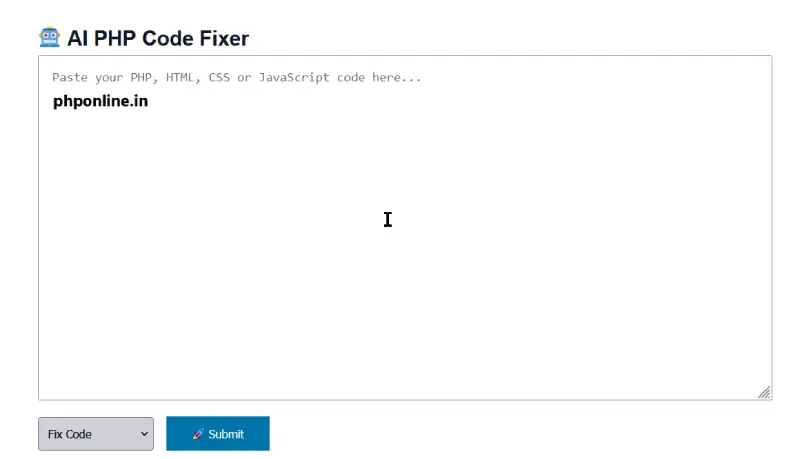
- Paste Your Code: Insert your raw PHP snippet into the editor window above.
- Select Your Action: Choose from Fix Code, Explain Code, Optimize Code, or Security Review.
- Run the Tool: Click the process button to let the free AI PHP code fixer analyze your script.
- Copy & Apply: Copy the corrected snippet directly into your local development server or WordPress environment.
Common PHP Errors Resolved Automatically
When running your code through our free AI PHP code fixer, it automatically scans for standard runtime and logic issues, such as:
1. Fatal Error: Uncaught Error / Call to Undefined Function
Occurs when calling a function or method that has not been defined, included via require_once, or loaded through Composer autoloading.
2. Parse Error: Syntax Error, Unexpected Token
Usually caused by a missing semicolon (;), unmatched curly braces ({}), or missing quotes around string values.
3. Warning: Undefined Array Key / Undefined Variable
Common in PHP 8+, where accessing an uninitialized variable or missing array index throws an explicit warning unless checked with isset() or the null coalescing operator (??).
Why Clean & Secure PHP Code Matters
Writing clean PHP is vital for maintaining web application performance, preventing server downtime, and protecting user data. Unoptimized database queries can slow down page loading times, negatively impacting your site’s SEO and Google Core Web Vitals.
Using a dedicated free AI PHP code fixer helps maintain high coding standards across your projects. To deepen your PHP knowledge and write better code from scratch, check out our Complete PHP Tutorial Series and refer to our Free PHP Cheat Sheet. For official language standards, consult the Official PHP Documentation.
Frequently Asked Questions (FAQ)
Is this free AI PHP code fixer completely free?
Yes! You can use our online PHP code fixer and debugger 100% free with no registration, subscription, or software installation required.
Is my code secure and private?
Yes. Your submitted code snippets are processed in real-time solely to generate fixes and are never stored permanently on our servers or shared with third parties.
Does this tool support PHP 8 features?
Engineered with modern PHP standards, the tool supports PHP 8.0 through 8.3 features like Union Types, Enums, Attributes, and Readonly properties.
Can this tool fix WordPress PHP errors?
Yes! It can debug custom WordPress theme functions (functions.php), plugin hooks, shortcodes, and WP_Query database calls.