🎉 New: Top 75 PHP Interview Questions for 2026 — Free for all learners

Developer Best Practices Resources | Free Tools, Learning Guides & Productivity Tips

Developer Best Practices Resources

Welcome to the final chapter of the Developer’s Best Practices Tutorial Series on PHPOnline.in.
Here, we bring together all the top tools, guides, references, and productivity boosters that help you apply everything you’ve learned — from writing clean code to managing your career growth.

This page is your developer toolkit for 2025 and beyond — designed to help you work smarter, faster, and more effectively in every project.


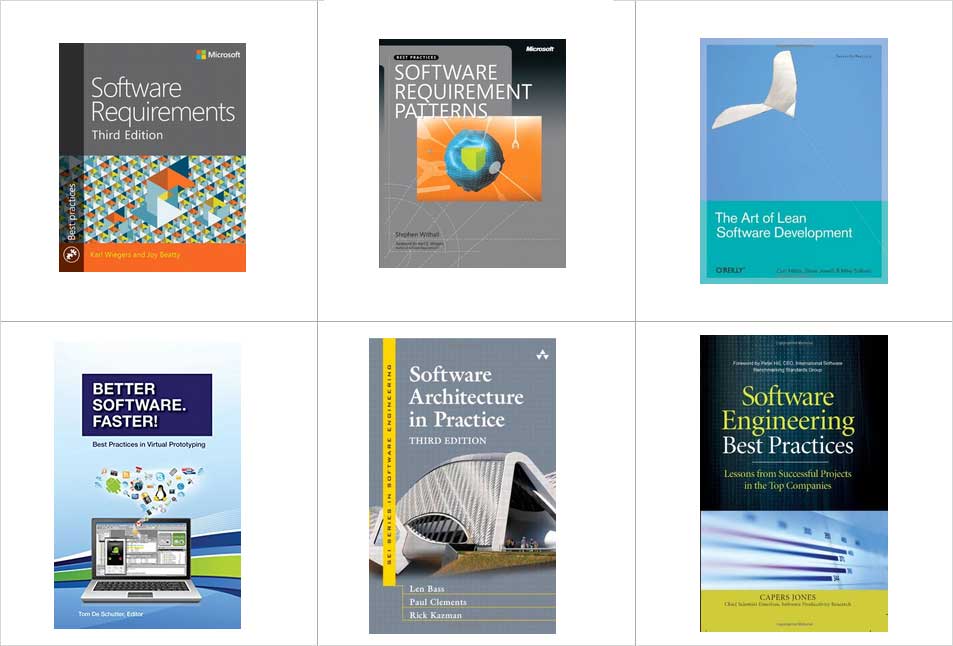
Better-Software.-Faster-Best-Practices-in-Virtual-Prototyping
Software-Architecture-in-Practice-(SEI-Series-in-Software-Engineering)
The Art of Lean Software Development
Software Engineering Best Practices: Lessons from Successful Projects in the Top Companies (PROGRAMMING & WEB DEV - OMG)
Software Requirements (Developer Best Practices)
Software Requirement Patterns

Why Developer Resources Matter

A great developer doesn’t just write code — they use the right tools and references to write better code.
Resources simplify your workflow, automate tasks, and keep your learning continuous.

Good resources help you:

  • Save time and effort
  • Maintain high-quality output
  • Stay updated with the latest technology
  • Collaborate effectively
  • Avoid common coding mistakes

You will learn here

  • “best developer resources for 2025”
  • “top free tools for programmers”
  • “coding best practices pdf and guides”
  • “developer learning websites and tutorials”
  • “software development productivity tools”
  • “online resources for web developers”
  • “developer roadmap tools and frameworks”

Essential Developer Tools and Resources

1. Code Editors & IDEs

  • Visual Studio Code
  • JetBrains PhpStorm
  • Sublime Text
  • Atom (lightweight for web development)

Tip: Customize your editor with extensions for linting, formatting, and Git integration.


2. Version Control Systems

  • Git & GitHub
  • GitLab
  • Bitbucket

Follow best practices from our page: [Managing Managers] and [Documentation is the Key] to keep repositories clean and well-documented.


3. Debugging & Testing Tools

  • PHPUnit (for PHP projects)
  • Postman (API testing)
  • Selenium (automation testing)
  • Chrome DevTools

Read our guide: [Testing is the Religion] for a complete testing mindset.


4. API & Database Tools

  • MySQL Workbench
  • MongoDB Compass
  • Postman
  • Swagger

Best Practice: Document every API endpoint using Swagger or Postman’s “Collection Docs” feature.


5. Learning & Practice Platforms


6. Productivity & Time Management Tools

  • Notion / Trello for task tracking
  • Clockify for time logging
  • Todoist for prioritization
  • Focus-to-Do for Pomodoro productivity

See [Stress Management] for how to integrate these tools into a calm, focused routine.


7. Documentation & Writing Tools

  • Markdown Editors (Typora, Obsidian)
  • Doxygen / JSDoc for auto documentation
  • Grammarly for professional writing

These align with [Documentation is the Key] — clear writing = clear thinking.


8. Cloud & Deployment Tools

  • AWS, Google Cloud, or DigitalOcean
  • Netlify / Vercel (for frontend projects)
  • Docker & Kubernetes

Tip: Automate your deployment pipelines early to save time later.


9. Design & Frontend Resources

  • Figma (UI design & prototyping)
  • Canva (quick visuals for presentation)
  • Tailwind CSS & Bootstrap (responsive UI frameworks)

Check [Handy Tools & Techniques] for combining these with your coding stack.


10. Career & Networking Resources

  • LinkedIn Learning
  • GitHub Portfolio Projects
  • AI-Based Resume Builder (from PHPOnline)
  • Tech Meetups & Online Communities

Revisit [Career Planning] for setting long-term goals and presenting your best self.


Recommended Reading – Developer Books & Guides

Book TitleAuthorFocus Area
Clean CodeRobert C. MartinWriting maintainable, readable code
The Pragmatic ProgrammerAndrew Hunt & David ThomasSmart developer habits
You Don’t Know JSKyle SimpsonDeep JavaScript understanding
RefactoringMartin FowlerImproving existing code
Soft SkillsJohn SonmezCareer and mindset advice
developer best practices resources, free coding tools, developer productivity tips, programming learning resources, web development tools, free software for programmers, coding reference guides, developer tools 2025, web developer resource library

Tip: Read at least one book every quarter — it compounds your knowledge over time.


Free Online Resources (2026 Edition)

  • PHP Manual & Documentation
  • Mozilla Developer Network (MDN)
  • CSS-Tricks
  • Dev.to Blogs
  • Stack Overflow Discussions
  • PHPOnline Learning Hub (Internal Link)

Frequently Asked Questions (FAQ)

Q1. What are the best resources for beginner developers?
Start with FreeCodeCamp, W3Schools, and PHPOnline.in tutorials — they’re beginner-friendly and practical.

Q2. How can I find reliable developer tools?
Use open-source platforms, developer forums, and official documentation to ensure quality and security.

Q3. How often should I update my tools and libraries?
Review updates monthly — staying current avoids bugs and compatibility issues.

Q4. Do I need paid tools to succeed as a developer?
Not necessarily. Many top developers use free or open-source tools effectively.

Q5. How do I stay updated with the latest developer trends?
Follow tech blogs, podcasts, YouTube channels, and join communities like Stack Overflow or Reddit’s r/programming.

Congratulations 🎉 — you’ve reached the end of the Developer’s Best Practices Series on PHPOnline.in.
You now have the mindset, tools, and techniques to build world-class software with clarity, confidence, and creativity.

Keep learning, keep experimenting, and always remember — great developers don’t just write code; they craft solutions.


Career Planning for Developers | Growth Roadmap, Skills & Future Goals

Career Planning for Developers – Design Your Future Like You Design Code

Every successful developer has one thing in common — a clear plan for the future.
Just like software, your career needs structure, direction, and maintenance to keep growing and evolving.

At PHPOnline.in, we believe that career planning is not optional — it’s the foundation of long-term success for every developer, whether you’re just starting out or have years of experience.


Why Career Planning is Essential for Developers

In a fast-changing tech industry, what you know today might be outdated tomorrow. Having a career plan keeps you adaptable, focused, and confident.

Here’s why it matters:

  • Provides direction – Know where you’re heading.
  • Improves decision-making – Choose projects that support your goals.
  • Boosts motivation – Clear milestones keep you energized.
  • Prepares you for change – Tech evolves; so should you.
  • Ensures long-term stability – Avoid burnout by balancing learning and growth.

You will Understand here for

  • “how to plan a programming career”
  • “software developer career growth roadmap”
  • “career development strategies for IT professionals”
  • “best programming skills to learn in 2025”
  • “developer career goals examples”
  • “how to switch from junior to senior developer”
  • “continuous learning plan for programmers”

Step-by-Step Guide to Career Planning for Developers

1. Define Your Career Vision

Ask yourself:

“Where do I see myself in 5 years?”

Do you want to become a full-stack developer, tech lead, freelancer, or start your own company?
Your career direction determines your learning and project focus.


2. Evaluate Your Current Skills

List your technical and soft skills.
Identify the gaps — maybe you’re great at backend logic but weak in frontend frameworks or cloud deployment.

Use those insights to build your learning roadmap.


3. Set SMART Goals

Goals should be Specific, Measurable, Achievable, Relevant, and Time-bound.

Example:

“I will learn React and deploy two portfolio projects within 3 months.”

Small, focused goals lead to consistent growth.


4. Keep Learning Continuously

The best developers are lifelong learners.

  • Follow new tech blogs, webinars, and YouTube tutorials.
  • Enroll in short online courses.
  • Experiment with open-source contributions.

At PHPOnline.in, we recommend spending at least 30 minutes a day learning something new.


5. Build a Strong Portfolio

Show your work through GitHub projects, personal websites, or code challenges.
Employers look for proof of skill, not just certificates.

Use our [AI Based Resume Builder] to create a smart, keyword-optimized resume that stands out.


6. Network and Build Relationships

Attend developer meetups, join online communities, and participate in hackathons.
Networking opens doors to mentorship, collaboration, and job opportunities.


7. Stay Updated with Industry Trends

Follow what’s hot: AI, Machine Learning, Cloud, Cybersecurity, or Web3.
Adapting early helps you stay ahead of the curve.


8. Maintain Work-Life Balance

Your career is a marathon, not a sprint.
Avoid burnout by balancing learning, working, and resting.
(See our [Stress Management] page for tips.)


Career Paths for Developers in 2025 and Beyond

Career RoleDescriptionKey Skills Needed
Full-Stack DeveloperMaster both frontend and backendHTML, JS, PHP, MySQL, APIs
Mobile App DeveloperBuild Android/iOS appsFlutter, React Native, Kotlin
Data ScientistAnalyze and visualize dataPython, SQL, ML, DataViz
DevOps EngineerAutomate and deploy systemsCI/CD, Docker, Cloud
AI EngineerDevelop smart systemsMachine Learning, TensorFlow
Cybersecurity ExpertProtect systems and dataNetwork security, Pen testing
Tech Lead / ManagerLead teams and projectsLeadership, Architecture
career planning for developers, developer roadmap 2025, career growth in software development, programming career goals, tech career advice, web developer roadmap, IT career development plan, future of programming careers, skills for software engineers

Your career should evolve based on your interests, strengths, and market demand.


Tips for a Successful Developer Career

  • Learn one new skill or language each year.
  • Document your learning and share online (blog or GitHub).
  • Contribute to open source — it builds credibility.
  • Focus on problem-solving, not just syntax.
  • Mentor juniors — teaching helps you grow too.

Frequently Asked Questions (FAQ)

Q1. How do I plan my career as a developer?
Set clear goals, learn continuously, network actively, and build a strong portfolio to showcase your growth.

Q2. Which programming languages have the best future?
Python, JavaScript, TypeScript, Go, and Rust continue to dominate 2025’s demand list.

Q3. How important is networking for developers?
Very. Networking helps you find mentorship, freelance work, and better job opportunities.

Q4. Should developers specialize or stay generalists?
Early in your career, explore broadly. Later, specialize in a domain that aligns with your interests and market demand.

Q5. How can I avoid burnout while growing my career?
Balance work, rest, and learning. Take breaks, exercise, and practice mindfulness to recharge.

Q6. What are the most valuable soft skills for developers?
Communication, teamwork, time management, and adaptability are essential for long-term career success.

Managing Managers | Effective Communication & Leadership Skills for Developers

Managing Managers – The Art of Upward Leadership

Developers are often taught how to write code — not how to manage the people who manage them.
But in the professional world, your ability to collaborate, communicate, and influence managers is what separates a good developer from a great one.

At PHPOnline.in, we believe that managing managers is a key soft skill every developer should master — because technical success depends on teamwork, not just talent.


What Does “Managing Managers” Really Mean?

“Managing managers” doesn’t mean controlling them — it means understanding how to work effectively with leadership.

It’s about:

  • Setting realistic expectations
  • Communicating clearly
  • Earning trust through consistency
  • Managing upward with professionalism
  • Aligning your work with company goals

Simply put: while managers lead teams, you lead through influence and clarity.


Why Developers Need to Manage Managers

1. To Communicate Progress Clearly

Managers rely on updates to make decisions. By communicating your work clearly, you help them understand progress and challenges.

2. To Reduce Misunderstandings

Many project delays happen due to unclear requirements or assumptions. Effective communication prevents rework.

3. To Build Professional Trust

When you handle feedback well, meet deadlines, and communicate issues early, managers start trusting your judgment.

4. To Grow into Leadership Roles

If you ever aim to be a tech lead or project manager, learning how to manage managers is your first step.


You will Understand here for

  • “how to manage your manager as a developer”
  • “communication skills between developers and project managers”
  • “how to handle feedback from tech leads”
  • “developer soft skills for leadership”
  • “ways to improve collaboration with management”
  • “developer communication tips for remote teams”
  • “how to deal with difficult project managers in IT”

Effective Strategies for Managing Managers

1. Communicate Proactively

Don’t wait for your manager to ask — update them regularly on what you’re working on, what’s done, and what’s blocked.

2. Learn to Say “No” Politely

Sometimes, managers may request unrealistic deadlines. Instead of refusing outright, explain constraints:

“To deliver with quality, we’ll need two more days for testing.”

3. Understand Their Goals

Every manager has KPIs (Key Performance Indicators). Align your work with their objectives — it creates mutual success.

4. Document Everything

Keep written records of requirements, timelines, and changes. This reduces blame and confusion later.

5. Ask Clarifying Questions

Don’t assume — confirm.
A simple “Just to confirm, should this API handle authentication?” can prevent hours of rework.

6. Build Empathy

Remember: managers also face pressure from higher-ups and clients. When you understand their challenges, teamwork improves.

7. Give Constructive Feedback

If management decisions affect your productivity, communicate politely:

“Can we explore a different workflow to save testing time?”

8. Stay Calm During Pressure

Managers respect developers who remain composed in stressful moments. Emotional stability is silent leadership.


Common Misunderstandings Between Developers and Managers

ChallengeManager’s ViewDeveloper’s View
Tight deadlines“We need to deliver fast.”“We can’t rush quality.”
Frequent meetings“We need visibility.”“Meetings waste coding time.”
Changing requirements“Client requested it.”“Scope keeps expanding.”
Lack of communication“The developer is silent.”“I’m focusing on code.”
managing managers in software development, how to communicate with project managers, leadership tips for developers, handling management pressure in IT, developer communication skills, working with tech leads, team collaboration for programmers, management skills for developers

Bridging this gap through communication and empathy turns conflict into collaboration.


How to Build Leadership Skills as a Developer

  • Own your work: Take responsibility for results, not just tasks.
  • Help teammates: Be the go-to person who solves problems.
  • Learn negotiation: Balance project scope and time effectively.
  • Improve emotional intelligence: Respond, don’t react.
  • Stay solution-oriented: Instead of saying “It’s not possible,” say “Here’s how we can approach it.”

Frequently Asked Questions (FAQ)

Q1. What does “managing your manager” mean?
It means understanding your manager’s expectations, communicating clearly, and helping them make better decisions through information and teamwork.

Q2. How can developers build trust with managers?
Deliver consistently, communicate progress, meet deadlines, and take ownership of your work.

Q3. What if my manager doesn’t understand technical details?
Simplify your explanation. Focus on the outcome and impact rather than deep technical jargon.

Q4. How to deal with a difficult manager?
Stay professional. Communicate through documented channels, focus on solutions, and maintain composure.

Q5. Can managing managers help career growth?
Absolutely. Developers who manage relationships well often move into leadership, architecture, or management roles themselves.


Stress Management for Developers | Work-Life Balance & Productivity Tips

Stress Management – Code Calmly, Work Smartly

Behind every great piece of software lies countless hours of focus, deadlines, and debugging — and often, stress.
Developers today face constant pressure to deliver faster, learn new technologies, and maintain quality.

At PHPOnline.in, we believe that mental well-being is just as important as coding skills.
Mastering stress management helps you stay productive, creative, and emotionally balanced, even under tight deadlines.


Why Stress Management Matters for Developers

Stress is not a sign of weakness — it’s a natural response to challenges.
However, unmanaged stress can lead to:

  • Burnout and reduced creativity
  • Decreased concentration and coding errors
  • Poor communication within teams
  • Sleep issues and mental fatigue
  • Health problems due to long sitting hours

Healthy developers build healthy codebases. Taking care of your mind is an investment in your long-term success.


Common Causes of Stress in Software Developers

CauseDescription
Unrealistic deadlinesTight schedules cause mental and emotional strain.
Debugging pressureLong hours fixing errors without progress.
Rapid tech changesConstantly learning new frameworks and languages.
Poor time managementMultitasking or unclear priorities.
Work-life imbalanceToo much screen time, too little rest.
Imposter syndromeFeeling like you’re not “good enough” despite competence.

Recognizing the causes is the first step to reducing stress effectively.


Effective Stress Management Techniques for Developers

1. Prioritize and Plan

Organize tasks daily using the Eisenhower Matrix (urgent vs. important).
Focus on high-impact tasks and set achievable goals.

2. Take Regular Breaks

Follow the Pomodoro Technique – 25 minutes of coding, 5 minutes of rest.
Micro-breaks refresh your brain and reduce fatigue.

3. Maintain a Healthy Routine

Eat well, sleep enough, and exercise regularly.
A quick 10-minute walk can recharge your focus more than another cup of coffee.

4. Set Clear Work Boundaries

Avoid mixing personal and professional life.
Shut down your IDE when your work hours end.

5. Practice Mindfulness and Meditation

Use apps like Headspace or Calm to relax your mind.
Even 5 minutes of deep breathing can reset your stress levels.

6. Collaborate and Communicate

Don’t hesitate to ask for help.
Discuss challenges with your team instead of suffering in silence.

7. Keep Learning, But With Balance

Continuous learning is vital — but avoid overloading yourself.
Plan learning goals realistically to avoid overwhelm.


You will Understand here for

  • “how to manage stress as a programmer”
  • “developer mental health and burnout prevention”
  • “mindfulness techniques for software engineers”
  • “stress management tips for remote developers”
  • “healthy work-life balance for coders”
  • “how to avoid programming burnout”
  • “mental wellness habits for developers”

Lifestyle Tips for a Healthier Developer Mindset

HabitBenefit
Stretch every hourPrevents back and neck strain.
Hydrate regularlyImproves brain function and energy.
Listen to calm musicReduces anxiety during long coding sessions.
Journal or reflect dailyHelps track stress triggers.
Celebrate small winsBuilds motivation and self-confidence
developer stress management, work-life balance for programmers, avoid burnout in coding, productivity tips for developers, mental health in IT, relaxation techniques for coders, stress relief at work, developer wellness guide, mindfulness for programmers

Workplace Tips to Reduce Developer Stress

  • Keep a clean workspace — clutter adds to mental chaos.
  • Use task management tools like Trello or Notion.
  • Disable unnecessary notifications during deep work.
  • Avoid comparison with others — focus on your growth.
  • Celebrate achievements, even minor ones.

Frequently Asked Questions (FAQ)

Q1. Why do developers experience high stress levels?
Due to tight deadlines, long coding hours, and constantly changing technologies.

Q2. How can I reduce stress while coding?
Take regular breaks, plan your tasks, and maintain a healthy lifestyle with proper sleep and exercise.

Q3. Can meditation help programmers?
Absolutely. Meditation improves focus, patience, and mental clarity — all crucial for problem-solving.

Q4. What is the Pomodoro Technique?
It’s a time management method where you work for 25 minutes, take a 5-minute break, and repeat — improving focus and reducing burnout.

Q5. How can I balance work and personal life as a developer?
Set clear boundaries, avoid overworking, and schedule time for rest and hobbies.

Q6. What are signs of developer burnout?
Exhaustion, irritability, lack of focus, and feeling detached from work — if you notice these, take a break and recharge.

Leave the Ego Behind, Be Eager to Learn | Developer Growth Mindset & Continuous Learning

Leave the Ego Behind, Be Eager to Learn – The Secret of True Developers

In the world of technology, change is the only constant.
Programming languages evolve, frameworks update, and new tools emerge every year.
The developers who thrive are not the ones who know everything — but the ones who are eager to keep learning.

At PHPOnline.in, we believe that humility and curiosity are the true superpowers of great developers.
When you leave your ego behind and embrace continuous learning, you open the door to limitless growth and innovation.


Why Ego is a Developer’s Worst Enemy

Ego creates a false sense of perfection — it makes you resist feedback, reject new ideas, and stop growing.
In software development, that mindset can quickly become toxic.

Ego stops you from:

  • Accepting constructive criticism
  • Learning from junior developers or peers
  • Exploring better solutions
  • Adapting to new technologies
  • Collaborating effectively in teams

Remember: even the best programmers make mistakes. The difference lies in how they respond and grow from them.


The Power of Humility in Software Development

Humility doesn’t mean underestimating yourself — it means staying open-minded and ready to learn.
A humble developer:

  • Listens to feedback with respect
  • Helps others without pride
  • Accepts when they’re wrong
  • Keeps refining their skills every day

By practicing humility, you gain trust, collaboration, and respect from your team — qualities every great developer should have.


Be Eager to Learn – The Developer’s Growth Mindset

A growth mindset is the belief that your abilities can improve through effort, curiosity, and persistence.
In coding, this means you never stop exploring, experimenting, and upgrading your knowledge.

How to Develop a Learning Habit:

  • Stay curious: Explore new languages, frameworks, and libraries.
  • Read code: Learn from open-source projects and professional repositories.
  • Follow tech blogs: Stay updated with the latest trends and releases.
  • Take online courses: Use free or paid learning platforms to upskill.
  • Join communities: Engage in developer groups, forums, or meetups.
  • Ask for feedback: Learn from reviews and code critiques.

Each small learning step compounds into long-term expertise.


You will Understand here for

  • “importance of humility in software development”
  • “how to build a growth mindset as a programmer”
  • “continuous learning strategies for developers”
  • “how to accept feedback as a coder”
  • “developer soft skills and communication tips”
  • “becoming a better programmer through curiosity”
  • “developer motivation and lifelong learning mindset”

Real-World Developer Lessons

LessonKey Takeaway
You don’t know everythingAlways be ready to learn from anyone, even juniors.
Code reviews aren’t personalThey’re opportunities to improve your craft.
Feedback is a giftIt helps you grow faster than coding alone.
Keep reinventing yourselfTechnology evolves, and so should you.
developer growth mindset, continuous learning for programmers, coding career tips, software developer attitude, how to improve as a programmer, importance of humility in coding, learn new technologies, developer self-improvement, feedback in software development

Practical Ways to Stay a Lifelong Learner

1. Experiment Often

Build side projects or clone existing apps. Real-world practice teaches more than theory.

2. Learn from Others’ Code

Reading open-source projects helps you discover new techniques and coding styles.

3. Share What You Learn

Write blogs, contribute to forums, or help others on platforms like Stack Overflow. Teaching strengthens understanding.

4. Attend Workshops & Meetups

Network with other developers, discuss ideas, and get exposure to new perspectives.

5. Reflect on Mistakes

Every bug or failed deployment is a lesson. Learn what went wrong and how to avoid it next time.


Benefits of Being Eager to Learn

  • Keeps your skills relevant and in-demand
  • Builds career resilience in a fast-changing tech world
  • Enhances problem-solving and creativity
  • Makes you a better team player and mentor
  • Leads to personal satisfaction and professional respect

Frequently Asked Questions (FAQ)

Q1. Why is humility important for developers?
Because humility keeps you open to feedback and continuous improvement — essential qualities in the fast-changing world of software.

Q2. How can I overcome ego as a programmer?
Focus on learning rather than proving. Accept feedback gracefully and remind yourself that everyone has room to grow.

Q3. What are the benefits of a growth mindset?
A growth mindset helps you stay adaptable, learn faster, and continuously upgrade your technical and soft skills.

Q4. How can I stay motivated to learn new things?
Set small goals, celebrate progress, and mix learning with fun projects that excite you.

Q5. How often should developers learn new technologies?
Continuously. Even dedicating 30 minutes daily to reading, watching tutorials, or experimenting is enough to stay ahead.

Q6. Can ego affect teamwork?
Yes, ego can create conflicts, reduce collaboration, and prevent innovation. A humble attitude encourages teamwork and creativity.

Handy Tools & Techniques | Essential Developer Tools and Coding Techniques

Handy Tools & Techniques – Supercharge Your Development Workflow

In modern software development, success is not only about how much you know, but also how efficiently you work.
That’s where the right tools and smart techniques come in.

At PHPOnline.in, we believe every developer should master a set of handy tools and time-saving techniques that simplify complex coding tasks, improve accuracy, and boost productivity.


Why Developers Need the Right Tools

Coding without proper tools is like building a house without equipment.
The right toolset can:

  • Speed up your development cycle
  • Improve code quality
  • Prevent bugs and vulnerabilities
  • Automate repetitive tasks
  • Simplify testing and deployment
  • Make collaboration easier

Whether you’re a beginner or an experienced developer, having a solid toolbox is essential to maintaining efficiency and creativity.


Must-Have Tools for Every Developer

1. Code Editors & IDEs

A powerful code editor is a developer’s best friend.

Top Choices:

  • Visual Studio Code (VS Code) – Lightweight, extensible, and beginner-friendly.
  • PhpStorm – Ideal for PHP developers with built-in debugging.
  • Sublime Text – Fast and efficient for quick edits.

Use extensions for syntax highlighting, auto-completion, and linting to make coding smoother.


2. Version Control Tools

Version control is the backbone of collaborative coding.

Recommended Tools:

  • Git – The most popular version control system.
  • GitHub / GitLab / Bitbucket – For remote repositories and team management.

Always maintain commits with meaningful messages and use branches for organized collaboration.


3. Debugging & Testing Tools

No code is perfect — debugging tools help find and fix errors efficiently.

Useful Tools:

  • Xdebug (PHP) – Advanced debugging and profiling.
  • Postman – Great for API testing.
  • PHPUnit – Essential for unit testing PHP applications.

These tools not only save time but also ensure better-quality software.


4. Automation Tools

Automate repetitive or time-consuming tasks to focus on problem-solving.

Examples:

  • Gulp / Grunt – For automating front-end workflows.
  • Jenkins / GitHub Actions – For continuous integration (CI/CD).
  • Docker – For containerized development environments.

Automation ensures consistency and reduces manual effort during deployment.


5. Code Quality & Optimization Tools

Quality tools help you write cleaner, faster, and more secure code.

Recommended Tools:

  • SonarQube – Detects bugs, vulnerabilities, and code smells.
  • ESLint / PHPCS – For enforcing coding standards.
  • Blackfire / New Relic – For performance profiling.

Using these tools regularly can help keep your projects scalable and maintainable.


6. Collaboration & Project Management Tools

Efficient teamwork requires organized communication and task tracking.

Best Tools for Teams:

  • Slack – For real-time communication.
  • Trello / Asana / ClickUp – For task management and workflow tracking.
  • Notion / Confluence – For shared documentation.

These ensure transparency, accountability, and faster delivery of projects.


7. Cloud & Deployment Tools

Deploying and maintaining projects in the cloud has become a norm.

Useful Platforms:

  • AWS / Google Cloud / Azure – Reliable cloud hosting and services.
  • Vercel / Netlify – Simple deployment for frontend and full-stack apps.
  • FileZilla / Cyberduck – For quick FTP file management.
developer tools and techniques, software development utilities, coding productivity hacks, must-have developer tools, best IDEs for developers, debugging techniques, automation in programming, code optimization tools, PHP developer tools 2025

Top Coding Techniques Every Developer Should Master

1. DRY Principle (Don’t Repeat Yourself)

Avoid redundant code. Modularize functions and use reusable components.

2. KISS (Keep It Simple, Stupid)

Write simple, readable, and maintainable code instead of over-engineering.

3. Code Refactoring

Regularly improve your existing code’s structure without changing its functionality.

4. Test-Driven Development (TDD)

Write tests before writing code — ensures clarity and bug-free software.

5. Continuous Integration

Integrate new code frequently to catch bugs early and keep projects stable.


You will understand for these

  • “essential software development tools for 2025”
  • “best debugging techniques for developers”
  • “top PHP tools for faster coding”
  • “developer productivity hacks and shortcuts”
  • “automate code testing and deployment”
  • “coding techniques to improve performance”
  • “developer collaboration and project management tools”

Best Practices for Using Developer Tools Effectively

  • Keep your toolset updated regularly.
  • Use automation for builds and testing.
  • Integrate tools with your IDE for seamless workflow.
  • Learn shortcuts and commands to save time.
  • Maintain a minimal setup — use only what you need.
  • Continuously explore new tools and frameworks.

Frequently Asked Questions (FAQ)

Q1. What are the best tools for PHP developers?
VS Code, PhpStorm, Xdebug, PHPUnit, and Composer are among the top tools for PHP development.

Q2. Why are developer tools important?
They automate repetitive tasks, enhance productivity, improve code quality, and simplify collaboration.

Q3. How do I choose the right development tools?
Focus on your project requirements, language, and team workflow — avoid unnecessary complexity.

Q4. Are free tools reliable for professional use?
Yes, many open-source tools like Git, VS Code, and Postman are industry standards used by professionals worldwide.

Q5. What techniques improve coding efficiency?
Use DRY, KISS, and TDD principles; automate testing; and follow consistent code standards.

Q6. How can I stay updated with new developer tools?
Follow tech blogs, join developer communities, and read documentation updates on official tool sites.

Keep the Assets Safely | Developer Asset Management & Secure Coding Practices

Keep the Assets Safely – Protect What You Build

Every great developer knows: your code and digital assets are your most valuable creations.
They represent hours of effort, innovation, and intellectual property — and protecting them should be your top priority.

At PHPOnline.in, we believe that “Keeping the assets safely” is not just a best practice — it’s a survival skill in modern software development.

Losing your code, credentials, or design assets can mean starting from zero, or worse, exposing your projects to security breaches.


What Are Developer Assets?

Developer assets are everything you create or manage during a software project, including:

  • Source code and scripts
  • APIs and configuration files
  • Database credentials
  • Environment variables
  • Design assets and documentation
  • Deployment keys, tokens, and certificates

Each of these assets has real-world value — and losing them can cause both technical and financial damage.


Why Asset Security is a Developer’s Responsibility

In modern software teams, security starts with the developer.
Your responsibility doesn’t end with writing code — it extends to storing, sharing, and maintaining those assets safely.

Unsecured repositories, exposed credentials, or lack of backups can lead to:

  • Project downtime
  • Unauthorized access
  • Data leaks
  • Legal or client trust issues

That’s why you must treat asset management like digital hygiene — something done daily, automatically, and without fail.


Best Practices to Keep Developer Assets Safe

1. Use Version Control Systems (VCS)

Always use tools like Git to track code changes, collaborate safely, and revert to older versions when needed.
Keep repositories private and grant access only to trusted team members.

2. Store Secrets Securely

Never hard-code sensitive data (API keys, passwords) directly in your code.
Use secure environment files (.env), secret managers, or encrypted vaults.

3. Regular Backups

Maintain automatic backups of your projects using cloud platforms like AWS, Google Drive, or GitHub.
Schedule weekly or daily backups depending on project activity.

4. Protect Cloud Storage and Repositories

Enable 2FA (Two-Factor Authentication) on all repository platforms like GitHub, GitLab, or Bitbucket.
Avoid public exposure of sensitive branches or commits.

5. Encrypt Sensitive Data

Use encryption tools and SSL certificates to safeguard sensitive files, especially when transferring data between systems.

6. Control Access Permissions

Grant access based on roles. Not every team member needs admin rights.
Remove access immediately when a member leaves a project or organization.

7. Monitor and Audit Regularly

Set up alerts for unauthorized access or unusual changes in repositories.
Use tools like Dependabot or Snyk to monitor vulnerabilities in dependencies.


How to Organize and Maintain Developer Assets

Asset TypeStorage RecommendationSecurity Tip
CodePrivate Git RepositoriesEnable 2FA and access control
APIs & KeysSecret Vault or Environment VariablesRotate keys periodically
DocumentationCloud Docs or WikiVersion control your documentation
DatabaseCloud Backup or Encrypted FileUse encryption & limit access
Design FilesSecure Drive or Git LFSRestrict edit permissions
developer asset management, secure code storage, version control best practices, data security for developers, protecting digital assets, GitHub security guide, code repository management, developer backup strategy, cybersecurity for programmers

You will get answer for these

  • “how to protect developer assets”
  • “secure source code management practices”
  • “safe version control for developers”
  • “best way to back up coding projects”
  • “how to store API keys securely”
  • “developer guide to digital asset management”
  • “cloud security best practices for programmers”

Common Mistakes Developers Make

  • Using public repositories without restricting access
  • Hardcoding API keys or passwords in code
  • Ignoring regular backups
  • Not rotating credentials or SSH keys
  • Sharing credentials over email or chat
  • Using weak or repeated passwords

Avoiding these mistakes can save your entire career’s worth of work from disaster.


Recommended Tools for Secure Developer Asset Management

CategoryTool/ServicePurpose
Version ControlGitHub, GitLab, BitbucketCode storage and tracking
Secret ManagementAWS Secrets Manager, HashiCorp VaultSecure API & credential storage
BackupGoogle Drive, Dropbox, AWS S3File and database backups
EncryptionVeraCrypt, OpenSSLEncrypt data and files
MonitoringSnyk, DependabotTrack vulnerabilities in code

Frequently Asked Questions (FAQ)

Q1. What are developer assets?
Developer assets include your code, credentials, documentation, and digital files that form part of your project.

Q2. Why is asset management important in development?
Because it ensures your data and projects remain secure, recoverable, and compliant with privacy standards.

Q3. How can I keep my code safe?
Use private repositories, backups, encrypted connections, and strong authentication measures.

Q4. Is GitHub safe for storing code?
Yes, if used with proper access control, 2FA, and private repositories.

Q5. How often should I back up my developer assets?
At least once a week — more frequently if you’re actively developing or deploying.

Q6. Can I store API keys in my code?
No, never. Always store them securely in environment variables or secret managers.


Testing is the Religion | Software Testing Best Practices and QA Principles for Developers

Testing is the Religion – Build Trust in Every Line of Code

In the world of software development, testing is not an option — it’s a belief system.
Every professional developer treats testing as a core principle, not an afterthought.

At PHPOnline.in, we believe testing is the religion of good programming — because only tested code is reliable, maintainable, and trustworthy.

A single bug can destroy weeks of hard work, crash systems, or damage your reputation. Testing ensures your code performs exactly how it should, every single time.


Why Testing is Called the Religion of Developers

Testing is about trust. It’s the process that confirms your code behaves correctly under all conditions.

Just like religion provides faith, testing provides confidence — confidence that your code will perform reliably in production, no matter who uses it or where it runs.

When you embrace testing as part of your daily workflow, you write better, safer, and more maintainable software.


Types of Software Testing Every Developer Should Know

1. Unit Testing

Tests small, individual components or functions to ensure they work correctly in isolation.
Example: Checking if a PHP function returns the right output for given inputs.

2. Integration Testing

Verifies that different modules or APIs work together as expected.
Example: Ensuring your login system correctly interacts with your database and session manager.

3. System Testing

Tests the complete application as a whole, ensuring it meets all functional and non-functional requirements.

4. User Acceptance Testing (UAT)

Performed by users or clients to confirm the software works as per expectations.

5. Regression Testing

Ensures that new updates or bug fixes haven’t broken existing functionality.

6. Automated Testing

Uses scripts and tools (like Selenium, PHPUnit, or Jest) to run tests automatically and save time.


Benefits of Testing in Software Development

BenefitDescription
Code ReliabilityEnsures your application performs consistently.
Error PreventionDetects issues before they affect users.
Time EfficiencySaves debugging time later in the project lifecycle.
Improved User ExperienceLeads to stable, bug-free software for customers.
Cost ReductionFixing bugs early is cheaper than post-deployment.

Testing is not just a step — it’s an ongoing discipline that defines the quality of your work.


How to Make Testing a Part of Your Development Habit

1. Test Early, Test Often

Start testing from the first line of code. Don’t wait until the end of development.

2. Automate Where Possible

Use tools like PHPUnit, Selenium, or Cypress to automate repetitive tests and reduce manual workload.

3. Write Testable Code

Design your functions and classes to be independent and modular — this makes testing easier.

4. Practice TDD (Test-Driven Development)

In TDD, you write tests before writing code, ensuring each function has a clear purpose and expected output.

5. Review Test Results

Don’t just run tests — analyze failures and improve your logic accordingly.

6. Include Testing in CI/CD Pipelines

Integrate testing into your Continuous Integration (CI) tools like GitHub Actions, Jenkins, or GitLab CI for automated verification on every commit.


You will learn here

  • “importance of software testing for developers”
  • “test-driven development best practices”
  • “automated testing tools for PHP developers”
  • “how to write unit tests for beginners”
  • “developer testing workflow examples”
  • “software quality assurance guide 2025”
  • “manual vs automated testing explained”

Common Testing Mistakes Developers Should Avoid

  • Skipping tests to save time
  • Writing unstructured test cases
  • Not automating repetitive tasks
  • Ignoring negative or edge-case inputs
  • Not maintaining or updating test scripts
  • Relying only on manual testing

Testing should evolve along with your code — not stay static.


Popular Testing Tools for Developers

CategoryTool NamePurpose
Unit TestingPHPUnit, JUnit, PyTestValidate code logic
AutomationSelenium, CypressAutomate user interactions
Continuous TestingJenkins, GitHub ActionsIntegrate tests with CI/CD
API TestingPostman, Rest AssuredTest REST APIs
Load TestingJMeterTest performance and scalability
software testing best practices, importance of testing in programming, unit testing tutorial, testing tools for developers, QA in software development, why testing is important, automated testing guide, developer testing habits, bug-free coding principles

Best Practices for Effective Testing

  • Write clear and descriptive test cases.
  • Include both positive and negative scenarios.
  • Run tests automatically on every deployment.
  • Fix failed tests immediately — don’t postpone.
  • Keep your test data realistic.
  • Continuously review and optimize your test coverage.

Frequently Asked Questions (FAQ)

Q1. Why is testing called the religion of developers?
Because testing builds faith in your code. It ensures your program performs reliably and safely under all conditions.

Q2. What type of testing should beginners start with?
Start with unit testing — it’s the simplest and most essential type of testing for learning structured development.

Q3. How does testing save time in the long run?
Testing catches bugs early, reducing debugging and rework time during later stages of development.

Q4. What is TDD (Test-Driven Development)?
It’s a process where developers write test cases first, then write code to pass those tests.

Q5. Which is better — manual or automated testing?
Both are important. Manual testing ensures usability and visual quality, while automation speeds up repetitive tasks.

Q6. How often should I test my code?
Continuously. Testing should be part of every coding, reviewing, and deployment cycle.

Write to be Reviewed | Code Review Best Practices and Guidelines for Developers

Write to be Reviewed – Code That Communicates

One of the biggest marks of a professional developer is not just writing code that works — but writing code that others can understand and review easily.

At PHPOnline.in, we teach developers to write code to be reviewed — not just to be executed. This mindset shift encourages cleaner, more structured, and more professional development.

Writing code for review improves collaboration, maintains consistency, and makes your project stronger through shared insight and accountability.


What Does “Write to Be Reviewed” Mean?

To “write to be reviewed” means writing your code as if another developer will read, test, and maintain it tomorrow.

It’s about making your code:

  • Understandable without extra explanation.
  • Readable with clear structure and naming.
  • Reusable with modular and scalable logic.
  • Maintainable with proper documentation and comments.

When you write code for review, you build software that is not only functional — but also collaborative and future-proof.


Why Writing Review-Friendly Code is Crucial

1. Encourages Clean Coding Habits

When you know your code will be reviewed, you naturally write cleaner, better-structured code.

2. Improves Team Collaboration

Readable code reduces confusion and saves review time. Teams can easily understand each other’s logic.

3. Prevents Bugs Early

Peer reviews catch potential issues early in the development cycle, reducing post-release fixes.

4. Enhances Learning and Growth

Review feedback helps developers learn from peers, improving their skills and logic over time.

5. Builds Trust and Professionalism

Well-written code builds credibility and earns the respect of your teammates and project leads.


How to Write Code That’s Easy to Review

1. Follow Consistent Coding Standards

Stick to a standard style guide (like PSR-12 for PHP). Use uniform naming conventions, indentation, and commenting.

2. Keep Functions Small and Focused

Avoid large, complex functions. Each function should perform one clear task.

3. Write Descriptive Commit Messages

Meaningful commit messages make it easier for reviewers to understand your changes.

4. Add Clear Comments Where Necessary

Use comments to explain why you did something, not what you did — your code should already show that.

5. Avoid Unnecessary Complexity

Keep logic simple and straightforward. If your code is hard to explain, it’s probably too complex.

6. Document Changes

Update project documentation or changelogs when you introduce new features or modify existing ones.


Best Practices for Effective Code Reviews

PracticeBenefit
Use version control (Git)Enables easy tracking and rollback of changes
Perform small, frequent commitsEasier to review and identify issues
Write self-explanatory variable namesImproves readability instantly
Be open to feedbackEncourages team learning and improvement
Review others’ codeBuilds empathy and understanding of good structure

Code reviews are not just about catching errors — they’re about building better developers.

code review best practices, write code for review, how to prepare code for peer review, developer code quality tips, code collaboration process, software review guidelines, team coding standards, developer productivity habits

This post will help you in

  • “how to write code that is easy to review”
  • “best practices for code reviews in teams”
  • “peer review process for developers”
  • “importance of reviewing code before deployment”
  • “tips for writing clean and readable code”
  • “developer code collaboration tools”
  • “how to handle feedback during code review”

The Code Review Process – Step by Step

  1. Write and test your code locally.
  2. Push your changes to a shared branch.
  3. Create a pull request (PR) with a detailed summary.
  4. Request a peer or senior developer to review your PR.
  5. Discuss suggestions or issues respectfully.
  6. Revise and resubmit if needed.
  7. Merge into the main branch after approval.

This transparent process ensures every line of code meets team standards and project goals.


Tools That Make Code Review Easier

  • GitHub / GitLab / Bitbucket – for managing pull requests and discussions.
  • VS Code Review Extensions – for inline commenting and visual diff comparison.
  • SonarQube – for automated quality checks and code smell detection.
  • Review Board / Crucible – for professional team review management.

These tools help automate parts of the review process, ensuring consistency and speed.


Frequently Asked Questions (FAQ)

Q1. What is the main purpose of a code review?
The purpose is to improve code quality, ensure consistency, and reduce bugs through collaborative evaluation.

Q2. How can I make my code easier to review?
Keep your code simple, consistent, and well-documented. Use meaningful names and small commits.

Q3. Should junior developers review code too?
Yes. Code reviews are a learning opportunity for all experience levels.

Q4. How do I handle negative feedback during code review?
Accept feedback professionally, focus on improvement, and treat it as part of your growth.

Q5. What’s the ideal size for a code review?
Small, incremental changes (under 400 lines) are easier to review and more effective for collaboration.

Follow the Standards | Best Coding Standards and Guidelines for Developers

Follow the Standards – The Secret to Writing Professional Code

Every great developer knows one golden rule: follow the standards.
Coding standards are the foundation of clean, consistent, and maintainable software development. Whether you’re building a simple PHP script or a large enterprise application, adhering to defined coding guidelines ensures that your code is understandable, scalable, and error-free.

At PHPOnline.in, we encourage developers to write code that not only works but also communicates clearly with other programmers. Following standards is not about rules — it’s about writing quality code that stands the test of time.


What Are Coding Standards?

Coding standards are a set of rules, conventions, and best practices used to write code in a consistent style across a project or team.

They typically include guidelines for:

  • Code formatting (indentation, spacing, alignment)
  • Naming conventions (variables, functions, classes)
  • File and folder structure
  • Documentation style
  • Commenting methods
  • Security and performance rules

For example, the PSR (PHP Standards Recommendations) defines common standards used by most PHP frameworks and libraries to ensure compatibility and readability.


Why Following Coding Standards Matters

1. Enhances Code Readability

Code written with consistent formatting is easier to understand, review, and maintain.

2. Improves Team Collaboration

When every developer follows the same structure, onboarding new team members becomes faster and smoother.

3. Reduces Bugs and Errors

Standardized coding practices prevent syntax mistakes, improve code flow, and make debugging more efficient.

4. Ensures Reusability and Scalability

Following design and naming conventions helps create reusable modules and functions.

5. Builds Professionalism

Following industry-accepted standards (like PSR for PHP or PEP8 for Python) reflects discipline and expertise — essential for professional development.


Types of Coding Standards Every Developer Should Know

1. Language-Specific Standards

Each programming language has its own best practices.
For PHP developers, PSR-1, PSR-2, and PSR-12 are essential guidelines covering naming, indentation, and file structure.

2. Documentation Standards

Properly document your functions, APIs, and classes using structured formats like PHPDoc or JSDoc.

3. Security Standards

Follow security practices such as input validation, data sanitization, and secure password handling.

4. Code Review Standards

Maintain peer-review guidelines to ensure quality control before deployment.

5. Testing Standards

Adopt unit testing, integration testing, and automated testing protocols to ensure software stability.


Popular Coding Standards Examples

Standard NameLanguage / PlatformPurpose
PSR-12PHPCoding style guide for PHP developers
PEP8PythonStyle and formatting conventions
Google Java Style GuideJavaCode structure and readability rules
Airbnb JS Style GuideJavaScriptModern JavaScript best practices
HTML5 / W3C StandardsWebWeb development and browser compatibility
coding standards for developers, importance of coding standards, software development guidelines, php coding conventions, code quality best practices, programming standards tutorial, developer style guide, clean code principles, follow the standards in software engineering

How to Implement Coding Standards

1. Use a Code Linter

Use linters like PHP_CodeSniffer, ESLint, or Pylint to automatically check for style and formatting errors.

2. Automate Code Formatting

Tools like Prettier or PHP-CS-Fixer help auto-format your code according to your chosen standards.

3. Conduct Regular Code Reviews

Peer reviews ensure all developers stick to the same standards and identify improvements early.

4. Integrate Standards in CI/CD

Include code quality checks in your build process to maintain consistency across all commits.

5. Educate Your Team

Conduct training sessions or create internal documentation explaining your project’s coding standards.


You will Understand these

  • “why follow coding standards in software development”
  • “best PHP coding standards 2025”
  • “importance of naming conventions in programming”
  • “developer code formatting guidelines”
  • “how to write clean and maintainable code”
  • “industry best practices for developers”
  • “coding standards checklist for beginners”

Advantages of Following the Standards

  • Cleaner and more maintainable code
  • Easier debugging and testing
  • Improved collaboration among developers
  • Faster project scalability
  • Consistency across projects
  • Better client and stakeholder trust

When your code follows standards, it speaks the same language as every other developer — clear, consistent, and reliable.


Frequently Asked Questions (FAQ)

Q1. Why should developers follow coding standards?
Following coding standards ensures consistency, readability, and maintainability across projects.

Q2. What happens if I don’t follow standards?
Non-standard code becomes difficult to read, debug, and maintain, especially in team environments.

Q3. Which coding standards are used for PHP?
PHP developers commonly follow PSR-1, PSR-2, and PSR-12, as defined by the PHP-FIG (Framework Interop Group).

Q4. How can I automatically apply coding standards?
Use code formatters like PHP-CS-Fixer or linters like PHP_CodeSniffer to enforce standards automatically.

Q5. Can I create my own coding standards?
Yes, teams often create internal guidelines based on language standards to suit specific project needs.