πŸŽ‰ New: Top 75 PHP Interview Questions for 2026 β€” Free for all learners

PHP AJAX Form Validation

PHP AJAX Form Validation – Complete Step-by-Step Tutorial

Form validation is one of the most important parts of any web application. Using AJAX form validation in PHP, you can validate user input instantly without reloading the page, improving both user experience and security.

This tutorial explains how to implement PHP AJAX form validation with clear code examples and outputs.


What Is AJAX Form Validation in PHP?

AJAX form validation means:

  • User fills a form field
  • AJAX sends data to PHP in the background
  • PHP validates the data
  • Validation messages appear instantly
  • Page does not reload

Why Use PHP AJAX Form Validation?

AJAX validation helps to:

  • Prevent invalid data submission
  • Improve form usability
  • Reduce server load
  • Provide real-time feedback
  • Enhance user experience

Technologies Used in PHP AJAX Validation

  • HTML for form layout
  • JavaScript for AJAX requests
  • PHP for validation logic
  • Optional MySQL for checking existing data

Prerequisites for This Tutorial

You should understand:

  • Basic HTML forms
  • Basic JavaScript
  • PHP fundamentals
  • PHP conditional statements

Example Form Fields to Validate

We will validate:

  • Username
  • Email
  • Password

Step 1: Create HTML Form

<!DOCTYPE html>
<html>
<head>
    <title>PHP AJAX Form Validation</title>

    <script>
        function validateField(field, value) {
            var xhr = new XMLHttpRequest();
            xhr.open("POST", "validate.php", true);
            xhr.setRequestHeader("Content-type", "application/x-www-form-urlencoded");

            xhr.onreadystatechange = function () {
                if (xhr.readyState == 4 && xhr.status == 200) {
                    document.getElementById(field + "_error").innerHTML = xhr.responseText;
                }
            };

            xhr.send("field=" + field + "&value=" + value);
        }
    </script>
</head>
<body>

<form>
    <input type="text" placeholder="Username"
           onkeyup="validateField('username', this.value)">
    <span id="username_error"></span><br><br>

    <input type="email" placeholder="Email"
           onkeyup="validateField('email', this.value)">
    <span id="email_error"></span><br><br>

    <input type="password" placeholder="Password"
           onkeyup="validateField('password', this.value)">
    <span id="password_error"></span>
</form>

</body>
</html>

Step 2: Create PHP Validation Script (validate.php)

<?php
$field = $_POST['field'];
$value = trim($_POST['value']);

if ($field == "username") {
    if (strlen($value) < 4) {
        echo "Username must be at least 4 characters";
    } else {
        echo "Valid username";
    }
}

if ($field == "email") {
    if (!filter_var($value, FILTER_VALIDATE_EMAIL)) {
        echo "Invalid email format";
    } else {
        echo "Valid email address";
    }
}

if ($field == "password") {
    if (strlen($value) < 6) {
        echo "Password must be at least 6 characters";
    } else {
        echo "Strong password";
    }
}
?>

Output While Typing

Typing username ab:

Username must be at least 4 characters

Typing username alex123:

Valid username

Typing invalid email:

Invalid email format

Typing strong password:

Strong password

All messages appear instantly without page reload.


AJAX Validation with Database Check Example

Check if email already exists:

$sql = "SELECT id FROM users WHERE email = ?";

This is useful for registration forms.


Difference Between Client-Side and AJAX Validation

FeatureClient-SideAJAX Validation
Real-timeYesYes
Server-side securityNoYes
Database checkNoYes
Page reloadNoNo

PHP AJAX form validation, real time form validation PHP, AJAX form validation tutorial, PHP AJAX validation example, PHP form validation without reload


Common Mistakes in AJAX Form Validation

  • Not sanitizing input
  • Displaying unclear error messages
  • Overloading server with requests
  • Missing final server validation

Best Practices for PHP AJAX Form Validation

  • Always validate again on form submit
  • Use meaningful error messages
  • Validate both client and server side
  • Keep validation logic clean
  • Use prepared statements for DB checks

Recommended Tutorials


Frequently Asked Questions (FAQ)

1. Is AJAX form validation secure?

Yes, when combined with server-side validation.

2. Can AJAX validation replace PHP validation?

No, final PHP validation is always required.

3. Does AJAX validation slow the site?

No, when optimized properly.

4. Can I validate multiple fields at once?

Yes, using JSON responses.

5. Is AJAX validation good for large forms?

Yes, it improves usability.
PHP AJAX Autocomplete Tutorial

PHP AJAX Autocomplete Tutorial – Complete Beginner Guide

Autocomplete improves user experience by suggesting possible values as users type in an input field. It is commonly used in search boxes, form inputs, city selection, email suggestions, and product names.

This tutorial explains how to build a PHP AJAX autocomplete system using MySQL, with clear examples and output.


What Is Autocomplete in PHP AJAX?

Autocomplete is a feature where:

  • User types in an input field
  • AJAX sends the typed value to PHP
  • PHP fetches matching data from MySQL
  • Suggestions appear below the input field
  • Page does not reload

Why Use AJAX Autocomplete?

Autocomplete helps to:

  • Improve form usability
  • Reduce typing errors
  • Speed up data entry
  • Enhance user experience

Technologies Used in PHP AJAX Autocomplete

  • HTML for input field
  • JavaScript for AJAX requests
  • PHP for server-side processing
  • MySQL for suggestion data

Prerequisites for Autocomplete Tutorial

Before starting, you should know:

  • Basic HTML
  • Basic JavaScript
  • PHP fundamentals
  • MySQL SELECT and LIKE

Sample MySQL Table Used for Autocomplete

CREATE TABLE cities (
    id INT AUTO_INCREMENT PRIMARY KEY,
    city_name VARCHAR(100)
);

PHP MySQL Database Connection File

<?php
$conn = mysqli_connect("localhost", "root", "", "testdb");

if (!$conn) {
    die("Database connection failed");
}
?>

Step 1: Create HTML Input Field

<!DOCTYPE html>
<html>
<head>
    <title>PHP AJAX Autocomplete</title>
    <style>
        #suggestions {
            border: 1px solid #ccc;
            max-width: 300px;
        }
        .item {
            padding: 5px;
            cursor: pointer;
        }
        .item:hover {
            background-color: #f0f0f0;
        }
    </style>

    <script>
        function getSuggestions(value) {
            if (value.length == 0) {
                document.getElementById("suggestions").innerHTML = "";
                return;
            }

            var xhr = new XMLHttpRequest();
            xhr.open("GET", "autocomplete.php?query=" + value, true);

            xhr.onreadystatechange = function () {
                if (xhr.readyState == 4 && xhr.status == 200) {
                    document.getElementById("suggestions").innerHTML = xhr.responseText;
                }
            };

            xhr.send();
        }

        function selectValue(value) {
            document.getElementById("search").value = value;
            document.getElementById("suggestions").innerHTML = "";
        }
    </script>
</head>
<body>

<input type="text" id="search" onkeyup="getSuggestions(this.value)" placeholder="Enter city name">
<div id="suggestions"></div>

</body>
</html>

Step 2: Create PHP Autocomplete Script (autocomplete.php)

<?php
include "db.php";

$keyword = $_GET['query'];

$sql = "SELECT city_name FROM cities WHERE city_name LIKE '%$keyword%' LIMIT 5";
$result = mysqli_query($conn, $sql);

while ($row = mysqli_fetch_assoc($result)) {
    echo "<div class='item' onclick="selectValue('".$row['city_name']."')">";
    echo $row['city_name'];
    echo "</div>";
}
?>

Output While Typing “del”

Delhi

Typing “mu”:

Mumbai

Suggestions appear instantly below the input field.


Secure Autocomplete Using Prepared Statement

<?php
include "db.php";

$stmt = mysqli_prepare($conn,
    "SELECT city_name FROM cities WHERE city_name LIKE ? LIMIT 5");
$search = "%" . $_GET['query'] . "%";
mysqli_stmt_bind_param($stmt, "s", $search);

mysqli_stmt_execute($stmt);
$result = mysqli_stmt_get_result($stmt);

while ($row = mysqli_fetch_assoc($result)) {
    echo "<div class='item'>".$row['city_name']."</div>";
}
?>

Difference Between Live Search and Autocomplete

FeatureLive SearchAutocomplete
Displays full resultsYesNo
Suggests valuesNoYes
Input focusOptionalRequired
UsageSearch pagesForms
PHP AJAX autocomplete, PHP autocomplete tutorial, AJAX input suggestion PHP, PHP MySQL autocomplete, PHP AJAX autocomplete example

Common Mistakes in Autocomplete Implementation

  • No result limit
  • Missing input validation
  • Not hiding suggestion box
  • Poor UI styling

Best Practices for PHP AJAX Autocomplete

  • Use LIMIT to restrict results
  • Use prepared statements
  • Add indexes on searchable columns
  • Hide suggestions when empty
  • Improve UX with CSS

Related tutorial


Frequently Asked Questions (FAQ)

1. What is autocomplete in PHP?

It suggests values while the user types.

2. Does autocomplete reload the page?

No, it works asynchronously.

3. Is autocomplete secure?

Yes, with prepared statements.

4. Can autocomplete work without database?

Yes, with static data.

5. Is autocomplete good for forms?

Yes, especially for large datasets.

PHP AJAX Live Search Tutorial

PHP AJAX Live Search – Complete Beginner Tutorial

A live search allows users to see search results while typing, without clicking a submit button or reloading the page. This feature is commonly used in search boxes, product filters, user lists, and admin panels.

This tutorial explains how to build a PHP AJAX live search using MySQL, with clear examples and outputs.


What Is Live Search in PHP AJAX?

Live search is a technique where:

  • JavaScript listens to user input
  • AJAX sends the typed text to PHP
  • PHP searches the database using MySQL
  • Results are returned instantly
  • The page updates without reload

Why Use AJAX Live Search?

Live search improves:

  • User experience
  • Search speed
  • Website interactivity
  • Data filtering efficiency

Examples include:

  • User search
  • Product search
  • Blog article search
  • Email or username lookup

Technologies Used in PHP AJAX Live Search

  • HTML for input field
  • JavaScript for AJAX request
  • PHP for server-side processing
  • MySQL for database search

Prerequisites for Live Search Tutorial

Before starting, ensure you know:

  • Basic HTML
  • Basic JavaScript
  • PHP fundamentals
  • MySQL SELECT and LIKE

Sample MySQL Table Used for Live Search

CREATE TABLE users (
    id INT AUTO_INCREMENT PRIMARY KEY,
    name VARCHAR(100),
    email VARCHAR(100)
);

PHP MySQL Database Connection File

<?php
$conn = mysqli_connect("localhost", "root", "", "testdb");

if (!$conn) {
    die("Database connection failed");
}
?>

Step 1: Create HTML Search Input

<!DOCTYPE html>
<html>
<head>
    <title>PHP AJAX Live Search</title>
    <script>
        function liveSearch(value) {
            if (value.length == 0) {
                document.getElementById("result").innerHTML = "";
                return;
            }

            var xhr = new XMLHttpRequest();
            xhr.open("GET", "search.php?query=" + value, true);

            xhr.onreadystatechange = function () {
                if (xhr.readyState == 4 && xhr.status == 200) {
                    document.getElementById("result").innerHTML = xhr.responseText;
                }
            };

            xhr.send();
        }
    </script>
</head>
<body>

<input type="text" onkeyup="liveSearch(this.value)" placeholder="Search user...">
<div id="result"></div>

</body>
</html>

Step 2: Create PHP Search Script (search.php)

<?php
include "db.php";

$query = $_GET['query'];

$sql = "SELECT * FROM users WHERE name LIKE '%$query%'";
$result = mysqli_query($conn, $sql);

if (mysqli_num_rows($result) > 0) {
    while ($row = mysqli_fetch_assoc($result)) {
        echo $row['name'] . " (" . $row['email'] . ")<br>";
    }
} else {
    echo "No results found";
}
?>

Output While Typing “ra”

Rahul (rahul@gmail.com)
Ravi (ravi@gmail.com)

Results update instantly without page refresh.


Live Search with Prepared Statement (Secure Version)

<?php
include "db.php";

$stmt = mysqli_prepare($conn,
    "SELECT * FROM users WHERE name LIKE ?");
$search = "%" . $_GET['query'] . "%";
mysqli_stmt_bind_param($stmt, "s", $search);

mysqli_stmt_execute($stmt);
$result = mysqli_stmt_get_result($stmt);

while ($row = mysqli_fetch_assoc($result)) {
    echo $row['name'] . "<br>";
}
?>

Improve Live Search with LIMIT

SELECT * FROM users WHERE name LIKE '%keyword%' LIMIT 5;

This improves performance for large datasets.


Common Mistakes in AJAX Live Search

  • Not validating input
  • Missing debounce for fast typing
  • Searching without LIMIT
  • Not handling empty input

PHP AJAX live search, live search PHP MySQL, AJAX real time search PHP, PHP AJAX search example, PHP MySQL live search tutorial


Best Practices for PHP AJAX Live Search

  • Use prepared statements
  • Limit search results
  • Add indexes on search columns
  • Use debounce for better performance
  • Sanitize user input

Related tutorial:


Frequently Asked Questions (FAQ)

1. What is live search in PHP?

It displays search results while the user types.

2. Does live search require page reload?

No, it works without reloading.

3. Is live search secure?

Yes, when using prepared statements.

4. Can live search work with large databases?

Yes, with LIMIT and indexing.

5. Is AJAX required for live search?

Yes, for real-time updates.

PHP Example – AJAX and XML Tutorial

PHP Example – AJAX and XML Complete Tutorial

Before JSON became popular, XML was the most commonly used format for AJAX responses. Even today, XML is still used in many legacy systems, APIs, and enterprise applications.

This tutorial explains how to use AJAX with XML in PHP, showing how PHP generates XML data and how AJAX reads and displays it without reloading the page.


What Is AJAX and XML in PHP?

  • AJAX sends asynchronous requests from the browser
  • XML is a structured data format
  • PHP generates or processes XML on the server

AJAX + XML allows the browser to fetch structured data from PHP and update part of a webpage dynamically.


Why Use XML with AJAX in PHP?

Using XML is useful when:

  • Working with legacy systems
  • Integrating SOAP-based APIs
  • Handling structured hierarchical data
  • Learning core AJAX concepts

How AJAX Works with XML in PHP

Flow:

  1. JavaScript sends AJAX request
  2. PHP processes request
  3. PHP generates XML response
  4. JavaScript reads XML
  5. Webpage updates content

Prerequisites for AJAX XML Tutorial

Before starting, you should know:

  • Basic HTML
  • Basic JavaScript
  • PHP fundamentals
  • How PHP runs on a server

Example Scenario for AJAX and XML

We will:

  • Request user data using AJAX
  • PHP will return data in XML format
  • JavaScript will parse XML and display it

Step 1: XML Data Generated by PHP

Create a PHP file named data.php

<?php
header("Content-Type: text/xml");

echo '<?xml version="1.0" encoding="UTF-8"?>';
echo "<users>";

echo "<user>";
echo "<name>Rahul</name>";
echo "<email>rahul@gmail.com</email>";
echo "</user>";

echo "<user>";
echo "<name>Amit</name>";
echo "<email>amit@gmail.com</email>";
echo "</user>";

echo "</users>";
?>

Step 2: HTML and AJAX JavaScript Code

Create index.html

<!DOCTYPE html>
<html>
<head>
    <title>AJAX XML Example</title>
    <script>
        function loadXML() {
            var xhr = new XMLHttpRequest();
            xhr.open("GET", "data.php", true);

            xhr.onreadystatechange = function () {
                if (xhr.readyState == 4 && xhr.status == 200) {
                    var xml = xhr.responseXML;
                    var users = xml.getElementsByTagName("user");
                    var output = "";

                    for (var i = 0; i < users.length; i++) {
                        var name = users[i].getElementsByTagName("name")[0].childNodes[0].nodeValue;
                        var email = users[i].getElementsByTagName("email")[0].childNodes[0].nodeValue;

                        output += name + " - " + email + "<br>";
                    }

                    document.getElementById("result").innerHTML = output;
                }
            };

            xhr.send();
        }
    </script>
</head>
<body>

<button onclick="loadXML()">Load XML Data</button>
<div id="result"></div>

</body>
</html>

Output on Button Click

Rahul - rahul@gmail.com
Amit - amit@gmail.com

The page loads XML data without refreshing.


Example: AJAX XML with PHP and MySQL

PHP can also generate XML from a database.

<?php
header("Content-Type: text/xml");
include "db.php";

echo "<?xml version='1.0' encoding='UTF-8'?>";
echo "<users>";

$result = mysqli_query($conn, "SELECT * FROM users");

while ($row = mysqli_fetch_assoc($result)) {
    echo "<user>";
    echo "<name>".$row['name']."</name>";
    echo "<email>".$row['email']."</email>";
    echo "</user>";
}

echo "</users>";
?>

Difference Between XML and JSON in AJAX

FeatureXMLJSON
ReadabilityVerboseLightweight
ParsingSlowerFaster
PopularityDecliningVery high
StructureTag-basedKey-value

PHP AJAX XML example, AJAX and XML PHP tutorial, PHP XML AJAX, PHP AJAX XML response, AJAX XML parsing PHP


Common Mistakes When Using AJAX XML

  • Forgetting Content-Type header
  • Incorrect XML structure
  • Not using responseXML
  • Parsing text instead of XML

Best Practices for AJAX and XML in PHP

  • Always set correct headers
  • Validate XML structure
  • Escape special characters
  • Use XML only when required
  • Prefer JSON for modern apps

Related tutorial:


Frequently Asked Questions (FAQ)

1. Is XML still used with AJAX?

Yes, mainly in legacy and enterprise systems.

2. Which is better, XML or JSON?

JSON is better for modern applications.

3. Can PHP generate XML?

Yes, easily using echo or DOM functions.

4. How does JavaScript read XML?

Using responseXML property.

5. Does XML work without database?

Yes, XML can be static or dynamic.

How AJAX works?

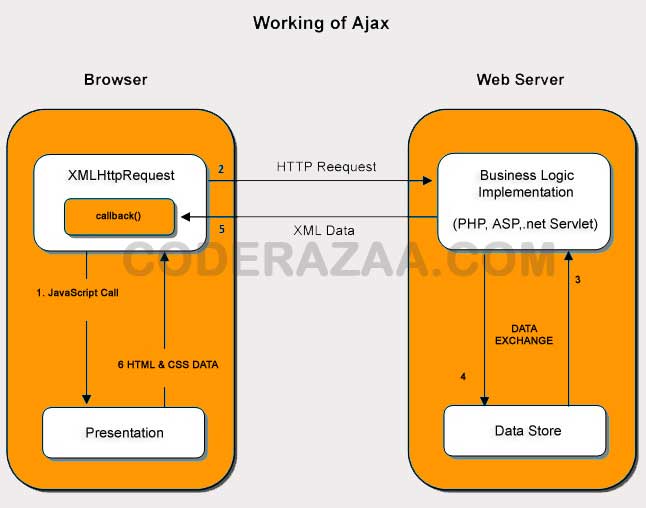
The XMLHttpRequest object is how AJAX talks to the server. Let’s look at the picture below to try to figure out how ajax works or how it flows.

how Ajax works and how it flows

How AJAX works, ajax system, ajax example,ajax

From the above example, you can see that the XMLHttpRequest object is very important.

The user sends a request from the UI, and XMLHttpRequest gets a call from JavaScript.
XMLHttpRequest object sends HTTP Request to the server.
Server uses JSP, PHP, Servlet, ASP.net, etc. to talk to the database.
The data is gotten.
The server sends the XMLHttpRequest callback function either XML data or JSON data.
Data in HTML and CSS is shown on the browser.

AJAX Technologies

AJAX Technologies

As was already said, ajax is not a single technology but a group of technologies that work together. Some AJAX technologies are:

  • CSS and HTML/XHTML
  • DOM
  • XML or JSON
  • XMLHttpRequest
  • JavaScript

CSS and HTML/XHTML

The content and style are shown with the help of these technologies. It is mostly used for showing off.

DOM

It is used to display and interact with data in real time.

XML or JSON

to move data to and from the server. JSON, or Javascript Object Notation, is similar to XML, but it is shorter and runs faster.

XMLHttpRequest

For client-server communication that doesn’t happen at the same time. For more visit next page.

JavaScript

It’s used to connect the above technologies.

It is mostly used for client-side validation when it is used on its own.

Synchronous vs Asynchronous – AJAX

The difference between synchronous and asynchronous

Let’s learn about the classic web application model and the ajax web application model before we learn about AJAX.

Synchronous (Classic Web-Application Model) (Classic Web-Application Model)

A synchronous request makes the client wait until the operation is done, which means the browser won’t do anything. In this case, the browser’s JavaScript engine is blocked.

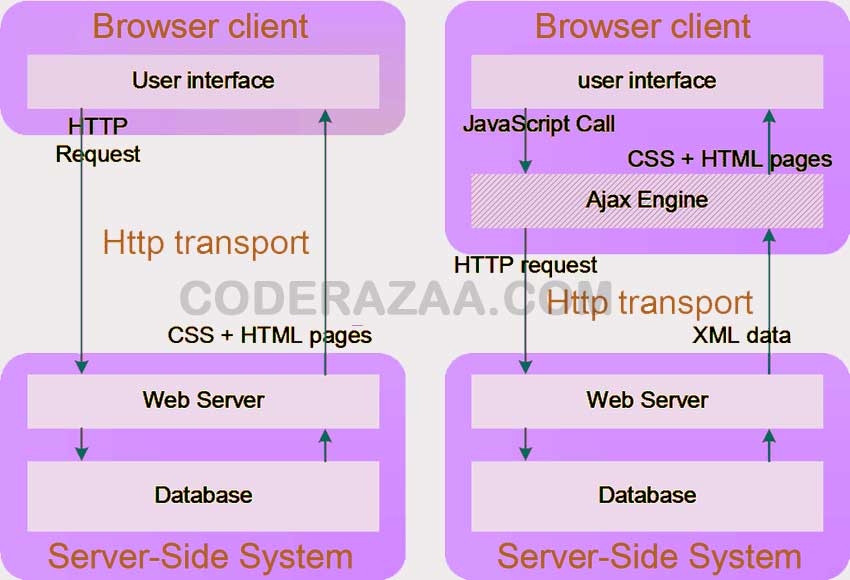
As you can see in the image above, when a request is made, the whole page is refreshed and the user is blocked until the request is done.

Let’s look at it from a different angle.

how a synchronous request works

Asynchronous (AJAX Web-Application Model) (AJAX Web-Application Model)

When a client makes an asynchronous request, it doesn’t stop the client from doing anything else. At that time, the user can also do other things. In this case, the browser’s JavaScript engine isn’t blocked.


asynchronous request

As you can see in the image above, the whole page is not reloaded when a request is made. Instead, the ajax engine sends a response to the user.

Let’s look at the picture below to try to figure out what asynchronous communication is.

how a request that doesn’t wait works

Note that not every operation that blocks something is synchronous and not every operation that unblocks something is asynchronous.

What is AJAX

Describe AJAX.

AJAX = JavaScript and XML that run in parallel.

AJAX is a way to make web pages that load quickly and change all the time.

AJAX lets small amounts of data be sent back and forth between the server and the web page in the background. This lets web pages be updated at different times. This means that parts of a web page can be changed without having to reload the whole page.

Traditional web pages that don’t use AJAX have to reload the whole page when the content changes.

Google Maps, Gmail, YouTube, and the tabs on Facebook are all examples of applications that use AJAX.


What is it used for?

Too many web apps, like Gmail, Facebook, Twitter, Google Maps, YouTube, etc., use ajax technology.


AJAX is Based on Internet Standards

AJAX is based on the standards of the internet and uses a mix of:

XMLHttpRequest object (to exchange data asynchronously with a server)
JavaScript/DOM (to show the information and interact with it)
CSS (to style the data) (to style the data)
XML (often used as the format for transferring data) (often used as the format for transferring data)

AJAX applications work on any browser or platform.

AJAX XMLHttpRequest

Getting to know XMLHttpRequest

Properties of XMLHttpRequest XMLHttpRequest Methods of XMLHttpRequest

An object of XMLHttpRequest is used for communication between the client and the server that happens at different times.

The following things are done with it:

Sends information from the client behind the scenes

takes the information from the server

The page is updated without having to be reloaded.

XMLHttpRequest object’s properties

The following are the common properties of the XMLHttpRequest object:

The property and what it is

onReadyStateChange

When the readystate attribute changes, it’s called. It cannot be used with requests that happen at the same time.

readyState

shows where the request is in its process. From 0 to 4, it goes.

0 UNOPENED open() is not run.

1 OPENED: open is called, but not send().

2: send() is called, and HEADERS RECEIVED is returned. Headers and status are now available.

3 LOADING Downloading data; the data are in responseText.

4 DONE The job is done completely.

reponseText

returns response as text.

responseXML

returns response as XML


XMLHttpRequest object methods

These are the most important methods of the XMLHttpRequest object:

Method and Explanation

void open (method, URL)

opens the request by giving the URL and either the get or post method.

void open (method, URL, async)

same as above, but specifies whether or not it is asynchronous.

void open (method, URL, async, username, password)

same as above, but the username and password are given.

void send ()

sends get request.

void send (string)

send post request.

setRequestHeader(header,value)

it adds headers to a request.

AJAX and MySQL with PHP – Dynamic Database Operations Tutorial

AJAX and MySQL – PHP Complete Beginner Tutorial

Combining AJAX, PHP, and MySQL allows you to build fast, interactive, and dynamic web applications. Data can be fetched or updated from the database without reloading the page, providing a smooth user experience.

This tutorial explains how AJAX works with PHP and MySQL, using clear examples and real outputs.


What Does AJAX and MySQL Mean in PHP?

AJAX is used on the client side to send requests, while PHP handles server-side logic and MySQL manages database storage.

Flow:

  1. User triggers an action
  2. AJAX sends request to PHP
  3. PHP queries MySQL
  4. MySQL returns data
  5. PHP sends response
  6. AJAX updates the page

Why Use AJAX with MySQL in PHP?

Using AJAX with MySQL helps to:

  • Load data instantly
  • Update content without refresh
  • Create live search systems
  • Build dynamic dashboards
  • Reduce server load

Prerequisites for AJAX MySQL Tutorial

Before proceeding, ensure you know:

  • Basic HTML and JavaScript
  • PHP fundamentals
  • MySQL basics
  • Database connection concepts

Sample MySQL Table Used in Examples

CREATE TABLE users (
    id INT AUTO_INCREMENT PRIMARY KEY,
    name VARCHAR(100),
    email VARCHAR(100)
);

PHP MySQL Database Connection File

<?php
$conn = mysqli_connect("localhost", "root", "", "testdb");

if (!$conn) {
    die("Database connection failed");
}
?>

Example 1: Fetch Data from MySQL Using AJAX and PHP

This example shows how to load database data without page reload.


Step 1: HTML and JavaScript (index.html)

<!DOCTYPE html>
<html>
<head>
    <title>AJAX MySQL Example</title>
    <script>
        function loadUsers() {
            var xhr = new XMLHttpRequest();
            xhr.open("GET", "fetch.php", true);
            xhr.onreadystatechange = function () {
                if (xhr.readyState == 4 && xhr.status == 200) {
                    document.getElementById("result").innerHTML = xhr.responseText;
                }
            };
            xhr.send();
        }
    </script>
</head>
<body>

<button onclick="loadUsers()">Load Users</button>
<div id="result"></div>

</body>
</html>

Step 2: PHP File to Fetch MySQL Data (fetch.php)

<?php
include "db.php";

$result = mysqli_query($conn, "SELECT * FROM users");

while ($row = mysqli_fetch_assoc($result)) {
    echo $row['name'] . " - " . $row['email'] . "<br>";
}
?>

Output on Button Click

Rahul - rahul@gmail.com
Amit - amit@gmail.com
Neha - neha@gmail.com

Example 2: Send Data to MySQL Using AJAX and PHP

This example inserts data into MySQL without refreshing the page.


Step 1: HTML Form

<form onsubmit="saveData(); return false;">
    <input type="text" id="name" placeholder="Enter Name">
    <input type="email" id="email" placeholder="Enter Email">
    <button type="submit">Save</button>
</form>

<div id="msg"></div>

Step 2: JavaScript AJAX POST Request

<script>
function saveData() {
    var name = document.getElementById("name").value;
    var email = document.getElementById("email").value;

    var xhr = new XMLHttpRequest();
    xhr.open("POST", "insert.php", true);
    xhr.setRequestHeader("Content-Type", "application/x-www-form-urlencoded");

    xhr.onreadystatechange = function () {
        if (xhr.readyState == 4 && xhr.status == 200) {
            document.getElementById("msg").innerHTML = xhr.responseText;
        }
    };

    xhr.send("name=" + name + "&email=" + email);
}
</script>

Step 3: PHP Insert Script (insert.php)

<?php
include "db.php";

$name = $_POST['name'];
$email = $_POST['email'];

mysqli_query($conn,
    "INSERT INTO users (name, email)
     VALUES ('$name', '$email')");

echo "Data inserted successfully";
?>

Output

Data inserted successfully

Example 3: Live Search Using AJAX and MySQL

AJAX is commonly used for real-time search.

SELECT * FROM users WHERE name LIKE '%keyword%';

This integrates with the PHP MySQL Search Using LIKE tutorial.


Common Errors When Using AJAX with MySQL

  • Database connection failure
  • Incorrect AJAX URL
  • SQL syntax errors
  • Not handling response properly

AJAX and MySQL PHP, PHP AJAX MySQL tutorial, PHP AJAX database example, AJAX fetch data MySQL PHP, PHP asynchronous database operations


Best Practices for AJAX MySQL with PHP

  • Always validate data in PHP
  • Use prepared statements
  • Return JSON for structured data
  • Handle AJAX errors gracefully
  • Avoid exposing sensitive data

Related tutorial:


Frequently Asked Questions (FAQ)

1. Can AJAX work with MySQL directly?

No, AJAX communicates with PHP, not MySQL.

2. Does AJAX require PHP?

No, but PHP is commonly used.

3. Can AJAX update database records?

Yes, via PHP scripts.

4. Is AJAX secure?

Yes, if PHP validation is applied.

5. Is AJAX still relevant?

Yes, widely used in modern web apps.