As PHP applications grow, developers often struggle with class name conflicts, code organization issues, and maintaining large codebases. PHP Namespaces solve these problems by providing a way to group related classes, interfaces, traits, and functions under a unique name.
Namespaces are essential when building large-scale applications, frameworks, and libraries. If you want to write modern PHP code, learning namespaces is a must.
This guide explains what namespaces are, how they work, real-world examples, outputs, best practices, aliasing, importing, and more.
Table of Contents:
What Are PHP Namespaces?
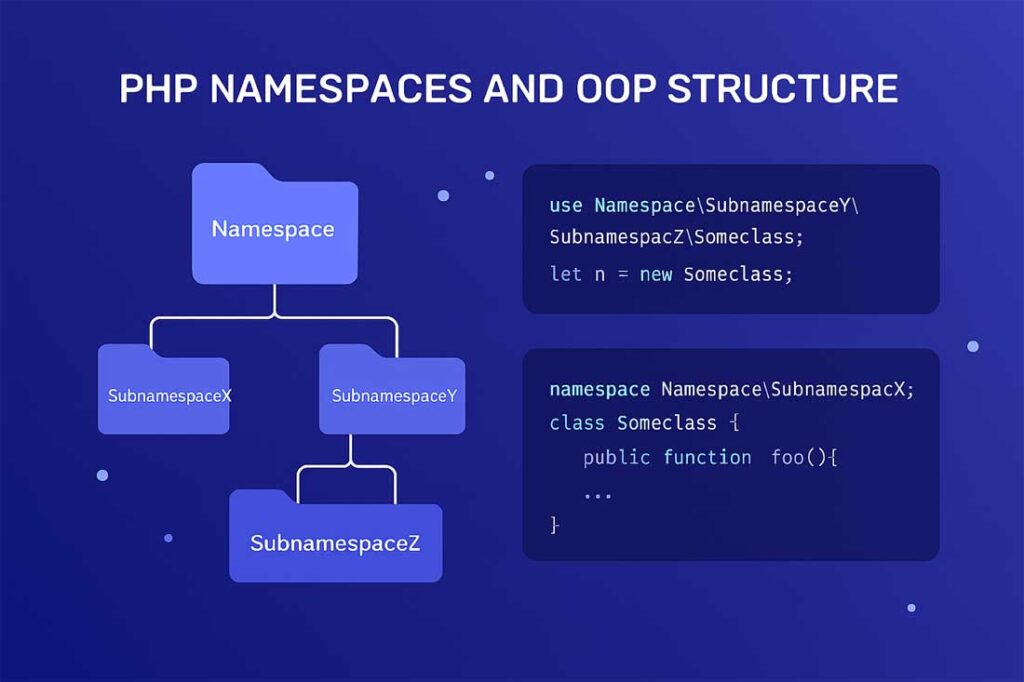
A namespace is a virtual container or grouping mechanism that allows you to organize classes and avoid name conflicts in PHP.
Think of namespaces as folders for your PHP classes.
Without namespaces, two classes having the same name would result in a fatal error.
Example problem:
class User {}
class User {} // Error: Cannot redeclare class User
Namespaces solve this issue:
namespace App;
class User {}

namespace Admin;
class User {}
Now both classes can exist without conflicts.
Why PHP Namespaces Are Important in Modern OOP Development
PHP namespaces provide several benefits:
- Prevent class name conflicts
- Organize code into logical modules
- Improve readability and maintainability
- Allow the use of the same class name in different modules
- Enable PSR-4 autoloading (used in Composer)
- Help manage large applications and frameworks
Frameworks like Laravel, Symfony, and CodeIgniter 4 rely heavily on namespaces.
PHP namespaces, what is namespace in php, php namespace example, oop namespace php, php use keyword, php alias classes, php namespace tutorial, php autoloading namespace, php naming conflict solution, php advanced oop
Syntax of Declaring a PHP Namespace (Simple and Clean Example)
A namespace is declared at the top of the PHP file, before any code.
Example:
<?php
namespace MyProject;

class Demo {
    public function message() {
        return "This is MyProject Namespace";
    }
}
Output:
This is MyProject Namespace
How to Use a Namespaced Class in PHP
To use a class inside a namespace, you must reference it with its fully qualified name.
Example:
<?php
namespace MyProject;

class Test {
    public function show() {
        return "Hello from MyProject";
    }
}
Using the class:
<?php
include "Test.php";

$obj = new MyProject\Test();
echo $obj->show();
Output:
Hello from MyProject
Using Multiple Namespaces in PHP
You can define multiple namespaces in one file, but it’s only recommended for educational purposes.
Example:
<?php

namespace App {
    class User {
        public function info() {
            return "User from App Namespace";
        }
    }
}

namespace Admin {
    class User {
        public function info() {
            return "User from Admin Namespace";
        }
    }
}
Using them:
echo (new App\User())->info();
echo "<br>";
echo (new Admin\User())->info();
Output:
User from App Namespace
User from Admin Namespace
Importing Namespaces Using the Use Keyword (Detailed Guide)
To simplify code, you can import a namespace using use.
Example:
<?php
namespace App;

class Product {
    public function show() {
        return "Product from App Namespace";
    }
}
Usage:
<?php
use App\Product;

$obj = new Product();
echo $obj->show();
Output:
Product from App Namespace
You no longer need fully qualified names like App\Product.
Using Namespace Aliases in PHP (use … as … Example With Output)
Aliasing helps shorten long namespaces.
Example:
use Ecommerce\Cart\Checkout as CartCheckout;

$obj = new CartCheckout();
echo $obj->process();
Output:
Checkout process started
Real-World Example of PHP Namespaces in Large Applications
A clean folder structure:
app/
  Controllers/
    HomeController.php
  Models/
    User.php
  Services/
    EmailService.php
Example Class:
<?php
namespace App\Controllers;

class HomeController {
    public function index() {
        return "Welcome to HomeController";
    }
}
Usage:
<?php
use App\Controllers\HomeController;

$home = new HomeController();
echo $home->index();
Output:
Welcome to HomeController
This is how modern frameworks are structured.
PHP Namespaces and Autoloading
Namespaces integrate perfectly with Composer’s PSR-4 Autoloading, which loads classes automatically without include or require.
Example configuration in composer.json:
"autoload": {
    "psr-4": {
        "App\\": "app/"
    }
}
This maps the App namespace to the app/ directory.
Best Practices for Using PHP Namespaces
- Always use StudlyCase for namespace names
- Match namespaces with folder structure (PSR-4)
- Avoid deeply nested namespaces unless needed
- Group related classes under meaningful namespaces
- Use
useand aliases for readability - Never place code before
namespacekeyword
Frequently Asked Questions (FAQ)
1. What is a namespace in PHP?
A namespace is a way to group related classes and prevent naming conflicts.
2. Why do we use namespaces?
To organize code and avoid duplicate class names in large projects.
3. Can two classes have the same name in different namespaces?
Yes, namespaces allow identical class names without conflict.
4. What is the use of the use keyword?
It imports namespaced classes to avoid writing long names.
5. Can we have multiple namespaces in one PHP file?
Yes, but it is not recommended for real-world applications.
6. Do namespaces work with functions and constants?
Yes, PHP namespaces support classes, functions, and constants.
7. Are namespaces required for autoloading?
Yes, PSR-4 autoloading relies on properly structured namespaces.